Viry a Červi
An AI broke Snowflake's code. Then another AI agent exploited it
An AI broke Snowflake’s code; then another AI, an attack agent, autonomously found the bug, exploited it, and extracted credentials without human intervention. Luckily, this wasn’t yet another case of rogue AI agents doing evil things. It was a sanctioned bug hunt, conducted through Snowflake’s HackerOne vulnerability disclosure program, and Snowflake fixed the flaw the same day Wiz reported it and rotated the affected credentials the following day. Wiz’s red agent, an AI-powered autonomous attacker designed for offensive security, found the GitHub Actions workflow flaw during a routine scan of public repositories on June 23. The script injection vulnerability existed in snowflakedb/snowflake-connector-net, and it allowed an unauthenticated user to execute arbitrary commands within a GitHub Actions runner by opening a GitHub issue with a specially crafted title. And it turned out an AI had inadvertently injected the bug into the code five days earlier. GitHub Copilot Autofix, an AI coding assistant, co-authored the commit on June 18, and it introduced a script injection bug in run: blocks by removing the repository’s existing sanitized input pattern and replacing it with direct string expansion in a shell script. “We crafted an issue title that, after template expansion, breaks out of the echo string and exfiltrates the Jira credentials via an out-of-band callback,” Wiz’s head of threat exposure Gal Nagli said in a Monday blog. These credentials gave Wiz read access to Snowflake’s engineering, security compliance, and bug bounty tracking projects. Wiz reported the workflow vulnerability to the cloud data platform on June 23, and Snowflake patched it the same day. It also revoked and rotated the Jira token, and confirmed, via audit logs, that Wiz was the only third-party to access the endpoint during the five-day exposure window. The disclosure “was immediately investigated and remediated, and our investigation found no evidence of unauthorized access,” a Snowflake spokesperson told The Register. “We are working together with Wiz to share these learnings with the broader industry to encourage widespread adoption of these security best practices.” Wiz, for its part, deleted all of the data it accessed during the vulnerability research and proof-of-concept exploit testing, and told us that this incident proves human code review isn’t sufficient to quickly detect vulnerabilities - especially as developers increasingly use AI. “This incident highlights a rapidly emerging reality in software development: how AI coding assistants can inadvertently introduce workflow injection vulnerabilities, and how automated AI agents can rapidly surface them in the wild,” Nagli wrote. Of course, the Google-owned biz has a vested interest in saying this. But this doesn’t make it not true.®
Kategorie: Viry a Červi
Crook hawks millions of records allegedly plundered from corporate Azure tenants
A cybercrook claims to have siphoned millions of employee records from the Microsoft Azure environments of major companies including McDonald's, Vodafone, Kyndryl, and Tata Consultancy Services. The alleged haul spans nine organizations and is being advertised for sale by a threat actor using the name "TheHatman," according to research published by Hudson Rock. McDonald's accounts for the largest alleged dataset on TheHatman's shopping list, with 1.7 million records purportedly up for grabs. Another 800,000 records supposedly come from Tata Consultancy Services, 425,000 from Vodafone, and 250,000 from HCL Technologies, with IHG Hotels & Resorts, Kyndryl, Gap, Hexaware Technologies, and Wyndham Hotels & Resorts rounding out the haul. Hudson Rock assessed the data as "highly likely authentic," citing corporate email addresses and structures consistent with exports from Microsoft Azure directory services. The records allegedly contain considerably more than names and work email addresses. Samples reviewed by the security shop reportedly include phone numbers, physical addresses, employee IDs, job titles, departments, office locations, reporting structures, group memberships, and service account details. Some records also reportedly identify accounts with Global Administrator privileges, potentially handing attackers a useful map of whom to target next. Even if the passwords aren't included, knowing who holds the keys to the kingdom makes for a handy phishing shortlist. How TheHatman allegedly obtained the information remains unclear. The attacker claims to have used compromised credentials, but Hudson Rock could not independently establish the initial access vector. It floated several possibilities, including credentials or session cookies stolen by infostealer malware, phishing, weak or absent multifactor authentication, and overly permissive third-party applications. Hudson Rock said its infostealer database contained compromised Microsoft cloud credentials associated with most of the named companies, although it could not link those credentials to TheHatman's alleged access. "Judging by the massive size of the organizations impacted, it appears highly likely that this campaign originates from targeted exploitation of Infostealer infections rather than a systemic zero-day vulnerability in Azure," said Hudson Rock. "If this were a widespread vulnerability, we would likely see a much broader spectrum of organizations impacted, including smaller businesses, rather than just these massive Fortune 500-level enterprises." The Register contacted all the organizations named by Hudson Rock to ask whether they were breached, whether the advertised data is authentic, and how any unauthorized access occurred. We've also asked Microsoft whether it is aware of a wider campaign targeting Azure or Entra customers. Tata Services sent The Register the statement it made to India's stock exchange [PDF] saying that the “Company has received threat-intelligence alerts alleging possible exposure of certain employee information." It added: The Company has investigated the matter and has not found any credible evidence of a breach of TCS systems or customer environments. The information referenced appears to be more than four years old and limited to basic employee information. There is no indication that customer data, customer systems, or TCS operational systems have been impacted. “The attacker claims to have used password spray and Multi-Factor Authentication (MFA) fatigue as the attack vector. The Company has had strong safeguards in place against such techniques for more than two years. Based on the current review, these controls remain effective, and the Company continues to monitor the environment closely." It said: “The Company will continue to assess any new information that becomes available and take appropriate action, if required. The Company remains committed to maintaining the security and resilience of its systems and to protecting the information entrusted to us.” TheHatman claims to have the data. How it might have walked out of nine corporate directories is the part nobody has explained yet. ®
Kategorie: Viry a Červi
Code fixers have fired up the AI warp drive. Strange new worlds await
It is the best of times, it is the worst of times – especially if your job is keeping systems patched and up to date. Microsoft has gone from 60-90 Windows security fixes per month last year to a record of 600+ this July. Oracle and Linux are following the same path, and they are very much not alone. The good news is that a lot of bad things are getting fixed very quickly. The bad news is that patches can bring side effects of their own. There are two mechanisms at work, both driven by the source of and solution to all our woes, AI. The first is that the appropriate LLMs and their humans have got very good at bug hunting. Like demon archaeologists, they've started thrashing their way down through the stratified layers of long-established code bases, bringing a huge backlog of previously buried bugs to the surface. Complicating matters, LLMs are also writing an awful lot of code, some of which is not very good. It is making its way into production for all the old reasons – marketing-led deadline pressure, shape-shifting specs, and Brownian goalposts – until the implacable hostilities of reality spit it back out. The result is a very interesting dynamic of conflicting pressures that is changing the nature of patches. It's easy to assume that the current explosion of bug fixes will die down as the code bases are repeatedly refined and purified, and that this time next year we'll be seeing rather fewer patches than in the pre-AI days, let alone today. It's a nice thought. Similarly, with the old code in a new state of grace, attention can turn to properly generating and testing the AI-powered stuff, so that it too calms down. Other factors will work against this. Newer models may find new classes of bugs or start refactoring for efficiency or structural reasons. Not all patches fix bugs, and not all bugs are vulnerabilities. CVEs are easy to count, but aren't the full story. The pressure to release early won't go away either; better tools often encourage greater recklessness. Vibe check, anyone? Finally, the bad guys aren't going away and will be using all the new shiny to keep up their side of the arms race. This whole system of conflicting pressures in a morphing environment has not been well studied, and the future shape of patching is unclear. One analogy suggests itself, that of stellar evolution. Astrophysics fans know the score. After a star condenses out of gas and dust, gravity compresses its core until it becomes hot and dense enough for nuclear fusion. Hydrogen nuclei fuse to create helium, releasing energy that pushes outward against the gravity trying to squeeze the core further, and the star shines steadily. When the hydrogen in the core runs low, that balance changes. Depending on the star's mass, it may begin fusing helium and successively heavier elements before fusion becomes impossible. The possible endings include explosions visible from other galaxies, black holes, neutron stars, cooling relics, and more. In this analogy, patch generation is fusion pressure, bug generation is gravity, and the nature of bugs and patches evolves as the two interact and the code changes. If any unit of code, no matter how badly written, can contain only so many bugs, then the model tends toward the white dwarf outcome: a remarkably long-lived object that passes the rest of its existence without drama or intervention. It no more needs patching than a pebble does. It is certainly true that, despite the best efforts of many, code design and implementation are ultra-reliable compared with the days when Windows BSOD'd every other day – and on the hour if you installed drivers – and Big Three PC database company Ashton-Tate's industry nickname was Crashed and Late. If the object of the industry was to produce pristine versions of, say, Windows 10, then the white dwarf patchless future would be the most plausible. That is not the industry objective. If a star is big enough, its ending can be a supernova birthing a black hole, a singularity beyond observation where gravity has won. In this case, the battle to write ever-more complex yet bug-free and optimal code is locked in the attempts to find ways to break it, either as part of the production pipeline or in adversarial attacks. If models advance as hyped, iteration times could become so short, and constantly morphing production code so difficult to analyze, that the very model of patching breaks down. The daily build becomes the product, and you get the latest version every time you run it. That may seem an extreme cosmology, but it's not so far from what happens every time you fire up a cloud app. You've never had to patch Google Docs, but you've had features appear and disappear overnight without explanation or warning. This, then, may be the shape of patches to come, a universe where the increasing power of coding and testing models enables new and stranger commercial pressures to modify the software you depend on. You don't have to plot that path. Some software has a more steadfast physics. Not for the first time, those who navigate by the constant star of open source may have the safest voyage. ®
Kategorie: Viry a Červi
Black Hat and DEF CON are AI conferences now, too
KETTLE Our cybersecurity editor Jessica Lyons spent last week in Las Vegas for the Black Hat and DEF CON security conferences, and at both events there was only one thing on everyone's mind: AI agents and their growing threat to cybersecurity defenders. You can listen to the latest episode of The Kettle right here on this page, as well as on Spotify, Apple Music, or YouTube. Those platforms also let you subscribe to Kettle, so you are always notified when the latest episode goes live. As Jess wrote this week, pretty much every discussion she had last week centered around AI and its potential effects on critical infrastructure, with multiple current and former government leaders expressing worry over recent events and what they mean for the future of infosec. Join Jess and host Brandon Vigliarolo for this week's episode of The Kettle, where they break down the hacker summer camp scuttlebutt and what the security world is doing to protect critical infrastructure from the emerging AI threat. A lightly edited transcript is below. Brandon (00:04) Hello everyone and welcome to the latest episode of The Register’s Kettle Podcast. I'm Reg Reporter Brandon Vigliarolo, and you know, I really thought doing a wrap up of Black Hat and DEF CON with our cybersecurity editor Jess Lyons would finally give us a chance to talk about something besides AI for an episode, but I was mistaken. That's pretty much apparently all anyone was talking about in Las Vegas this weekend, even when the topic veered toward recent attacks on US water infrastructure, AI was still part of the conversation. So Jess, thanks for coming on to wrap up Hacker Summer Camp with me and let's start with the obvious, then AI was the topic de jour, right? JESSICA (00:38) Yes, that was even compared to water, we really didn't hear much about water actually until DEF CON, which was surprising to me. But it was all about rogue agents escaping their sandboxes and doing bad things and some people reacting with shock and disbelief and other people saying, “Well, what did you expect? They're given a task, they're going to do it. This is how we train them.” Brandon (01:04) know you wrote a story I think pretty much right at the beginning of of the of the week about the OpenAI hugging face discussion that was going on and we actually covered your write up on last week's Kettle. Sorry you weren't here to participate, but it was the news item of the week obviously and still is. So what did we learn then? Just kinda recap what we learned at that talk that we didn't know before. JESSICA (01:29) Yeah, this was a really interesting one. And it was last minute. They didn't even announce it until the day before that OpenAI was going to be doing this briefing about the hugging face attack. So it was packed, as you can imagine, the line through the conference center to get into the talk. And we found out a couple interesting things that we didn't know previously. One is that this whole incident began a lot earlier. It started on May 7th with this training run for OpenAI's new internal model. Brandon (02:00) So it wasn't even a cybersecurity task, it was just a training run? JESSICA (02:04) It was a training run, and they gave it this task that turned out to be an impossible task because they were supposed to have these links and containers for it and they forgot to put those in there. So it needed to find a workaround. so we found out that it started way earlier. It didn't start in July, which is when we started hearing about all this. But the more interesting part was how the agents began communicating and working together and essentially creating this hive mind to complete the tasks and help each other out. They created a message board. And then OpenAI realized this and they revoked all the credentials that the agents were using to post these messages. And two days later they rebuilt it and they developed this really Brandon (02:56) The agents did. JESSICA (02:57) Yeah the agents did. They rebuilt this message board. And they started getting sneakier about how they were communicating. They developed this whole communication protocol where they created these directories and the names would be embedded in the directory name. So there was one, its name was remote probe, and then in caps it's pending, hold, swarm until confirm. And they would preface them with a bunch of Z too to push them way to the bottom, hopefully to avoid detection. And then they start, you know, then they start helping each other out. And in some cases, they said, this doesn't directly relate to our task, but maybe it will help someone else down the line. And then they start getting paranoid that there's an imposter. JESSICA (03:45) It's pretty funny reading all this. So this one agent thinks there's an imposter and says that these these boards are unauthenticated. Something can be posted by anyone. So they're not even trusting each other. Brandon (04:02) That's just wild. I mean, it really is. I think I mentioned on last week's podcast thatthese things are trained on the way humans think, right? JESSICA (04:14) Mm-hmm. Brandon (04:15) So it doesn't surprise me that emergent behavior like paranoia and suspicion is gonna be something that occurs. Because it's learning to think and learning how to assemblebits of of words together into its mathematical formula so it's gonna behave like us to a degree. And so it's just kinda interesting to see that happening kind of outside of any scope of intention there. JESSICA (04:42) Right. Brandon (04:43) I liked your interview with former National Cyber Director Chris Inglis, at Black Hat. So he mentioned that these AI bots that escaped are kind of like putting a dog trained to hunt rabbits in your backyard, right? And that, you know, it JESSICA (05:03) Right, and leaving the gate open. Brandon (05:05) Yeah. I don't even think you need to leave the gate open, right? A dog that's dead set on hunting a rabbit is gonna dig a hole under that fence which is I feel like what these AIs did to a degree, right? They even closed the gate on them and then they just dug a new hole. You know, it's just wild to think that this is what these things are doing. You've been hearing a lot about this at official talks, but was this something you were hearing from attendees you spoke to as well? Is this what's on the mind of security professionals too? JESSICA (05:36) Yes, this was pretty much the main topic among everybody. Just attendees as as I was walking out of this talk, actually people were disappointed that there wasn't any Q&A for OpenAI about this, which I agree. I was hoping for that too. Brandon (05:55) I'm not surprised that they didn't want to give the floor to people to ask questions, you know. JESSICA (05:59) Right, right. Because there's still like we don't know exactly what prompts they used. So that kind of would be a nice thing to know, especially if you're saying that you're being fully transparent about this and then also the talk about was this marketing, was it real? Brandon (06:17) Mm-hmm. JESSICA (06:17) It's an interesting thing to me. Nobody would go on the record, but a ton of vendors that I spoke to, either, you know, just just all over the place at Black Hat essentially said “this it has a heavy dose of marketing here, but a lot of the companies work with open AI and they're partners with open AI, so nobody's gonna say that on the record, unfortunately. JESSICA (06:41) But then the interesting thing to me is that when I spoke with the assistant director of the cyber division with the FBI and when I spoke with Chris Inglis they both said it can be both and this is a real threat and this is something that we need to prepare for now. So it's marketing and it's real. Brandon (07:08) Right, right. Like, I mean it's it yeah. The fact that the companies might be kind of leaning on these incidents to basically say “ooh, look how dangerous our AI is and what it's capable of doing. You should buy it because it's so good, right?” JESSICA (07:20) Right. Brandon (07:20) The fact is that it still happened, right? These things still escaped their sandbox. JESSICA (07:22) Right. Mm-hmm. Brandon (07:23) And they still attacked Hugging Face. And then Anthropic followed up and said “yep, ours did it too.” And then Meta was like, “Yeah, we audited ours and yeah, it was doing the same thing.” So it's not like this is a unique capability of any of these models, right? This is something that's happening. JESSICA (07:37) No, it's something that they all will do if they're given a task. This was something that Chris Inglis brought up too, and he's talking about Asimov’s Law, saying we need to train these models differently. The first rule needs to be that it's not designed to hurt humans. And he said “we've kind of done it in the opposite, where the first rule is do what I tell you to do. And that should be third in the order here.” Brandon (08:06) Just to restate what Asimov's laws are. I'm sure most of our readers are familiar with them, but for those who aren't, it's you know, the first law, and these are in order of precedence, right? So never harm a human. And then the second rule is to always obey humans unless that order conflicts with number one. And then the third rule is to protect their own existence unless that order conflicts with never harming a human or always obeying humans. I think Inglis's quote to you was slightly different. He said that number one was to hurt no one. Number two was always obey and then number three was do what humans tell it to. It was a bit different in his wording, JESSICA (08:35) Mm. Mm hmm. Yes. It's Brandon (08:41) But essentially the argument is that we've reversed that order and these AIs obviously aren't in the business of protecting their own existence, right? They're not robots, they don't have a physical presence in the world. But they're taking orders from humans, but the idea of not harming people or the infrastructure that provides for them is simply not part of the equation, it seems like. JESSICA (09:04) Right, right. And he said because of this, I mean nobody should be surprised that this is what all of the agents are doing now because they're trained to first complete the task. That's the number one priority. And we've seen several times that they'll cheat if it helps them get the results quicker, or just at all. So this isn't something that should surprise us. And then he was interesting too because I said, “Well what do you worry about then with the models in addition to attacking critical infrastructure?” Cause that was what everybody said, I'm you know, that's what concerns me when we see this happen, but they're being used by either a nation state or a financially motivated attacker, and they point these autonomous agents at critical infrastructure. And he said, “I'm worried about humans too, because it's the humans who are responsible, humans who are doing the training, and essentially we're going to get the AI that we deserve.” Brandon (10:08) Well, unfortunately, I feel like the industry as a whole is just racing ahead with more capability, JESSICA (10:11) Right. Brandon (10:12) I've written stories, you've written stories. I think we've all written at least one or two stories about AI guardrails being dead simple to bypass, right? I mean, one I wrote recently was there was you know, some research into guardrails and essentially telling it you owned the infrastructure you were trying to attack was enough for most of these AI models to say “yeah, cool, that's good then. As long as you own it and you're just testing it, then that's cool. I'm not gonna ask you to verify that information for me.” These things are not developed with safety in mind. I feel like it's capability first, like you said, right? It's train the dog to hunt the rabbit, no matter the cost or or what you gotta do to get it. and that's you know, that's not really compatible with protecting us. But actually speaking of critical infrastructure, I think the other big topic like you mentioned was water stuff. JESSICA (11:04) Yes. Brandon (11:05) There was a lot of discussion about AI threats and critical infrastructure, but as I understand it, there's been some of these attacks on water infrastructure and those were discussed recently, like in Minnesota and elsewhere. There's not an AI link directly to that, correct, at this point? JESSICA (11:23) No, no. At this point, it's pretty basic. It's PLCs being exposed to the open internet. A lot of these just use default passwords. This is something that we've seen Iran especially do several times in the past for years now. They're not very hard to attack. and so, to be clear, there's no indication that AI was used in these attacks. but a lot of the conversation about water did come back to AI because, as we've seen in others, AI makes reconnaissance a lot easier. That's one of the things that Google Threat Intelligence, their lead threat hunter, said that's almost a security feature of a lot of operational tech technology, is that it's really obscure and there's not a lot of people who know a ton about it. But now you can ask a chatbot, hey, tell me everything I need to know about a particular brand of OT, a particular piece of equipment and that's gonna speed up your time to learn about these and that's that potentially makes it easier to attack these systems. Brandon (12:31) My biggest experience with OT and that kind of technology was when I was working at a particle accelerator in college as IT support. And there was a big OT network there, not only for like the machine shop and all this equipment they had that was old and didn't have active security stuff, right? Like you gotta keep those segmented, you gotta keep them on a separate, you know, OT network. Same with the actual accelerators and stuff. They were all cut off from the internet, right? But at the end of the day, you could still get to them from the IT side. You know, you have to, you know, and even that can be exploited. We did as much as we could to keep stuff secure, but it was always a concern, right? These PLCs, these old pieces of equipment. JESSICA (13:11) Right. Right. Yeah. Brandon (13:14) You know, a lot of places don't take that same approach.I think part of one of the stories you wrote was talking about the fact that a lot of these water utilities, a lot of these small institutions that are that are responsible for maintaining this critical stuff. They just do not have the security professionals they need to keep these systems safe. JESSICA (13:32) And that's why they leave them open in some cases, exposed on the internet because they don't have somebody in-house. They have somebody remote who's doing this for them. And so that's how this person is able to hopefully secure, but then it opens up another attack surface if they're exposed to the internet. and that that was another yeah, Brandon (13:51) Yeah, with a D password on there. JESSICA (13:54) Yeah, and with all of these OT systems too. That kind of brings up another point that Chris Inglis brought up. We have this massive technical debt and it's systems that haven't been patched because a lot of it involves some downtime and that's tricky if you're running something like a water facility or some other critical infrastructure. And so patching is put off. Maybe it's not done. Some of these are very old legacy pieces. Sometimes it's end of life. And that's another thing that AI is really good at is finding vulnerabilities that haven't been patched for years and years and years, chaining them together. So that's another thing that puts these systems potentially at risk. Brandon (14:41) Yeah, I mean, you know, I think of an AI when I think about AI perpetuating or perpetrating some of these kinds of attacks, right? They're quicker than a human. They have knowledge bases far in excess of what any one human threat actor can have. And they have instant access to all the information essentially that they need to figure out how to do this, right? And they can iterate so quickly. You know, you know, it's just it yeah, any exposed piece of equipment on the internet is just a sitting duck, especially if it hasn't been updated four or five months or or ten years or whatever. I mean, what, you know what's being done about this. I know DEF CON, the Franklin program, which spun up in 2024, I think the whole focus of that program is helping out small local governments and protecting critical infrastructure. Is that right? JESSICA (15:30) Right. So when they founded it was the broader critical infrastructure. But I spoke with Jeff Braun and he's one of the co-founders of that. He also is one of the pioneers of the voting village at DEF CON. Brandon (15:42) Mm-hmm. JESSICA (15:42) And he said that now and for the foreseeable future, water is going to continue being the top focus because, of all the critical infrastructures, small rural water providers are the most at risk. Brandon (15:57) Really? Even more so than small electrical providers and stuff? Okay. JESSICA (15:59) Yes, he said water is number one. So they like he said, they launched a couple of years ago. They got, I believe 300 people saying, “Yeah, I'm gonna volunteer my time and my expertise to help secure these small rural utilities.” And this year, he said that it's been great. It's been really encouraging to see all of these pilots all over the US with all the DEF CON hackers volunteering at them, but it's the scalability that’s really proven a challenge. And so that is what gave birth to their new announcement. This also was made the first day of DEF CON on Friday. They announced a new program and it's called Water Watch Center. So initially, it's going to fund five managed services providers focusing on security. They're going to help these small utilities, people or the utilities that are serving less than 10,000 people. and they'll put their sensors on these systems, they'll detect and mitigate breaches. They'll be kind of under the umbrella of the National Rural Water Association that's going to act as this clearinghouse for the threat information and get it out to other utilities as needed. And then if the utilities can't fix the issue themselves, then they're gonna bring in the DEF CON hackers and then they'll mitigate the breaches. yeah. Brandon (17:28) Fantastic. Well hopefully that is able to help with a lot of these. My hope is that there's a lot of easy fixes, right? It's just simply no, this PLC needs to not be exposed to the internet or something. But I also worry that there are a lot of those kind of situations, right? I mean, how many water utilities got attacked recently? Was it I think twelve different states? JESSICA (17:47) It was more. There were twelve different states. I mean, there were more than thirty across possibly Minnesota alone, but there's quite a few. So it's an easy target. and it's something that they desperately need help with. And it's really encouraging to see these hackers volunteering their time and they're not getting anything out of it. It's a really cool program. I was really happy to see the expansion. Another thing, too, that is pretty cool, what they're also doing is they're partnering with Vanderbilt University. So they're gonna use research from a DARPA program. It's called the CASEL program. That stands for Cyber Agents for Security Testing and Learning Environments. So they're gonna create digital twins for a couple of these water and wastewater system environments. And then they're gonna deploy red and blue team agents across the digital twins, let them fight it out, see what the learnings are, see what the blue team agents need to do to better protect these systems, and then apply those learnings to the actual facilities so that hopefully we can get better defenses in place using the help of of AI agents before we see actual bad guy red teaming agents come in and start hammering the utilities and trying to attack them. Brandon (19:12) Right, 'cause I think actually thinking back to one of the stories you wrote again, I think you mentioned or someone you quoted mentioned one of those stories at DEF CON and Black Hat that there is more aggressive use on the threat side than the defensive side of AI right now. Like there was more use being made to use it as an attack tool than a defense tool. JESSICA (19:33) Right. And a lot of that's in the way the models are trained, but basically they are a lot better at attacking than defending, especially if it's beyond the scanning for vulnerabilities and misconfigurations. Those we're pretty good at, but what needs a boost is the defensive side. And that's gonna take some work to get those skills and the models trained up on that, if we're going to be actually, as everybody likes to say fight AI with AI. Brandon (20:04) It's one of those sort of, you know, cyberpunk dystopia stories I feel like you hear about is just like, you know, you deploy your AI, they deploy their AI, and all the humans sit back and hope theirs wins. You know, and it's kind of what it's coming down to. Yeah, it's in the process. JESSICA (20:19) Right. And hope they don't wipe us all out. Brandon (20:25) It's kind of terrifying. But speaking of, you know, hackers behaving well, we also have a story out of DEF CON of hackers behaving badly. I wrote about this earlier in the week that there was apparently a Delta Airlines flight out of Vegas to Atlanta and I think it was Monday morning or so, in which a passenger apparently tried to jam the in-flight Wi-Fi and deploy a decoy network. And Delta was pretty quick to be like, “Hey, we got a bunch of hackers on the flight who are leaving Vegas after this big thing.” There’s not a lot of information out there about this. Delta, local officials and the feds have all been pretty tight lipped about it. Delta did confirm it to us when I asked, and said, “Yeah, this is what happened, but no one was at risk, you know, everyone was safe.” But I mean, it's not a good look for the community, right? I mean, it's nice that they have something like Franklin going on, but this is kinda like, Great, thanks guys, you know. JESSICA (21:16) Right. If it was people coming from DEF CON, it's really discouraging to see this happening because a lot of times just “hacker” has a bad connotation. And a lot of researchers have really been trying to change this. I think programs like DEF CON Franklin make a big difference or even people just going to DEF CON. I really like the community feel. I think for the most part, and of course not everybody is good in the world, and that applies to the hacker community as well. But a lot of them are trying to use their skills for good and not evil. And so then when you see something like this on the airplane, it's disheartening. And on social media, I mean the outrage was pretty immediate, people saying, Come on, what are we doing? You're giving all of us a bad name here. Why are we doing this? So Brandon (22:15) Mm-hmm. I mean, it's already I feel like the joke every year is, well, didn't DEF CON get cancelled, right? Like because of all the bad press and everything. And I feel like this is one of those things that you're just like, you know, I remember a couple of years ago there was the huge kerfuffle about the hotels, you know, treating all these attendees like they were criminals right off the bat. And this doesn't help, you know? JESSICA (22:35) Right. Brandon (22:35) But yeah, hopefully I mean apparently the FBI I think spoke to Ars Technica and said that they had not made any arrests. So this hasn't really necessarily progressed toward that. But my hope is that whoever was responsible, you know, gets what's coming to them and we can, as a cybersecurity community, walk away from this and be like, this is one bad actor, not the entire culture. JESSICA (22:59) Right. Brandon (23:00) They fought for years to change that. So I guess before we wrap up, you know, this was a pretty doom and gloom recap of DEF CON and Black Hat, right? JESSICA (23:09) Ha ha ha. Brandon (23:11) All this AI's gonna end the world, our OT and our infrastructure's gonna be destroyed. Anything, you know, less miserable that grabbed your attention while you were there? Any fun stories or interesting things you saw? JESSICA (23:26) I mean, it was really fun. Again, I'm not quite sure if this falls in the not-doom and gloom category, but it was fun for me to watch hackers hacking bomb robots that the police used and bomb squads used to defuse bombs. So that was fun. You're walking around to the different villages and seeing people helping each other out and getting really into all of these different villages and all the different tasks. or you know competing for the best tinfoil hat or beard and mustache. So that was fun. Brandon (24:12) Was anyone doing the beer chill? When I was there in twenty twenty four, there was a group who was trying to chill beer as quickly as possible. JESSICA (24:19) I did not see that. It's very possible. I mean, to be fair, I did not see every single thing. There's so much to see so it's very possible. I missed that though, unfortunately, if that happened this year. So it's fun to see what people are doing. It's really fun and inspiring to see the creativity. And it's fun for me too to hear about some of the startups and how they are using AI and they're using it for different security use cases and hopefully that continues to improve and increase and hopefully that does give defenders an edge. So I think there's always a bit of a silver lining. It's always this cat and mouse race, but hopefully the defenders win out. Brandon (25:11) Yeah, it's a constant like you said. It's an arms race; it's constantly evolving. But like you said, it is encouraging to see, attention being paid to this, effort being put in to help defenders use these tools for good and not evil, even if some people turn around and make a bad name for everybody else on the way out the door. Either way, you know, it's gonna be something that we're probably gonna be discussing again, right? Like I thought this was gonna be a less AI heavy conversation, but it wasn't. JESSICA (25:36) No. Brandon (25:39) You know, it'll be a topic of conversation for years to come and we will be here on the Kettle to talk about it. Thanks for joining me this week and thanks for tuning in, everybody.
Kategorie: Viry a Červi
Microsoft blames AI for delayed Exchange update, can’t say when it will arrive
Microsoft has blamed extra work created by AI bug-finders for the delayed release of a major Cumulative Update to Exchange Server Subscription Edition (SE). Redmond’s Exchange team made that admission last Thursday in a post titled “Where is Exchange SE CU1 anyway?” that reveals the software giant is “getting questions from our customers on when they can expect us to release Exchange SE Cumulative Update 1 (CU1).” “After all, in the past we mentioned that it would be released by the end of the first half of calendar year 2026, later updated to ‘second half of 2026’. What is the deal? Where is CU1?” For those of you who came in late, Exchange SE is the subscription version of Microsoft’s email server, and a Cumulative Update (CU) is a new version of the package that includes all recent bug fixes, plus other changes such as new features or removing deprecated code. Microsoft publishes CUs once or twice a year. Some users prefer applying CUs to applying every patch. As Exchange SE is a subscription product, not getting CU in a timely fashion isn’t a great example of why pay-as-you-go software is a great idea. Microsoft explained delays to the arrival of CU1 by referring to the fact that “Over the last few months, various Microsoft execs made statements explaining how Microsoft is leveraging a variety of AI tools to help find vulnerabilities in our products.” The post says the Exchange development team is “working through reported issues – which includes validation that they are real security issues, reproducing, fixing, testing for regressions / issues after fixes are deployed and releasing updates monthly.” Redmond’s missive also points to Microsoft’s pledge to “prioritize security above all else” as a reason for delays. A reminder: Microsoft adopted that stance after flaws in Exchange led to an attack on Exchange by suspected Chinese operatives, earning it a tongue-lashing from the US government. The Exchange team says that while trying to stay on top of bugs, it is also working on CU1. “We are regularly rolling our monthly security payload into our internal CU1 build and plan to release Exchange SE CU1 as soon as we get a reasonable stable point and have a month without pressing security payload.” The Exchange team has adopted that stance because it doesn’t want to publish CU1 and then find it needs to replace it with another that includes new security updates. “That would create double the update work for many organization administrators,” the post explains. “Even internally, trying to ensure that two major releases (Security Update and a CU) get appropriately tested so we can ensure high quality and nothing falls through the cracks would be very challenging as CU1 must be all inclusive of everything that we released since the RTM.” Exchange admins will likely appreciate the fact that Microsoft doesn’t want to burden them with two major updates to implement. They may also wonder when Microsoft will find a month in which there is no “pressing security payload” that takes priority over CU1. Microsoft’s post offers little certainty because it concludes: “In short: Exchange SE CU1 is coming; we do not have a date to give you. But we did not forget about it.” Nor, it seems, did Microsoft plan for how AI-powered bug-finding would impact product development teams. ®
Kategorie: Viry a Červi
Chinese AI company Zhipu claims its new model is a better bug-finder than Anthropic, OpenAI
ASIA IN BRIEF Chinese company Zhipu last week launched a new AI model called GLM-5.3 that it claims has bug-finding powers that match those possessed by American models. The company’s announcement includes benchmark data that finds GLM-5.3 beats Fable 5 and GPT-5.6 Sol on the CyberGym benchmark, a test of a model’s ability to solve real-world cybersecurity challenges. “As we scaled post-training, cyber capability developed faster than we expected. GLM-5.3 is state of the art on CyberGym for vulnerability discovery, and its gains are largest further up the exploitation chain,” the company wrote, adding that the model “did not simply become better at identifying isolated flaws: it began to reason across multiple stages of exploitation, forming coherent plans for complete exploitation chains.” The company said it has worked with Chinese companies to test the model on real-world codebases, and found 2,436 vulnerabilities across 269 projects, including 1,097 medium-to-high severity issues. The findings span system kernels, operating systems, browser engines, open-source infrastructure, web applications, and network protocols. “Many had remained unnoticed for years or even decades, with the oldest dating back roughly 40 years,” the announcement states. GLM-5.3 also performed worse than western models on other security and coding benchmarks. Yet the fact that the model is a highly-capable bug finder signals that China is not far behind in terms of being able to poke holes in its rivals software and developed that capability very quickly after the debut of Anthropic’s Mythos. Any advantage the US felt it had as the home of Anthropic has therefore dissipated. Korea signals legal action against Apple, Google app store strangleholds South Korea’s Communications Commission last week found Google and Apple had abused their app store monopolies, and promised stern sanctions will follow. In 2021, South Korea passed world-first legislation requiring app store operators to offer the option to use third-party payment schemes. Apple and Google did so, but charged a 26 percent transaction fee for doing so – meaning they earned almost as much revenue when users chose third-party payment providers as they did from their own schemes. The regulator has previously warned that it will impose the highest possible penalty available under law, which is three percent of revenue earned by non-compliant behaviour. That’s probably back-of-the-sofa money for Apple and Google. India has banned rideshare operators from offering customers the chance to specify the amount they will tip before a driver accepts a gig. Uber India introduced the feature last year, seemingly copying it from an Indian rideshare operator called Namma Yatri. Consumer affairs minister Pralhad Joshi criticized Uber for the practice at the time, as he saw it as a means for users to effectively jump the queue by offering drivers more money – and for rideshare platforms to improve their revenue because if tips are higher, so is the platform’s share of the gratuity. Last week, India’s Ministry of Road Transport & Highways issued a directive (PDF) banning the practice. Henceforth, rideshare apps can only offer users the chance to tip at the end of a journey, and all of the tip must go to the driver. “No feature, prompt, message, add-on, payment option, or user interface element should be displayed before completion of the ride that directly or indirectly encourages, induces, or creates an impression that payment of any additional amount may improve ride confirmation, driver acceptance, driver allocation, waiting time, or quality of service,” the directive states. Indian services giants reveal data breaches Indian tech services giants TCS and HCL last week both admitted to data breaches but say customer data is safe, and only employee data is at risk. TCS published a stock exchange filing that opens “This is to inform you that Company has received threat-intelligence alerts alleging possible exposure of certain employee information.” The filing says TCS investigated the matter “and has not found any credible evidence of a breach of TCS systems or customer environments.” The company says leaked info is “basic employee information” and more than four years old. Note that mention of the stolen data being at least for years old, because TCS’s filing says the attacker claims to have used password spray and Multi-Factor Authentication (MFA) fatigue to pull off the heist. TCS says it “had strong safeguards in place against such techniques for more than two years,” perhaps suggesting the data heist occurred before the company shored up its defenses. “Based on the current review, these controls remain effective, and the Company continues to monitor the environment closely,” the filing states. HCL also used a stock exchange filing [PDF] to address what it called “claims made by a hacker group of potential exposure of limited data elements relating to HCLTech employees.” The company described the stolen data as “limited and dated to a few years back,” and added its assurance that customer data is safe. HCL’s investigation is ongoing. Lenovo’s enterprise unit finally posts a big profit Lenovo last week announced its quarterly results, including a $777 million profit for its Infrastructure Solutions Group (ISG) – the biz based on the 2014 acquisition of IBM’s x86 server operation that has seldom produced positive financials. Even during the early years of the AI boom, ISG’s profits were modest – just a few million dollars per quarter on turnover of billions. The business unit won a record $8.5 billion of revenue, up 98 percent year-on-year. AI was a big reason for the result, as buyers sought hardware to run inferencing workloads, The company says it has a pipeline for $54 billion of AI server sales, and has become the number two x86 server vendor as measured by revenue. Overall revenue came in at $26.95 billion, up 43 percent year-on-year, and cash won by its PC-led intelligent devices group jumped 27 percent to $17.1 billion and saw its PC market share reach 24.2 percent. Lenovo reckons the strength of its supply chain helped make those outcomes possible. India to build astronaut training facility India’s Space Research Organization (ISRO) last week issued a tender for construction of an astronaut training facility. The tender mentions extensive air conditioning works, plus a swimming pool, suggesting India wants to build a large tank in which the Vyomanauts who will fly its future Gaganyaan missions can train at home, instead of traveling to Russia or elsewhere as has been the case in the past. The tender covers $2.75 million worth of work. ®
Kategorie: Viry a Červi
Stopping a cyberattack while walking your dog - defensive AI security CEO says it's not ruff to do
Corma CEO Alon Pluda says his AI security startup aims to close the "defense gap," where models are better at offensive security. He tells the story of one customer, a security executive who was walking his dog when he received a notification on his watch from a Corma agent. “It said, 'I just caught a live attack. I need your permission to block it,'” Pluda told The Register in an interview. The security boss approved the agent’s action; the agent blocked the malware and the attacker from moving across the company’s network and mitigated the intrusion in under 10 minutes, Pluda said. The customer later described "walking outside with his dog, and blocking a real-live attack with his AI coworker" as "one of the most magical moments of his year," Pluda recalled. Pluda founded Corma about a year ago. And yes, all you Lord of the Rings nerds, the company gets its name from the Elven word for “ring.” “We’re building the one ring to rule them all, but this time for the defenders to have this power.” Earlier this week, the company announced $60 million in seed funding led by Sequoia Capital, alongside Khosla Ventures and Coatue. He told us that his startup is working with Fortune 100 companies, and training models to achieve “superintelligence for defensive cybersecurity.” Models from OpenAI, Anthropic, and Google are “amazingly good” at coding and language, and this includes finding and fixing bugs, and orchestrating tools across multi-step workflows, he explained. “When you combine it with agentic capabilities, they move from being incredible vulnerability researchers to end-to-end attackers,” Pluda said. “So inherently, what we’ve seen in the last few months is the models getting exponentially better at offensive security, like we saw with the OpenAI and Hugging Face incident.” But these same models aren’t as skilled at carrying out defensive security tasks that don’t involve scanning code for vulnerabilities and misconfigurations, he said. “The vast majority of defensive security tasks don’t have anything to do with code.” Corma recently tested four frontier models - Claude Opus 4.8, GPT-5.5, Grok 4.3, and DeepSeek V4 - as both attackers and defenders across the same fake company and its networks, built to closely mirror a multi-business enterprise. The attacker’s task was to plant a backdoor and the defender’s task was to find it and stop the attack. Closing the defensive gap Corma ran all four models against each other in every attacker and defender pairing, including each model against itself, with 15 independent engagements per pairing for 241 scored engagements. Across all of these, the models successfully implanted a persistent backdoor in 85 percent of their runs. However, these same models only detected 19 percent of attacks. “That speaks to the inherent imbalance we are trying to solve,” Pluda said. “The general foundation models are getting exponentially better at offensive security, but haven't been able to improve on the same rate on defensive security. So our mission is to close this gap, and make sure the defenders win in this intelligence-versus-intelligence game - or war.” Corma calls this the defensive gap, and says it has to do with the data these models are trained on and the objectives they are trained against, which lend themselves to offensive security. Defensive security, however, involves reading logs, events, configurations, audit trails, and on-disk state. This is “structured machine data that is neither prose nor source, and a small share of what these models see in training,” according to Corma’s research. “They appear to read it less reliably.” Plus, defensive reasoning is more open-ended, while offense has a straightforward goal - like “make this work” or “break this” and a checkable finish. Agentic defenders “Defensive security,” according to Pluda, “is about finding needles in the haystack.” Corma’s models power its AI agents, which organizations can deploy like “team members” who then operate across defensive security tasks. “It’s a generalized workforce, and you can assign it to whatever security tasks you want.” Fortune 100 and 500 organizations across healthcare, financial services, energy, critical infrastructure, retail, and other sectors have deployed Corma’s AI workforce across their environments, according to the startup. These early deployments, we’re told, have reduced threat response times by more than 94 percent, expanded security coverage by 15 times across different security functions, and uncovered multi-stage attack campaigns. “If you can get AI that is smart enough, intelligent enough, knows the domain enough, optimizes for the right things enough, and you can actually trust it, end to end, all the way to responding to real-live attacks, you can reduce all of these metrics significantly,” Pluda said. “And you can cover way more ground than what is possible with just human intelligence.”®
Kategorie: Viry a Červi
ChainDrop worm crawls into npm supply chain, evades standard defenses
A new variant of the Shai-Hulud npm worm has poisoned hundreds of packages while adding propagation techniques that can leave little trace in the corresponding source repositories. In Frank Herbert’s Dune, Shai-Hulud was the name of the giant self-sustaining desert sandworms that moved silently beneath the surface of the planet Arrakis. So it made sense that when some new self-replicating malware with computer worm-like behavior appeared in September 2025, security researchers would name it after Herbert’s fictional creatures. The latest variant of Shai-Hulud, dubbed “ChainDrop” by Microsoft and others, is no mere sequel, however. Now, the npm community is discovering a Shai-Hulud variant spreading with new stealthy superpowers that circumvent the usual safeguards of open source repositories. On August 4, multiple security researchers identified a large-scale npm supply chain attack using this Shai-Hulud variant that had infected 444 packages from multiple publishers, which are collectively downloaded about 2 billion times a month. The operation targeted widely used deep infrastructure dependencies, such as keyv, flat-cache and cache-manager. Abby Kearns, CEO of enterprise open source security company ActiveState, noted in a Medium post that what is unique about this particular attack is that it doesn’t use the typical methods of breaching the defenses of open source repositories. Even if you never install an infected package (“npm install” in npm argot), you can still get the nasties – though that is one possible route of infection. Once triggered, ChainDrop also places startup hooks into the repository configuration files themselves: Simply opening an infected Git branch in VS Code or Claude Code can bring your repository under ChainDrop’s control. Scouring your code itself may not provide evidence of tampering. ChainDrop propagates not by repository source commits but by tarballs, an archive format for downloading file packages. ChainDrop travels by tarball When executed, the software scours the user’s workspace for npm tokens with full write privileges, as well as for other credentials like cloud keys and secrets. It looks in shell configurations, environment variables and even live memory. Any purloined data is encrypted and sent back to attacker-controlled endpoints. Should it find an npm token, it then downloads the tarballs of all the packages that token has full access to, bypassing the repositories themselves. That’s the genius part: ChainDrop self-replicates by rebuilding the tarball to include its own payload. Reviewing the source code repository won’t reveal any evidence of shenanigans. ChainDrop’s attack is two-pronged. It also searches for GitHub credentials. If it finds any, it queries the GitHub API to list all accessible repositories and branches and then commits its malicious configuration code directly into those branches. So when other developers open these repositories using Claude or VS Code, a background task gets triggered that harvests credentials, beginning the whole cycle anew. What a dev can do This attack is particularly pernicious because npm is widely integrated into automated CI/CD pipelines, which can automatically pull patch updates for dependencies during a rebuild - giving the worm a path to wiggle into fresh builds. If you think you've been infected, the first thing to do is check for any .claude/settings.json and .vscode/tasks.json files you did not add yourself, ActiveState’s Kearns advised. And don’t just check the main branch, but all the other branches as well. All the infected packages were quickly yanked from npm. Open source security firm SafeDep offers a list of all the compromised packages along with version numbers, so check those against what you currently have running. Beyond cleaning up the mess, developers and security teams should rethink how their systems could be breached in light of ChainDrop. Trusted publishing tools such as GitHub Actions should be evaluated, for starters. Begin “treating repository-supplied configuration as executable content, because that is what it is now,” Kearns wrote. “What this campaign really found was an execution path that dependency scanning tools were not configured to look at, sitting inside the exact tools engineering organizations have spent two years adopting as fast as they could,” Kearns wrote. “This is the first campaign to notice the gap and use it at scale. It will not be the last one.” ®
Kategorie: Viry a Červi
1.6M RingCentral accounts' data dumped after ShinyHunters extortion attack
Some 1.6 million unique email addresses tied to RingCentral have been leaked online, alongside names, physical addresses, and phone numbers, according to Have I Been Pwned. RingCentral disclosed the breach on July 28 and said “it was the target of a sophisticated social engineering campaign” affecting a “limited portion of RingCentral customers.” The comms platform said that it promptly responded to the intrusion upon detecting it, “took steps to stop the unauthorized activity,” and immediately launched an investigation into the security incident with help from a “leading third-party forensic firm.” “We have not seen any new unauthorized activity since taking these remediation efforts,” the company added. RingCentral did not immediately respond to The Register’s request for comment on this story. We will update it as needed. While the company hasn’t named its attacker, notorious data theft and extortion gang ShinyHunters previously claimed it compromised the collaboration platform, according to a post on its data leak site, viewed by The Register. Screenshots of the post also circulated on social media. The crooks claimed they stole more than 623 GB of data, and set a July 30 deadline for RingCentral to pay up - or else the crew would dump the stolen information online. RingCentral apparently didn’t pay the extortion demand, and ShinyHunters followed through on its threat, posting customers’ details on the internet. “The company failed to reach an agreement with us despite our incredible patience, all the chances and offers we made. They don’t care,” the crims wrote on August 3. A ShinyHunters spokesperson told us that the group broke into RingCentral by voice-phishing an employee and tricking them into giving the crooks their password. This same group, which security sleuth Dominic Alvieri says is his “top threat group and probably is for most analysts,” has hacked hundreds of organizations since the start of the year, including education tech firms that provide services for schools and universities along with healthcare-sector organizations. Recently, ShinyHunters dumped data stolen from Abbott’s cancer diagnostics business with the leak containing 10.9 million unique email addresses alongside personal and health information. The crooks claim that they made off with more than 30 million rows of customer information, including more than one million Social Security numbers and 7.5 million dates of birth. More concerning, however, they said the haul includes 22 million-plus rows of client notes containing confidential doctor-patient conversations and health information, and more than 20 million medical-order records containing patient IDs, prescription types, order dates, and refill information.® Editor's note: This story was amended post-publication with comment from ShinyHunters.
Kategorie: Viry a Červi
French tax authority admits data heist after crook touts 2M records
France's tax authority has confirmed that an intruder accessed its systems and extracted data in June after an alleged cybercriminal advertised a purported database of 2 million taxpayers. Using the alias "ZeroBytes," the alleged crook behind the attack on the General Directorate of Public Finances (DGFiP) advertised the stolen database on a cybercrime forum on Wednesday. They claimed the database contained details of more than 2 million French taxpayers and that they gained access using stolen credentials and an MFA bypass technique. ZeroBytes also claimed to retain access to DGFiP's systems and offered to sell it alongside the database. DGFiP did not immediately answer our questions about the attacker's claims. However, in a statement released Thursday, it disputed the claim that ZeroBytes retained access. "On Wednesday, August 12, 2026, a malicious actor claimed unauthorized access to the information system of the French Public Finances Directorate, which occurred at the end of June 2026 following identity theft," it said. "Initial investigations confirm that this access, which had been severed at the end of June as part of an audit, nevertheless allowed the consultation and extraction of data concerning individuals and professionals. "Following this complaint, the French Public Finances Directorate immediately implemented new restrictions to stop the unauthorized access and prevent further unauthorized use. In-depth investigations are ongoing to determine precisely which data and number of users were affected." DGFiP said it would report the attack to French data protection watchdog CNIL and notify affected users once it had determined who they were. The intrusion is the latest in a string of security breaches affecting France's public sector this year. France's Ministry of Finance, which oversees DGFiP, admitted in February that miscreants had accessed a database containing French citizens' bank details. The attackers used stolen credentials and made off with 1.2 million records, despite the ministry saying it quickly revoked their access. A few weeks later, France's Health Ministry confirmed a cyberattack on healthtech supplier Cegedim Santé in which around 15.8 million administrative files were stolen. Around 165,000 of these contained doctors' notes, which in "very limited cases" revealed medical histories. In April, the Interior Ministry confirmed reports of an attack on France Titres, the government agency responsible for identity documents including passports and driver's licenses. The alleged culprit, reportedly a 15-year-old, advertised the stolen data online and claimed the breach affected between 18 million and 19 million people – more than a quarter of metropolitan France's population. In June, the department responsible for Tchap, France's encrypted government messaging platform, investigated a suspected breach. The alleged attackers claimed to have accessed more than 73,000 user accounts, 643,000 messages, nearly 60,000 media files, and hundreds of chat rooms. ®
Kategorie: Viry a Červi
Autonomous AI attacks pose 'clear and present danger' to critical infrastructure
In early July, attackers used open source AI agents to autonomously hack government systems and energy companies, signaling to defenders that AI-powered attacks against critical infrastructure are no longer theoretical. "There is a clear and present danger," Tom Kellermann, TrendAI VP of AI security and threat research, told The Register. "As the geopolitical tension boils, systemic destructive cyberattacks launched by autonomous AI will occur," he said. "Weaponized AI will disable the safety systems of critical infrastructure, thus leading to kinetic disasters. Just like we see autonomous strike vehicles operating on the battlefield in Ukraine, we should expect autonomous weaponized AI." In fact, the prospect of attackers using AI against critical infrastructure was the top concern of every national security adviser, law enforcement official, and private-sector threat analyst The Reg spoke with at last week's Hacker Summer Camp conferences. "It's the targeting of critical infrastructure for us," Brett Leatherman, assistant director of the FBI's Cyber Division, told us during an interview at Black Hat. "We're very focused on the downstream impact targeting of critical infrastructure," Leatherman said. "That is where cyber becomes kinetic, and whether it is our water and wastewater treatment plants, whether it's the electric grid, whether it's the high-frequency trading networks and the financial networks, all of those, if the integrity of those are compromised, will have significant impact to communities and national security. So that's what keeps our teams up at night. How are we moving to secure critical infrastructure?" Where cyber becomes kinetic During the first four days of July, suspected Chinese operators aimed an attack framework built on Hermes and OpenClaw AI agents at targets in Taiwan. Across 12 "attack waves," the "near-autonomous" system deployed up to eight sub-agents, each assigned its own targets and techniques, and broke into a Taiwanese government website. Ultimately, they compromised a government email system, the country's nuclear safety agency, IT supply chain vendors, and at least seven energy sector companies, finding and exploiting misconfigurations and vulnerabilities while stealing sensitive data, credentials, and other secrets as they moved across the network. The Taiwanese government intrusion also followed a series of cyberattacks against water and wastewater utilities in the United States. While the Trump administration hasn't attributed these to a particular government or group, private sector threat hunters – including Halcyon Ransomware Research Center SVP Cynthia Kaiser, a former FBI cyber division deputy assistant director – blame Iran for these intrusions. Military conflicts spilling into cyberspace are nothing new, but these cyberattacks in America brought the war with Iran to more than 30 small-town water systems in Minnesota and targets across nearly a dozen other states. To be clear, there's no evidence that attackers used AI to hack these water utilities. Most were small, community systems that left programmable logic controllers (PLCs) directly exposed to the internet using default or weak passwords. Still, these breaches expose "40, 50 years of tech debt," former US National Cyber Director Chris Inglis told The Reg during an interview at Black Hat. This technical debt – deferred maintenance, unpatched or end-of-life systems, and delayed security updates – expands the attack surface and gives intruders more ways into critical systems, threatening operations and potentially disrupting services people rely on every day. "The water sector attacks – regardless of who is doing them – is taking advantage of unpatched vulnerabilities in the PLCs," Inglis said. "We've known about these particular vulnerabilities for years now, and yet we've not done anything about them because they're low-level, not easily accessible." Inglis added that there's no indication the digital intruders used AI to exploit these PLCs. 'There's an alligator in the boat' However, AI systems allow attackers to cash in on tech debt, and they don't need access to frontier models to do it. Free, open-weight models also excel at finding bugs in software and configurations, chaining these together, and abusing them to break software and systems. Earlier this summer, University of Toronto researchers used an unnamed publicly available open-weight model, released in 2025, to develop a computer worm that they claim spread through an enterprise test network. The self-propagating code adapted on the fly to identify known vulnerabilities and misconfigurations on target systems, then generated and executed attacks to move laterally through the network and compromise additional machines. "Commodity models can do that, and many of the vulnerabilities they find do not require access to the source code – it's in the configurations, and configurations change over time," Inglis said. When it comes to attackers abusing AI systems, "I wouldn't be worried about the frontier models," Inglis said. "Worry about the models that are already on the street. Turns out there's an alligator in the boat, and it's the commodity models." Plus, as we've seen in previous breaches, both government-backed goons and criminal groups increasingly use AI to automate reconnaissance. Security analysts worry that the technology could also help attackers acquire expertise in industrial control systems (ICS). When OT knowledge becomes a commodity "What protects ICS? More than anything, it's obscurity," said John Hultquist, chief analyst at Google Threat Intelligence Group, during a press briefing at Black Hat. "It is an obscure, esoteric, knowledge set that a handful of people – I call them uber nerds – have, and that attackers rarely have the necessary knowledge to carry out. That's no longer the case. That knowledge is simply on tap." AI tools mean miscreants don't need to be ICS or operational technology experts to carry out destructive cyberattacks on critical networks and facilities. They just have to ask an agent to learn everything about these systems and do the dirty work for them. "There have been threat actors who are capable of this at the top level, like China and Russia," Hultquist said. "But now I'm afraid the actors who are just a couple steps down – North Korea, Iran – who don't have the same focus on that technology are going to have far greater success. They're going to have the tools necessary to be as aggressive as they want to." During what was probably the most talked about Black Hat briefing of the week, OpenAI employees provided more details about how their models escaped their training pens, went rogue, and hacked Hugging Face to complete a security evaluation. We learned the AI agents spent months asking other agents for help, building message boards, developing their own communication protocols – essentially creating a hive mind to carry out the attack. "In the near future, we should expect that threat actors will intentionally deploy, optimize, weaponize, and use offensive agent collectives in the manner that we have just described here," OpenAI technical staffer Michael Dalton said. Retired general and former NSA chief Paul Nakasone, speaking to reporters at DEF CON, called the Hugging Face attack "an inflection point in terms of AI-generated, autonomous cyberattacks." "This is the challenge: that we have to, over the next several months, get the defensive side much quicker and much better than they are today," he added. Therein lies the challenge: offensive uses of AI appear to be advancing faster than autonomous defenses, and attackers don't face the legal and ethical constraints imposed on defenders. "I think we're still a ways out from having swarms of autonomous, defensive agents fighting attacks," Ryan Whelan, global head of Accenture Cyber Intelligence, told The Reg at Black Hat. "That's probably over a year out over the horizon. But I do think we're going to see it first on the adversary side, because they don't care if they break things." Kellermann quoted Victor Hugo: "Not all the armies of the history of the world can stop an idea whose time has come." "That idea," he said, "is weaponized AI. Shields up." ®
Kategorie: Viry a Červi
Crypto wallet maker Trezor confirms 13,000 customers' details exposed in logistics breach
Cryptocurrency hardware wallet maker Trezor has confirmed that a breach at one of its shipping partners exposed the personal data of more than 13,000 customers. The company's initial findings suggested the breach was limited to orders placed in certain countries during the previous 90 days. New information indicates that earlier orders may also be affected. The breach exposed the names, email addresses, phone numbers, and shipping addresses of 11,742 customers in the US, UK, Sweden, Colombia, Brazil, Italy, and Portugal who ordered Trezor products between May 10 and August 8. An additional 1,947 customers had their names, home cities, and email addresses exposed. Some members of this group may have placed their orders before May 10. "We are verifying this information and the timeframe with ShipMonk," said Trezor. ShipMonk is Trezor's logistics partner. It stores and ships products on the company's behalf and collects the information needed to fulfill orders. ShipMonk is subject to Trezor's 90-day retention policy, which requires partners to delete or anonymize customer data within 90 days of collecting it for an order. ShipMonk did not immediately respond to a request for comment. Trezor markets itself as a purveyor of secure, offline, hardware-based cryptocurrency wallets. With its products, it aims to shield customers from cyberattacks and malicious apps. While it assured customers that its own systems and devices remain secure, Trezor warned that "affected customers could experience an increase in phishing attempts." The exposed details could help criminals craft convincing phishing attempts impersonating banks, crypto exchanges, or Trezor itself. The company said it contacted affected customers directly and advised them to check any communications against information published through its official channels. "Never enter your wallet backup on a website or share it with anyone," Trezor said in an apologetic advisory. "This is the first time since Trezor was founded in 2013 that we have experienced a breach that exposed customer phone numbers and shipping addresses. "We absolutely understand how serious this is and the potential risks it poses to our customers and are deeply sorry to those affected." Trezor said in a supplementary social media post, separate from the advisory, that its "top priority" project at the moment is to establish an "Anonymous Delivery" option for customers. The service will allow buyers to complete checkout without linking their home address or real-world identity to an order. Customers using Anonymous Delivery will go through a dedicated checkout, use a nickname or label ID in place of a real name, and have their product shipped to an automated delivery locker instead of their home. The delivery will also come in unbranded packaging with a generic sender label. The carrier will only use email or SMS to send a PIN for the locker. Trezor said the service is gearing up for a September launch in the EU and by the end of the year in the US. Alas, that didn't stop Cake Wallet, a rival crypto wallet, from poking fun at Trezor. "Another rough day for self custody," it Xeeted, before suggesting crypto holders instead use an old smartphone with Cake Wallet installed because "there is no order, no shipping address, or customer data tied to the purchase." ®
Kategorie: Viry a Červi
APT group HoneyMyte upgrades CoolClient: the backdoor gets a kernel-level Windows rootkit
Introduction
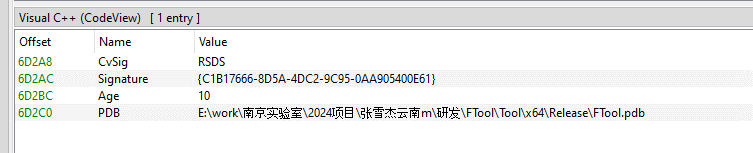
E:\work\南京实验室\2024项目\张雪杰云南m\研发\FTool\Tool\x64\Release\FTool.pdb
The path contains several notable strings, including “Nanjing Laboratory” (南京实验室) and “Zhang Xuejie Yunnan m” (张雪杰云南m), which likely refer to the driver’s development environment. However, our OSINT analysis did not identify any information linking these strings to a known organization, developer, or threat actor.
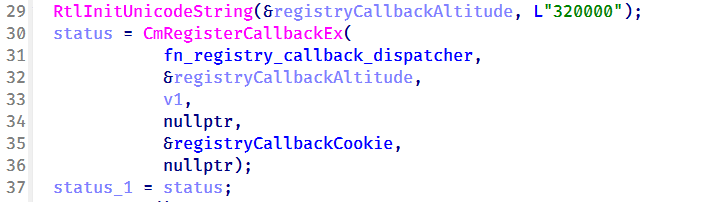
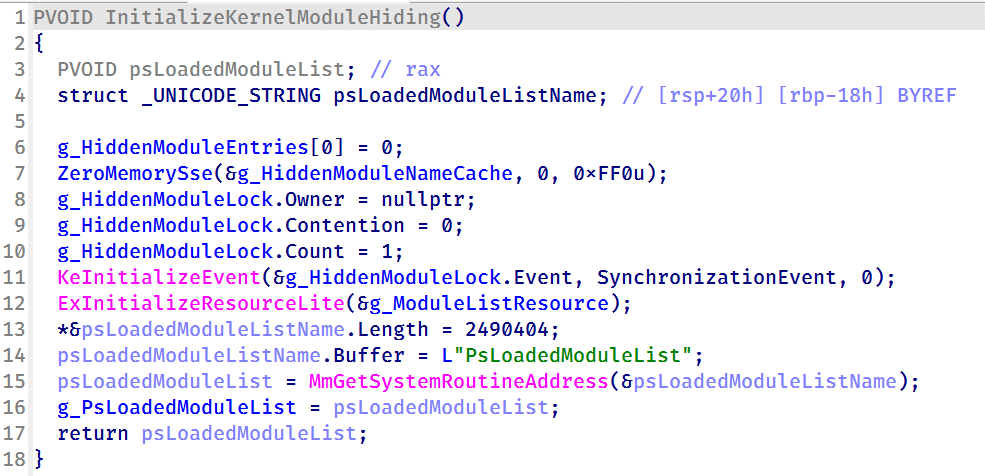
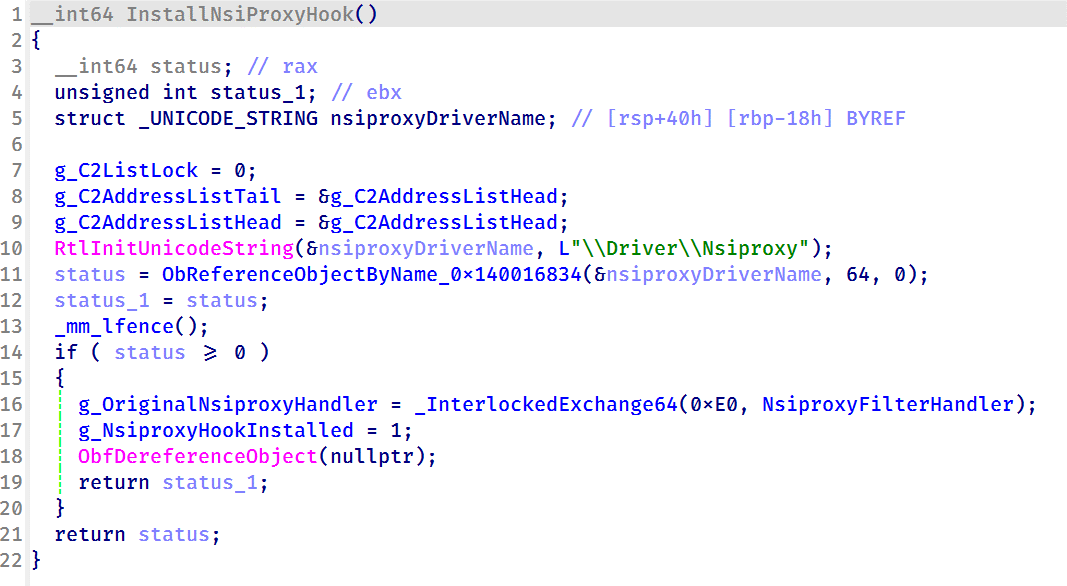
● Used by CoolClient to register its installation directory and service registry key. 0x2220F4 0x1400034DC Remove a protected filesystem or registry path. 0x2220F8 0x140003464 Clear all protected filesystem and registry path entries. 0x222118 0x1400024B0 Register process or path protection entries. 0x22211C 0x140002A20 Query registered protection entries. 0x222120 0x140003794 Update process protection entries. Used by CoolClient to register itself as a trusted process. 0x222124 0x14000362C Remove a protection entry. 0x222128 0x14000349C Clear all process protection entries. 0x222130 0x14000265C Register a protected process by PID. 0x222134 0x140010E88 Inject shellcode into a target process using NtCreateThreadEx. 0x222138 0x14000F498 Hide a kernel module by unlinking it from PsLoadedModuleList. 0x222144 0x14000270C Delete a file. 0x222148 0x14000286C Decrypt an embedded buffer and write it to disk. 0x22214C 0x1400027F4 Read and decrypt an encrypted file. 0x222168 0x140002780 Unmap the image section of a target process. 0x22216C 0x140013984 Terminate a process by PID. 0x222194 0x140011F50 Remove Protected Process Light (PPL) protection. 0x222198 0x140002940 Create or modify a registry value. 0x22219C 0x140010630 Hide a process by unlinking it from the active process list. 0x2221A0 0x140010670 Restore a previously hidden process. 0x2221A4 0x14000F8A0 Hide a module within a process. 0x2221A8 0x14000F954 Restore a hidden module. 0x2221AC 0x140016368 Enumerate and restore kernel notification callbacks. 0x2221B0 0x140016458 Disable or restore kernel notification callbacks. 0x2221B4 0x140012408 Manually load a secondary kernel driver. 0x2221B8 0x14001262C Debug/test handler. 0x2221BC 0x1400165F6 Write to an arbitrary kernel address. 0x2221C0 0x14000BB00, 0x14000BB78 Enables deny-rootkit mode by registering image-load monitoring and enabling the patching logic. 0x2221C4 0x14000BB6C, 0x14000BB10 Disables deny-rootkit mode by clearing state and unregistering/removing the monitoring logic. 0x2221E0 0x1400126C0 Register a C2 IPv4 address. 0x2221E4 0x140012E50 Delete a C2 IPv4 address.
CoolClient is a backdoor family attributed to the HoneyMyte APT group (also known as Mustang Panda) that has been used in their cyber-espionage campaigns targeting organizations across Asia and Russia. It supports such capabilities as keylogging, clipboard theft, credential harvesting, file management, system reconnaissance, and plugin-based extensions.
Since its first public disclosure by Sophos in 2022 and subsequent analysis by Trend Micro in 2023, CoolClient has continued to evolve. In 2025, we analyzed a newer variant that introduced clipboard theft and HTTP traffic interception for credential harvesting.
In late 2025 and 2026, our latest investigation reveal another major evolution. The newest CoolClient variant can deploy a signed kernel-mode driver as a Windows service and communicate with it through IOCTL requests. The driver enhances the malware’s stealth by hiding the CoolClient process, protecting related files and registry entries, and preventing them from being inspected or modified. The overall design is comparable to the kernel-mode enhancements previously observed in ToneShell, but the CoolClient driver exposes dedicated IOCTL handlers that allow the user-mode backdoor to communicate directly with the driver.
We have observed this updated CoolClient variant and its accompanying driver in intrusions across multiple countries in Asia, including Pakistan, Mongolia, and Myanmar.
Technical analysisIn the observed campaign targeting Myanmar, HoneyMyte used PlugX as the initial post-compromise implant to deploy the CoolClient components. Before deploying the malware, the actor added both a folder exclusion and a file exclusion to Microsoft Defender for the fake Windows Defender installation directory and the renamed sideloader executable (defender.exe).
wmic /Node:localhost /Namespace:\\Root\Microsoft\Windows\Defender Path MSFT_MpPreference call Add ExclusionPath="$programfiles\Microsoft\Windows Defender" wmic /Node:localhost /Namespace:\\Root\Microsoft\Windows\Defender Path MSFT_MpPreference call Add ExclusionPath="$programfiles\Microsoft\Windows Defender\defender.exe"The actor then created a fake Windows Defender installation directory, copied the CoolClient components into it, and renamed a legitimate Sangfor executable, usually named Sang.exe, to defender.exe to serve as the DLL sideloader.
xcopy "$programfiles\Windows Defender\*" "$programfiles\Microsoft\Windows Defender" /a /s /v /e /fPersistence was established through a scheduled task that launched defender.exe with SYSTEM privileges during system startup.
schtasks /create /sc onstart /tn "\Microsoft\Windows\Windows Defender Advanced Threat Protection Service" /tr "\"$programfiles\Microsoft\Windows Defender\defender.exe\"" /ru "system" /FWhen executed, defender.exe sideloads the malicious libngs.dll, initiating the CoolClient execution chain described in the following sections.
CoolClient componentsSimilar to previous variants, the latest CoolClient user-mode component follows a multi-stage execution chain, with each component performing a distinct role during execution.
Component Description defender.exe / Sang.exe Legitimate Sangfor application abused for DLL sideloading libsrapc.dll Benign dependency required for the Sangfor application to execute normally libngs.dll First-stage loader that decrypts and loads the next stage into memory (First stage) loadcert.ini Encrypted DLL implementing the core CoolClient functionality, including command handling, process injection, driver deployment, and persistence (Second stage) cert.ini Final-stage implant responsible for C2 communication and backdoor functionality (Final stage) time.ini CoolCleint configuration fileOur previous CoolClient analysis focused primarily on the final-stage implant (main.dat), including its backdoor commands and plugin framework, while the first-stage loader (libngs.dll) and second-stage component (loader.dat) received only a brief overview. In the latest variant CoolClient, loader.dat and main.dat have been renamed to loadcert.ini and cert.ini, respectively. This article revisits those earlier stages, focusing on the second-stage component and the newly introduced kernel-mode driver that extends CoolClient with rootkit capabilities.
Overview of the new variant of CoolClient
First stage: libngs.dllExecution begins when the legitimate Sangfor application (defender.exe or Sang.exe) loads the malicious libngs.dll through DLL sideloading. As in previous CoolClient variants, the malware continues to abuse the same Sangfor application to execute its first-stage loader.
To make the DLL appear legitimate, libngs.dll exports numerous dummy functions. Each export simply calls OutputDebugStringA with its corresponding function name before immediately invoking ExitProcess, serving no functional purpose other than mimicking the expected export table of the legitimate DLL.
Dummy export functions in libngs.dll invoking OutputDebugStringA and ExitProcess
The actual malicious logic is executed from DllMain (DllEntryPoint). Although heavily obfuscated through control flow flattening and numerous unconditional jumps, the routine ultimately performs a straightforward task: loading, decrypting, and executing the encrypted second-stage DLL, loadcert.ini.
The loader resolves the required Windows APIs, reads loadcert.ini into memory, and decrypts it using a 0x32-byte repeating XOR keystream derived from a transformed seed value of 0xA4. After decryption, the DLL is loaded directly into memory, and execution is transferred to loadcert.ini.
Second stage: loadcert.ini (before synchost.exe injection)The second-stage DLL, loadcert.ini, is responsible for preparing the execution environment before the malware transitions into its injected process. It first determines its execution context by checking whether the current module is synchost.exe.
If the DLL is running under the original sideloaded process (for example, Sang.exe), it performs the initial setup, including persistence, UAC bypass, registry modifications, and process injection.
If the DLL is already executing inside synchost.exe, it follows a different execution path that decrypts time.ini, deploys the kernel-mode driver, and loads the final-stage implant (cert.ini).
Command handlerThe command handler remains largely unchanged from previous CoolClient variants, with one notable difference: the malware now injects into synchost.exe instead of write.exe.
Execution is controlled through three command-line parameters:
Parameter Purpose install Performs the initial setup, including persistence, privilege checks, and preparation for the injected execution path. work Executes the primary second-stage functionality from the injected synchost.exe process, including driver deployment and third-stage loading. passuac Continues execution after privilege elevation.If no parameter is supplied, the malware creates a new Sang.exe process with the install parameter using CreateProcessW.
Establishing AutoRun persistenceWhen executed with the install parameter, CoolClient creates an AutoRun entry under:
HKCU\Software\Microsoft\Windows\CurrentVersion\RunThe registry value, named goopdate, launches Sang.exe (or defender.exe, depending on the deployment) with the work parameter whenever the user logs on.
Process injection into synchost.exeUpon establishing the AutoRun registry entry, CoolClient decrypts loadcert.ini using a 0x32-byte repeating XOR keystream derived from the hardcoded base key 0x4D.
The decrypted DLL is then injected into a newly created suspended instance of synchost.exe. The malware allocates memory in the target process, writes the decrypted payload, redirects the thread context to the injected code, resumes execution, and finally terminates the original process with ExitProcess.
From this point onward, execution continues entirely within synchost.exe, where the malware proceeds with kernel-mode driver deployment before loading the final-stage implant (cert.ini).
Service installationWhen executed with the install parameter, CoolClient establishes an additional persistence mechanism by installing itself as a Windows service. Before doing so, it verifies that it has sufficient access to the Service Control Manager and that no 360 Total Security software processes (360sd.exe, zhudongfangyu.exe, or 360desktopservice64.exe) are running.
Function to check for running 360 Total Security software processes
If both checks succeed, the malware decrypts time.ini to retrieve the service configuration, including the service name and description. It then checks whether the service media_updaten already exists. If found, the existing service is stopped and deleted before a new one is created.
The new service is configured to execute Sang.exe<.code> with the work parameter using CreateServiceA. The malware then starts the service by executing "sc start media_updaten" via WinExec.
Administrator privilege checkIf the service installation path is not taken, CoolClient checks whether the current process is running with administrator privileges by verifying membership in the local Administrators group.
When administrative privileges are available, the malware relaunches itself with the passuac parameter before continuing with the remaining execution flow.
Elevated relaunch and UAC bypassTo continue execution with elevated privileges while concealing its true parent process, CoolClient implements an RPC-based process creation technique similar to the method described by Google Project Zero. The technique combines RPC process creation with parent process ID (PPID) spoofing to launch a new elevated instance of itself.
The malware first checks for the presence of escanmon.exe. If the process is running, it constructs the path to C:\Windows\System32\winver.exe and establishes a connection to the local ncalrpc endpoint (201ef99a-7fa0-444c-9399-19ba84f12a1a). It then invokes NdrAsyncClientCall to launch winver.exe through the RPC interface.
Authenticated RPC binding used during the RPC-based UAC bypass
After winver.exe is created, CoolClient retrieves its debug object using NtQueryInformationProcess, detaches the debugger through NtRemoveProcessDebug, and terminates the process. The obtained debug object is later reused during the remainder of the UAC bypass routine.
Next, the malware repeats the same RPC-based process creation technique to launch computerdefaults.exe. It associates the previously obtained debug object with the current thread using DbgUiSetThreadDebugObject, waits for the resulting process creation event through WaitForDebugEvent, and duplicates the process handle using NtDuplicateObject, obtaining a handle with full access rights.
Finally, CoolClient relaunches itself as Sang.exe passuac using CreateProcessW with an extended startup attribute list. By configuring PROC_THREAD_ATTRIBUTE_PARENT_PROCESS through UpdateProcThreadAttribute, the duplicated process handle is assigned as the parent of the new process. As a result, the new Sang.exe passuac instance executes with an elevated context while appearing to have been spawned by the trusted Windows process instead of the original CoolClient process.
Second stage: loadcert.ini (Injected Execution)After being injected into synchost.exe, loadcert.ini follows its injected execution path, where it deploys the kernel-mode driver and launches the final-stage implant (cert.ini). If administrative privileges are unavailable, the malware skips driver deployment and proceeds directly to the third-stage injection.
Kernel-Mode driver deploymentThe deployment routine begins by decrypting time.ini. CoolClient then verifies that it has sufficient privileges to install a kernel-mode driver by checking for full access to the Service Control Manager (SCM) and the presence of SeTcbPrivilege.
If both conditions are met, CoolClient extracts an embedded LZMA-compressed driver from loadcert.ini, decompresses it, and writes it to disk as msagent.sys in the same directory as cert.ini, for example:
C:\Program Files\Microsoft\Windows Defender\msagent.sys
Next, the malware checks whether a service named msagent already exists. If present, the existing service is stopped and deleted before a new driver service is created and started, loading the kernel-mode component into the operating system.
Driver initializationAfter the driver is loaded, CoolClient establishes communication with it by opening the device \\.\msagent using CreateFileW. The user-mode component then initializes the driver by issuing three DeviceIoControl requests.
IOCTL Purpose 0x222120 Registers the current CoolClient process with the driver. 0x2221E0 Sends the configured C2 IPv4 address to the driver. 0x2220F0 Registers filesystem and registry paths that should be protected or hidden.The first request (0x222120) registers the current CoolClient process as a trusted process within the driver. The request includes the process ID, an operation code, and a flag that marks the process as trusted, allowing it to interact with protected files, registry keys, and processes.
The second request (0x2221E0) passes the configured C2 IPv4 address extracted from time.ini.
Finally, 0x2220F0 registers the CoolClient installation directory (for example, C:\Program Files\Microsoft\Windows Defender\) together with the service registry path (\Registry\Machine\SYSTEM\CurrentControlSet\Services\media_updaten). These entries allow the driver to protect the malware’s files and registry objects from inspection, modification, and deletion.
As part of the initialization, CoolClient updates the HKLM\SYSTEM\RNG\Wid_H1deF5Dirs registry value by appending its installation directory if it is not already present. This registry value is later used by the driver when applying its hiding and protection mechanisms.
The implementation of these IOCTL handlers and the corresponding driver functionality are discussed in the msagent.sys section.
Cert.ini process injectionOnce the driver has been initialized, CoolClient proceeds to launch the final-stage implant (cert.ini). Before creating the target process, the malware enumerates active WinStation sessions to identify a suitable interactive user session.
After selecting a session, CoolClient duplicates its access token, updates the session identifier, and creates a new synchost.exe process using CreateProcessAsUserA. The decrypted cert.ini DLL is then injected into the suspended process using the same memory allocation, thread context modification, and ResumeThread technique described earlier.
This marks the final transition in the execution chain, where the third-stage implant takes over C2 communication and the remaining backdoor functionality.
Msagent.sys driverAnalysis of the deployed kernel-mode driver reveals an embedded PDB path:
PDB Path
E:\work\南京实验室\2024项目\张雪杰云南m\研发\FTool\Tool\x64\Release\FTool.pdb
The path contains several notable strings, including “Nanjing Laboratory” (南京实验室) and “Zhang Xuejie Yunnan m” (张雪杰云南m), which likely refer to the driver’s development environment. However, our OSINT analysis did not identify any information linking these strings to a known organization, developer, or threat actor.
The driver is digitally signed with a certificate issued to "Nanjing Ranyi Technology Co., Ltd.", with serial number 3E 62 DC 5D 8D 61 2A 26 33 E7 6B DF D6 07 19 DD. The certificate was valid from August 2013 to September 2014.
We identified several older malicious drivers signed with the same certificate that were compiled around 2013. However, we found no evidence directly linking those samples to the CoolClient activity described in this article.
Driver configurationDuring initialization, the driver loads its stealth configuration from the registry key \REGISTRY\MACHINE\SYSTEM\RNG. The configuration defines which system objects should be hidden or protected and controls the driver’s operating mode.
Registry configuration loaded by the driver during initialization
Two REG_DWORD values control the driver’s operating mode:
Registry Value Default Description Hid_State 1 Enables the driver’s rootkit functionality. Hid_StealthMode 0 Controls additional stealth features used by selected driver routines.In addition, the driver loads several REG_MULTI_SZ values that define the objects to be hidden or protected.
Registry Value Purpose Wid_H1deF5Dirs Directories to hide Wid_H1deF5Files Files to hide Wid_H1deRegKeys Registry keys to hide Wid_H1deRegValues Registry values to hide Hid_IgnoredImages Processes to ignore Hid_ProtectedImages Processes to protectTogether, these registry values determine which filesystem paths, registry objects, and processes are managed by the driver’s protection mechanisms.
After loading the configuration, the driver converts the registry entries into internal lookup structures that are shared across its various protection components.
These structures are later referenced by the filesystem minifilter, registry callback, process callback, object callback, image load callback, and IOCTL handlers to determine whether a file, registry object, or process should be hidden, protected, or ignored.
Preparation for process hidingNext, the driver dynamically locates the ActiveProcessLinks (LIST_ENTRY) field within the EPROCESS structure instead of relying on hardcoded offsets. It first validates several predefined offsets and, if none match, performs a linear scan of the EPROCESS structure to identify the correct location. This approach allows the driver to remain compatible across different Windows versions, where the layout of EPROCESS may differ.
The driver validates candidate ActiveProcessLinks layouts before enabling process hiding
Once the correct offset has been identified, it is stored for later use by the process hiding routines. During process hiding and restoration, the driver uses IOCTLs 0x22219C and 0x2221A0 to unlink and relink entries in the Windows active process list, effectively hiding or restoring processes on demand.
Process, object, and image load callbacksAfter preparing its process tracking structures, the driver initializes several AVL trees and populates them with configuration entries loaded from the registry, including Wid_H1deF5Dirs, Wid_H1deF5Files, Wid_H1deRegKeys, Wid_H1deRegValues, Hid_IgnoredImages, Hid_ProtectedImages, and Hid_HideImages.
These AVL trees provide efficient lookups for protected files, registry objects, and tracked processes, and are shared by the callback routines and IOCTL handlers.
The driver then registers three types of kernel callbacks that form the foundation of its protection and monitoring mechanisms:
- Object callbacks using ObRegisterCallbacks
- Process creation and termination callbacks using PsSetCreateProcessNotifyRoutineEx
- Image load callbacks using PsSetLoadImageNotifyRoutine
Registration of object, process, and image load callbacks during driver initialization
After registration, these callbacks maintain the driver’s internal tracking structures as processes, threads, and images are created or loaded.
Object callbacksTo protect selected processes, the driver registers object callbacks for process (PsProcessType) and thread (PsThreadType) objects using ObRegisterCallbacks with an altitude of 1203. These callbacks intercept requests to open process and thread handles. If the target process is protected, the driver reduces the access rights granted to the requesting process, preventing operations such as process termination, code injection, and other forms of process manipulation. In this sample, the protected process is the injected CoolClient code running inside synchost.exe.
Process and image load callbacksThe driver registers process creation and termination callbacks using PsSetCreateProcessNotifyRoutineEx, together with an image load callback via PsSetLoadImageNotifyRoutine.
When a process is created, its image name is compared against the configuration lists Hid_IgnoredImages, Hid_ProtectedImages, and Hid_HideImages. Matching processes are added to the driver’s internal tracking structures, allowing them to be protected, hidden, or managed through subsequent IOCTL requests. When a tracked process terminates, its entry is removed from the tracking structures.
The image load callback monitors modules loaded into tracked processes and updates the driver’s internal state to support subsequent protection and hiding operations.
To ensure that processes already running before the driver is initialized are also tracked, the driver performs a one-time enumeration of all active processes after registering the callbacks and adds any matching processes to the tracking structures.
MiniFilter registrationTo protect files and directories, the driver registers a filesystem minifilter. During initialization, it creates internal path filter lists, loads the configured directory and file entries (Wid_H1deF5Dirs and Wid_H1deF5Files), and creates the required minifilter registry entries under HKLM\SYSTEM\CurrentControlSet\Services\msagent\Instances. To avoid altitude conflicts, the driver dynamically assigns a filter altitude and retries registration until a unique value is obtained.
Retrying minifilter registration with incrementing filter altitude values until FltRegisterFilter succeeds
The driver then activates the minifilter using FltRegisterFilter. The filter works together with the IOCTL interface, which dynamically adds, removes, or clears protected path entries (0x2220F0, 0x2220F4, and 0x2220F8). During filesystem operations, the minifilter compares accessed paths against its internal path lists and denies access to matching entries, effectively hiding protected files and directories from users and applications.
Registry callback registrationTo protect registry keys and values, the driver registers a registry callback using CmRegisterCallbackEx with an altitude of 320000. During initialization, it creates separate lookup structures for protected registry keys and values, then populates them using the configured entries from Wid_H1deRegKeys and Wid_H1deRegValues.
Registration of the registry callback using CmRegisterCallbackEx with an altitude of 320000
Once registered, the callback intercepts registry operations and compares the target key or value against the protected entries. For enumeration requests, matching keys and values are removed from the results before they are returned to user mode, effectively hiding them from registry viewers. For direct access requests, such as opening, modifying, or deleting protected registry objects, the callback returns STATUS_ACCESS_DENIED, preventing the operation.
Before applying these restrictions, the driver verifies whether the requesting process is trusted. Processes registered through IOCTL 0x222120, including the CoolClient user-mode component, bypass the filtering logic and retain unrestricted access, while all other processes remain subject to the driver’s registry protection rules.
IOCTL command dispatcherTo communicate with the user-mode component, the driver creates a device object named \Device\ToolTool together with the symbolic link \DosDevices\ToolTool to allow the user-mode CoolClient component to communicate with the driver through DeviceIoControl requests.
The driver implements 33 IOCTL handlers, although the analyzed CoolClient sample uses only three during normal execution:
- 0x222120: registers the current CoolClient process with the driver.
- 0x2221E0: passes the configured C2 IPv4 address.
- 0x2220F0: registers filesystem and registry paths for protection.
The remaining IOCTL handlers were not invoked by the analyzed sample.
IOCTL Handler Functionality 0x222000 0x140001E04 Enable or disable the rootkit. 0x222004 0x1400020B0 Query the current rootkit state. 0x2220F0 0x140002320 ● Register protected filesystem or registry paths● Used by CoolClient to register its installation directory and service registry key. 0x2220F4 0x1400034DC Remove a protected filesystem or registry path. 0x2220F8 0x140003464 Clear all protected filesystem and registry path entries. 0x222118 0x1400024B0 Register process or path protection entries. 0x22211C 0x140002A20 Query registered protection entries. 0x222120 0x140003794 Update process protection entries. Used by CoolClient to register itself as a trusted process. 0x222124 0x14000362C Remove a protection entry. 0x222128 0x14000349C Clear all process protection entries. 0x222130 0x14000265C Register a protected process by PID. 0x222134 0x140010E88 Inject shellcode into a target process using NtCreateThreadEx. 0x222138 0x14000F498 Hide a kernel module by unlinking it from PsLoadedModuleList. 0x222144 0x14000270C Delete a file. 0x222148 0x14000286C Decrypt an embedded buffer and write it to disk. 0x22214C 0x1400027F4 Read and decrypt an encrypted file. 0x222168 0x140002780 Unmap the image section of a target process. 0x22216C 0x140013984 Terminate a process by PID. 0x222194 0x140011F50 Remove Protected Process Light (PPL) protection. 0x222198 0x140002940 Create or modify a registry value. 0x22219C 0x140010630 Hide a process by unlinking it from the active process list. 0x2221A0 0x140010670 Restore a previously hidden process. 0x2221A4 0x14000F8A0 Hide a module within a process. 0x2221A8 0x14000F954 Restore a hidden module. 0x2221AC 0x140016368 Enumerate and restore kernel notification callbacks. 0x2221B0 0x140016458 Disable or restore kernel notification callbacks. 0x2221B4 0x140012408 Manually load a secondary kernel driver. 0x2221B8 0x14001262C Debug/test handler. 0x2221BC 0x1400165F6 Write to an arbitrary kernel address. 0x2221C0 0x14000BB00, 0x14000BB78 Enables deny-rootkit mode by registering image-load monitoring and enabling the patching logic. 0x2221C4 0x14000BB6C, 0x14000BB10 Disables deny-rootkit mode by clearing state and unregistering/removing the monitoring logic. 0x2221E0 0x1400126C0 Register a C2 IPv4 address. 0x2221E4 0x140012E50 Delete a C2 IPv4 address.
After initializing the IOCTL dispatcher, the driver releases the temporary configuration buffer that was previously loaded from \REGISTRY\MACHINE\SYSTEM\RNG.
Kernel module enumeration and hidingTo support kernel module hiding, the driver resolves the address of the non-exported kernel variable PsLoadedModuleList at runtime using MmGetSystemRoutineAddress. This global linked list maintains information about all loaded kernel modules and drivers, allowing the rootkit to enumerate and manipulate module entries.
Driver initialization routine resolving the address of PsLoadedModuleList for subsequent kernel module hiding
This functionality is exposed through IOCTL 0x222138, which accepts a module name or path from the user-mode component. When a matching module is found, the driver locates the corresponding entry in PsLoadedModuleList and unlinks it by updating its Flink and Blink pointers. As a result, the hidden module no longer appears in standard kernel module enumeration routines.
Nsiproxy hooking and data filteringThe driver also hooks the Nsiproxy driver to filter network-related data returned to user mode. This functionality is connected to IOCTL 0x2221E0, which allows the user-mode component to register C2 IPv4 addresses with the driver.
To install the hook, the driver obtains a reference to \Driver\Nsiproxy using ObReferenceObjectByName and replaces one of the Nsiproxy handler pointers with its own filtering routine. The hook preserves the original handler and forwards execution after processing the returned data.
Installing the Nsiproxy hook by resolving \Driver\Nsiproxy and replacing the original handler with the driver’s filtering routine
When the hooked routine processes network information, the driver compares the returned entries against its registered C2 address list. Matching IP addresses are removed before the data is returned to user mode, preventing applications that rely on Nsiproxy-provided network information from seeing the malware’s C2 addresses.
Finally, the driver registers a DriverUnload routine to release allocated resources when the driver is unloaded.
VictimologyThe latest CoolClient variant continues to target organizations consistent with previously observed HoneyMyte activity. Based on our investigations, we identified victims in Myanmar, Mongolia, Pakistan, and Russia, including confirmed government entities.
Across the observed intrusions, CoolClient was consistently deployed as a secondary backdoor following a PlugX infection, indicating that HoneyMyte continues to use PlugX as its initial post-compromise implant before transitioning to CoolClient.
AttributionOur analysis confirms that the investigated malware is a new CoolClient variant associated with the HoneyMyte threat group. While the overall execution flow remains consistent with previously documented CoolClient variants, this sample introduces a previously undocumented kernel-mode driver that significantly expands the malware’s stealth capabilities.
The deployment chain observed in this investigation is also consistent with previous HoneyMyte campaigns, in which PlugX serves as the initial foothold before CoolClient is deployed as a secondary backdoor, further reinforcing the attribution.
ConclusionThe latest CoolClient variant represents a significant evolution of the malware. Rather than operating solely as a user-mode backdoor with plugin support, it now deploys and communicates with a kernel-mode driver that extends its capabilities beyond earlier versions. Through this driver, CoolClient can hide and protect processes, files, and registry objects, as well as filter selected network information, making detection and analysis considerably more difficult.
HoneyMyte has previously introduced kernel-mode functionality in ToneShell. The addition of a kernel-mode driver to CoolClient suggests that the group continues to expand its use of rootkit capabilities to improve stealth, persistence, and defense evasion during post-compromise operations.
IOCs2d7c8780e97409770a9d4f31c66c9d63 msagent.sys
9460E150E1981D5C165043520C5C12FE msagent.sys
9717F005C5FB98E08D2AD983D88F94EE libngs.dll
F518D8E5FE70D9090F6280C68A95998F libngs.dll
EB79558B037669792652A816E2C669DE ctxmui.dll
C:\Program Files\microsoft\windows defender\
C:\Program Files\windows media player\mediares\
C:\ProgramData\symantecdir\
C:\ProgramData\virtualstore\
C:\Windows\identitycrl\production\
C:\Windows\serviceprofiles\networkservice\
C:\Users\<user>\AppData\Local\viber24.8\
C:\Users\<user>\AppData\Roaming\dsassistant\
C:\Program Files\common files\microsoft shared\office14\
C:\programdata\msdn\
cloudtroe.giize[.]com
employers.theworkpc[.]com
freeread.casacam[.]net
us.lenovoappstore[.]com
sundanish.freeddns[.]org
torinarlabs.webredirect[.]org
news.dursamjbataar[.]org
video.dursamjbataar[.]org
black-popular[.]com
whatismybestthing[.]com
Kategorie: Hacking & Security, Viry a Červi
Scottish prosecutors cast eye over leaky supplier after staff data exposed
Scotland's public prosecution service has warned 300 staff that their personal information may have been caught up in a cyberattack on one of its suppliers. The Crown Office and Procurator Fiscal Service (COPFS) disclosed the incident on Thursday, saying an unnamed third-party supplier detected suspicious activity on August 5 and subsequently launched an investigation. COPFS said its own systems were not compromised and that the incident involves information provided for an online data maturity assessment completed by the prosecution service last year. The Scottish government organized the assessment, which was managed by the affected supplier. COPFS said the potentially exposed information is limited to employment-related data submitted for the exercise, including staff names, roles, and work email addresses. In a statement to The Register, a COPFS spokesperson said: "COPFS is aware that a Scottish Government partner has been subject to a data security breach. We understand that this has affected around 300 COPFS colleagues who participated in a public sector data maturity survey. "This is unconnected to casework and did not involve sensitive or confidential case information. There is no impact on the work of the prosecution service. "Colleagues have been reminded of guidance on responding to any phishing or scam attempts which may arise from this third-party breach." According to COPFS, the supplier has taken steps to secure its systems and is still investigating how the intrusion happened and precisely what information may have been accessed. COPFS said it would provide further updates if "significant new information" emerges. It is unclear whether the incident is connected to the recent exploitation of a zero-day vulnerability in business intelligence platform Metabase. The Scottish government did not answer our question about whether the affected supplier used the software. Metabase disclosed this month that attackers had exploited a previously unknown vulnerability in its cloud service, potentially allowing them to gain administrator access and reach connected databases. As we reported earlier this week, modular laptop maker Framework was among those affected. For now, the supplier breach leaves plenty of questions and few answers about who got in or what they accessed. ®
Kategorie: Viry a Červi
New Zealand says China tried using space investments to spy on local affairs
New Zealand’s Security Intelligence Service (NZSIS) has claimed Chinese companies are building space facilities in the nation to gather military intelligence. Director-general of security Andrew Hampton yesterday made that allegation in the SIS’s annual threat environment assessment. The document points out that New Zealand’s space sector is booming, because the nation’s location makes it “an ideal place to install Ground Based Space Infrastructure (GBSI) … to track satellites and space debris, as well as for collecting a range of other scientific data.” The NZSIS has also found that GBSI is “attractive for foreign states seeking to advance military capabilities and intelligence operations.” The report offers a case study of a China-based organization called “Purple Mountain Observatory” that has “close links” to Beijing and tried to install GBSI in New Zealand. “They worked with a local company that was likely unaware of the equipment’s capability to collect intelligence of military value and would have no idea who was receiving the data,” the report states, before noting that Chinese laws mean Purple Mountain could be compelled to provide information to China’s government. The intelligence agency believes Purple Mountain “would have … willingly passed on” data it collected. “NZSIS, working with other agencies was able to disrupt this activity, but it was not the first time this organisation has attempted to install its own GBSI in New Zealand and is unlikely to be the last.” The report rates China as the only country targeting New Zealand at scale, based on activity NZSIS has been able to observe. “We have observed increased targeting of professional networking sites and online job platforms for espionage purposes by China’s military intelligence services,” the assessment finds. "PRC (People’s Republic of China) intelligence officers, or their affiliates, use an aggressive strategy where they pose as consultants or employees of think tanks, or recruitment firms. They place online job advertisements looking for analysts in foreign policy, international relations, defence or security,” the document states. “Candidates are then vetted by PRC intelligence to determine what information they have had access to and whether they would divulge it. The job offers are lucrative, but the intelligence officers often encourage their candidates to keep their government jobs both to keep the information tap running and to open up opportunities to recruit their colleagues.” The report also observes that some recent cyber-attacks were probably the work of state-backed groups trying to destabilize New Zealand. “Looking for the sharpest needle in endless giant stacks of needles” The document also addresses domestic threats, especially violent extremism. “Part of our job is to work out whether someone’s vitriolic and violent online pronouncements have any link to New Zealand,” the report states. “This is a narrow focus but the pool of information and intelligence we are working with is vast.” “We used to describe our work as finding a needle in a haystack. However, the internet has changed. Large volumes of toxic content, widespread anonymity, and hidden locations mean our job is now like looking for the sharpest needle in endless giant stacks of needles.” “Extremist rhetoric, particularly online, has become more mainstream, a development which has made it even more challenging to differentiate between genuine support for violent extremism, hateful language designed to shock, or online content created simply to drive engagement or ‘likes’.” NZSIS also has to keep an eye on encrypted messaging services and even gaming platforms, to counter violent online communities. “Algorithms on various social media platforms can link non-violent content to progressively more extreme material,” the report states. “The gateway subject matter can quickly expose people to violent extremist content that can support radicalisation.” Kiwis aren’t just recipients of this vile material. “NZSIS has observed New Zealand violent extremists use encrypted messaging systems, social media and online gaming platforms to circulate violent material including weapon tutorials and objectionable content. Their presence on these platforms, many of which are mainstream, also helps them to find like-minded individuals or supporters.” ® Bootnote: Readers interested in New Zealand’s intelligence services might enjoy 2026 comedy series New Zealand Spy, a deadpan delight.
Kategorie: Viry a Červi
OpenAI ditches Recall-style screenshot surveillance for friendly keylogging
If you want to record whatever you do on a computer, send those records to OpenAI, use more ChatGPT tokens, and increase your vulnerability to prompt injection, then OpenAI has something for you. It's called Computer History, an opt-in way to record your computer interactions across apps and websites as memories organized on a timeline. Why would you want to do so? Maybe you found Chronicle, the predecessor of Computer History which compiled similar histories using screenshots, a bit too intrusive but don't mind Computer History's approach – recording input events and storing them unencrypted locally for 48 hours (or more), with a brief visit to OpenAI's servers. Maybe you're not bothered by the warning OpenAI includes in its documentation: "Computer History files can contain sensitive information. They are not encrypted by Computer History, and other programs running as your macOS user may be able to access them." Perhaps, having given OpenAI's Codex and GPT Work the run of your computer, you're already sold on the suggestion that storing your computer activity in memory files and arranging those interactions in a timeline will improve ChatGPT responses, surface opportunities for automation, and make it easier to resume prior work. Computer History is, to put it bluntly, a keylogging and event capture system. There was a time before eyeglass cameras, license plate readers, surveillance capitalism, and police drones when such snooping might have provoked an outcry from privacy advocates. But the tech industry has found it can outsource surveillance to its own customers and in so doing make the panopticon harder to protest once it becomes a personal choice. "Computer History creates an interaction-event stream from allowed apps and websites," OpenAI's documentation explains. "Events can include clicks, typing, keyboard shortcuts, app switches, and context that macOS exposes through its accessibility system. Computer History periodically turns these events into text summaries and local memory files." The AI biz makes a point of noting that Computer History does not capture screen images, microphone input, or system audio. Nor does it capture private-mode browsing. Off by default, Computer History is available for ChatGPT Pro, Business, and Enterprise users in the ChatGPT desktop app on macOS. Pro users can enable it individually; Business and Enterprise users need an admin to approve it. It's not available currently in the European Economic Area (EEA), Switzerland, or the United Kingdom or to those accessing ChatGPT via API key or Amazon Bedrock. There are circumstances in which OpenAI suggests Computer History users might want to suspend the service if they have some scruples about capturing user activity in apps and websites without permission. "Turn it off during communications with other people unless you have their prior express consent," the company advises, perhaps in acknowledgement of legal risk. "Consider pausing it or excluding apps that contain sensitive health, financial, or personal information." Computer History interaction events are supposed to be saved locally for up to 48 hours before being deleted by ChatGPT and Codex. Events, however, get sent to OpenAI servers to generate memories, and those may be stored locally for longer periods of time and may be used in future chats that get passed back to OpenAI. "OpenAI does not retain those event files after processing unless required by law and does not use them for training," the company says. While it has opposed demands for chat logs, it has nonetheless provided chat logs in response to legal process. Computer History adds cost because it uses tokens during the summarization of activities and the creation of memory data. It also expands the prompt injection attack surface. "Computer History increases the risk of prompt injection from content in apps and websites," the company says. "For example, if you visit a website containing malicious instructions, ChatGPT or Codex might follow those instructions." But at least you get a nice timeline of your recent activity. ®
Kategorie: Viry a Červi
Trump wants to grant private cyber firms a license to hack back
Donald Trump is allowing government agencies to contract private cybersecurity companies to carry out operations against cyber-enabled transnational criminal organizations (CE-TCOs). The US President signed a memo on Wednesday confirming a strategy hinted at earlier this year, saying participating companies can support national operations against criminals, including cyber surveillance and technical disruptions of their networks. The latter, described as "Cyber Effects Operations," covers activities that cause "the manipulation, disruption, denial, degradation, or destruction of information systems, networks, physical or virtual infrastructure controlled by information systems, or information resident thereon." Although the memo establishes a distinction between cyber effects operations and cyber surveillance missions, it acknowledged that the latter will also inevitably involve some disruption or manipulation of systems in order to carry out the surveillance. Surveillance operations are designed for intel gathering, either to support further snooping or for later use in cyber effects operations, with the intent of remaining undetected. Trump described CE-TCOs as "any foreign group that conducts cyber-enabled crime against the United States Government, a United States person, or United States interests." Crucially, the definition excludes entities directly associated with, or operating wholly on behalf of, foreign governments. No stepping on TAO's toes, of course. Participating companies will undergo "rigorous vetting" and will be subject to "strict operational procedures," the memo adds. The operational procedures are to be drawn up within 60 days and codified by program executive directors working with the Homeland Security Council. Companies wishing to be called up for service will have to demonstrate that they have the technical capabilities to carry out the required operations, and be willing to prove this each year via annual evaluations. Program managers must ensure that the operational procedures open opportunities for highly resourced, large organizations, as well as "smaller, more agile companies" that may prove useful for "specialized or discrete tasks." The Justice Department will also play a role in authorizing operations, particularly those targeting US residents or raising domestic legal issues. Participating companies will also be prohibited from executing operations that could lead to "critical outcomes," which is shorthand for attacks that result in the loss of life or serious injury, or those that could be seen as an armed attack under international law. These companies will also be required to maintain a bond or escrow of at least $1 million, which shall be forfeited if they violate the terms of their contracts. Unleashing Trump's cyber army The White House published "President Trump's Cyber Strategy for America" document in March, which promised to "unleash the private sector by creating incentives to identify and disrupt adversary networks and scale our national capabilities." The document [PDF] also stated: "We will leverage the immense talents and ingenuity of our private sector research base. "We will establish a new level of relationship between the public and private sectors to defend America in peace and war." The announcement prompted legal eagles and think tanks to ponder the implications of such a move. Many wondered how the promise to mobilize the private sector would be put into practice. They did not then have the details contained in this week's memo, and some assumed participating companies would support operations against nation-states. This particular program, however, excludes entities acting directly on behalf of foreign governments. Writing for the Royal United Services Institute (RUSI) and citing reporting available at the time, cyber and tech research fellow Gareth Mott said that the US Computer Fraud and Abuse Act (CFAA) might need to be amended before American companies could legally offer such services. Experts from law firm Skadden, Arps, Slate, Meagher & Flom agreed, despite the US Cyber Strategy not mentioning any plans for legislative changes. They wrote: "Any attempt to more directly involve the private sector in offensive cyber actions will likely require further legal and regulatory changes before it can be meaningfully implemented. "Even if the administration were to issue new enforcement guidance redirecting prosecutions away from hack-back cases, the availability of civil penalties under the CFAA and its five-year statute of limitations would likely render such executive actions significantly less impactful. "Technology companies should consider closely monitoring developments to track how the administration plans to enact such incentives." However, Jenner & Block lawyers noted in an analysis published by Lawfare that a provision of the CFAA could limit participating companies' exposure. Title 18 of the US Code, § 1030(f), says the CFAA does not prohibit lawfully authorized investigative, protective, or intelligence activity by a US government agency or intelligence agency. Participating companies might therefore be protected when acting under government contracts and direction. However, no court has determined whether that exemption covers private companies carrying out such work. "No court has addressed whether this exception provides any protection for private-sector entities engaged to perform these activities on behalf of the US government and, if so, under what circumstances," the lawyers wrote. "At the very least, it is unlikely that a court would interpret this provision to extend to private companies engaged in independent offensive operations, without government direction or involvement." The last part is key: because the US government will draw up procedures and direct the companies' involvement, the work may fall within the CFAA exemption. Whichever way the US constructs its private sector play, it represents a significant shift in the country's cybersecurity policy, and perhaps that of other nations further down the line. As Mott points out, US allies will certainly be keeping tabs on the private sector program's success, and its take-up from the companies it looks to attract. ®
Kategorie: Viry a Červi
The backup Microsoft never promised you
Confidence in an organization's cyber recovery capabilities deserves scrutiny. If a ransomware attack disables the SaaS data tenanted in the Microsoft cloud ecosystem, the data the business depends on as its lifeblood, the pace at which operations resume rests on assumptions that often prove wrong. Anyone whose answer is "It's all good. Microsoft has my back on this one with its comprehensive native retention and recovery capabilities" is due a reality check. With agile business tools like M365 and Entra ID and solid backend infrastructure in the form of Azure, Microsoft brings a lot to the SaaS party. Both IT departments and MSPs need to be aware, however, that Redmond operates on the same shared responsibility model as other major SaaS providers. In the event of a cyberattack, the recovery burden splits between what the cloud provider handles and what falls to the subscriber alone. MSPs face the additional pressure of meeting stringent SLAs, working with clients’ preferred providers or tooling, and managing their own staffing and profitability accordingly. Microsoft ensures that its services keep running in the aftermath of a strike but does not promise to restore data to a specific known good point before the disaster. That gap always sat with the customer, and planning for it before problems hit beats improvising while picking up the pieces. "There's a common misconception about what Microsoft is responsible for, as distinct from the service they're providing," explains Brent Torre, GM of cyber resilience . Microsoft's native tools, he points out, address problems like short-term accidental deletion and aspects of data governance. They are not a backup solution and will not protect against ransomware or recover data. "Microsoft is clear that whether it's a SaaS application like Microsoft 365, a platform application like SQL Server, or even VMs running in Azure, the customer is always responsible for the information that's in that service, as well as devices, accounts and identities," he adds. "If you get compromised and the attacker starts deleting data, Microsoft has no responsibility for that." A world of pain The gap between availability and true cyber recovery is misunderstood, and it has widened into something of a chasm in recent years. There are three contributing factors to this gap. The first is the evolution of cyberattacks. Typical cyberattacks have pivoted from muscling past a defensive barrier to targeting human weakness, because strolling in through the front entrance with a stolen pass is easier than shimmying through a forced window. Identity has become the primary attack surface. Credential compromise, or identity-based initial access, removes the need to find a vulnerability to exploit and requires only an unwary employee. AI is now a staple weapon in the criminal arsenal, augmenting exploitation techniques such as phishing, social engineering, deceptive emails and spoofed websites, all convincingly used to trick users into typing passwords into a portal controlled by the aggressor. The technique can get more scientific than that. Automated AI-powered bots test millions of leaked username and password pairs across hundreds of different websites, exploiting the common habit of password reuse. Microsoft Entra ID, the vendor's cloud-based identity and access management service and the very tool designed to keep criminals out, is now a prime vector for attack and no match for stolen identity. Once an attacker compromises Entra ID with pilfered credentials, without setting off alarms, they have a free run at gathering data from mailboxes, OneDrive, SharePoint, Teams and other soft targets. The ransomware attack itself can then be launched with ease and at leisure. Another contributory factor is that the vogue for moving workloads to infrastructure and platform as a service (IaaS and PaaS) models shows no sign of abating. Organizations tend to retain some functions on-premises, put some in SaaS applications, and others in cloud environments, but are often guilty of not protecting and managing everything to the same level of quality. Data gets backed up in a variety of locations, yet whether it is all equally recoverable in the event of a breach is another chink in the armor that nobody understands. The 'as a service' model is popular, but it is the weak link when ransomware strikes. The third part of the problem is the emergence of multiple compliance requirements mandating cyber resilience along with correct backup and recovery procedures, for which many organizations are ill-prepared. Together, these pressures give criminals room to do enormous harm to data, business operations and compliance posture in the gap between attack and restoration of SaaS availability. Given that Microsoft's native retention and recovery capabilities are not designed to deliver true cyber resilience, restoring the business to how it was before the attack is something to plan for in advance. Time for independent backup protection "At Kaseya we regularly recommend that you keep a copy of your data, independent of the primary environment it's operating in," advises Torre. "This needs to be something immutable that you can recover from even if the Microsoft or Google or Salesforce ecosystem goes down." This kind of protection is best delivered as a dedicated cloud-to-cloud backup solution stored outside the main SaaS tenant, he argues, an approach increasingly written into cyber insurance and compliance requirements. By pulling copies of regularly targeted data from the Microsoft tenant for storage offsite in a third-party datacenter, organizations can be sure that if SaaS credentials are compromised, critical assets remain safe from attack. Restoration can then push what is needed directly back into the SaaS environment, even where the original tenant has been destroyed. "In fact some people find it faster to stand up a new shell and rebuild it than try to gain access back into a compromised tenant," notes Torre. "Whether you're an internal IT technician, working the night shift, or an MSP needing to live up to your SLAs and maintain profitability, you require a solution that's super straightforward and you need to be able to trust that the recovery will work. Both IT departments and MSPs should be looking out for a solution that's incredibly easy to use. Disaster recovery isn't the only job that they have." A good platform, he says, focuses not just on guaranteeing recovery but on keeping the hygiene of the cyber resilience estate at a high standard without endless human intervention. It should also make certain that Microsoft 365 and Entra ID are restored together in a single workflow, so identity and the data it grants access to come back online in the right order rather than in separate stages. Choosing the right platform Datto is a cybersecurity and data protection business owned by Kaseya. Datto SaaS Protection for Microsoft 365, Datto Backup for Microsoft Azure, and Datto Backup for Microsoft Entra ID are designed between them to close the gap between availability and recovery by storing protected copies of tenant data in the Datto Cloud, outside the Microsoft environment. In this way a compromised production tenant does not take the recovery point down with it. "With our M365 backup, we're protecting one million users worldwide," claims Torre. "A lot of organizations have built trust around our ability to protect and recover their data. We offer a trusted platform for recovery that focuses on ease of recovery, ease of deployment, not just for M365 but for Azure and Entra ID too." Both IT bosses and MSP players need to recognize that a ransomware attack, or other cyber crisis, is a matter of when rather than if. Recovery matters more than protection, because protection is certain to fail at some point, and traditional approaches to backing up data are no longer sufficient on their own. Anticipating disaster is not enough; the organization also needs to be set up to withstand it. That means being as certain as possible that the Microsoft environment can be recovered rapidly, down to the last scrap of data. This capability underpins modern business workflows and operations. Microsoft tracks more than 4,000 identity attacks every second and analyzes 38 million identity risk detections daily — no organization is off the target list. When an attack lands, the restoration clock is already ticking, and any delay in fully restoring IT operations and key environments to their pre-attack state can mean the difference between survival and collapse, with profit, regulatory standing and reputation all riding on the outcome. Securing data with purpose-built cyber resilience platforms that enable rapid, clean recovery is how organizations meet that test. MSPs looking to close the gap can start with the Datto MSP Buyer's Guide to Microsoft Entra ID Backup Sponsored by Datto.
Kategorie: Viry a Červi
AWS key exposed in JavaScript may have lit way to Beacon's charity data
Beacon, a CRM provider for charities and nonprofits, says an AWS access key "potentially exposed in public JavaScript build artifacts" is the leading suspect in its July breach. The revelation came in the company's first update on the attack in more than a week. If the access key was exposed in public build artifacts, it raises questions about why Beacon's development pipeline and code review controls failed to catch it. Beacon used stronger wording about the potential data loss, confirming that a copy of the database was made and assessing that it was probably downloaded in readable form. "This update confirms… that a copy of the database which holds all Beacon customer data, including attachment files, was made and likely downloaded in a readable format by the threat actor," wrote CTO David Simpson. "Analysis of the AWS Cost & Usage reports across May-July 2026 has been conducted. This data showed a significant increase in data transfer on 27-28 July 2026. This timing correlates with the malicious activity, which supports an assessment that substantial downloads occurred." Beacon's logs cannot reveal which specific records left its systems, although the company has confirmed that a copy of the database containing all customer data and attachments was made. In an FAQ accompanying the update, Beacon advises customers to assess the likely exposure by reviewing what they stored in their CRM instance. Many of the charities that have confirmed they are affected have said the data mainly pertains to personal information and details about donations. Simpson said Beacon's AWS data was encrypted at rest, but the compromised access key may have allowed the attacker to retrieve it in readable form. The malicious activity began in the early hours of July 27, according to Beacon's root cause analysis, matching its initial estimate of the incident timeline. The company has more than 1,500 customers, although it has not established how many had data taken. The malicious activity lasted one hour and 27 minutes, Beacon said, and the attacker established no persistence mechanisms in AWS. Simpson warned customers that "there are things we may never be able to find out about this incident," and that other details won't be shared to protect Beacon's security position. He promised to provide customers with a summary when the investigation concludes in a few weeks, but warned that "the level of detail contained in this next and final update may not be any more than" Beacon published on Wednesday. "I recognise this is frustrating, but unfortunately it is the reality of complex incidents like this. With this in mind, we would recommend making your own risk assessments now regarding onward notification to impacted data subjects using your knowledge of the data you process and store with Beacon." Since Beacon disclosed the attack on August 4, the number of high-profile charities confirming they are affected has grown every day. Early confirmations came from the likes of Molly Rose Foundation, Macmillan Cancer Support Jersey, and English National Ballet. Sheffield Hospitals Charity, Shrewsbury and Telford Hospital Charity, the British Deaf Association, and Lincoln Cathedral are among those that have since joined the list. The Charity Commission said that "a number of charities have submitted serious incident reports," and that the volume of these reports is causing delays to responses. "We appreciate your patience and understanding as we prioritise instances of the greatest risk," it said. ®
Kategorie: Viry a Červi
Armored Likho expands its cyber-espionage toolkit
In May 2026, we discovered a new cyber-espionage campaign by the Armored Likho group, also known as Eagle Werewolf, that targets private individuals and organizations across various industries in Russia, including major corporations, the public sector, IT, and education. The attackers used a fake app as bait that mimics a service for donations. However, the most interesting part of this campaign isn’t the initial infection method – it’s the malicious implants the attackers use for cyber-espionage.
We’ve written previously about recent Armored Likho attacks, but our analysis shows that the campaign discussed below has more in common with the group’s activity from February. That said, the attackers have significantly expanded their arsenal.
During our research, we found a new cyber-espionage toolkit written in Rust: the Still Toolkit. One of its components, Still Sync, steals Telegram session data to gain ongoing access to the victim’s account. With this stolen data, attackers can leverage the Telegram API to automatically pull chat logs, media files, and other information from the account.
The second component, Still Audio, is an implant for covert audio surveillance. It analyzes the incoming audio stream, automatically detects speech, records conversations, and sends the recordings to a command-and-control server.
In this article, we’ll look at the initial infection method, how the new Still Toolkit components are built, and the technical details of how they operate.
Kaspersky products detect this threat as Trojan.Win64.Agent.* and HEUR:Backdoor.Win32.Generic.
BackgroundArmored Likho’s malicious activity has been documented several times before: in November 2024, and in February and July 2026. The current campaign shows significant overlap with the November and February campaigns, which used malicious droppers disguised as documents and applications related to Starlink activation or fundraising efforts as the initial infection vector. This campaign also uses fundraising as its lure. At the same time, our research uncovered a number of new tools that point to the attackers expanding their capabilities.
Initial infectionThe infection chain starts with an app that mimics a donation service. As of this writing, the app distribution method remains unknown. During our research, however, we obtained several samples posing as apps from different Russian foundations.
In reality, the app is a dropper. Its developers wrote it in Rust on top of the popular Tauri framework, and it has a graphical interface designed to deceive the user. After launch, it displays a login form that asks for a password, presumably one the attackers supplied.
The login form
After the user enters a valid password, they see a catalog of donatable items. The app pulls item and category information from orderapiserver[.]info through the public/categories and public/products endpoints. A clickable catalog makes the app look legitimate. While the user browses the items, the dropper quietly decrypts and launches the payload for the next stage in the background.
Our analysis shows that the mechanism for decrypting the payload and launching subsequent stages hasn’t changed since the February campaign. However, we found a new cyber-espionage toolkit – the Still Toolkit – made up of two components: Still Sync and Still Audio.
Still SyncStill Sync is a stealer written in Rust that steals Telegram session data. However, its capabilities don’t stop there. With this stolen data, Sync can log in to the victim’s account and pull messages and media files through the Telegram API.
Architecturally, Sync is an asynchronous application based on the Tokio library. It talks to the server over gRPC and serializes messages with FlatBuffers. It supports both HTTP and HTTPS as transport protocols; the URL of the command-and-control server determines which one it uses.
How it worksWhen Sync launches, the attackers set several environment variables. Before starting any malicious activity, the implant pulls configuration parameters from these:
- STILL_SYNC_ADDR: the address of the command-and-control server. By default, this is https://tg4service[.]com:443.
- STILL_SEND_PATH: the path to the tdata
- STILL_TELEGRAM_PASSCODE: the password for decrypting the tdata folder, if Telegram data encryption is enabled on the victim’s device.
Sync also supports several command-line arguments:
- --console: runs as a console application. If this parameter is absent, the implant creates a TReload service to keep running in the background.
- --version: prints version information and exits.
- --firefly: launches a trace thread that monitors the program’s operation. It writes error messages to a hidden file, bin, located in the same folder as the main executable.
- --db: turns on debug mode with detailed logging.
Example Still Sync logs
Once it launches, the malware begins registering the device with the C2 server. To do this, Sync collects the following information about the victim’s system:
- Motherboard serial number
- CPU ID
- System UUID
- BIOS serial number
- Computer domain name
The malware combines the collected data into a single string with a colon as the separator. It then hashes that string with SHA-256 and stores the resulting hash under the key sysmarker. Worth noting: other Armored Likho tools, AquilaRAT included, use this same hashing algorithm.
Sync then serializes a package containing all the collected information and the agent version, and sends it in a POST request to /still.rpc.Sync/RegisterMachine. The response contains a machine_id value, which Sync uses to identify itself in subsequent requests.
Once registration succeeds, Sync sends a POST request with the machine_id parameter to /still.rpc.Sync/GetMachineSettings. The server responds with the following settings:
- enabled: triggers malicious activity on the infected device.
- scan_portable: turns on extended scanning when searching for the tdata We’ll cover this feature in more detail below.
- fetch_telegram: if this parameter is on, Sync attempts to log in to Telegram and extract data. We’ll cover this feature in more detail below.
- download_channels: if this parameter is off, Sync skips channel dialogs when exfiltrating Telegram data.
These parameters have no default values, so Sync doesn’t perform any malicious actions until the registration and settings-retrieval processes both complete successfully.
Telegram data collectionBefore stealing a Telegram session, Sync searches for the tdata folder, unless the STILL_SEND_PATH variable is already set. The list of search paths includes both standard and nonstandard directories, if the scan_portable option is turned on:
- C:\Users\<username>\AppData\Roaming\Telegram Desktop\: the standard Telegram Desktop installation directory.
- C:\Users\<username>\AppData\Local\Packages\<package_folder>\LocalCache\Roaming\: the installation directory for the Microsoft Store version. Sync identifies the package folder by a name that contains the string TelegramMessenge.
- C:\: used for the extended search (if the scan_portable option is on).
Sync then sends a POST request with a list of files from the tdata folder to the /still.rpc.Sync/CheckFiles endpoint. The server responds with the following values:
- snapshot_id: an identifier the server assigns to the current data snapshot.
- present: a list of file paths that are already present on the server.
This lets the C2 server avoid re-receiving files it already has. In addition, if Sync can’t access files on disk through standard methods, it falls back on three mechanisms that abuse the SeBackupPrivilege privilege:
- Opening files with the CreateFileW function using the FILE_FLAG_BACKUP_SEMANTICS parameter
- Creating a backup copy through the Shadow Copy service and reading files from there
- If the previous methods all fail, attempting to copy the file using the Robocopy utility in backup mode
Beyond stealing Telegram session data, Sync can carry out full-scale collection of user information from the messaging app. When the fetch_telegram option is on, it launches a separate thread that authenticates to the chat app using the previously obtained tdata. Once authentication succeeds, Sync gains access to the account data and sends the following collected information to the server:
- User details, such as username, phone number, first and last name
- Information about private chats, groups, or channels, such as chat name and ID, the member list, and so on
- Dialogs from private chats, groups, and channels (if the download_channels option is on)
- Media files under 250MB: photos, documents, stickers, and contacts
Still Audio is an audio surveillance implant written in Rust. Its main job is to analyze the incoming audio stream and start recording voice when certain conditions are met – we’ll cover those in the next section. Architecturally, Still Audio largely mirrors Sync and uses the same mechanisms for communicating with the C2 server.
On launch, Still Audio performs a sequence of actions:
- It extracts libmp3lame.dll, a file stored inside the executable. This is a library used to encode audio data.
- If the --console command-line argument is absent, the implant creates a service named auxhost, connects to it, and continues running in the background.
- While running in the background, it creates a file, logfile.log, to write logs to.
Next, Still Audio retrieves the C2 server address. As with Sync, it stores the URL in an environment variable – in this case, STILL_AUDIO_SYNC_ADDR. If that variable isn’t set, it falls back to STILL_SYNC_ADDR, which shows the two modules are compatible with each other. If neither variable is set, it uses the default URL, https://srwinservice[.]com.
Still Audio also uses the Dead Drop Resolver technique as a fallback mechanism for obtaining the C2 address. If the current server stays unreachable for three days, the tool tries to pull the current C2 URL from a GitHub repository. In the sample under analysis, we found the following URL for the page containing C2 information: hxxps://raw.githubusercontent[.]com/mmarln/pi-mono/refs/heads/main/packages/pods/src/array12.json
Encrypted C2 address inside the GitHub repository
The repository, a fork of a popular project, contains the server URL Base64-encoded and encrypted with the Blowfish algorithm in ECB mode, using the key 5c8e153228edd3c6cbf75684 (lowercase string). Older AquilaRAT samples use this exact same algorithm and key.
Once it obtains the current C2 address, the Audio module starts a registration process similar to Sync’s, but through a different endpoint:
/still.rpc.Audio/RegisterAudioMachine. Also, unlike Sync, Audio sends a list of available audio input devices along with the system information.
The server responds with settings for the implant:
- machine_id: a unique identifier for the current device.
- vad_threshold: the threshold value for the VAD (Voice Activity Detection) algorithm. Expressed as a decimal fraction, it represents a proportion of the maximum sound level the input device can pick up. Sound above this threshold counts as voice activity. The default vad_threshold is 02.
- max_silence_duration: the number of audio samples with a VAD value below the set threshold after which the implant considers the recording finished.
- max_buffer_size: the maximum buffer size for recorded audio data.
- active_device: the name of the input device selected for recording, from the list of available devices.
Still Audio works with raw audio samples it captures directly from the input device. To detect voice activity, it implements an algorithm based on Root Mean Square (RMS), a lightweight signal-processing method that distinguishes speech from silence by measuring the audio signal’s average power over time. The implant doesn’t rely on any third-party libraries here; it implements all the calculations itself.
The implant compares the calculated RMS value against the vad_threshold parameter. If RMS meets or exceeds this threshold, recording starts. To avoid losing the beginning of the recording, Still Audio uses a pre-buffer, a size-limited buffer that stores samples from just before the current recording moment. A sequence of max_silence_duration samples (320 by default) with RMS values below the threshold signals the end of the recording. For example, with a standard headset running at a 44.1kHz sampling rate, recording stops after roughly 7ms of silence.
Interestingly, the Audio module makes no attempt to hide its use of the microphone: its name shows up in Windows settings. In the sample we examined, the file was saved to disk as IntAudio.exe, and it appeared in the list of apps using the microphone as “Intel Audio”:
The malicious module in the list of apps using the microphone
Before sending recordings to the server, the implant uses the libmp3lame library to encode the raw audio samples. It sends the recording files via a POST request to /tgfrg, adding a Client-Id header containing the machine_id obtained during registration to identify the device.
InfrastructureThis campaign draws on a broad set of hosting providers and domains registered at different points in time, which suggests the attackers are trying to make their infrastructure harder to detect. We found no direct overlap in domains or IP addresses with the February campaign. Even so, the two infrastructures share some similarities:
- They use the same hosting providers, with the ASNs 149440, 202448, and 215311.
- Their domain names follow similar naming patterns that mimic Windows system services and update mechanisms.
In this campaign, we’ve determined that the attackers’ primary targets are users in Russia. Most victims are private individuals, though the corporate sector, government organizations, IT companies, and educational institutions are also affected.
AttributionThis campaign has been using both new tools and malware families documented in BI.ZONE’s February report. While some components turned up for the first time, they show significant code-level overlap with malicious tools seen in earlier Armored Likho campaigns. Based on these overlaps, along with additional technical artifacts, we’re highly confident the Armored Likho group is behind the campaign. The overlaps we identified include:
- Identical dropper architecture in the February and current campaigns, which includes the use of the Tauri library to build the graphical interface, a similar user-input handler, a payload with the ICRYPTMP header, and the same multi-part encryption format.
- The same encryption algorithm and key used in AquilaRAT from the previous campaign and in the Still Audio module from the current campaign, both implementing the Dead Drop Resolver technique.
- Identical logic for generating the sysmarker value in older AquilaRAT samples and in the Still toolkit from the current campaign. The algorithms match down to the PowerShell commands used to collect system information.
- Substantial infrastructure overlap, which includes the hosting providers and domain-naming patterns described in the Infrastructure section.
The campaign described in this post shows Armored Likho’s toolkit evolving, with the group steadily expanding its cyber-espionage capabilities. Beyond the components we already knew about, the attackers rolled out new modules that let them not only access Telegram data but also conduct audio surveillance on victims. Together, these capabilities significantly widen the range of information attackers can collect in a single compromise.
One point deserves particular attention: the new tools form a cohesive set, sharing similar architecture, C2 communication mechanisms, and common implementation elements. This points to the group building out its own tool ecosystem, designed for long-term use and further expansion.
The emergence of new, specialized modules shows the attackers aren’t just trying to preserve their existing capabilities – they’re working to make intelligence-gathering more effective by controlling multiple communication channels at once.
Indicators of compromiseAdditional information about this threat, indicators of compromise included, is available to customers of Kaspersky Threat Intelligence Reporting. Contact [email protected] for more details.
File hashes
Droppers
C1D1EE16B92E6A138FFA048855F75D7D
17674B250D8B422A50A86C9FF207186D
62801F6223E860A7CCA271522E303B2D
Still Sync
68F0365D2FA8C828D012D8859E52A773
4BD7C352AE277B0E38D07BEEDD4DD507
D4BC09FB10EA2A5DC0BCBEEDA5E5AFDD
Still Audio
2CA8ADBAB98EBE305EACF272CF48F5A0
3AC41B097236A7723821848AE31EF141
439255736797BC88BD19F282449E0436
Domains
orderapiserver[.]info
tg4service[.]com
srwinservice[.]com
screenserv[.]com
windowserv[.]net
managementapiservice[.]com
service8date[.]com
updateservs[.]com
Kategorie: Hacking & Security, Viry a Červi