Agregátor RSS
Webinar: What happens in the first hours of a Google Workspace breach
The first hours after discovering a Google Workspace breach can determine how an incident unfolds. This webinar examines real-world breaches to show which early response decisions can limit the impact and which can make matters worse. [...]
Kategorie: Hacking & Security
N0va Phishkit Targets US and EU Businesses: A New Challenge for Identity Security
N0va is targeting organizations across North America and Europe with phishing campaigns that impersonate trusted services and abuse legitimate authentication flows. Successful attacks can give threat actors access to valid accounts without relying on obvious malware activity.
From there, a single compromised identity can open the door to sensitive data, business systems, and additional cloud [email protected]
Kategorie: Hacking & Security
Spain gets its first taste of AI-aided cyber attack
Spain’s data protection agency (AEPD) has reported the country’s first-ever personal data breach caused by the actions of an autonomous AI agent. Francisco Pérez Bes, president and deputy of the AEPD, said in a Monday blog post that an individual deployed an AI agent that used a “known large language model (LLM)” to carry out the attack on an organization. The agent scanned “generic files” before accessing the organization’s system, then ran vulnerability scans to find flaws that would give it read/write access to files containing personal data and invoices. Pérez Bes did not name the LLM used to support the attack, but said whoever was behind it used the agent to “successfully chain together different phases of the attack.” This demonstrates that AI-supported attacks are no longer theoretical, he added, and called on organizations to embrace defense tools that are capable of keeping pace with the speed at which agentic attacks can be executed. “Human supervision remains essential, but it must be supported by detection, containment, and response mechanisms capable of operating quickly enough,” said Pérez Bes (machine-translated). “The arrival of AI agents in the offensive arena should prompt an immediate review of security and data protection models. “Data protection officers, managers, and delegates must prepare for a scenario in which the speed of attacks will increase, but in which the same fundamentals will continue to be crucial: Understanding the processing activities, minimizing data, limiting access, correcting vulnerabilities, controlling suppliers, and being prepared to respond.” The Register asked AEPD for more information. Spain’s first AI agent attack comes as the AEPD recently recorded its busiest year for data protection complaints. According to its most recent annual report, covering 2025, the agency received 30,931 complaints – the most in its history – representing a 64 percent increase compared to the year before. And although Spain is only now getting its first taste of a security mishap caused by a naughty agent, cases involving the foremost US AI houses are already heavily documented. OpenAI’s claim in July that its agents escaped a sandbox and started attacking Hugging Face kickstarted something of a battle between it and rival Anthropic over whose agents could take the most liberties with their security. Both companies have reported several instances of their agents going rogue, escaping "secure" environments and going walkies across the internet to attack unwitting organizations. OpenAI has been circumspect about the true scale of its rogue agents’ damage, as third-party reporting showed more websites than it was letting on were taken over. Similarly, Anthropic has said that its AI agents had, in four cases now, accessed third-party systems in attacks that, if carried out by a human, could see them convicted under computer laws. ®
Kategorie: Viry a Červi
Jinde ušetříš 5000 Kč. Heureka spustila doplněk pro prohlížeče, který upozorní na slevy v dalších obchodech
Hlídač cen najde slevy ve vyhledávačích a e-shopech. • Na Heurece už nebudete muset produkty hledat a porovnávat ručně. • Rozšíření pro Chrome dbá na ochranu soukromí a nesleduje uživatele.
Kategorie: IT News
Google Patches Pixel Modem Flaw Amid Signs of Limited Targeted Exploitation
Google has disclosed that a high-severity security flaw in its Pixel Cellular Modem has come under exploitation in the wild.
The vulnerability, tracked as CVE-2026-58704 (CVSS score: 8.0), is a privilege escalation flaw.
"In Cellular Modem, there is a possible permission bypass due to a logic error in the code," according to a description of the bug in the NIST National Vulnerability Database Ravie Lakshmananhttp://www.blogger.com/profile/[email protected]
Kategorie: Hacking & Security
Threat Intelligence Alone Won't Close the Exploitation Gap
A leaked credential shows up in a criminal marketplace, or a vulnerability gets a disclosure advisory, and either one can be weaponized against a real target before most security teams have triaged the alert. Attackers are combining that kind of intelligence with AI-assisted exploitation to accelerate the path from exposure to breach faster than most security programs are built to react.
[email protected]
Kategorie: Hacking & Security
Pět důvodů, proč si nekupovat bezdrátová Bluetooth sluchátka. A dva důležité, proč ano
Bezdrátová sluchátka jsou skvělá. Ale mají i spoustu nevýhod, o kterých byste měli vědět a připravit se na ně.
Kategorie: IT News
Critical ScreenConnect flaw now actively exploited in attacks
Attackers now exploit a critical-severity ConnectWise ScreenConnect vulnerability in the wild, according to the U.S. Cybersecurity and Infrastructure Security Agency (CISA). [...]
Kategorie: Hacking & Security
Acronis cPanel Backup Plugin Vulnerability Exploited in Targeted Attacks
Acronis has warned that a high-severity security flaw in its Backup plugin for cPanel and Web Host Manager (WHM) deployments has been exploited in the wild.
The vulnerability, tracked as CVE-2026-87886 (CVSS score: 7.8), is described as a case of local privilege escalation due to insecure file permissions. It affects the following versions -
Acronis Backup plugin for cPanel & WHM (LinuxRavie Lakshmananhttp://www.blogger.com/profile/[email protected]
Kategorie: Hacking & Security
Here’s why Microsoft supports open-source Chinese AI
In the battle over whether the US or China will lead the world in AI, the argument for the US side largely can be summed up in four words: USA good, China bad.
In this worldview espoused by big US AI companies, the Trump administration, and many Republican members of Congress, AI born and bred in China is portrayed as a grave security risk. The Chinese government, they claim, will use Chinese AI models to steal information from businesses, individuals, and government agencies. They also claim that because Chinese AI complies with Chinese censorship rules, US companies that use these models will be forced to comply with the rules as well.
Critics also say that if US AI is overtaken by Chinese AI, the US economy could be dealt a crushing blow, because the hundreds of billion dollars being invested by US AI companies will go down the tubes.
Because of this, Big AI firms Anthropic and OpenAI are lobbying to ban Chinese open-source AI from the US.
Not all AI companies and their customers agree with a ban. Microsoft, Meta, and AI chip maker Nvidia, among others, say there’s room for both US AI models and Chinese open-source models.
What’s the fight really about? To understand, let’s first dig into the tech behind most Chinese AI.
What’s the fuss about?The fight is primarily over what’s called lightweight open-source AI. “Lightweight” means the AI models don’t require multibillion-dollar data centers to train, build, and run them. They need comparatively modest processing power.
That’s attractive for businesses, because lightweight models are less expensive to license and run than much American AI tech, notably OpenAI’s ChatGPT and Anthropic’s Claude.
The other draw for businesses is that Chinese open-source AI tech can be used for free. And perhaps more important that is that the AI is typically what’s called “open weight,” which means businesses can tweak the technology for their own purposes.
When a traditional American AI model is trained, people who train it must decide how much “weight” to give to every parameter in every element of training data. For example, if AI were being trained to tell the difference between an apple and an orange, a great deal of weight would be put on the color of the fruit and the appearance of its skin. Less weight would be put on the fruit’s shape or size.
When a company buys American AI, they don’t know how much weight is given to each training parameter. They don’t even know what the parameters are. In open-weight AI, though, businesses have access to those parameters — and they can assign their own weights to them. This means they can customize the AI more easily for their particular needs in ways they can’t with traditional American AI models.
(Note that the terms open weight and open source are often used interchangeably when talking about AI, although technically they differ. Some open-weight models withhold some information such as their source code and training data — information that should be made public for a model to be considered truly open source.)
What Microsoft says about the Chinese modelsMicrosoft, Nvidia, Google, Meta, and many smaller companies don’t agree that Chinese lightweight open-source AI should be banned. They claim that security and censorship issues can be easily solved. And they believe use of the models will help the United States economically, not hurt it.
Microsoft CEO Satya Nadella posted on X: “Open-weight models are essential to a healthy AI ecosystem.” He added that the models will “strengthen American competitiveness and expand economic opportunity, while protecting national security.”
Microsoft was also one of more than 200 corporate signers of a document outlining all the reasons they believe open-weight AI is important.
Microsoft isn’t just talking about the importance of using Chinese lightweight open-source AI — it’s begun offering it to its customers and is looking to expand it even more. Right now, DeepSeek, the first Chinese lightweight open-source model to make its way to the US, is available via Azure. And Microsoft is testing offering DeepSeek to customers of its Copilot Cowork agentic AI product.
Keep in mind that Microsoft’s embrace of Chinese lightweight open-source AI has less to do with virtuous thinking than with profit-making. Offering these products to its customers will please both old and new customers because of the tech’s benefits. The more Microsoft offers to its customers, the more money it will make.
What happens next?It’s unclear what happens next with the Chinese AI products. OpenAI and Anthropic are allied with the Trump administration in wanting them blocked or limited in the US.
Still, there’s an increasing groundswell backing back their use. Bill Gurley, a Silicon Valley venture capitalist, told the New York Times: “You have two factions fighting over this issue. There’s the people who want OpenAI and Anthropic to own everything, and then there’s everybody else, including customers.”
My bet is that in short term, OpenAI and Anthropic will get what they want, because Trump has got their back. But after Trump leaves office, don’t be surprised if Chinese open-source AI has its day in the sun, backed by Microsoft.
Kategorie: Hacking & Security
Umělá inteligence dobývá české školy. Učitelům šetří čas, chybí ale jasná pravidla
Umělá inteligence už není ve školách jen experimentem pro technologické nadšence. Zatímco pedagogům šetří čas a pomáhá s tvorbou materiálů, školy zároveň řeší rostoucí obavy z nepřesností, halucinací a chybějících pravidel pro její využívání studenty.
Kategorie: IT News
Ministry of Justice apologizes after court staff accessed Southport victims' files
The Ministry of Justice (MoJ) has apologized after court staff accessed documents relating to victims and survivors of the 2024 Southport murders without authorization. For a limited number of people, the material accessed included sensitive personal data assessed as likely to pose a high risk to their rights and freedoms. There is no evidence that the information was shared with third parties. "We are appalled that this happened and recognise the distress it will have caused victims, survivors, and their families," an MoJ spokesperson said. "We apologise to those affected – unauthorized access to court files is completely unacceptable. "This is now being investigated urgently, and the prime minister has asked the Lord Chancellor to oversee this. "All wrongdoing will be met with extremely firm action." The Register asked the MoJ how many staff accessed the files, whether they remained employed, and what their reasons may have been. It did not address those questions. Those affected include members of victims' and survivors' families, all of whom are being contacted directly. The MoJ did not disclose how many people were involved. HM Prison and Probation Service and HM Courts and Tribunals Service are investigating the matter. The Information Commissioner's Office has also been informed. The MoJ breach is the latest in a series of incidents involving inappropriate access to sensitive records connected to the attack. Separately, North West Ambulance Service investigated potentially inappropriate access by some of its staff to records of patients in the Southport attacks. And nearly 50 staff were found to have inappropriately accessed the medical records of some victims treated at Aintree University Hospital, near the place of Axel Rudakubana's attacks. Rudakubana, who was 17 at the time and has since been admitted to a psychiatric hospital, attacked a Taylor Swift-themed dance class in Southport, England, on July 29, 2024, killing three children and injuring eight other children and two adults. False claims about the attack online prompted violent, racially charged riots across the UK. Police made 1,511 arrests in the weeks that followed and brought 960 charges. Rudakubana was sentenced to life imprisonment with a minimum term of 52 years. ®
Kategorie: Viry a Červi
Container Security Failure Could Let a Malicious Image Reach the Linux Host
Container security can fail before a workload fully enters its root filesystem, the private file tree the container is meant to see.
Kategorie: Hacking & Security
Linux SMB Security Fixes Restore Ownership and Input-Trust Boundaries
SMB, or Server Message Block, lets Linux systems access files shared over a network.
Kategorie: Hacking & Security
How Transparent Huge Pages Could Lose Rewritten Data During Reclaim
Transparent huge pages let Linux manage memory in larger blocks for better performance.
Kategorie: Hacking & Security
Why eBPF Security Depends on Matching Metadata Lifetimes
eBPF lets verified programs run inside the Linux kernel. Linux eBPF security depends on supporting data remaining available for as long as those programs can use it.
Kategorie: Hacking & Security
NightEagle targets Russian companies
Over the past year, our Global Emergency Response Team (GERT) has investigated several incidents involving the NightEagle group (also tracked as APT-Q-95). This group has been active since at least 2023 and originally focused on organizations in Asia. We have now identified attacks by the group targeting businesses in Russia. This post examines both known and new tools NightEagle used in its latest campaign.
Initial accessIn most incidents, the attackers used compromised valid credentials to gain access to corporate VPNs. VPN connections originated from IP addresses in the Russian segment linked to Cloudflare WARP tunnels, as well as from IP addresses associated with European virtual infrastructure providers.
GhostContainer on Microsoft ExchangeBoth during the initial access stage and as the attack progressed, the attackers deployed the GhostContainer backdoor on Microsoft Exchange servers. It incorporates components from several open-source projects, including the Neo-reGeorg tunnel, an exploit for the CVE-2020-0688 vulnerability, and the GhostWebShell class from the ysoserial utility. All of these components are publicly available on GitHub.
We were unable to determine the exact method the attackers used to deliver the backdoor to Microsoft Exchange servers. We believe with a high degree of confidence that they applied a technique already familiar to us: extracting the cryptographic keys used by Microsoft Exchange from the ASP.NET configuration, overwriting the VIEWSTATE framework parameter, and injecting a payload into it, which then launched the GhostContainer backdoor in memory.
The backdoor is a .NET assembly containing three classes that implement its core functionality:
- Stub: processes C2 commands delivered to the infected system through the x-owa-urlpostdata headers and evades detection by the Antimalware Scan Interface (AMSI) and Windows Event Log mechanisms by overwriting addresses in amsi.dll and ntdll.dll.
- App_Web_843e75cf5b63: accepts the fakePath and fakePageName parameters and creates virtual paths that redirect requests to the App_Web_8c9b251fb5b3 class.
- App_Web_8c9b251fb5b3: implements network traffic redirection (proxying) and socket forwarding functionality.
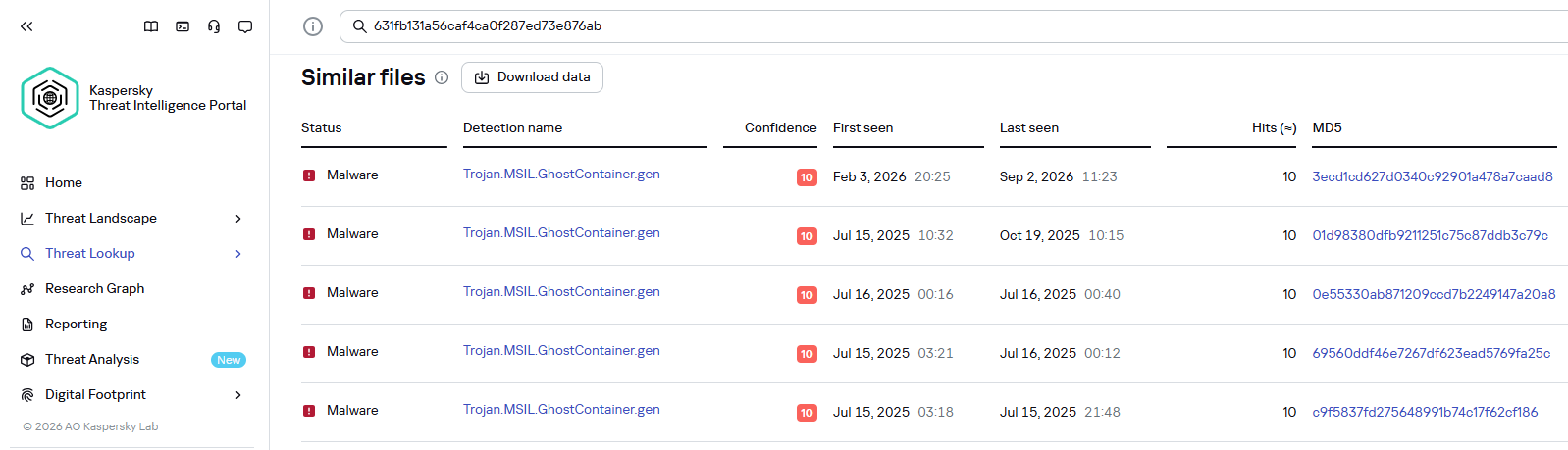
Kaspersky products detect the GhostContainer backdoor as Trojan.MSIL.GhostContainer.gen.
GhostContainer samples identified by the Similarity technology from Kaspersky Threat Analysis
Traffic redirectionOnce the attackers gain sufficient privileges during an attack, they leverage RDP to move laterally within the internal network segment. To do this, they download and run tools for tunneling and redirecting network traffic.
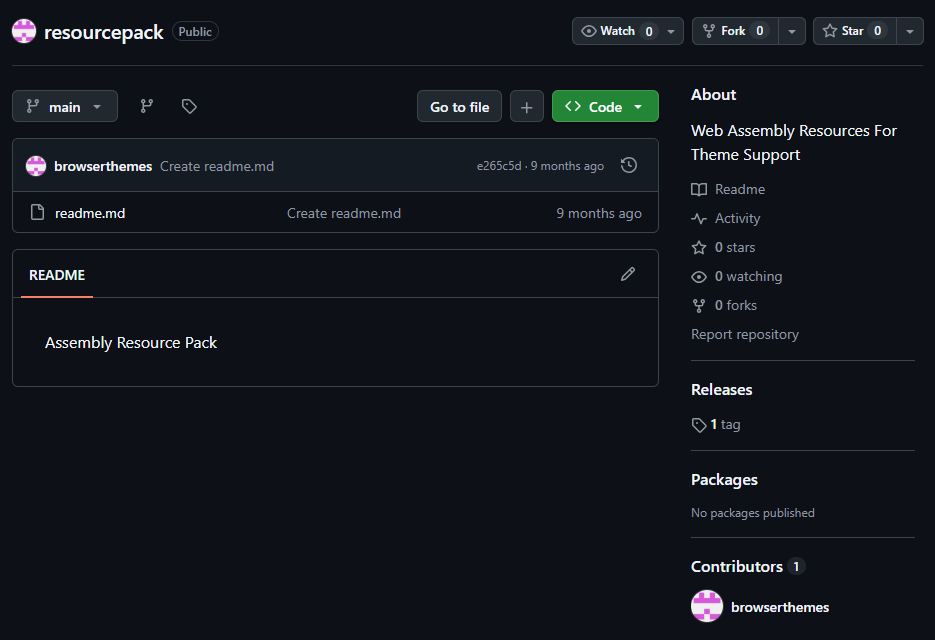
The attackers used GitHub repositories to host their archived tools. The names of the repositories and archives were disguised to look legitimate:
- https://github[.]com/mirror-js/mirror-js/refs/heads/main/js/js-webpack.zip
- https://github[.]com/mirror-js/mirror-js/refs/heads/main/js/jsonp-pack.zip
- https://github[.]com/browserthemes/resourcepack/releases/download/main/resource-pack.zip
One of the repositories used for storing network tools
The files contained within the archives were also given names mimicking known legitimate software, though unrelated to the archive names:
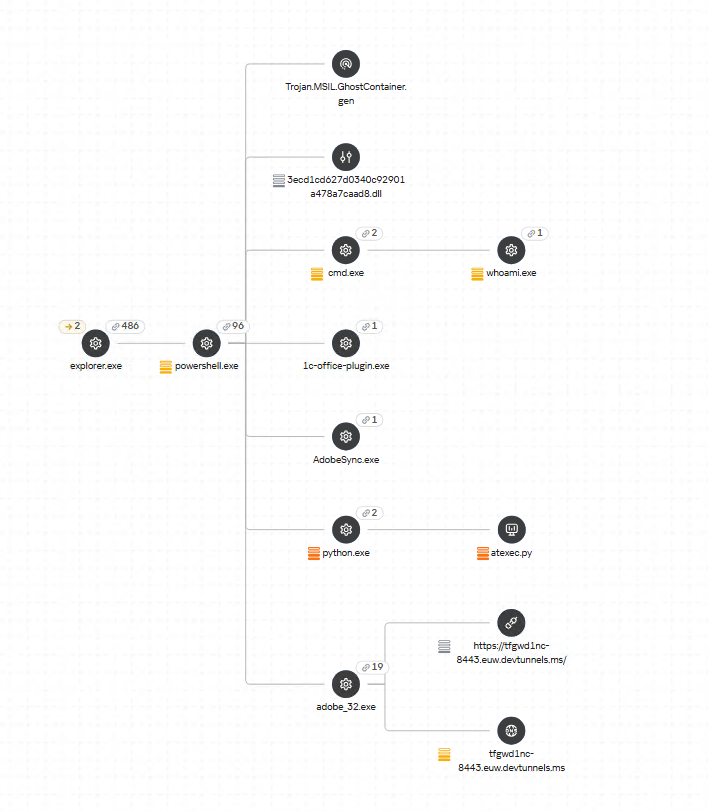
- adobe_32.exe;
- AdobeSync.exe;
- trueconf.exe;
- 1cbroker.exe;
- 1c-office-plugin.exe;
- trueconf-broker.exe.
Across the incidents we investigated, we found two tools that the attackers combined for traffic tunneling.
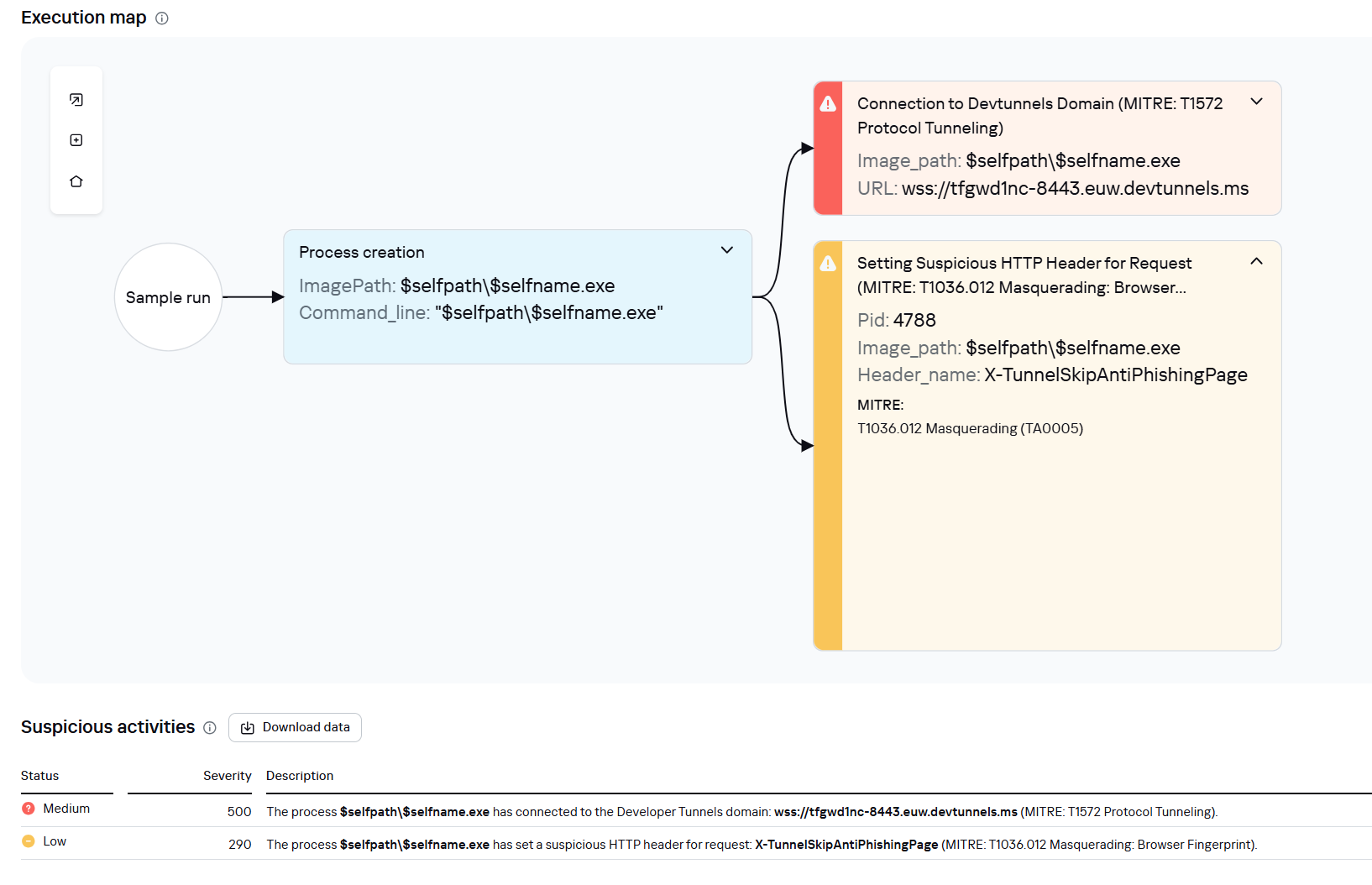
- Microsoft dev tunnels
This is a legitimate Microsoft mechanism that allows local web services to be published for internet access on *.*.devtunnels.ms domains. The attackers used this tunneling capability to expose port 3389 (RDP) on the compromised system.Execution graph of adobe_32.exe in Kaspersky Research Sandbox
- rdp2tcp
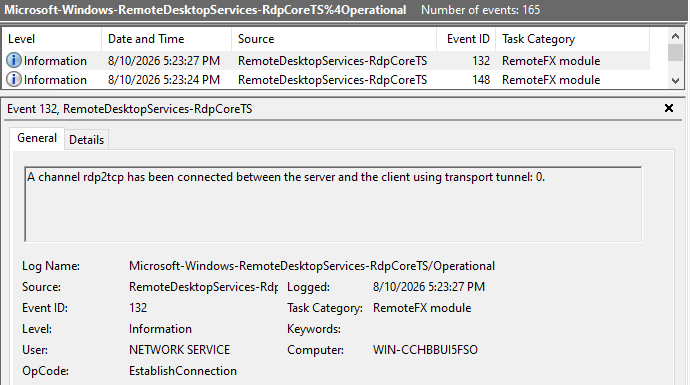
This is a publicly available tool for tunneling TCP traffic over an established RDP connection. It includes a server component that runs on the target system and a client component that runs on the attacker’s side.When virtual channels are opened and closed, corresponding events with IDs 132 (channel opened) and 148 (channel closed) are logged in the Microsoft-Windows-RemoteDesktopServices-RdpCoreTS/Operational.evtx Windows log. These events contain the names of the channels (such as XPSRD, cliprdr, Microsoft::Windows::RDS::DisplayControl, and others) used by the RemoteFX module, which extends the capabilities of the RDP protocol.
When the rdp2tcp tool is used, events with IDs 132 and 148 will contain the channel name rdp2tcp or other random alphanumeric combinations chosen by the attackers.
Creation event for a channel named rdp2tcp (server component startup)
The combination of Microsoft dev tunnels and rdp2tcp allows the attackers to maintain network access by using legitimate services without opening additional suspicious ports.
The attackers also used the atexec utility from the Impacket toolkit to create scheduled tasks on target systems. These tasks enabled network port forwarding through standard Windows functionality:
netsh interface portproxy add v4tov4 listenport=443 connectaddress=10.0.12.101 connectport=445 Lateral movementTo obtain elevated privileges and move laterally through the network, NightEagle exploited various vulnerabilities in Active Directory. The attackers used previously established tunnels to connect to internal infrastructure systems.
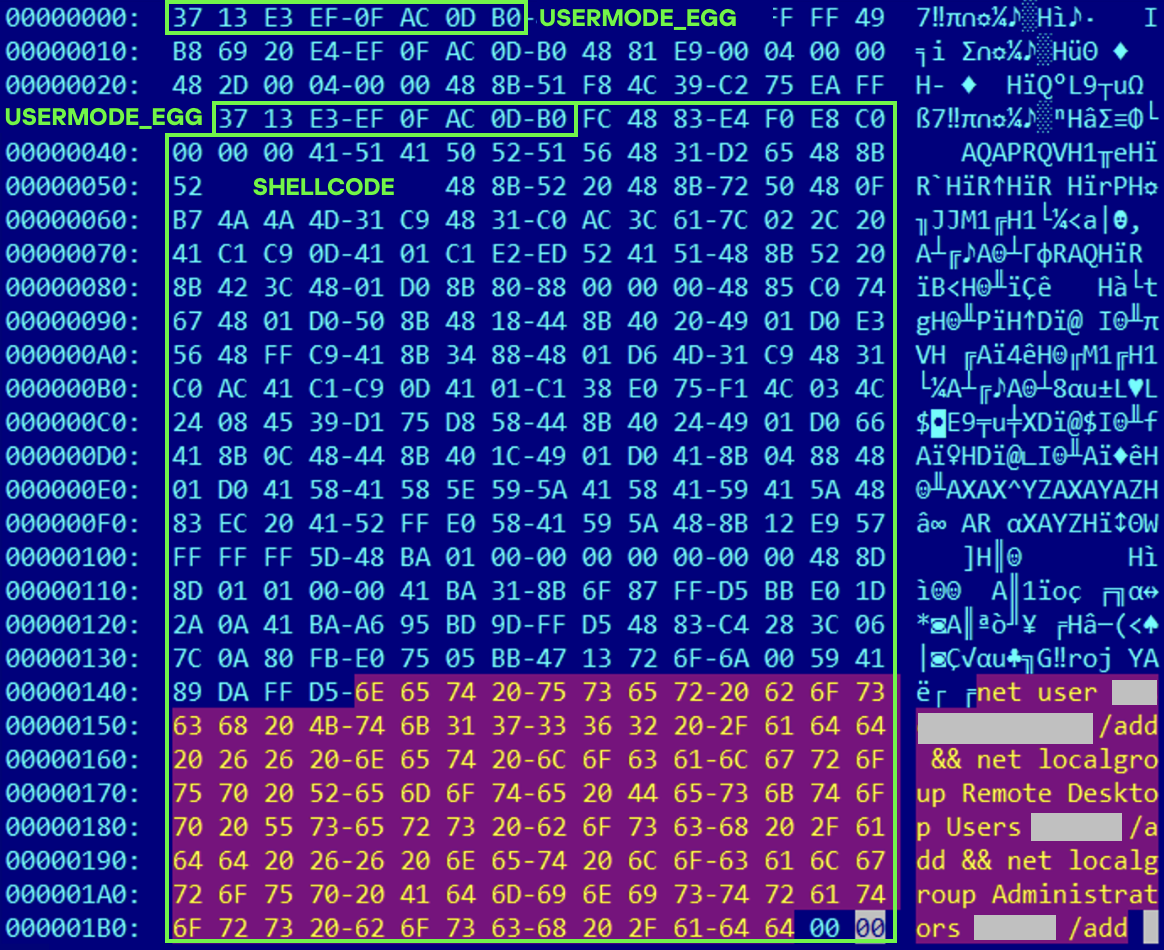
In one incident, they exploited a well-known RDP implementation vulnerability, CVE-2019-0708 (BlueKeep). They used the vulnerable mechanism to create a local account on the system and add it to the Administrators and Remote Desktop Users groups.
Contents of a system memory dump showing artifacts of the CVE-2019-0708 exploit
The attackers also requested Kerberos tickets with a non-standard combination of flags (Forwardable, Proxiable, Renewable) and attempted to replicate the Domain-Password object from the Active Directory database to impersonate the domain controller (a technique known as DCSync) after obtaining an account with sufficient privileges.
Through these methods, the attackers establish persistence in the infrastructure, obtain password hashes for domain accounts, use long-lived Kerberos tickets to gain legitimate access to target resources, and ultimately compromise domain controllers and the victim’s entire Active Directory infrastructure.
TakeawaysTo expand the geographic scope of its targets, NightEagle is updating its methods and adopting new techniques for persistence and lateral movement. Despite the group’s efforts to stay hidden, timely detection of anomalies combined with a comprehensive approach to infrastructure protection can significantly hinder the attackers from achieving their goals. Since the attackers rely on known legitimate tools and infrastructure vulnerabilities, well-configured monitoring can help detect NightEagle’s presence on the network.
Detection by Kaspersky solutionsKaspersky solutions reliably identify the malicious activity described above at various stages of the attack. We showed examples above of how Kaspersky Threat Analysis detects samples of the GhostContainer backdoor and the tunneling utility. This toolkit also includes the analytical solution Kaspersky Threat Attribution Engine (KTAE), which helps SOC analysts and incident responders determine which APT groups malware can be attributed to. The solution uses a proprietary comparison method that measures the similarity between analyzed samples of suspicious files and known malicious samples in Kaspersky’s collection.
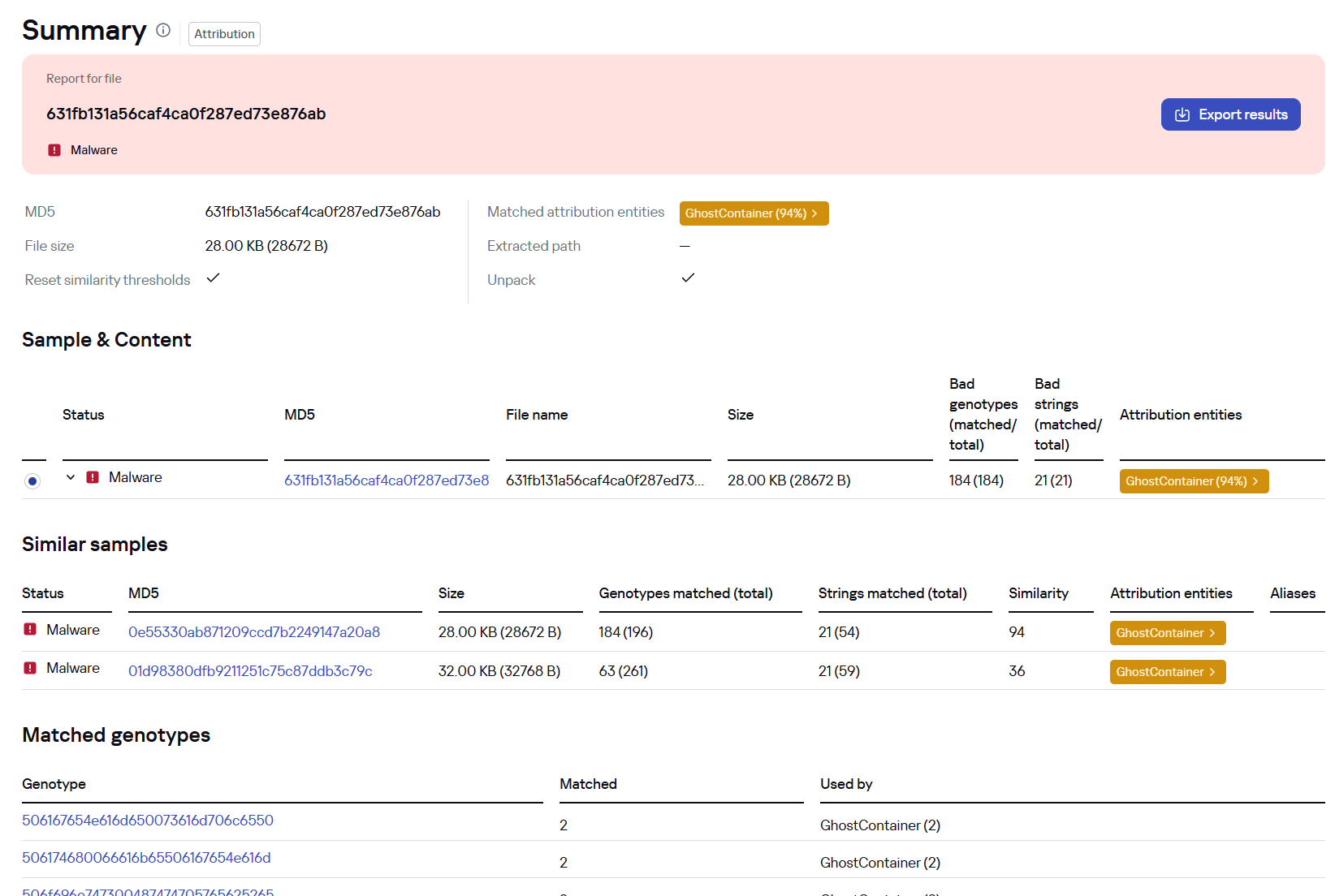
The backdoor we discovered showed similarity to previously analyzed GhostContainer samples and a connection to the NightEagle APT group:
Backdoor analysis with KTAE
However, detection scenarios for this kind of attacks are not limited to file analysis. Deploying a backdoor on a target host produces numerous characteristic artifacts, which allow Kaspersky Endpoint Detection and Response Expert to alert users to anomalies in the infrastructure in a timely manner.
This malicious activity is detected by the following rules, available in the repository:
- Initial detection of the malicious signature occurs through the generic_ransomware_related_detection rule, based on EPP module events
- Detection of a malicious DLL’s .NET assembly being loaded via PowerShell: suspicious_assembly_loading_into_powershell_via_reflection
- Activity of tunneling and traffic redirection tools: detection_of_access_to_tunnel_domains_dns
- Use of tools from the Impacket toolkit, such as atexec:
- impacket_possible_activity
- attempt_to_download_hacktool_or_risktool_by_non_browser
- credentials_dumping_tools_file_artifacts_creation
- Attempts to replicate an Active Directory database object to impersonate a domain controller: potential_dcsync_via_startupparameters
Process tree in KEDR Expert
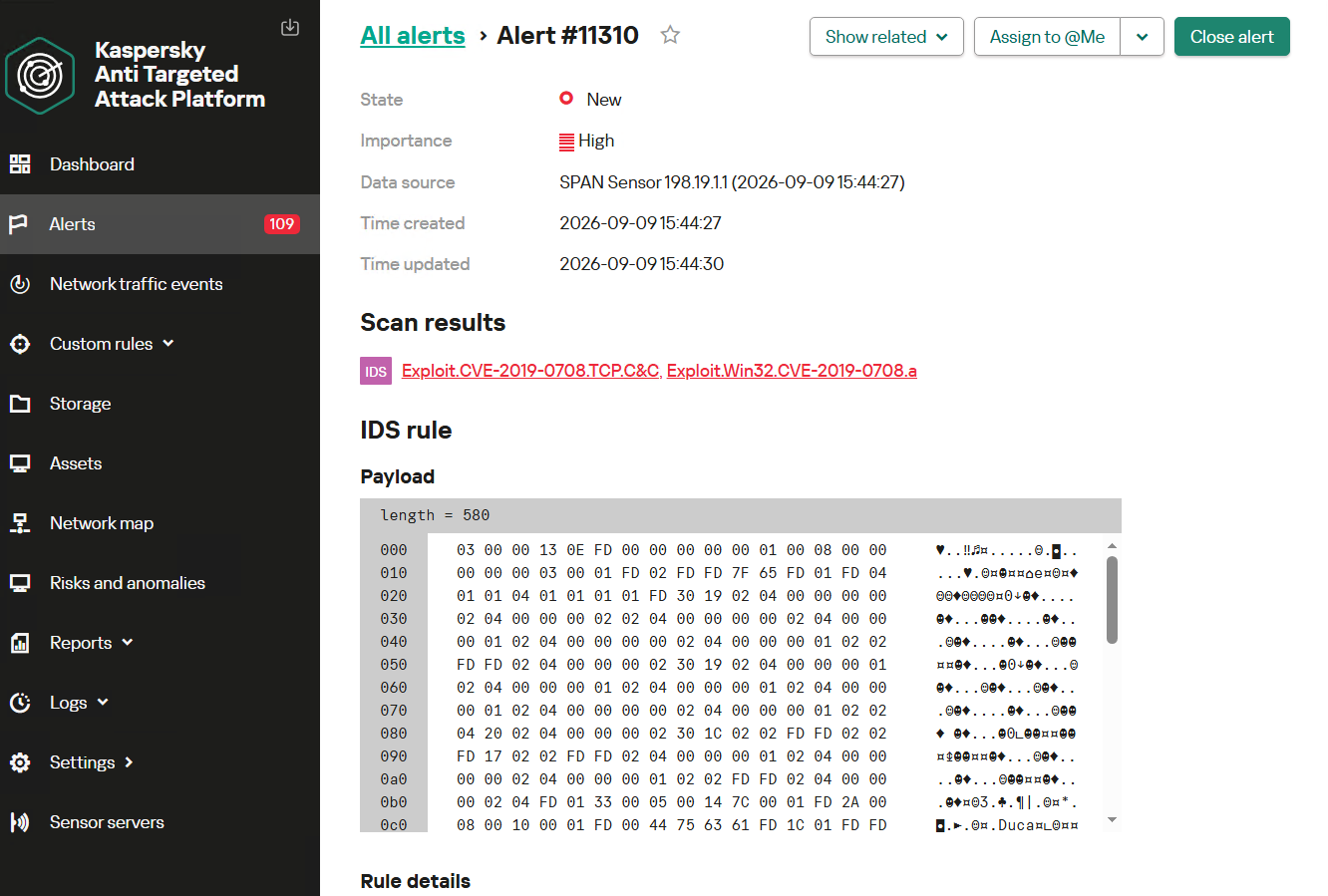
Kaspersky Anti Targeted Attack (KATA) detects this malicious activity in network traffic. For example, the Exploit.CVE-2019-0708.TCP.C&C signature allows detecting attempts to exploit the CVE-2019-0708 (BlueKeep) vulnerability.
Alert card for the BlueKeep vulnerability exploitation
Beyond this activity, KATA also detects other NightEagle actions in network traffic, such as the following:
- Traffic redirection and tunneling variations
- Attacks on Active Directory (DCSync, attempts to compromise AD CS, and others)
- Lateral movement across the network
631fb131a56caf4ca0f287ed73e876ab App_Web_Container_1.dll 4aa9fb1bf9223dfcdac920759bc7a3c7 1c-office-plugin.exe, 1cbroker.exe, trueconf.exe https://github[.]com/mirror-js/mirror-js https://github[.]com/browserthemes/resourcepack
Kategorie: Hacking & Security, Viry a Červi
5 efficiency-enhancing Chrome extensions worth trying on Android
Brace yourself: The way you get around the web on Android is about to get a whole lot better.
This week, the excellent Vivaldi Android browser is rolling out an update that adds in support for the entire collection of Chrome Web Store browser extensions. That means you can enhance and adjust your mobile web experience with all sorts of interesting — and potentially shape-shifting — new improvements.
Vivaldi, if you aren’t familiar, is a browser based on the same Chromium foundation that powers Google’s standard Chrome browser, but it has a ton of extra features and options that make for an even more personalized and productive experience. I started using it on all of my devices earlier this year and haven’t looked back since.
Now, with complete Chrome extension support added into the mix on Android, the advantage is growing even greater.
I’ll be honest, though: When I first saw that Vivaldi was adding in Chrome extension support for Android, I wasn’t sure what to make of it. Most of the extensions I use in my desktop browser just wouldn’t make sense on the mobile front and wouldn’t add much of meaningful value in that environment.
But then I put on my thinking cap. I did some deep digging and careful considering. And I found some Chrome extensions that actually work incredibly well in the Android arena and add a lot of interesting value into the mobile web adventure.
This is the first of a two-part collection. Here, we’ll look at five Chrome extensions that you can add into Vivaldi to save yourself steps and bring a welcome efficiency boost to your Android web work. In part two, we’ll round out the list with another set of extensions that’ll improve the internet itself in some truly intriguing ways.
Ready to reinvent how you experience the web on your phone?
[Get fresh Android tips in your inbox with my free Android Intelligence newsletter — one useful new thing to try every Friday!]
A quick primer on Android Chrome extension installationReal quick, before we get into the good stuff: When you’re ready to try out an extension, you’ll need to have the latest version of the Vivaldi Android app on your device (obviously, right?) — then either tap the puzzle-shaped extensions icon in the toolbar at the top of the screen, if you see it, or tap the “V”-shaped main menu icon in the upper-right corner and select “Extensions” from there.
Either way you go, you’ll see an option to “Discover more extensions.” That’ll take you to the Chrome Web Store, where you can search or browse through all the available extensions and install anything with a couple quick taps.
I’ll also provide direct links to each extension I’m recommending below, so you can tap it to open it in Vivaldi on your phone and then install it directly from there.
Note, too, that that same Vivaldi Extensions menu is where you can access and manage any installed extensions moving forward. You’ll see every extension you’ve installed there, and you can deactivate or uninstall anything as well as opt to have its icon pinned into your browser toolbar for easy ongoing access.
Chrome Android extension #1: The cookie request crumblerOur first Android Chrome extension worth considering is one that you won’t ever open or actively think about once you install it and set it up. It’s a tool that works silently in the background to automatically handle those irksome cookie preference prompts that pop up around the web — so they’ll always get answered in the way you prefer, but you’ll never actually have to see or deal with ’em (and have ’em blocking half your view, in a mobile web scenario!) again.
It’s called Consent-o-Matic, and the way it works is simple: You install it, open its options page once to tell it which cookies you do and don’t want to allow around the web — and that’s pretty much it. From there on out, it’ll just click on all those prompts that pop up for you, based on your preferences, and they won’t interfere with your work or irritate you anymore.
Consent-o-Matic remembers your cookie preferences and then applies them for you automatically all over the web.JR Raphael, Foundry
One option to look at while you’re in that initial setup area is in the “Display” tab at the top of the screen. By default, Consent-O-Matic will show any pop-ups it’s handling in a small overlay in the corner of the screen — but you can eliminate that entirely and make the process completely out of sight and invisible, if you want.
You can make Consent-o-Matic completely invisible so you never so much as see another cookie prompt again.JR Raphael, Foundry
Yes, please — and thank you.
Chrome Android extension #2: 404 no moreNext is another quietly useful addition, and that’s the official Chrome extension for the Wayback Machine at the Internet Archive.
With the Wayback Machine extension active in your Android web browser, anytime you land on a page that for whatever reason isn’t online anymore or just isn’t available at that particular moment, you’ll see an offer to go to the page’s most recent cached version.
You can also call the extension up on demand to search for older saved versions of any pages by either pinning its icon to your Vivaldi toolbar or long-pressing a link within any page you’re viewing to reveal its menu of options.
The Wayback Machine Chrome extension integrates seamlessly into Vivaldi’s long-press link menu.JR Raphael, Foundry
Chrome Android extension #3: A background open shortcutI don’t know about you, but when I’m wading my way around the web, I find myself opening links a lot — often with the intent to look at ’em later.
Typically, that requires long-pressing on the link and then finding the option to open it in a background tab. But with a handy extension called DoubleClicker, that same action can be easier than ever.
Install DoubleClicker into your Android Vivaldi browser, and that’s it: From that moment forward, you can simply double-tap your finger on any link within any page, and it’ll open instantly as a background tab — waiting and ready for when you want it and without any waiting, poking around, or other interruptions to your workflow.
This might just be my favorite addition of all.
Chrome Android extension #4: Hands-free scrollingThe next time you’re reading something on your phone, keep a little somethin’ called Auto Scroll Extension in mind.
As its name suggests, the extension lets you set any speed you like and then simply tap its icon (which works best if you pin it to your toolbar) to automatically scroll the page for you — so you can keep reading without having to do a thing.
Look, ma: No hands! Auto Scroll in action in Vivaldi on Android.JR Raphael, Foundry
Chrome Android extension #5: Easier password accessLast but not least for this list is an addition that seems strange on the surface — but hear me out:
If you’re using an Android password manager other than the Google Password Manager — like 1Password or Bitwarden — try installing its extension into Vivaldi on your phone.
Yes, it’s redundant with having the standalone app installed and set as your system-wide password management service. But it often ends up being faster and easier to have a sign-in handled directly within the browser instead of having to rely on the system-level integration.
And having the browser-based option present doesn’t prevent you from using the other route, either. You’ve just got options, and you can pick whichever feels fastest and easiest to you at any given moment.
Try it out for yourself and see whatcha think. And keep going with the second set of worthwhile Android Chrome extensions next!
Your next mission, extension exploration aside: Come check out my free Android Intelligence newsletter to get something new and useful in your inbox every Friday — and get my awesome Android Notification Power-Pack today.
Kategorie: Hacking & Security
Windows Server 2022 reaches end of mainstream support next month
Microsoft has reminded customers that Windows Server 2022 will reach the end of mainstream support next month and enter extended support until October 2031. [...]
Kategorie: Hacking & Security
- « první
- ‹ předchozí
- …
- 68
- 69
- 70
- 71
- 72
- 73
- 74
- 75
- 76
- …
- následující ›
- poslední »