Agregátor RSS
Mustang Panda Adds Signed Windows Rootkit to CoolClient Backdoor for Stealth
The threat actor known as HoneyMyte (aka Mustang Panda) has been observed deploying an updated version of the CoolClient backdoor with a signed Windows kernel-mode rootkit that can hide and protect malicious processes, files, registry objects, and command-and-control (C2) network information.
Russian cybersecurity vendor Kaspersky said it identified victims in Myanmar, Mongolia, Pakistan, Swati Khandelwalhttp://www.blogger.com/profile/[email protected]
Kategorie: Hacking & Security
Meta gives up control of Chinese AI startup Manus after eight months
Chinese AI company Manus has laid out its plans to operate as an independent company following the reversal of its acquisition by Meta.
The US social media company agreed to buy Manus last year but Chinese regulators quickly opened an investigation into the deal, as they were concerned that it violated Chinese export controls. In April, China’s National Development and Reform Commission blocked the purchase.
Manus will now revert to being an independent company and to meet with regulatory requirements must delete some user data collected while it was part of Meta, it said Tuesday.
The failure of the deal illustrates the problems that US and Chinese companies are having as they attempt to build a hold on the AI market.
While regulatory authorities in China don’t want Manus under US ownership, US authorities are equally suspicious of China’s role in AI development. The US administration fired a warning shot this March by unveiling a new cybersecurity policy, a move which was prompted by suspected Chinese involvement in a cyber-attack on the FBI.
Also in March, the US-China Economic and Security Review Commission warned that Chinese use of open-source AI tools could lead to an economic advantage that the US couldn’t counter through regulation. And last year, US and Chinese authorities played a cat-and-mouse game over Nvidia chip exports.
Customers of AI vendors in both countries may need to be wary about future cross-border acquisitions as the two superpowers jostle for a technological lead.
Kategorie: Hacking & Security
Autonomous AI attacks pose 'clear and present danger' to critical infrastructure
In early July, attackers used open source AI agents to autonomously hack government systems and energy companies, signaling to defenders that AI-powered attacks against critical infrastructure are no longer theoretical. "There is a clear and present danger," Tom Kellermann, TrendAI VP of AI security and threat research, told The Register. "As the geopolitical tension boils, systemic destructive cyberattacks launched by autonomous AI will occur," he said. "Weaponized AI will disable the safety systems of critical infrastructure, thus leading to kinetic disasters. Just like we see autonomous strike vehicles operating on the battlefield in Ukraine, we should expect autonomous weaponized AI." In fact, the prospect of attackers using AI against critical infrastructure was the top concern of every national security adviser, law enforcement official, and private-sector threat analyst The Reg spoke with at last week's Hacker Summer Camp conferences. "It's the targeting of critical infrastructure for us," Brett Leatherman, assistant director of the FBI's Cyber Division, told us during an interview at Black Hat. "We're very focused on the downstream impact targeting of critical infrastructure," Leatherman said. "That is where cyber becomes kinetic, and whether it is our water and wastewater treatment plants, whether it's the electric grid, whether it's the high-frequency trading networks and the financial networks, all of those, if the integrity of those are compromised, will have significant impact to communities and national security. So that's what keeps our teams up at night. How are we moving to secure critical infrastructure?" Where cyber becomes kinetic During the first four days of July, suspected Chinese operators aimed an attack framework built on Hermes and OpenClaw AI agents at targets in Taiwan. Across 12 "attack waves," the "near-autonomous" system deployed up to eight sub-agents, each assigned its own targets and techniques, and broke into a Taiwanese government website. Ultimately, they compromised a government email system, the country's nuclear safety agency, IT supply chain vendors, and at least seven energy sector companies, finding and exploiting misconfigurations and vulnerabilities while stealing sensitive data, credentials, and other secrets as they moved across the network. The Taiwanese government intrusion also followed a series of cyberattacks against water and wastewater utilities in the United States. While the Trump administration hasn't attributed these to a particular government or group, private sector threat hunters – including Halcyon Ransomware Research Center SVP Cynthia Kaiser, a former FBI cyber division deputy assistant director – blame Iran for these intrusions. Military conflicts spilling into cyberspace are nothing new, but these cyberattacks in America brought the war with Iran to more than 30 small-town water systems in Minnesota and targets across nearly a dozen other states. To be clear, there's no evidence that attackers used AI to hack these water utilities. Most were small, community systems that left programmable logic controllers (PLCs) directly exposed to the internet using default or weak passwords. Still, these breaches expose "40, 50 years of tech debt," former US National Cyber Director Chris Inglis told The Reg during an interview at Black Hat. This technical debt – deferred maintenance, unpatched or end-of-life systems, and delayed security updates – expands the attack surface and gives intruders more ways into critical systems, threatening operations and potentially disrupting services people rely on every day. "The water sector attacks – regardless of who is doing them – is taking advantage of unpatched vulnerabilities in the PLCs," Inglis said. "We've known about these particular vulnerabilities for years now, and yet we've not done anything about them because they're low-level, not easily accessible." Inglis added that there's no indication the digital intruders used AI to exploit these PLCs. 'There's an alligator in the boat' However, AI systems allow attackers to cash in on tech debt, and they don't need access to frontier models to do it. Free, open-weight models also excel at finding bugs in software and configurations, chaining these together, and abusing them to break software and systems. Earlier this summer, University of Toronto researchers used an unnamed publicly available open-weight model, released in 2025, to develop a computer worm that they claim spread through an enterprise test network. The self-propagating code adapted on the fly to identify known vulnerabilities and misconfigurations on target systems, then generated and executed attacks to move laterally through the network and compromise additional machines. "Commodity models can do that, and many of the vulnerabilities they find do not require access to the source code – it's in the configurations, and configurations change over time," Inglis said. When it comes to attackers abusing AI systems, "I wouldn't be worried about the frontier models," Inglis said. "Worry about the models that are already on the street. Turns out there's an alligator in the boat, and it's the commodity models." Plus, as we've seen in previous breaches, both government-backed goons and criminal groups increasingly use AI to automate reconnaissance. Security analysts worry that the technology could also help attackers acquire expertise in industrial control systems (ICS). When OT knowledge becomes a commodity "What protects ICS? More than anything, it's obscurity," said John Hultquist, chief analyst at Google Threat Intelligence Group, during a press briefing at Black Hat. "It is an obscure, esoteric, knowledge set that a handful of people – I call them uber nerds – have, and that attackers rarely have the necessary knowledge to carry out. That's no longer the case. That knowledge is simply on tap." AI tools mean miscreants don't need to be ICS or operational technology experts to carry out destructive cyberattacks on critical networks and facilities. They just have to ask an agent to learn everything about these systems and do the dirty work for them. "There have been threat actors who are capable of this at the top level, like China and Russia," Hultquist said. "But now I'm afraid the actors who are just a couple steps down – North Korea, Iran – who don't have the same focus on that technology are going to have far greater success. They're going to have the tools necessary to be as aggressive as they want to." During what was probably the most talked about Black Hat briefing of the week, OpenAI employees provided more details about how their models escaped their training pens, went rogue, and hacked Hugging Face to complete a security evaluation. We learned the AI agents spent months asking other agents for help, building message boards, developing their own communication protocols – essentially creating a hive mind to carry out the attack. "In the near future, we should expect that threat actors will intentionally deploy, optimize, weaponize, and use offensive agent collectives in the manner that we have just described here," OpenAI technical staffer Michael Dalton said. Retired general and former NSA chief Paul Nakasone, speaking to reporters at DEF CON, called the Hugging Face attack "an inflection point in terms of AI-generated, autonomous cyberattacks." "This is the challenge: that we have to, over the next several months, get the defensive side much quicker and much better than they are today," he added. Therein lies the challenge: offensive uses of AI appear to be advancing faster than autonomous defenses, and attackers don't face the legal and ethical constraints imposed on defenders. "I think we're still a ways out from having swarms of autonomous, defensive agents fighting attacks," Ryan Whelan, global head of Accenture Cyber Intelligence, told The Reg at Black Hat. "That's probably over a year out over the horizon. But I do think we're going to see it first on the adversary side, because they don't care if they break things." Kellermann quoted Victor Hugo: "Not all the armies of the history of the world can stop an idea whose time has come." "That idea," he said, "is weaponized AI. Shields up." ®
Kategorie: Viry a Červi
Jak správně nastavit otáčky ventilátorů v UEFI. Návod pro Asus, Gigabyte a MSI
Horké letní počasí vede k úvahám o tom, jak chladit nejen sebe, ale i počítač. Názorně ukážeme, jak desktopu ulevit nastavením ventilátorů rovnou v UEFI.
Kategorie: IT News
Microsoft brings Copilot apps together ahead of ‘super app’ overhaul
Microsoft will bring its two Copilot apps into a unified interface for consumer and work users, part of a wider drive to create a Copilot “super app” that consolidates various features.
Until now, Microsoft has offered two Copilot apps across web, desktop and mobile platforms: a simplified, consumer-focused Copilot app, and Microsoft 365 Copilot, which combines the AI assistant with access to Microsoft’s productivity apps and files.
Microsoft on Thursday announced an “updated Copilot app” aimed at providing a “simpler, more cohesive experience” for personal and work users.
For users of the consumer Copilot app, the update will provide access to Microsoft 365 tools such as Word, Excel, and Outlook from within Copilot, as well as the ability to connect email, calendars and cloud storage. At the same time, some features previously available in the consumer-focused app will be retired, including group chats and Deep Research, though Microsoft 365 Premium subscribers will still have access to a similar research tool called Researcher.
The changes mean consumer Copilot app users will be moved to an updated version of the app starting Aug. 18, with their history and most content carried across.
For Microsoft 365 Copilot work accounts, there’ll be minimal changes aside from a change to the app name and icon, Microsoft said.
As the two apps are brought together, Microsoft said work and personal accounts will remain separate, with security and admin controls remaining in place when users are logged into their Microsoft 365 Copilot account at work:
“Commercial data boundaries, tenant controls, and compliance protections are not changing,” the company said. “The boundaries that keep work and personal separate remain in place: Personal (Microsoft account) and work (Microsoft Entra) accounts are distinct by design. Data entered into the work (Microsoft Entra) experience does not flow into the personal (Microsoft account) experience, and vice versa.”
The changes can be viewed as part of a wider overhaul of Microsoft’s Copilot strategy, which centers around the introduction of a “super app” later this quarter. The plan — rumored for some time and recently confirmed by Microsoft CEO Satya Nadella in an earnings call — is to consolidate various Copilot features, including Copilot Cowork and “autopilot” agents into a single app.
Microsoft has struggled to convince business customers to pay for the Microsoft 365 Copilot since it launched in 2023. The AI assistant costs $30 per user each month in addition to Microsoft 365 subscriptions for enterprises, and $20 per for user a month for smaller firms. (Microsoft does offer promotional discounts.)
Microsoft said earlier this year that it had 15 million paid seats, meaning that only 3.3% of Microsoft 365 customers pay for the tool. That figure has grown however, reaching 30 million paid seats as of last month, the company said.
Kategorie: Hacking & Security
Prusa XL+, CORE One+ (Gen 2) a CORE One L+
Prusa Research představil nové modely svých 3D tiskáren: Prusa XL+, CORE One+ (Gen 2) a CORE One L+.
Kategorie: GNU/Linux & BSD
Shell investigates 'potential incident' after Clop data theft claims
Oil giant Shell has confirmed it is investigating a potential security incident after the Clop ransomware gang claimed it stole 89GB of data. [...]
Kategorie: Hacking & Security
Netflix a další na víkend: Nový Jack Reacher, trenér Mourinho, filmová Akta X. A také Rozhovory s vrahem
Kategorie: IT News
Crown Game Engine 0.64
Crown je multiplatformní open source herní engine. Zdrojové kódy jsou k dispozici na GitHubu pod licencí MIT a GPLv3+. Byla vydána nová verze 0.64. Vyzkoušet lze online demo.
Kategorie: GNU/Linux & BSD
Chrome DevTools Technique Enables Authenticated Session Hijacking in Live Windows Browsers
Cybersecurity researchers have detailed a post-exploitation technique that enables the Chrome DevTools Protocol (CDP) inside a running Google Chrome or Microsoft Edge process on Windows, allowing an operator to access cookies, saved data, and authenticated browser sessions.
The technique assumes that an operator already has code execution on the Windows host and does not involve Swati Khandelwalhttp://www.blogger.com/profile/[email protected]
Kategorie: Hacking & Security
Apple cracks China with Alibaba for iPhone AI
Apple recently posted and removed details explaining how Mac users in China could set up their computers to work with Alibaba’s Qwen AI. Now, Reuters has confirmed long-held speculation that Apple has revisited its Google Gemini AI playbook and built its own proprietary AI model for China with support from Alibaba.
Apple worked with a Chinese partner because US models such as ChatGPT or Claude are not being made available there, though Chinese AI development doesn’t seem to be held back by that lack. Apple and Alibaba have not commented on the claims, the report said.
The approach echoes Apple’s work with Google to build more advanced large language models (LLMs) for use with Apple Intelligence, and the news will likely be seen as broadly positive by Chinese iPhone users. They can now look forward to working with Apple Intelligence on their devices. The proximity of the reporting suggests they may be able to access Apple’s AI quite soon, once new Apple operating systems ship next month.
The silver liningIt’s also smart, as it means Apple has identified a way to introduce AI features in nations that are becoming protective of their tech stack.And while Apple’s work with Google on Apple Intelligence was widely regarded as signifying how far behind the company had grown on AI, the work it is now doing with Alibaba shows how the partnership approach has become a strategic tool. Basically, Apple found a way to use such development partnerships to navigate protectionism and political rivalry for the benefit of its customers.
The approach means Apple has the distinction of becoming the first foreign company approved to offer a proprietary AI model in China.
The work seems to have begun in February 2025, when Apple and Alibaba submitted co-developed AI features for approval to China’s Internet regulator, the Cyberspace Administration of China. Apple last month crossed a milestone in this work when the regulator finally registered Apple’s service. Apple will work with both Alibaba’s Qwen and tech from Baidu, previous reporting has claimed. It is not yet clear how the work with Baidu will be deployed.
This work supports US presence in ChinaDelivering AI to Chinese customers is strategically vital to Apple. Its products are hugely popular among Chinese consumers and can arguably be seen as an expression of US soft power there. Any erosion of its position also erodes the US reputation in the economically vibrant market.
AI, or the lack of it, has become a fulcrum for change. Morgan Stanley analyst Erik Woodring explained this last year, when he said: “Our survey work shows that Chinese iPhone users are not only more interested in access to genAI technology than US or European iPhone owners, but over 50% of Chinese iPhone owners cited the staggered rollout of Apple Intelligence as having a moderate to significant impact on their decision not to upgrade to a new iPhone this cycle.”
Apple is already struggling with these new competitive pressures. It has been encountering stiff competition from Huawei’s already AI-capable devices in China, with Huawei now the biggest-selling smartphone vendor there.
Apple is also experiencing a seasonal slowdown in sales as shoppers wait on the introduction of the new iPhone Pro range. They expect powerful AI to be baked into the devices they select. “Increasing investment in agentic AI is becoming a competitive necessity rather than a differentiator,” Counterpoint warns.
Good for jobsThere’s also an impact on US employment. While Apple often faces criticism for having some of its assembly done in Asia, rather than the more expensive and inadequately resourced US, outgoing CEO Tim Cook recently explained that the company accounts for more than 400,000 jobs in the US. Many of those jobs are generated by the manufacturing of high-tech parts such as the protective glass used on iPhones.
While the significance may be easy to miss, this also means that any slowdown in device sales in the world’s second-largest economy — China — will also have a negative impact on US employment. Apple, meanwhile, continues to invest in improving US manufacturing skills and infrastructure. The company recently opened its Advanced Manufacturing Center in Houston in the presence of US Secretary of Commerce Howard Lutnick.
“With this Advanced Manufacturing Center, Apple will equip American workers with the skills they need to lead the next generation of technology,” Lutnick said.
Apple, meanwhile, is apparently planning toward introducing its much-anticipated folding iPhone Ultra device initially in America first.
Please join me on BlueSky, LinkedIn, Mastodon and subscribe to The Core for your extensive, hand-curated Apple-related daily news fix.
Kategorie: Hacking & Security
How to replace Edge as the default browser in Windows — and why you shouldn’t
Microsoft has been struggling to get people to use its Edge browser for years. Even though the company made Edge the default browser in Windows 10, users left in droves, most of them flocking to Google Chrome — and with good reason. The original version of Edge was underpowered, had difficult-to-use features, and offered very few extensions compared to Chrome and Firefox.
But in January 2020, Microsoft launched a new version of Edge that’s based on the same technologies that drive Chrome. (The new Edge is the only one that’s ever been offered in Windows 11.) The Chromium-based Edge is a much better browser, and there are compelling reasons to use it. But you might still prefer to use Chrome, Firefox, or one of the many other browsers out there.
Even if you’ve set up another browser to be your default in the past, it might have been changed since then. When there’s a major Windows upgrade, the installation software recommends switching to Edge, and you might have inadvertently made the switch.
Whatever the reason, if Edge is your default browser in Windows 10 or 11, it’s easy to switch to the browser of your choice. As I’ll show you, it only takes a few minutes.
The instructions in this article assume you’re using either Windows 10 version 22H2 or Windows 11 version 25H2. If you’re using an earlier version, the screens you see may vary somewhat from what you see here.
Why you might want to stick with EdgeIt’s probably worth at least trying out Edge. The browser offers a clean design with intuitive features. One of the biggest drawbacks to the old Edge was its paltry selection of browser extensions, but because the new Edge uses the same rendering engine as Chrome, it can run Chrome extensions, which number in the thousands. Edge also has its own library of extensions.
In my tests, Edge feels faster than Chrome and uses less RAM. It has some interesting features worth trying, such as the ability to launch a website as if it’s an app. And if you prefer Microsoft’s Copilot generative AI chatbot to Chrome’s Gemini, Edge is the logical choice.
All that said, you might not be interested in trying out Edge, or you might try it and decide you still prefer Chrome, Firefox, or another browser. You may, for example, like Firefox’s ability to alert you when a website covertly uses your computer’s processor to mine cryptocurrency in the background, without your knowledge. Or you might like Chrome’s Gemini more than you like Edge’s Copilot.
If you want to use another browser as your default, here’s what to do.
How to designate another browser as your defaultThe first thing you need to do to switch to another browser as your default is to install the other browser on your system. What you do next depends on whether you use Windows 10 or Windows 11.
Changing the default browser in Windows 101. If you’re using Windows 10, click the Start button and then click the Settings icon that appears on the left-hand side of the screen. (It looks like a little gear.) You can alternatively type settings into the search box and click the Settings result that appears at the top of the screen.
2. In the Settings app, select Apps > Default apps. The “Default apps” screen appears. It shows the default apps for email, maps, playing music and videos, viewing photos, and more.
3. To change the default browser, you’ll have to scroll down toward the bottom of your screen. There you’ll see Microsoft Edge under the “Web browser” listing.
4. Click the Microsoft Edge icon and you’ll see a pop-up with a list of your installed browsers.
Select a different browser to be your default.
Preston Gralla / Foundry
Side note: The pop-up also has a “Look for an app in the Microsoft Store” option, but if you click it, you may not find a popular browser you want to install. Clicking it launches a search of the Windows App Store for the term “http.” When I tried it for this article, the only familiar browsers it found were Firefox, Opera, and Edge. Otherwise, there was a motley collection of apps, from file downloaders to an app that dims your Windows background to make it easier to view videos. There are also some little-known browsers listed, such as C Lite Browser and Flash Browser. Try them out if you like, but keep in mind that they’re Windows Store apps, and as a general rule, Windows Store apps are underpowered compared to desktop apps like Chrome, Firefox, and Opera.
5. Click the browser that you’d like to be your default browser. No need to restart; your work is done.
Changing the default browser in Windows 111. In Windows 11, after you’ve installed an alternate browser, click the Start button and then click the Settings icon.
2. In Settings, select Apps > Default apps, then scroll to the browser you want to make your default — for example, Google Chrome.
3. Click the arrow next to it, and at the top of the screen that appears, click Set default.
chrome screen in windows 11 with set default button highlighted" class="wp-image-4203104" width="899" height="465" sizes="(max-width: 899px) 100vw, 899px">Making Google Chrome your default browser in Windows 11.
Preston Gralla / Foundry
4. A checkmark then appears next to “Set default.” To change the default back to Edge or another browser, scroll to the browser you want to be the default and click Set default.
When you do this, some but not all of the file types associated with Edge will become associated with Chrome instead. Below, I’ll show you how to have more than just those file types be opened by your alternate browser.
Some links will still open in EdgeOnce you switch the default browser to something other than Edge, clicking most web links in emails, documents, and most other apps will open them in your new default browser. However, some links associated with web browsing will likely still open in Edge — for example, PDF files, some graphics files such as .svg, mailto links, and more.
You can hunt down each of those file types and links and change them individually to your new default browser, but it’s going to take you time. Here’s how to do it.
Changing link defaults in Windows 101. In Windows 10, go to Settings > Apps > Default apps > Choose default apps by file type.
2. On the screen that appears, scroll through all the file types and look for those still associated with Microsoft Edge — for example, .pdf.
width="634" height="389" sizes="(max-width: 634px) 100vw, 634px">Microsoft Edge is still associated with the .pdf file type on this screen.
Preston Gralla / Foundry
3. Click the Microsoft Edge icon to the right of the file type, and from the screen that appears, select your default browser — for example, Google Chrome.
4. You can alternatively choose to have an app from the Microsoft Store run the file. To do it, click Look for an app in the Microsoft Store and follow the directions.
5. After you’ve done that, go to Settings > Apps > Default apps > Choose default apps by protocol and follow the same steps.
Changing link defaults in Windows 111. In Windows 11, go to Settings > Apps > Default apps and click your default browser — for example, Google Chrome.
2. Scroll through all the file types and protocols, and click any still associated with Microsoft Edge — for example, .pdf.
Change the file types associated with Edge in Windows 11.
Preston Gralla / Foundry
3. On the pop-up screen that appears, select the browser you want to handle the file type (for example, Google Chrome), then click Set Default. Note that you don’t have to choose your default browser for every file type — you can choose another app, such as a PDF reader for .pdf files.
Even after all that, you may still find that clicking links in the Windows interface itself — such as in the Start menu, Windows Search results, or widgets — will open them in Edge. Microsoft changed this behavior in Windows 11 so that all links open in the user-set default browser, but only in Europe. There’s hope for the rest of us, though: sleuths at Windows Latest discovered flags in early preview software indicating that browser choice may be coming to the Start menu and taskbar. Time will tell.
This story was originally launched in September 2017 and most recently updated in August 2026.
Related reading:
Kategorie: Hacking & Security
CTM360 Uncovers Over 3,000 Recruitment Phishing URLs Using Browser-in-the-Browser (BitB) Credential Traps
Cybersecurity researchers have uncovered a large-scale, global recruitment-themed phishing campaign that uses fake interview scheduling pages and Browser-in-the-Browser (BitB) windows to steal Google and Facebook credentials and, in more advanced cases, relay multi-factor authentication (MFA) prompts in real time.
CTM360, which detailed the activity in a new report titled RecruitTrap, said it [email protected]
Kategorie: Hacking & Security
RingCentral data breach exposed info of 1.6 million accounts
The ShinyHunters extortion group stole personal information from 1.6 million RingCentral accounts after hacking the company in July, according to the data breach notification service Have I Been Pwned. [...]
Kategorie: Hacking & Security
Nejvýhodnější 4K monitor. LG s úhlopříčkou 32" za 3767 Kč nabízí USB-C, dálkový ovladač a systém webOS
Monitor LG 32U721SA-W zlevnil na 3767 Kč, běžně stojí skoro dvakrát tolik. • Má 32", rozlišení 4K a potěší vstupem USB-C s 65W nabíjením. • Tahákem jsou také integrovaný systém webOS a dálkový ovladač.
Kategorie: IT News
Apple Warns Users in 110 Countries They May Be Targets of Mercenary Spyware
Apple on Thursday sent a fresh batch of notifications to customers whom it suspects may have been targeted by mercenary spyware attacks.
In a statement shared with TechCrunch, the iPhone maker said it alerted an unspecified number of users targeted in 110 countries and that it has notified customers in over 150 countries to date. Apple began sending threat notifications to users in late 2021.
Ravie Lakshmananhttp://www.blogger.com/profile/[email protected]
Kategorie: Hacking & Security
Crypto wallet maker Trezor confirms 13,000 customers' details exposed in logistics breach
Cryptocurrency hardware wallet maker Trezor has confirmed that a breach at one of its shipping partners exposed the personal data of more than 13,000 customers. The company's initial findings suggested the breach was limited to orders placed in certain countries during the previous 90 days. New information indicates that earlier orders may also be affected. The breach exposed the names, email addresses, phone numbers, and shipping addresses of 11,742 customers in the US, UK, Sweden, Colombia, Brazil, Italy, and Portugal who ordered Trezor products between May 10 and August 8. An additional 1,947 customers had their names, home cities, and email addresses exposed. Some members of this group may have placed their orders before May 10. "We are verifying this information and the timeframe with ShipMonk," said Trezor. ShipMonk is Trezor's logistics partner. It stores and ships products on the company's behalf and collects the information needed to fulfill orders. ShipMonk is subject to Trezor's 90-day retention policy, which requires partners to delete or anonymize customer data within 90 days of collecting it for an order. ShipMonk did not immediately respond to a request for comment. Trezor markets itself as a purveyor of secure, offline, hardware-based cryptocurrency wallets. With its products, it aims to shield customers from cyberattacks and malicious apps. While it assured customers that its own systems and devices remain secure, Trezor warned that "affected customers could experience an increase in phishing attempts." The exposed details could help criminals craft convincing phishing attempts impersonating banks, crypto exchanges, or Trezor itself. The company said it contacted affected customers directly and advised them to check any communications against information published through its official channels. "Never enter your wallet backup on a website or share it with anyone," Trezor said in an apologetic advisory. "This is the first time since Trezor was founded in 2013 that we have experienced a breach that exposed customer phone numbers and shipping addresses. "We absolutely understand how serious this is and the potential risks it poses to our customers and are deeply sorry to those affected." Trezor said in a supplementary social media post, separate from the advisory, that its "top priority" project at the moment is to establish an "Anonymous Delivery" option for customers. The service will allow buyers to complete checkout without linking their home address or real-world identity to an order. Customers using Anonymous Delivery will go through a dedicated checkout, use a nickname or label ID in place of a real name, and have their product shipped to an automated delivery locker instead of their home. The delivery will also come in unbranded packaging with a generic sender label. The carrier will only use email or SMS to send a PIN for the locker. Trezor said the service is gearing up for a September launch in the EU and by the end of the year in the US. Alas, that didn't stop Cake Wallet, a rival crypto wallet, from poking fun at Trezor. "Another rough day for self custody," it Xeeted, before suggesting crypto holders instead use an old smartphone with Cake Wallet installed because "there is no order, no shipping address, or customer data tied to the purchase." ®
Kategorie: Viry a Červi
První mRNA vakcína proti chřipce od Moderny získala po složitém schvalování povolení od FDA
Americký úřad FDA po průtazích schválil první mRNA vakcínu proti chřipce • Očkovací látka mFlusiva od Moderny je určena lidem od padesáti let • Rychlejší výroba umožní daleko lépe reagovat na nové mutace chřipkového viru
Kategorie: IT News
Trump Memo Paves Way for U.S. Firms to Hack and Disrupt Foreign Crime Groups
A new White House memo signed by U.S. President Donald Trump has instructed the National Coordination Center (NCC) to establish a program that would allow private sector companies to take advantage of their "innovative capabilities" to break into foreign Transnational Criminal Organizations (TCOs) and disrupt them.
"By partnering with vetted United States companies subject to the direction and Ravie Lakshmananhttp://www.blogger.com/profile/[email protected]
Kategorie: Hacking & Security
APT group HoneyMyte upgrades CoolClient: the backdoor gets a kernel-level Windows rootkit
Introduction
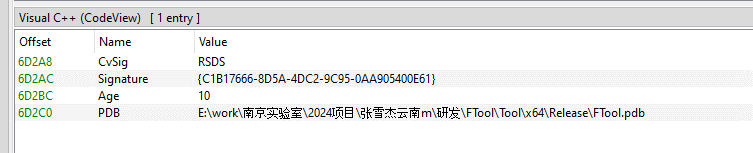
E:\work\南京实验室\2024项目\张雪杰云南m\研发\FTool\Tool\x64\Release\FTool.pdb
The path contains several notable strings, including “Nanjing Laboratory” (南京实验室) and “Zhang Xuejie Yunnan m” (张雪杰云南m), which likely refer to the driver’s development environment. However, our OSINT analysis did not identify any information linking these strings to a known organization, developer, or threat actor.
● Used by CoolClient to register its installation directory and service registry key. 0x2220F4 0x1400034DC Remove a protected filesystem or registry path. 0x2220F8 0x140003464 Clear all protected filesystem and registry path entries. 0x222118 0x1400024B0 Register process or path protection entries. 0x22211C 0x140002A20 Query registered protection entries. 0x222120 0x140003794 Update process protection entries. Used by CoolClient to register itself as a trusted process. 0x222124 0x14000362C Remove a protection entry. 0x222128 0x14000349C Clear all process protection entries. 0x222130 0x14000265C Register a protected process by PID. 0x222134 0x140010E88 Inject shellcode into a target process using NtCreateThreadEx. 0x222138 0x14000F498 Hide a kernel module by unlinking it from PsLoadedModuleList. 0x222144 0x14000270C Delete a file. 0x222148 0x14000286C Decrypt an embedded buffer and write it to disk. 0x22214C 0x1400027F4 Read and decrypt an encrypted file. 0x222168 0x140002780 Unmap the image section of a target process. 0x22216C 0x140013984 Terminate a process by PID. 0x222194 0x140011F50 Remove Protected Process Light (PPL) protection. 0x222198 0x140002940 Create or modify a registry value. 0x22219C 0x140010630 Hide a process by unlinking it from the active process list. 0x2221A0 0x140010670 Restore a previously hidden process. 0x2221A4 0x14000F8A0 Hide a module within a process. 0x2221A8 0x14000F954 Restore a hidden module. 0x2221AC 0x140016368 Enumerate and restore kernel notification callbacks. 0x2221B0 0x140016458 Disable or restore kernel notification callbacks. 0x2221B4 0x140012408 Manually load a secondary kernel driver. 0x2221B8 0x14001262C Debug/test handler. 0x2221BC 0x1400165F6 Write to an arbitrary kernel address. 0x2221C0 0x14000BB00, 0x14000BB78 Enables deny-rootkit mode by registering image-load monitoring and enabling the patching logic. 0x2221C4 0x14000BB6C, 0x14000BB10 Disables deny-rootkit mode by clearing state and unregistering/removing the monitoring logic. 0x2221E0 0x1400126C0 Register a C2 IPv4 address. 0x2221E4 0x140012E50 Delete a C2 IPv4 address.
CoolClient is a backdoor family attributed to the HoneyMyte APT group (also known as Mustang Panda) that has been used in their cyber-espionage campaigns targeting organizations across Asia and Russia. It supports such capabilities as keylogging, clipboard theft, credential harvesting, file management, system reconnaissance, and plugin-based extensions.
Since its first public disclosure by Sophos in 2022 and subsequent analysis by Trend Micro in 2023, CoolClient has continued to evolve. In 2025, we analyzed a newer variant that introduced clipboard theft and HTTP traffic interception for credential harvesting.
In late 2025 and 2026, our latest investigation reveal another major evolution. The newest CoolClient variant can deploy a signed kernel-mode driver as a Windows service and communicate with it through IOCTL requests. The driver enhances the malware’s stealth by hiding the CoolClient process, protecting related files and registry entries, and preventing them from being inspected or modified. The overall design is comparable to the kernel-mode enhancements previously observed in ToneShell, but the CoolClient driver exposes dedicated IOCTL handlers that allow the user-mode backdoor to communicate directly with the driver.
We have observed this updated CoolClient variant and its accompanying driver in intrusions across multiple countries in Asia, including Pakistan, Mongolia, and Myanmar.
Technical analysisIn the observed campaign targeting Myanmar, HoneyMyte used PlugX as the initial post-compromise implant to deploy the CoolClient components. Before deploying the malware, the actor added both a folder exclusion and a file exclusion to Microsoft Defender for the fake Windows Defender installation directory and the renamed sideloader executable (defender.exe).
wmic /Node:localhost /Namespace:\\Root\Microsoft\Windows\Defender Path MSFT_MpPreference call Add ExclusionPath="$programfiles\Microsoft\Windows Defender" wmic /Node:localhost /Namespace:\\Root\Microsoft\Windows\Defender Path MSFT_MpPreference call Add ExclusionPath="$programfiles\Microsoft\Windows Defender\defender.exe"The actor then created a fake Windows Defender installation directory, copied the CoolClient components into it, and renamed a legitimate Sangfor executable, usually named Sang.exe, to defender.exe to serve as the DLL sideloader.
xcopy "$programfiles\Windows Defender\*" "$programfiles\Microsoft\Windows Defender" /a /s /v /e /fPersistence was established through a scheduled task that launched defender.exe with SYSTEM privileges during system startup.
schtasks /create /sc onstart /tn "\Microsoft\Windows\Windows Defender Advanced Threat Protection Service" /tr "\"$programfiles\Microsoft\Windows Defender\defender.exe\"" /ru "system" /FWhen executed, defender.exe sideloads the malicious libngs.dll, initiating the CoolClient execution chain described in the following sections.
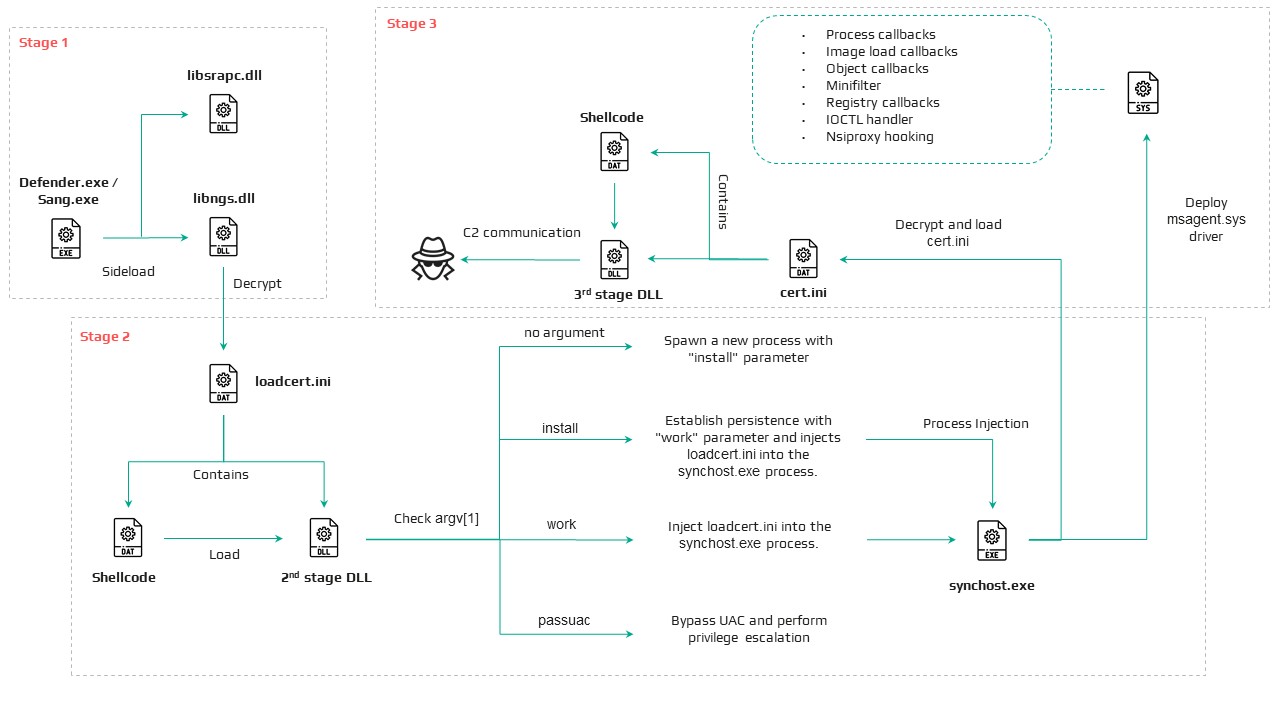
CoolClient componentsSimilar to previous variants, the latest CoolClient user-mode component follows a multi-stage execution chain, with each component performing a distinct role during execution.
Component Description defender.exe / Sang.exe Legitimate Sangfor application abused for DLL sideloading libsrapc.dll Benign dependency required for the Sangfor application to execute normally libngs.dll First-stage loader that decrypts and loads the next stage into memory (First stage) loadcert.ini Encrypted DLL implementing the core CoolClient functionality, including command handling, process injection, driver deployment, and persistence (Second stage) cert.ini Final-stage implant responsible for C2 communication and backdoor functionality (Final stage) time.ini CoolCleint configuration fileOur previous CoolClient analysis focused primarily on the final-stage implant (main.dat), including its backdoor commands and plugin framework, while the first-stage loader (libngs.dll) and second-stage component (loader.dat) received only a brief overview. In the latest variant CoolClient, loader.dat and main.dat have been renamed to loadcert.ini and cert.ini, respectively. This article revisits those earlier stages, focusing on the second-stage component and the newly introduced kernel-mode driver that extends CoolClient with rootkit capabilities.
Overview of the new variant of CoolClient
First stage: libngs.dllExecution begins when the legitimate Sangfor application (defender.exe or Sang.exe) loads the malicious libngs.dll through DLL sideloading. As in previous CoolClient variants, the malware continues to abuse the same Sangfor application to execute its first-stage loader.
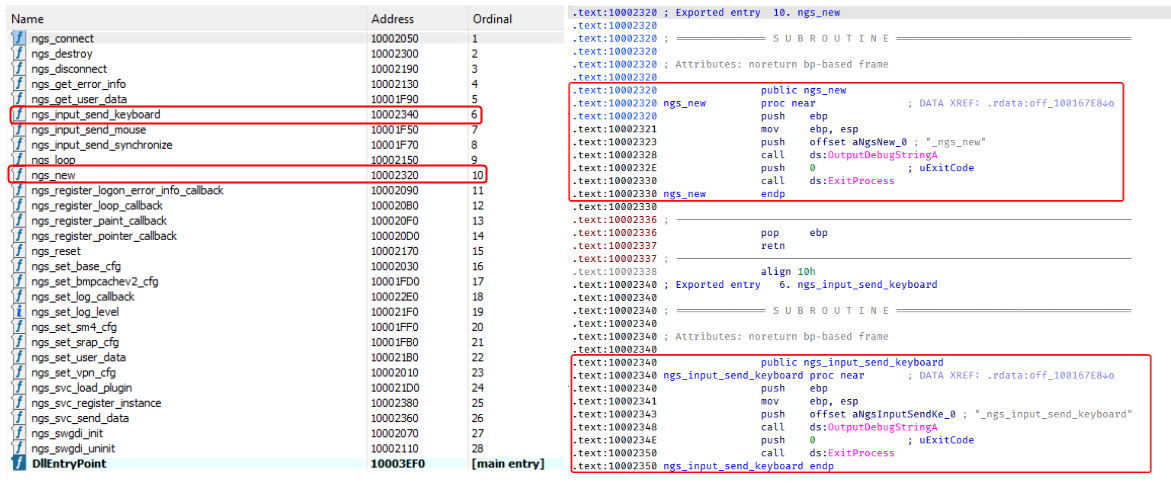
To make the DLL appear legitimate, libngs.dll exports numerous dummy functions. Each export simply calls OutputDebugStringA with its corresponding function name before immediately invoking ExitProcess, serving no functional purpose other than mimicking the expected export table of the legitimate DLL.
Dummy export functions in libngs.dll invoking OutputDebugStringA and ExitProcess
The actual malicious logic is executed from DllMain (DllEntryPoint). Although heavily obfuscated through control flow flattening and numerous unconditional jumps, the routine ultimately performs a straightforward task: loading, decrypting, and executing the encrypted second-stage DLL, loadcert.ini.
The loader resolves the required Windows APIs, reads loadcert.ini into memory, and decrypts it using a 0x32-byte repeating XOR keystream derived from a transformed seed value of 0xA4. After decryption, the DLL is loaded directly into memory, and execution is transferred to loadcert.ini.
Second stage: loadcert.ini (before synchost.exe injection)The second-stage DLL, loadcert.ini, is responsible for preparing the execution environment before the malware transitions into its injected process. It first determines its execution context by checking whether the current module is synchost.exe.
If the DLL is running under the original sideloaded process (for example, Sang.exe), it performs the initial setup, including persistence, UAC bypass, registry modifications, and process injection.
If the DLL is already executing inside synchost.exe, it follows a different execution path that decrypts time.ini, deploys the kernel-mode driver, and loads the final-stage implant (cert.ini).
Command handlerThe command handler remains largely unchanged from previous CoolClient variants, with one notable difference: the malware now injects into synchost.exe instead of write.exe.
Execution is controlled through three command-line parameters:
Parameter Purpose install Performs the initial setup, including persistence, privilege checks, and preparation for the injected execution path. work Executes the primary second-stage functionality from the injected synchost.exe process, including driver deployment and third-stage loading. passuac Continues execution after privilege elevation.If no parameter is supplied, the malware creates a new Sang.exe process with the install parameter using CreateProcessW.
Establishing AutoRun persistenceWhen executed with the install parameter, CoolClient creates an AutoRun entry under:
HKCU\Software\Microsoft\Windows\CurrentVersion\RunThe registry value, named goopdate, launches Sang.exe (or defender.exe, depending on the deployment) with the work parameter whenever the user logs on.
Process injection into synchost.exeUpon establishing the AutoRun registry entry, CoolClient decrypts loadcert.ini using a 0x32-byte repeating XOR keystream derived from the hardcoded base key 0x4D.
The decrypted DLL is then injected into a newly created suspended instance of synchost.exe. The malware allocates memory in the target process, writes the decrypted payload, redirects the thread context to the injected code, resumes execution, and finally terminates the original process with ExitProcess.
From this point onward, execution continues entirely within synchost.exe, where the malware proceeds with kernel-mode driver deployment before loading the final-stage implant (cert.ini).
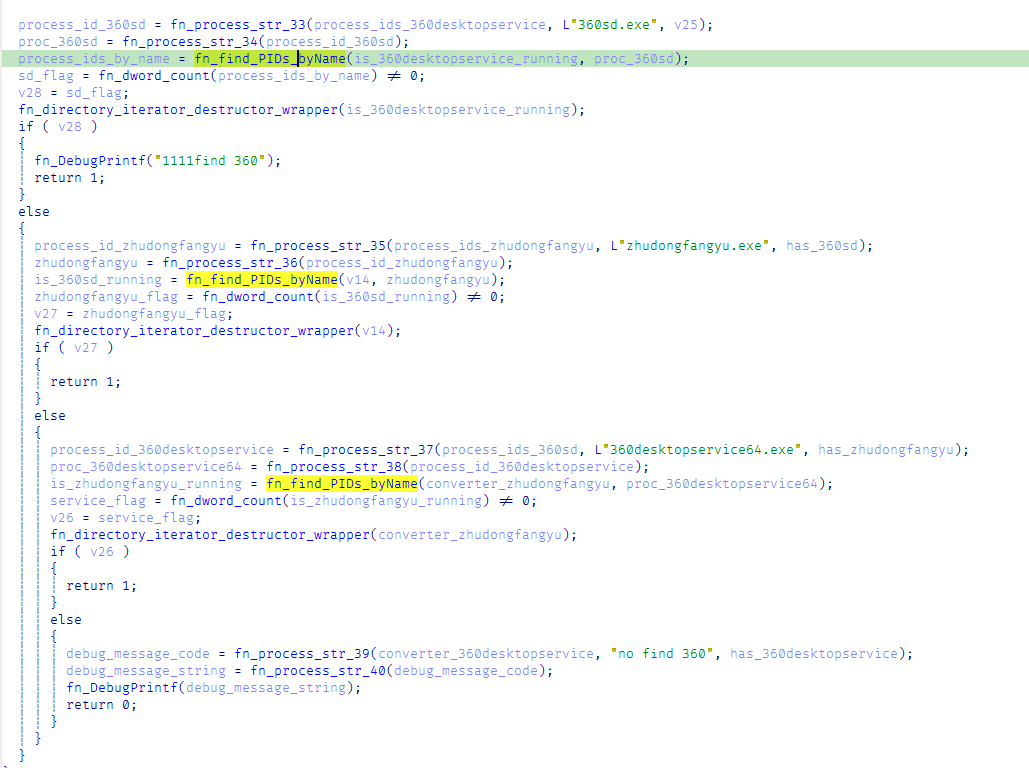
Service installationWhen executed with the install parameter, CoolClient establishes an additional persistence mechanism by installing itself as a Windows service. Before doing so, it verifies that it has sufficient access to the Service Control Manager and that no 360 Total Security software processes (360sd.exe, zhudongfangyu.exe, or 360desktopservice64.exe) are running.
Function to check for running 360 Total Security software processes
If both checks succeed, the malware decrypts time.ini to retrieve the service configuration, including the service name and description. It then checks whether the service media_updaten already exists. If found, the existing service is stopped and deleted before a new one is created.
The new service is configured to execute Sang.exe<.code> with the work parameter using CreateServiceA. The malware then starts the service by executing "sc start media_updaten" via WinExec.
Administrator privilege checkIf the service installation path is not taken, CoolClient checks whether the current process is running with administrator privileges by verifying membership in the local Administrators group.
When administrative privileges are available, the malware relaunches itself with the passuac parameter before continuing with the remaining execution flow.
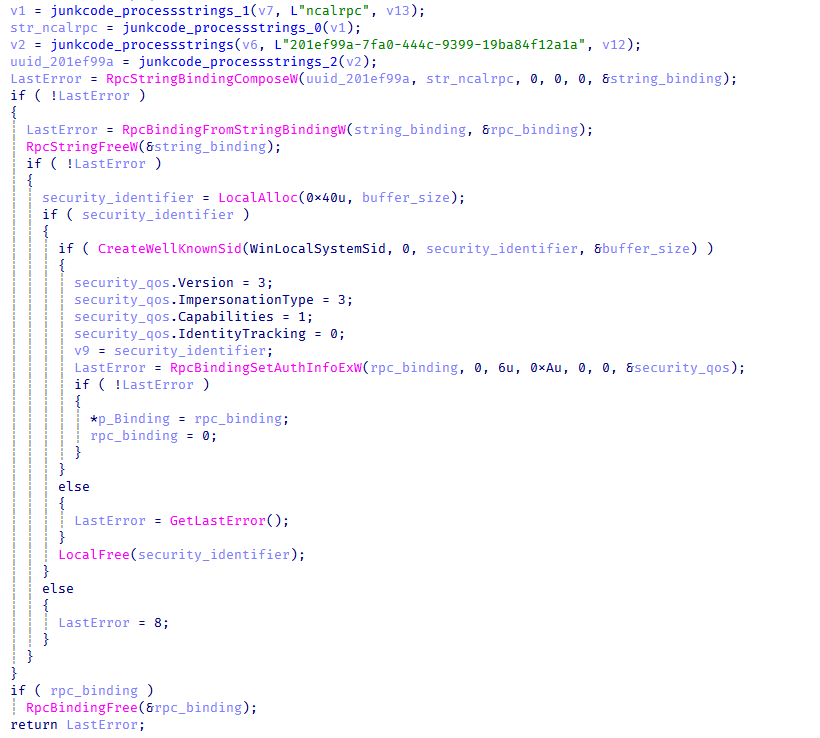
Elevated relaunch and UAC bypassTo continue execution with elevated privileges while concealing its true parent process, CoolClient implements an RPC-based process creation technique similar to the method described by Google Project Zero. The technique combines RPC process creation with parent process ID (PPID) spoofing to launch a new elevated instance of itself.
The malware first checks for the presence of escanmon.exe. If the process is running, it constructs the path to C:\Windows\System32\winver.exe and establishes a connection to the local ncalrpc endpoint (201ef99a-7fa0-444c-9399-19ba84f12a1a). It then invokes NdrAsyncClientCall to launch winver.exe through the RPC interface.
Authenticated RPC binding used during the RPC-based UAC bypass
After winver.exe is created, CoolClient retrieves its debug object using NtQueryInformationProcess, detaches the debugger through NtRemoveProcessDebug, and terminates the process. The obtained debug object is later reused during the remainder of the UAC bypass routine.
Next, the malware repeats the same RPC-based process creation technique to launch computerdefaults.exe. It associates the previously obtained debug object with the current thread using DbgUiSetThreadDebugObject, waits for the resulting process creation event through WaitForDebugEvent, and duplicates the process handle using NtDuplicateObject, obtaining a handle with full access rights.
Finally, CoolClient relaunches itself as Sang.exe passuac using CreateProcessW with an extended startup attribute list. By configuring PROC_THREAD_ATTRIBUTE_PARENT_PROCESS through UpdateProcThreadAttribute, the duplicated process handle is assigned as the parent of the new process. As a result, the new Sang.exe passuac instance executes with an elevated context while appearing to have been spawned by the trusted Windows process instead of the original CoolClient process.
Second stage: loadcert.ini (Injected Execution)After being injected into synchost.exe, loadcert.ini follows its injected execution path, where it deploys the kernel-mode driver and launches the final-stage implant (cert.ini). If administrative privileges are unavailable, the malware skips driver deployment and proceeds directly to the third-stage injection.
Kernel-Mode driver deploymentThe deployment routine begins by decrypting time.ini. CoolClient then verifies that it has sufficient privileges to install a kernel-mode driver by checking for full access to the Service Control Manager (SCM) and the presence of SeTcbPrivilege.
If both conditions are met, CoolClient extracts an embedded LZMA-compressed driver from loadcert.ini, decompresses it, and writes it to disk as msagent.sys in the same directory as cert.ini, for example:
C:\Program Files\Microsoft\Windows Defender\msagent.sys
Next, the malware checks whether a service named msagent already exists. If present, the existing service is stopped and deleted before a new driver service is created and started, loading the kernel-mode component into the operating system.
Driver initializationAfter the driver is loaded, CoolClient establishes communication with it by opening the device \\.\msagent using CreateFileW. The user-mode component then initializes the driver by issuing three DeviceIoControl requests.
IOCTL Purpose 0x222120 Registers the current CoolClient process with the driver. 0x2221E0 Sends the configured C2 IPv4 address to the driver. 0x2220F0 Registers filesystem and registry paths that should be protected or hidden.The first request (0x222120) registers the current CoolClient process as a trusted process within the driver. The request includes the process ID, an operation code, and a flag that marks the process as trusted, allowing it to interact with protected files, registry keys, and processes.
The second request (0x2221E0) passes the configured C2 IPv4 address extracted from time.ini.
Finally, 0x2220F0 registers the CoolClient installation directory (for example, C:\Program Files\Microsoft\Windows Defender\) together with the service registry path (\Registry\Machine\SYSTEM\CurrentControlSet\Services\media_updaten). These entries allow the driver to protect the malware’s files and registry objects from inspection, modification, and deletion.
As part of the initialization, CoolClient updates the HKLM\SYSTEM\RNG\Wid_H1deF5Dirs registry value by appending its installation directory if it is not already present. This registry value is later used by the driver when applying its hiding and protection mechanisms.
The implementation of these IOCTL handlers and the corresponding driver functionality are discussed in the msagent.sys section.
Cert.ini process injectionOnce the driver has been initialized, CoolClient proceeds to launch the final-stage implant (cert.ini). Before creating the target process, the malware enumerates active WinStation sessions to identify a suitable interactive user session.
After selecting a session, CoolClient duplicates its access token, updates the session identifier, and creates a new synchost.exe process using CreateProcessAsUserA. The decrypted cert.ini DLL is then injected into the suspended process using the same memory allocation, thread context modification, and ResumeThread technique described earlier.
This marks the final transition in the execution chain, where the third-stage implant takes over C2 communication and the remaining backdoor functionality.
Msagent.sys driverAnalysis of the deployed kernel-mode driver reveals an embedded PDB path:
PDB Path
E:\work\南京实验室\2024项目\张雪杰云南m\研发\FTool\Tool\x64\Release\FTool.pdb
The path contains several notable strings, including “Nanjing Laboratory” (南京实验室) and “Zhang Xuejie Yunnan m” (张雪杰云南m), which likely refer to the driver’s development environment. However, our OSINT analysis did not identify any information linking these strings to a known organization, developer, or threat actor.
The driver is digitally signed with a certificate issued to "Nanjing Ranyi Technology Co., Ltd.", with serial number 3E 62 DC 5D 8D 61 2A 26 33 E7 6B DF D6 07 19 DD. The certificate was valid from August 2013 to September 2014.
We identified several older malicious drivers signed with the same certificate that were compiled around 2013. However, we found no evidence directly linking those samples to the CoolClient activity described in this article.
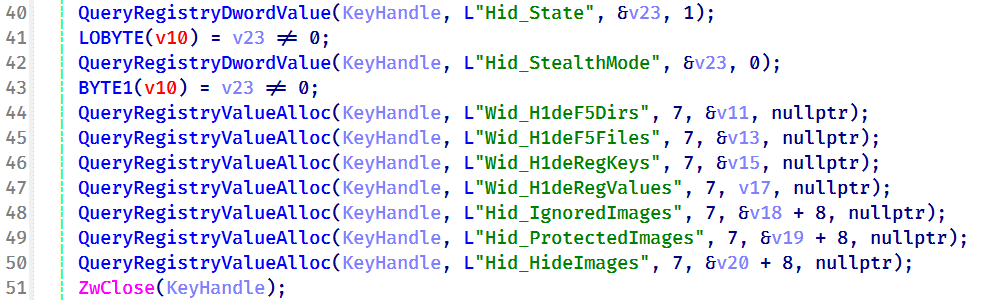
Driver configurationDuring initialization, the driver loads its stealth configuration from the registry key \REGISTRY\MACHINE\SYSTEM\RNG. The configuration defines which system objects should be hidden or protected and controls the driver’s operating mode.
Registry configuration loaded by the driver during initialization
Two REG_DWORD values control the driver’s operating mode:
Registry Value Default Description Hid_State 1 Enables the driver’s rootkit functionality. Hid_StealthMode 0 Controls additional stealth features used by selected driver routines.In addition, the driver loads several REG_MULTI_SZ values that define the objects to be hidden or protected.
Registry Value Purpose Wid_H1deF5Dirs Directories to hide Wid_H1deF5Files Files to hide Wid_H1deRegKeys Registry keys to hide Wid_H1deRegValues Registry values to hide Hid_IgnoredImages Processes to ignore Hid_ProtectedImages Processes to protectTogether, these registry values determine which filesystem paths, registry objects, and processes are managed by the driver’s protection mechanisms.
After loading the configuration, the driver converts the registry entries into internal lookup structures that are shared across its various protection components.
These structures are later referenced by the filesystem minifilter, registry callback, process callback, object callback, image load callback, and IOCTL handlers to determine whether a file, registry object, or process should be hidden, protected, or ignored.
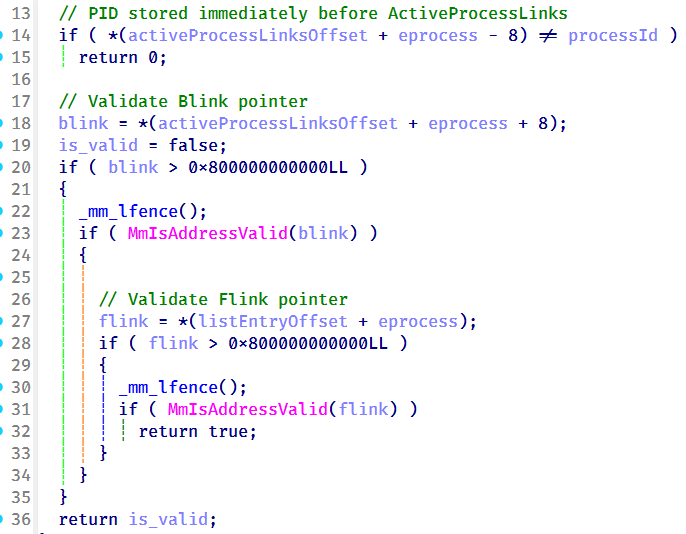
Preparation for process hidingNext, the driver dynamically locates the ActiveProcessLinks (LIST_ENTRY) field within the EPROCESS structure instead of relying on hardcoded offsets. It first validates several predefined offsets and, if none match, performs a linear scan of the EPROCESS structure to identify the correct location. This approach allows the driver to remain compatible across different Windows versions, where the layout of EPROCESS may differ.
The driver validates candidate ActiveProcessLinks layouts before enabling process hiding
Once the correct offset has been identified, it is stored for later use by the process hiding routines. During process hiding and restoration, the driver uses IOCTLs 0x22219C and 0x2221A0 to unlink and relink entries in the Windows active process list, effectively hiding or restoring processes on demand.
Process, object, and image load callbacksAfter preparing its process tracking structures, the driver initializes several AVL trees and populates them with configuration entries loaded from the registry, including Wid_H1deF5Dirs, Wid_H1deF5Files, Wid_H1deRegKeys, Wid_H1deRegValues, Hid_IgnoredImages, Hid_ProtectedImages, and Hid_HideImages.
These AVL trees provide efficient lookups for protected files, registry objects, and tracked processes, and are shared by the callback routines and IOCTL handlers.
The driver then registers three types of kernel callbacks that form the foundation of its protection and monitoring mechanisms:
- Object callbacks using ObRegisterCallbacks
- Process creation and termination callbacks using PsSetCreateProcessNotifyRoutineEx
- Image load callbacks using PsSetLoadImageNotifyRoutine
Registration of object, process, and image load callbacks during driver initialization
After registration, these callbacks maintain the driver’s internal tracking structures as processes, threads, and images are created or loaded.
Object callbacksTo protect selected processes, the driver registers object callbacks for process (PsProcessType) and thread (PsThreadType) objects using ObRegisterCallbacks with an altitude of 1203. These callbacks intercept requests to open process and thread handles. If the target process is protected, the driver reduces the access rights granted to the requesting process, preventing operations such as process termination, code injection, and other forms of process manipulation. In this sample, the protected process is the injected CoolClient code running inside synchost.exe.
Process and image load callbacksThe driver registers process creation and termination callbacks using PsSetCreateProcessNotifyRoutineEx, together with an image load callback via PsSetLoadImageNotifyRoutine.
When a process is created, its image name is compared against the configuration lists Hid_IgnoredImages, Hid_ProtectedImages, and Hid_HideImages. Matching processes are added to the driver’s internal tracking structures, allowing them to be protected, hidden, or managed through subsequent IOCTL requests. When a tracked process terminates, its entry is removed from the tracking structures.
The image load callback monitors modules loaded into tracked processes and updates the driver’s internal state to support subsequent protection and hiding operations.
To ensure that processes already running before the driver is initialized are also tracked, the driver performs a one-time enumeration of all active processes after registering the callbacks and adds any matching processes to the tracking structures.
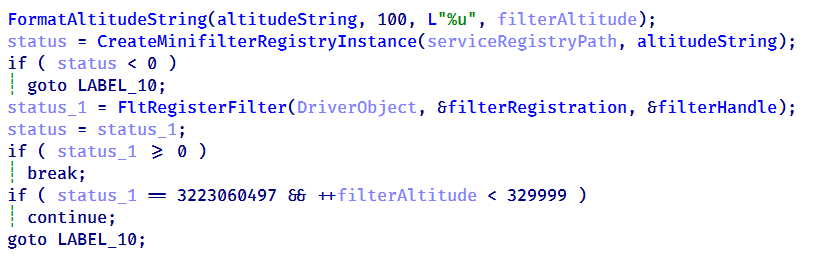
MiniFilter registrationTo protect files and directories, the driver registers a filesystem minifilter. During initialization, it creates internal path filter lists, loads the configured directory and file entries (Wid_H1deF5Dirs and Wid_H1deF5Files), and creates the required minifilter registry entries under HKLM\SYSTEM\CurrentControlSet\Services\msagent\Instances. To avoid altitude conflicts, the driver dynamically assigns a filter altitude and retries registration until a unique value is obtained.
Retrying minifilter registration with incrementing filter altitude values until FltRegisterFilter succeeds
The driver then activates the minifilter using FltRegisterFilter. The filter works together with the IOCTL interface, which dynamically adds, removes, or clears protected path entries (0x2220F0, 0x2220F4, and 0x2220F8). During filesystem operations, the minifilter compares accessed paths against its internal path lists and denies access to matching entries, effectively hiding protected files and directories from users and applications.
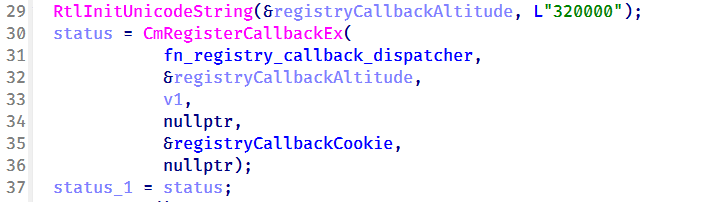
Registry callback registrationTo protect registry keys and values, the driver registers a registry callback using CmRegisterCallbackEx with an altitude of 320000. During initialization, it creates separate lookup structures for protected registry keys and values, then populates them using the configured entries from Wid_H1deRegKeys and Wid_H1deRegValues.
Registration of the registry callback using CmRegisterCallbackEx with an altitude of 320000
Once registered, the callback intercepts registry operations and compares the target key or value against the protected entries. For enumeration requests, matching keys and values are removed from the results before they are returned to user mode, effectively hiding them from registry viewers. For direct access requests, such as opening, modifying, or deleting protected registry objects, the callback returns STATUS_ACCESS_DENIED, preventing the operation.
Before applying these restrictions, the driver verifies whether the requesting process is trusted. Processes registered through IOCTL 0x222120, including the CoolClient user-mode component, bypass the filtering logic and retain unrestricted access, while all other processes remain subject to the driver’s registry protection rules.
IOCTL command dispatcherTo communicate with the user-mode component, the driver creates a device object named \Device\ToolTool together with the symbolic link \DosDevices\ToolTool to allow the user-mode CoolClient component to communicate with the driver through DeviceIoControl requests.
The driver implements 33 IOCTL handlers, although the analyzed CoolClient sample uses only three during normal execution:
- 0x222120: registers the current CoolClient process with the driver.
- 0x2221E0: passes the configured C2 IPv4 address.
- 0x2220F0: registers filesystem and registry paths for protection.
The remaining IOCTL handlers were not invoked by the analyzed sample.
IOCTL Handler Functionality 0x222000 0x140001E04 Enable or disable the rootkit. 0x222004 0x1400020B0 Query the current rootkit state. 0x2220F0 0x140002320 ● Register protected filesystem or registry paths● Used by CoolClient to register its installation directory and service registry key. 0x2220F4 0x1400034DC Remove a protected filesystem or registry path. 0x2220F8 0x140003464 Clear all protected filesystem and registry path entries. 0x222118 0x1400024B0 Register process or path protection entries. 0x22211C 0x140002A20 Query registered protection entries. 0x222120 0x140003794 Update process protection entries. Used by CoolClient to register itself as a trusted process. 0x222124 0x14000362C Remove a protection entry. 0x222128 0x14000349C Clear all process protection entries. 0x222130 0x14000265C Register a protected process by PID. 0x222134 0x140010E88 Inject shellcode into a target process using NtCreateThreadEx. 0x222138 0x14000F498 Hide a kernel module by unlinking it from PsLoadedModuleList. 0x222144 0x14000270C Delete a file. 0x222148 0x14000286C Decrypt an embedded buffer and write it to disk. 0x22214C 0x1400027F4 Read and decrypt an encrypted file. 0x222168 0x140002780 Unmap the image section of a target process. 0x22216C 0x140013984 Terminate a process by PID. 0x222194 0x140011F50 Remove Protected Process Light (PPL) protection. 0x222198 0x140002940 Create or modify a registry value. 0x22219C 0x140010630 Hide a process by unlinking it from the active process list. 0x2221A0 0x140010670 Restore a previously hidden process. 0x2221A4 0x14000F8A0 Hide a module within a process. 0x2221A8 0x14000F954 Restore a hidden module. 0x2221AC 0x140016368 Enumerate and restore kernel notification callbacks. 0x2221B0 0x140016458 Disable or restore kernel notification callbacks. 0x2221B4 0x140012408 Manually load a secondary kernel driver. 0x2221B8 0x14001262C Debug/test handler. 0x2221BC 0x1400165F6 Write to an arbitrary kernel address. 0x2221C0 0x14000BB00, 0x14000BB78 Enables deny-rootkit mode by registering image-load monitoring and enabling the patching logic. 0x2221C4 0x14000BB6C, 0x14000BB10 Disables deny-rootkit mode by clearing state and unregistering/removing the monitoring logic. 0x2221E0 0x1400126C0 Register a C2 IPv4 address. 0x2221E4 0x140012E50 Delete a C2 IPv4 address.
After initializing the IOCTL dispatcher, the driver releases the temporary configuration buffer that was previously loaded from \REGISTRY\MACHINE\SYSTEM\RNG.
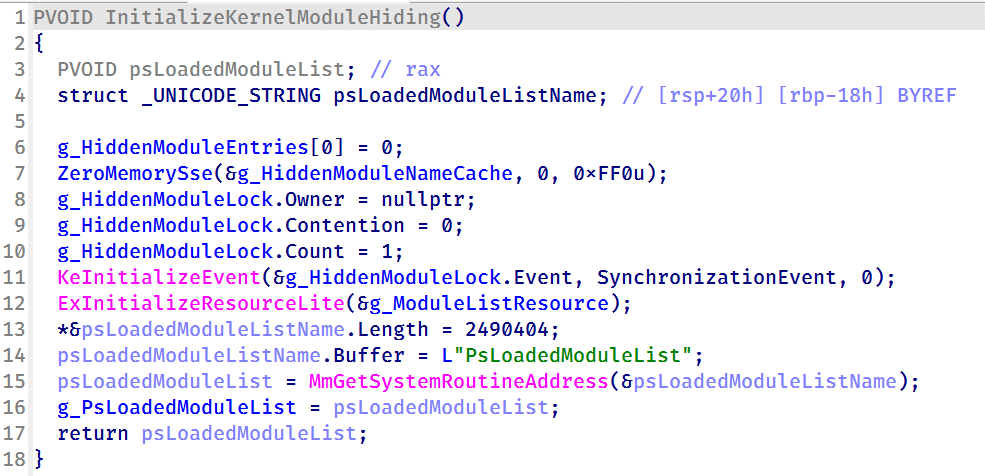
Kernel module enumeration and hidingTo support kernel module hiding, the driver resolves the address of the non-exported kernel variable PsLoadedModuleList at runtime using MmGetSystemRoutineAddress. This global linked list maintains information about all loaded kernel modules and drivers, allowing the rootkit to enumerate and manipulate module entries.
Driver initialization routine resolving the address of PsLoadedModuleList for subsequent kernel module hiding
This functionality is exposed through IOCTL 0x222138, which accepts a module name or path from the user-mode component. When a matching module is found, the driver locates the corresponding entry in PsLoadedModuleList and unlinks it by updating its Flink and Blink pointers. As a result, the hidden module no longer appears in standard kernel module enumeration routines.
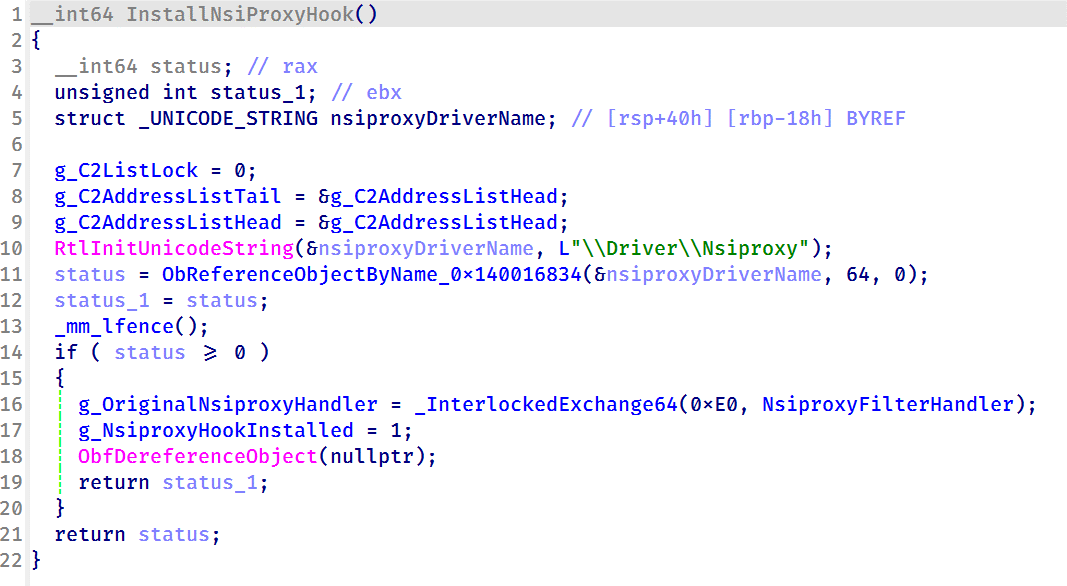
Nsiproxy hooking and data filteringThe driver also hooks the Nsiproxy driver to filter network-related data returned to user mode. This functionality is connected to IOCTL 0x2221E0, which allows the user-mode component to register C2 IPv4 addresses with the driver.
To install the hook, the driver obtains a reference to \Driver\Nsiproxy using ObReferenceObjectByName and replaces one of the Nsiproxy handler pointers with its own filtering routine. The hook preserves the original handler and forwards execution after processing the returned data.
Installing the Nsiproxy hook by resolving \Driver\Nsiproxy and replacing the original handler with the driver’s filtering routine
When the hooked routine processes network information, the driver compares the returned entries against its registered C2 address list. Matching IP addresses are removed before the data is returned to user mode, preventing applications that rely on Nsiproxy-provided network information from seeing the malware’s C2 addresses.
Finally, the driver registers a DriverUnload routine to release allocated resources when the driver is unloaded.
VictimologyThe latest CoolClient variant continues to target organizations consistent with previously observed HoneyMyte activity. Based on our investigations, we identified victims in Myanmar, Mongolia, Pakistan, and Russia, including confirmed government entities.
Across the observed intrusions, CoolClient was consistently deployed as a secondary backdoor following a PlugX infection, indicating that HoneyMyte continues to use PlugX as its initial post-compromise implant before transitioning to CoolClient.
AttributionOur analysis confirms that the investigated malware is a new CoolClient variant associated with the HoneyMyte threat group. While the overall execution flow remains consistent with previously documented CoolClient variants, this sample introduces a previously undocumented kernel-mode driver that significantly expands the malware’s stealth capabilities.
The deployment chain observed in this investigation is also consistent with previous HoneyMyte campaigns, in which PlugX serves as the initial foothold before CoolClient is deployed as a secondary backdoor, further reinforcing the attribution.
ConclusionThe latest CoolClient variant represents a significant evolution of the malware. Rather than operating solely as a user-mode backdoor with plugin support, it now deploys and communicates with a kernel-mode driver that extends its capabilities beyond earlier versions. Through this driver, CoolClient can hide and protect processes, files, and registry objects, as well as filter selected network information, making detection and analysis considerably more difficult.
HoneyMyte has previously introduced kernel-mode functionality in ToneShell. The addition of a kernel-mode driver to CoolClient suggests that the group continues to expand its use of rootkit capabilities to improve stealth, persistence, and defense evasion during post-compromise operations.
IOCs2d7c8780e97409770a9d4f31c66c9d63 msagent.sys
9460E150E1981D5C165043520C5C12FE msagent.sys
9717F005C5FB98E08D2AD983D88F94EE libngs.dll
F518D8E5FE70D9090F6280C68A95998F libngs.dll
EB79558B037669792652A816E2C669DE ctxmui.dll
C:\Program Files\microsoft\windows defender\
C:\Program Files\windows media player\mediares\
C:\ProgramData\symantecdir\
C:\ProgramData\virtualstore\
C:\Windows\identitycrl\production\
C:\Windows\serviceprofiles\networkservice\
C:\Users\<user>\AppData\Local\viber24.8\
C:\Users\<user>\AppData\Roaming\dsassistant\
C:\Program Files\common files\microsoft shared\office14\
C:\programdata\msdn\
cloudtroe.giize[.]com
employers.theworkpc[.]com
freeread.casacam[.]net
us.lenovoappstore[.]com
sundanish.freeddns[.]org
torinarlabs.webredirect[.]org
news.dursamjbataar[.]org
video.dursamjbataar[.]org
black-popular[.]com
whatismybestthing[.]com
Kategorie: Hacking & Security, Viry a Červi
- « první
- ‹ předchozí
- 1
- 2
- 3
- 4
- 5
- 6
- 7
- 8
- 9
- …
- následující ›
- poslední »